

Van's Air Force

The definitive Van's Aircraft support community! Buying, building or flying an RV? Join our exclusive family of mentors and enthusiasts!

Garmin G3X Touch Feature Wish List

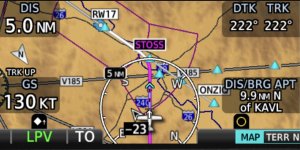
On most EFIS systems I’ve flown, the nav/map display includes range rings. This is a common and extremely useful feature that seems to be missing from G3X. As an example see the first pic. Right off the bat I can tell my display is in the 10 mile scale because of the “5” shown on the middle range ring. This allows the pilot to instantaneously and intuitively determine an approximate distance to everything on the screen. I can tell that SAM30 is about 4 miles away. I can tell the edge of that weather cell is about 7 miles away. Had any airports been displaying on the map, I could tell the approximate distance to each one at a glance. Same with traffic. Why doesn’t G3X have this basic feature? (Or if it does, please tell me how to activate it!)

I have searched the G3X manual and can’t find it. The GNX375 has it, as shown on that screen shot (second image). In the GNX375 manual they call it a Range Ring. If I search the G3X manual for that term, the only results are the Fuel Range Ring and Glide Range Ring. No map Range Ring that I can find.

Instead, to tell scale, G3X includes a small “Scale Bar” on the lower right corner of the screen. That is nowhere near as useful. To tell distance to an object with that, I’d have to estimate how many scale widths are between me and the object in question and multiply that by the current value of that scale. Yes, I know I can tap an object on G3X and see the distance, but that’s not as useful. With a range rings a pilot can estimate the distance to multiple objects at a glance, rather than tapping several objects individually. (Sometimes my hands are busy actually FLYING!😆)

This should be a simple feature to add. Just some arcs and a number!
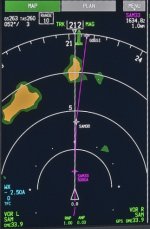
IMG_1196.jpeg


GNX375rangering.jpeg
 

Attachments

  • IMG_1195.jpeg
    IMG_1195.jpeg
    164.7 KB · Views: 55
Last edited:
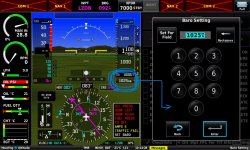
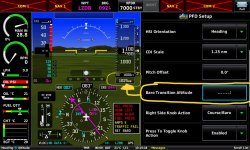
Move the TRANSITION ALTITUDE (TRANSITION LEVEL) pre-select from the PFD Setup menu to the BARO setting window. There are many countries in the EU with a Transition Alt @ 5.000 or 10.000ft so the switch over occurs frequently.
 

Attachments

  • 20240616_131429.jpeg
    20240616_131429.jpeg
    243.8 KB · Views: 76
  • 20240616_131518.jpeg
    20240616_131518.jpeg
    248.6 KB · Views: 74
Move the TRANSITION ALTITUDE (TRANSITION LEVEL) pre-select from the PFD Setup menu to the BARO setting window. There are many countries in the EU with a Transition Alt @ 5.000 or 10.000ft so the switch over occurs frequently.
An even simpler way would be to add a button (where your blue arrow is) to the QNH set popup, that is labeled "STD" and that sets the QNH to 1013.2 or 29.92 depending on your area. If possible it would set the PFD to show STD instead of the default QNH. A one click of the QNH rotary selector would then change it back to Mb/HPa/Inch for selection. The TA/TL in the setting is only as a reminder for when you climb past that level/altitude.
 
An even simpler way would be to add a button (where your blue arrow is) to the QNH set popup, that is labeled "STD" and that sets the QNH to 1013.2 or 29.92 depending on your area. If possible it would set the PFD to show STD instead of the default QNH. A one click of the QNH rotary selector would then change it back to Mb/HPa/Inch for selection. The TA/TL in the setting is only as a reminder for when you climb past that level/altitude.
I want to set that reminder on the Baro Setting Page
 
G3X or Garmin Pilot or GTN;

Unless there's already a way that I can't figure out, I'd like to have the ability to simply draw a circle around a fix (eg, show a 30 NM ring around an airport, etc)
 
Feature request:

Use the autopilot's pitch servo to detect stick position, and display it on a GDU as "commanded AoA," as a safety feature to avoid inadvertent stall/spin, with audible and CAS alerts if the commanded AoA will cause the airplane to stall.

(See this thread for the background https://vansairforce.net/threads/go-down-speed-up-stall-out.228078/post-1781286)

- mark
While I see no reason for this feature, you could do this right now using a discrete input and a simple potentiometer to measure stick displacement.
 
Use the autopilot's pitch servo to detect stick position, and display it on a GDU as "commanded AoA," as a safety feature to avoid inadvertent stall/spin, with audible and CAS alerts if the commanded AoA will cause the airplane to stall.
Three letters: ESP
 
While I see no reason for this feature, you could do this right now using a discrete input and a simple potentiometer to measure stick displacement.

The entire point of the feature proposal is to give the rough equivalent of an AoA indicator without needing to retrofit any new equipment.

Yes, you can do it with a discrete input and a potentiometer. But you can also do it with software using the position encoder already built in to the pitch servo.

- mark
 
Three letters: ESP

ESP is triggered by airspeed or attitude.

You can stall at any airspeed or any attitude. Stall is related to AoA, and AoA is directly related to stick position.

(see the thread I linked above for more discussion, no need to replicate it here)

- mark
 
Feature request for G3X/T :

Automatically return elevator or aileron trim to a preset position. Given G3X/T has the ability to display trim positions and control trim via the appropriate LRUs and Garmin autopilot can also adjust trim automatically. A nice feature to have might be to use a spare input to a pusbutton that returns trim to say a neutral or predefined position (e.g. set trim to take off position) maybe useful after landing/prior to takeoff and even more useful when completing touch and go circuits in the pattern.

Similar logic to the pre-defined flap position just for trim instead.
 
Feature request: when radar is displayed on map view, use a OR filter (not the current AND filter) to display the region/CONUS NEXRAD information.

Currently low-res CONUS radar overlays with regional data and makes the display look like pixel vomit. If regional NEXRAD is available there should be no CONUS data displayed for that area. Garmin Pilot does this nicely, G3X Touch does not.
 
I wish the audio panel would fit on the MFD between the com radios to make com freq display more intuitive, the only way it will show on the MFD now is in compact mode which I don't like. Looks like there is room for this where 'FLT/WX ALT' is?
Com display.jpg
 
Last edited:
Feature Request:

With the recent addition of "Smart Glide" and other features, I started thinking about what other flight dynamics could be fine tuned by the G3X Touch / EIS / FCS. With all the data available to the G3X system, I was thinking that a “Flight Optimizer” mode within the G3X Touch - EIS/FCS could be a real benefit.

A lot of pilots are aware of the benefits of operating the engine “Lean of Peak”, but no one knows what is the “best” value for fuel flow or EGT’s in this operating regime. Expanding a bit further, we’ve all been taught that the engine POH has charts and you can determine “Best Power” and “Best Economy” settings. However, this is specific to an engine sitting in a test-cell somewhere, and almost nonsensical when mated to a propeller and airframe.

Given the amount of real time data available from the EIS (e.g. MAP, RPM, FF, CHT, EGT, Spark Advance) and the FCS (Pitch, Yaw, Roll, OAT, TAS, Alt, AoA/Lift, Lat. Accel. Vert. Accel, etc.) it should be possible to develop an algorithm that uses all of these inputs to determine the “optimal” engine settings and airframe configuration, and prompt the pilot to set the Throttle, RPM, Mixture (and optionally the Spark Advance) according to the desired operating mode — Best Speed, Best Fuel Economy, Best Economy @ Speed, Best Speed @ Power, and so forth...

Additionally, using available OAT and GPS Track, the FCS could prompt for a new altitude to maximize engine and airframe performance.

Here’s the scenario;

The aircraft is stable in cruise, AP/FD engaged. Pilot selects ‘Flight Optimizer - Best Economy’, the G3X grinds on the available data and spits out "SET RPM to [2275]", after a moment of running the engine at 2275, the system indicates that the Fuel Flow should be set to 8.7 gph. A few moments later, after the FIS-B WX is received and the Winds Aloft Forecast is updated, the system determines that the OAT and the nearby QNH would result in a 2% increase in economy and suggests a cruise climb to 9500 — this value is populated in the FD Altitude Select with a rate of climb at 500fpm; all you need to do is press [Accept]...

Just a thought...

Brian
 
Last edited:
Feature Request:

With the recent addition of "Smart Glide" and other features, I started thinking about what other flight dynamics could be fine tuned by the G3X Touch / EIS / FCS. With all the data available to the G3X system, I was thinking that a “Flight Optimizer” mode within the G3X Touch - EIS/FCS could be a real benefit.

A lot of pilots are aware of the benefits of operating the engine “Lean of Peak”, but no one knows what is the “best” value for fuel flow or EGT’s in this operating regime. Expanding a bit further, we’ve all been taught that the engine POH has charts and you can determine “Best Power” and “Best Economy” settings. However, this is specific to an engine sitting in a test-cell somewhere, and almost nonsensical when mated to a propeller and airframe.

Given the amount of real time data available from the EIS (e.g. MAP, RPM, FF, CHT, EGT, Spark Advance) and the FCS (Pitch, Yaw, Roll, OAT, TAS, Alt, AoA/Lift, Lat. Accel. Vert. Accel, etc.) it should be possible to develop an algorithm that uses all of these inputs to determine the “optimal” engine settings and airframe configuration, and prompt the pilot to set the Throttle, RPM, Mixture (and optionally the Spark Advance) according to the desired operating mode — Best Speed, Best Fuel Economy, Best Economy @ Speed, Best Speed @ Power, and so forth...

Additionally, using available OAT and GPS Track, the FCS could prompt for a new altitude to maximize engine and airframe performance.

Here’s the scenario;

The aircraft is stable in cruise, AP/FD engaged. Pilot selects ‘Flight Optimizer - Best Economy’, the G3X grinds on the available data and spits out "SET RPM to [2275]", after a moment of running the engine at 2275, the system indicates that the Fuel Flow should be set to 8.7 mph. A few moments later, after the FIS-B WX is received and the Winds Aloft Forecast is updated, the system determines that the OAT and the nearby QNH would result in a 2% increase in economy and suggests a cruise climb to 9500 — this value is populated in the FD Altitude Select with a rate of climb at 500fpm; all you need to do is press [Accept]...

Just a thought...

Brian
VERY COOL
 
Feature Request:

With the recent addition of "Smart Glide" and other features, I started thinking about what other flight dynamics could be fine tuned by the G3X Touch / EIS / FCS. With all the data available to the G3X system, I was thinking that a “Flight Optimizer” mode within the G3X Touch - EIS/FCS could be a real benefit.

A lot of pilots are aware of the benefits of operating the engine “Lean of Peak”, but no one knows what is the “best” value for fuel flow or EGT’s in this operating regime. Expanding a bit further, we’ve all been taught that the engine POH has charts and you can determine “Best Power” and “Best Economy” settings. However, this is specific to an engine sitting in a test-cell somewhere, and almost nonsensical when mated to a propeller and airframe.

Given the amount of real time data available from the EIS (e.g. MAP, RPM, FF, CHT, EGT, Spark Advance) and the FCS (Pitch, Yaw, Roll, OAT, TAS, Alt, AoA/Lift, Lat. Accel. Vert. Accel, etc.) it should be possible to develop an algorithm that uses all of these inputs to determine the “optimal” engine settings and airframe configuration, and prompt the pilot to set the Throttle, RPM, Mixture (and optionally the Spark Advance) according to the desired operating mode — Best Speed, Best Fuel Economy, Best Economy @ Speed, Best Speed @ Power, and so forth...

Additionally, using available OAT and GPS Track, the FCS could prompt for a new altitude to maximize engine and airframe performance.

Here’s the scenario;

The aircraft is stable in cruise, AP/FD engaged. Pilot selects ‘Flight Optimizer - Best Economy’, the G3X grinds on the available data and spits out "SET RPM to [2275]", after a moment of running the engine at 2275, the system indicates that the Fuel Flow should be set to 8.7 gph. A few moments later, after the FIS-B WX is received and the Winds Aloft Forecast is updated, the system determines that the OAT and the nearby QNH would result in a 2% increase in economy and suggests a cruise climb to 9500 — this value is populated in the FD Altitude Select with a rate of climb at 500fpm; all you need to do is press [Accept]...

Just a thought...

Brian
Well my theme of this post is, “ Just go fly”

Most of us dont have accountants harassing us because we spent too much on fuel, so for me, eking out the last dollar in savings doesnt matter.
Now for the science. I found the greatest efficency is at the slowest speed, ( best L/D), but I never want to be that slow. Once I am at peak EGT, the engine seems to be most efficient. I can increase my mpg by either leaning to go further into LOP, or reduce throttle, either way reduces power settings and increases mpg. This is where theCarson speed comes in. But on my trip lengths of less than 4 hours, it seems achieving maximum efficency is only worth about 15 minutes or 3 gallons of fuel.

So this is why I said earlier, Just go fly. My plane has an efficent region of operation in cruise. Once I am in the region, further optimization doesn't move the needles very much. JMHO
 
DEMO MODE with adjustable simulated parameters; e.g. Flap position, Trim position,Engine Sensor Inputs..

For being able to verify my config / limitations setup is giving me the alerts at the right time.
 
On most EFIS systems I’ve flown, the nav/map display includes range rings. This is a common and extremely useful feature that seems to be missing from G3X. As an example see the first pic. Right off the bat I can tell my display is in the 10 mile scale because of the “5” shown on the middle range ring. This allows the pilot to instantaneously and intuitively determine an approximate distance to everything on the screen. I can tell that SAM30 is about 4 miles away. I can tell the edge of that weather cell is about 7 miles away. Had any airports been displaying on the map, I could tell the approximate distance to each one at a glance. Same with traffic. Why doesn’t G3X have this basic feature? (Or if it does, please tell me how to activate it!)

I have searched the G3X manual and can’t find it. The GNX375 has it, as shown on that screen shot (second image). In the GNX375 manual they call it a Range Ring. If I search the G3X manual for that term, the only results are the Fuel Range Ring and Glide Range Ring. No map Range Ring that I can find.

Instead, to tell scale, G3X includes a small “Scale Bar” on the lower right corner of the screen. That is nowhere near as useful. To tell distance to an object with that, I’d have to estimate how many scale widths are between me and the object in question and multiply that by the current value of that scale. Yes, I know I can tap an object on G3X and see the distance, but that’s not as useful. With a range rings a pilot can estimate the distance to multiple objects at a glance, rather than tapping several objects individually. (Sometimes my hands are busy actually FLYING!😆)

This should be a simple feature to add. Just some arcs and a number!
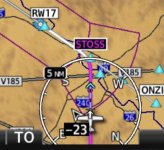
View attachment 63093


View attachment 63178
I do miss the distance rings on my G3X. The Dynon HDX has them, seems like a pretty easy feature to implement. Just another Map option you can turn on or off.

Gary
 
I'd like to see
  • A Vnav top of decent (TOD) point depicted on the flight plan course line.
  • To have the ability to touch/press any of the data field blocks and have them flip to additional info. In other words, if I have ETA set then when I press it would flip to display ETE. Or whatever data I've set it to. Because of the audio, transponder, comm blocks I'm limited to four data fields. This would effectively double the number data fields for me.
  • Have a distance ring option.
 
* Display KML shapes on the map or chart view. This could be used to draw a 50-mile circle for phase 1 flight testing, but there are many other potential uses.
 
I’m sure this has been requested before, but I’m really surprised this isn’t already a feature

Scheduled reminders based on date, tach time or Hobbs time.

Annual due on x date. Oil change every x hours of tach time. ADs that are required every x hours of Hobbs time, etc

Seems like an easy add


cheers,


Jeff
 
Stop displaying spurious parachute jump areas. I now have lovely 100/200nn yellow rings displaying that I can't deselect on the MFD. Why?

I just want Garmin to fix the code in their displays before they attempt to add anything else. When G3X started it was AWESOME. It has slowly become an over-featured and buggy piece of hardware that I am less and less confident of.

I'm frustrated too because I've been dealing with corrupted display of ADS-B weather products for the last 3 years. First TFRs and winds, now G-AIRMETS (and the new "feature" parachute areas which may be unrelated)
 

Attachments

  • IMG_1681.jpeg
    IMG_1681.jpeg
    4 MB · Views: 82
Stop displaying spurious parachute jump areas. I now have lovely 100/200nn yellow rings displaying that I can't deselect on the MFD. Why?
I was prepared to tell you "au contraire, there's a map setting called 'Parachute Areas', just turn that off"... but when I went and looked, I found you are right, it doesn't exist anymore! I know it used to be there, but it seems to have disappeared.

As it happens, I was just talking to someone at Garmin about a different database issue, and thought to mention this. That person suggested that this airspace type might now be controlled by the map setting labeled "Euro Airway". So I tried turning this off, and sure enough it worked. From their reaction it sounds like this might be a discrepancy that they'll fix in a future navigation database cycle, but in the meantime this is probably worth a look.
 
Feature Request:

With the recent addition of "Smart Glide" and other features, I started thinking about what other flight dynamics could be fine tuned by the G3X Touch / EIS / FCS. With all the data available to the G3X system, I was thinking that a “Flight Optimizer” mode within the G3X Touch - EIS/FCS could be a real benefit.

A lot of pilots are aware of the benefits of operating the engine “Lean of Peak”, but no one knows what is the “best” value for fuel flow or EGT’s in this operating regime. Expanding a bit further, we’ve all been taught that the engine POH has charts and you can determine “Best Power” and “Best Economy” settings. However, this is specific to an engine sitting in a test-cell somewhere, and almost nonsensical when mated to a propeller and airframe.

Given the amount of real time data available from the EIS (e.g. MAP, RPM, FF, CHT, EGT, Spark Advance) and the FCS (Pitch, Yaw, Roll, OAT, TAS, Alt, AoA/Lift, Lat. Accel. Vert. Accel, etc.) it should be possible to develop an algorithm that uses all of these inputs to determine the “optimal” engine settings and airframe configuration, and prompt the pilot to set the Throttle, RPM, Mixture (and optionally the Spark Advance) according to the desired operating mode — Best Speed, Best Fuel Economy, Best Economy @ Speed, Best Speed @ Power, and so forth...

Additionally, using available OAT and GPS Track, the FCS could prompt for a new altitude to maximize engine and airframe performance.

Here’s the scenario;

The aircraft is stable in cruise, AP/FD engaged. Pilot selects ‘Flight Optimizer - Best Economy’, the G3X grinds on the available data and spits out "SET RPM to [2275]", after a moment of running the engine at 2275, the system indicates that the Fuel Flow should be set to 8.7 gph. A few moments later, after the FIS-B WX is received and the Winds Aloft Forecast is updated, the system determines that the OAT and the nearby QNH would result in a 2% increase in economy and suggests a cruise climb to 9500 — this value is populated in the FD Altitude Select with a rate of climb at 500fpm; all you need to do is press [Accept]...

Just a thought...

Brian
Ok lets play mr airline pilot. Ha ha. To sve o.5 gal on a trip i would rather be looking outside at scenary.
 
CAP + aural Information when the TRIM RUNAWAY PROTECTION kicks in, so that I know it's the protection and not a switch/contact fault when I'm retrimming from one end to the other.
 
CAP + aural Information when the TRIM RUNAWAY PROTECTION kicks in, so that I know it's the protection and not a switch/contact fault when I'm retrimming from one end to the other.
I like this one. With an annunciation to the pilot about runaway trim protection being activated it would provide situational awareness of the problem. This is also good when training a newbie who inadvertently activates the runaway trim protection motor shutdown feature by holding the trim button down instead of pulsing it. I ran into this one and because the front seater wouldn't release the trim button (death grip) it took both of us to provide enough force to fly a pattern and land. I didn't realize until later what he was doing when we both thought the trim system shut down in an out-of-trim condition, when it was actually the runaway trim protection feature triggered by the constant button push.
 
I like this one. With an annunciation to the pilot about runaway trim protection being activated it would provide situational awareness of the problem. This is also good when training a newbie who inadvertently activates the runaway trim protection motor shutdown feature by holding the trim button down instead of pulsing it. I ran into this one and because the front seater wouldn't release the trim button (death grip) it took both of us to provide enough force to fly a pattern and land. I didn't realize until later what he was doing when we both thought the trim system shut down in an out-of-trim condition, when it was actually the runaway trim protection feature triggered by the constant button push.
I installed a switch in the cockpit of my Long EZ which cut the ground path to all functions on the rear stick for just such a situation. I installed one in the Velocity (Left-Both-Right). Handy when flying Young Eagles and you don't want them keying the mic, trimming, putting the speed brake down....
 
That person suggested that this airspace type might now be controlled by the map setting labeled "Euro Airway". So I tried turning this off, and sure enough it worked. From their reaction it sounds like this might be a discrepancy that they'll fix in a future navigation database cycle, but in the meantime this is probably worth a look.
Not all hero's wear capes! Thank you sir, one G3X software problem solved (at least worked-around). Now just to figure out what else got turned off by the mysterious "Euro Airway"...
 
I like this one. With an annunciation to the pilot about runaway trim protection being activated it would provide situational awareness of the problem. This is also good when training a newbie who inadvertently activates the runaway trim protection motor shutdown feature by holding the trim button down instead of pulsing it. I ran into this one and because the front seater wouldn't release the trim button (death grip) it took both of us to provide enough force to fly a pattern and land. I didn't realize until later what he was doing when we both thought the trim system shut down in an out-of-trim condition, when it was actually the runaway trim protection feature triggered by the constant button push.
I have a G3xTouch in an RV-12. I am not aware of TRIM RUNAWAY PROTECTION.
Can anyone point me to anything in Garmin manual that would explain it - how it works, what activates it, how to handle it if it activates.
From searching there seems referrence to VP_X and also to Dynon, but not much about it being a Garmin G3XT system.
 
I have a G3xTouch in an RV-12. I am not aware of TRIM RUNAWAY PROTECTION.
Can anyone point me to anything in Garmin manual that would explain it

From section 30.4.13.2 of the current G3X installation manual: (revision AV)

The GSA 28 servos can limit the maximum continuous run time of the pitch trim motor to help prevent the potential for a trim runaway situation. The Pitch rim Max Run Time setting is the maximum amount of time the trim motor will run continuously when a manual electric trim input is detected. If the maximum time is exceeded, the pilot must release the Manual Electric Trim (MET) control and then reassert it to continue running trim. If the maximum trim motor run time is set to "No Limit", the electric trim motor will run indefinitely as long as the manual trim input switch is held. This item has no effect on auto trim.
 
What do YOU want to see on the future releases?
Feature request: I just saw an FAA notice about AOA where they mentioned the Navy used an AOA system with an audible tone, and I wondered if the G3x system could provide something similar.
 
Back
Top