Van's Air Force

The definitive Van's Aircraft support community! Buying, building or flying an RV? Join our exclusive family of mentors and enthusiasts!

Dynon AoA utility?

Iluke

Well Known Member
Patron
For those of you who have a Dynon Skyview HDX, have you found a way to make the angle of attack (AoA) feature useful? I'm thinking of something like the recent video by Paul Dye of KITPLANES showing how to use AoA as a primary reference during approach instead of airspeed.

All mine seems good for is being a sophisticated stall warning horn.

Any experiences to share?

thanks

Ivan
 
Mine doesn’t beep until I am over the runway and ready for either wheel landing attitude or about the 3point attitude. I don’t even look at the AOA on my dynon. I only look at the speed to make sure it’s 75kts on base and 70kts on short final.

On touchdown it beeps constantly until I am ready to taxi off the runway

Edit: to clarify, I don't look at the AoA during landing because it's not very convenient and I was only focus on the IAS by habit. If the AoA is directly in the line of sight when I look at the runway then it is more useful. I had looked at the AOA when I was practicing the engine out landings during the low key phase but I saw it didn't change at all when my approach speed was over 70kts.
 
Last edited:
For those of you who have a Dynon Skyview HDX, have you found a way to make the angle of attack (AoA) feature useful? I'm thinking of something like the recent video by Paul Dye of KITPLANES showing how to use AoA as a primary reference during approach instead of airspeed.

All mine seems good for is being a sophisticated stall warning horn.

Any experiences to share?

thanks

Ivan
You can adjust the onset point of the tone, and the setting that gradually increases the rate I find useful to let you know you are approaching the high AoA condition like when tightening the turn for a short approach. Not as good as the "on-speed" system discussed at length on the forum but better than a straight stall warning. I rarely look at the chevron display on the EFIS.
Figs
 
If your AoA isn’t coming on until you’re in the flare, then it simply needs to be re-calibrated, an easy enough task in the Dynon - just check the manuals, and then as I recall, you have a Wizard in teh software that guides you step by step in the air…easy-peasy. We have the Dynon in our Tundra (along with an Alpha Eagle) and its tones work fine.

I agree that visual indicators of AoA are not very useful in our airplanes - whether on the screen or on the glare shield, that isn;t where you’re looking in teh pattern. The tone is the real AoA cue in modern systems, and Dynon’s works just fine. As I said - if it doesn’t come on until you are over the runway and getting ready to flare, it is not calibrated right - or you’re flying final too fast! You can go up and play with it at altitude to figure out which is the case.

We are finding that many, many pilots are habitually flying approaches too fast BTW…and a properly calibrated AoA can really help with that!

Paul
 
The tone in the headset is all I use, and it's wonderful. When down close to the ground and doing turns looking at stuff, if you get a little sluggish while eyeballs-out the little beep beep in your headset tells you to shove in a little throttle and ease up on the turn without having to go eyeballs-in.

On landing, I don't even look at the airspeed or anything else on the panel once I'm down below about 4 feet above the ground. My home runway is only about 30' wide and it's very useful to just focus on the centerline for crosswinds, let the speed bleed off at about 6" altitude and listen to the tone. Works great. I couldn't even tell you what speed I normally touchdown at anymore, it's been so long since I looked at the airspeed during a landing - but it's about 2 knots above stall, I can tell you that.
 

This is how my Dynon AoA behaves after I calibrated it. It doesn't beep until the plane is almost at touch down. It's more like the analog stall vane where the buzzer sounds when you are at the flare
 

This is how my Dynon AoA behaves after I calibrated it. It doesn't beep until the plane is almost at touch down. It's more like the analog stall vane where the buzzer sounds when you are at the flare
I tried to zoom in on your EFIS in the image - looks like approach speed is OK….but yes, your range from the onset of AoA tones to stall is very narrow - I’d try a re-calibration. I don’t have any Dynon reference material at hand, so can’t remember the exact procedure, but I think you can control the onset point to be at or slightly above your Vref - then you should have a slow tone for approach. You’re right thatwith the current Calibration, it’s not as useful.

Hey - its an excuse to go fly and experiment!
 
I tried to zoom in on your EFIS in the image - looks like approach speed is OK….but yes, your range from the onset of AoA tones to stall is very narrow - I’d try a re-calibration. I don’t have any Dynon reference material at hand, so can’t remember the exact procedure, but I think you can control the onset point to be at or slightly above your Vref - then you should have a slow tone for approach. You’re right thatwith the current Calibration, it’s not as useful.

Hey - its an excuse to go fly and experiment!
This isn’t my airplane but I found it from YouTube that shows the similar AOA behavior that I see in mine. I found some additional calibration adjustments in the menu so I will try to experiment with them this weekend. Thanks
 
with the full flaps my AOA wakes up at about 52-53 kts which is 10 kts above Vso of my RV9A. I cross the threshold at 60kts and never hear the AOA until in the flare. Curious if 60kts is too fast and i should slow to hear some AOA chirping on short final instead of just during the flare.

It would be nice if Dynon could add some sort of on-speed tone that sounds distinct from the stall warning to aid flying the approach at the proper speed until runway is made.
 
with the full flaps my AOA wakes up at about 52-53 kts which is 10 kts above Vso of my RV9A. I cross the threshold at 60kts and never hear the AOA until in the flare. Curious if 60kts is too fast and i should slow to hear some AOA chirping on short final instead of just during the flare.

It would be nice if Dynon could add some sort of on-speed tone that sounds distinct from the stall warning to aid flying the approach at the proper speed until runway is made.
I think you're floating down the runway a lot more than you need to, due to excessive speed on final approach. I saw it a lot during my transition training into my RV8. I was screaming on approach and my landing ate up the einter 2500' runway. Once I got used to my plane I would approach about 20kts slower than what I had been taught and was stopped before the 1000' marker.
 
If your AoA isn’t coming on until you’re in the flare, then it simply needs to be re-calibrated, an easy enough task in the Dynon - just check the manuals, and then as I recall, you have a Wizard in teh software that guides you step by step in the air…easy-peasy. We have the Dynon in our Tundra (along with an Alpha Eagle) and its tones work fine.

I agree that visual indicators of AoA are not very useful in our airplanes - whether on the screen or on the glare shield, that isn;t where you’re looking in teh pattern. The tone is the real AoA cue in modern systems, and Dynon’s works just fine. As I said - if it doesn’t come on until you are over the runway and getting ready to flare, it is not calibrated right - or you’re flying final too fast! You can go up and play with it at altitude to figure out which is the case.

We are finding that many, many pilots are habitually flying approaches too fast BTW…and a properly calibrated AoA can really help with that!

Paul
Hi Paul,
Let me give you a datapoint on the Dynon Skyview AoA that is different than your experience. Mine wasn't coming on until just before the stall and it was not a calibration issue. I'd calibrated it carefully IAW their instructions with the same result. I finally resolved it with the help of their customer service manager (Don Jones) by changing the programming. He provided me with a "CONFIG " file that altered the software and not mine behaves like you said. The tone now comes on at right about 1.3 X Vs, allowing me to fly the pattern by reference to the audio ques. Don confirmed that their software is not set up to do this out of the box. It has to be altered with a file upload. That shouldn't be, in my view.

Maybe you could engage Dynon and suggest they make this change across the board? You've done a great job raising awareness of the value of AoA, and as a respected aviation journalist, I think your opinion would carry weight.

Just a thought. Thanks for all your great work on this and all your other initiatives!
-Ivan
 
Let's Engage with Dynon and AFS.

We to need have their software working like Onspeed tones as option if not the default mode.

I like the Onspeed doughnut chevrons display too.
 
Hi Paul,
Let me give you a datapoint on the Dynon Skyview AoA that is different than your experience. Mine wasn't coming on until just before the stall and it was not a calibration issue.
-Ivan
After the previous post, I went up and re-calibrated the AOA again. The Vs was the same as before. I readjusted the software setting so the initial tone will come on at the earliest time. Yet the tone from the Dynon comes on very late. It will start beeping at at 1.10 x Vs for my airplane, a very uncomfortable speed for anything except close to touchdown.
 
After the previous post, I went up and re-calibrated the AOA again. The Vs was the same as before. I readjusted the software setting so the initial tone will come on at the earliest time. Yet the tone from the Dynon comes on very late. It will start beeping at at 1.10 x Vs for my airplane, a very uncomfortable speed for anything except close to touchdown.
Exactly. The settings allow you to adjust when the tone starts, but the "earliest" setting is 50% AoA. And before I altered it with the new CONFIG file, the system had the break of the stall at 70% AoA instead of 100% as logic would suggest. After loading the new CONFIG file it now shows the stall at 100% AoA (Data gleaned from exporting the user-log-data file). After the fix, with the initial tone adjustment still set at the minimum (50%), the tone comes on right where you'd want it to, just about exactly 1.3Vs. Why they don't set it up to do that as the factory default, I can't figure. And my very helpful contact at Dynon did not know either.
-Ivan
 
I can’t get mine to beeb at all. I have spent sometime with Dynon trying to figure out and still don’t. I get all the Dynon sounds, announcements etc, but no AOA
 
Mine doesn’t beep until I am over the runway and ready for either wheel landing attitude or about the 3point attitude. I don’t even look at the AOA on my dynon. I only look at the speed to make sure it’s 75kts on base and 70kts on short final.

On touchdown it beeps constantly until I am ready to taxi off the runway

Edit: to clarify, I don't look at the AoA during landing because it's not very convenient and I was only focus on the IAS by habit. If the AoA is directly in the line of sight when I look at the runway then it is more useful. I had looked at the AOA when I was practicing the engine out landings during the low key phase but I saw it didn't change at all when my approach speed was over 70kts.
PhatRV,

I had a different experience with the AOA I installed in my -4.
It was a very inexpensive model (~$300) that simply ran on differential air input and connected to a needle gauge on my panel.
I found that once calibrated it REALLY improved my landing performance.
Prior to the AOA I would land my -4 on grass at my local airport in about 850'.

Afterward, I consistently land at 650'.
I see that as a big difference.
I found it conforting to me to know that I had an instantaneous readout of my wing- at all airspeed/attitudes/and weights.

Daddyman
 
That's probably of little use to the OP, whose question was about the DYNON AOA, not some other system. :)

But my question...which values in the config file were changed? My search of the .dfg file only shows a handful of AOA-related parameters, none of which immediately jump out as being something would affect onset of tones, etc.
 
I can’t get mine to beeb at all. I have spent sometime with Dynon trying to figure out and still don’t. I get all the Dynon sounds, announcements etc, but no AOA
Dumb question but have you calibrated the stall speed with the Dynon system
 
Hi Paul,
Let me give you a datapoint on the Dynon Skyview AoA that is different than your experience. Mine wasn't coming on until just before the stall and it was not a calibration issue. I'd calibrated it carefully IAW their instructions with the same result. I finally resolved it with the help of their customer service manager (Don Jones) by changing the programming. He provided me with a "CONFIG " file that altered the software and not mine behaves like you said. The tone now comes on at right about 1.3 X Vs, allowing me to fly the pattern by reference to the audio ques. Don confirmed that their software is not set up to do this out of the box. It has to be altered with a file upload. That shouldn't be, in my view.

Maybe you could engage Dynon and suggest they make this change across the board? You've done a great job raising awareness of the value of AoA, and as a respected aviation journalist, I think your opinion would carry weight.

Just a thought. Thanks for all your great work on this and all your other initiatives!
-Ivan
Thanks for digging into this! It’s very possible that I somehow ended up with a different software package than everyone else…that sort of thing happens a lot in my position … and didn’t;t recall that it was tweaked.

At any rate, I would hope that Dynon makes that widely available for everyone!
 
I ask Dynon for the config file and Don Jones got back to me right away, and, as mentioned above, the settings file is required. I will be sending it tomorrow and I'll see shortly after that if it changes the way my AoA responds. As it is right now, like most of you, it is only of value as a stall warning. I've used AoAs in the past that were very useful and of great comfort. Hopefully, the Dynon will be the same with this change.
 
Gents,
While I can do this, it's quite time consuming and sometimes will require multiple files to be created and subsequent test flights collecting data, etc.
It is possible to do this with a simple change to the AOA calibration routine.
When doing the stalls during calibration, if you don't drive the airplane into a full stall, but rather go to the first sign of the stall, (tail buffett in most RV's) it will set the critical angle of attack lower than actual and cause the whole calibration to be shifted to where the beep will start at a higher airspeed and lower angle of attack. It may take a couple of tries to find the right combination, but it works. I actually did this on my own 9A years ago.

There is lots of talk about AOA these days and we did some work to add the ability to calibrate for different flap positions, but it appears more is to be done. I will request that engineering look into this to see if we can't do better with an important feature like this.
 
PhatRV,

I had a different experience with the AOA I installed in my -4.
It was a very inexpensive model (~$300) that simply ran on differential air input and connected to a needle gauge

Daddyman
What is this AoA sensor? Do you have a link to this product?
 
Gents,
While I can do this, it's quite time consuming and sometimes will require multiple files to be created and subsequent test flights collecting data, etc.
It is possible to do this with a simple change to the AOA calibration routine.
When doing the stalls during calibration, if you don't drive the airplane into a full stall, but rather go to the first sign of the stall, (tail buffett in most RV's) it will set the critical angle of attack lower than actual and cause the whole calibration to be shifted to where the beep will start at a higher airspeed and lower angle of attack. It may take a couple of tries to find the right combination, but it works. I actually did this on my own 9A years ago.

There is lots of talk about AOA these days and we did some work to add the ability to calibrate for different flap positions, but it appears more is to be done. I will request that engineering look into this to see if we can't do better with an important feature like this.
Thanks for refreshing my memory Don - I am pretty sure that must be what Idid with our Dynon-equipped airplane, because I don’t remember a patch - it was years ago (and many AoA systems in many airplanes), so I apologize if I have confused anyone on this thread - or created a workload problem for you Don!
 
When doing the stalls during calibration, if you don't drive the airplane into a full stall, but rather go to the first sign of the stall, (tail buffett in most RV's) it will set the critical angle of attack lower than actual and cause the whole calibration to be shifted to where the beep will start at a higher airspeed and lower angle of attack. It may take a couple of tries to find the right combination, but it works. I actually did this on my own 9A years ago.
So it's not really displaying the correct AOA but in the end working as an electronic progressive stall warning.
 
Gents,
While I can do this, it's quite time consuming and sometimes will require multiple files to be created and subsequent test flights collecting data, etc.
It is possible to do this with a simple change to the AOA calibration routine.
When doing the stalls during calibration, if you don't drive the airplane into a full stall, but rather go to the first sign of the stall, (tail buffett in most RV's) it will set the critical angle of attack lower than actual and cause the whole calibration to be shifted to where the beep will start at a higher airspeed and lower angle of attack. It may take a couple of tries to find the right combination, but it works. I actually did this on my own 9A years ago.

There is lots of talk about AOA these days and we did some work to add the ability to calibrate for different flap positions, but it appears more is to be done. I will request that engineering look into this to see if we can't do better with an important feature like this.
Don,
Fascinating as I am about to calibrate within a day or 2. Just waiting for VFR.
Interestingly as I approached the stall, I stopped my test flight (unrelated).
Afterward, my Dynon asked me if I wanted to calibrate the AOA.
Daddyman
 
Gents,
While I can do this, it's quite time consuming and sometimes will require multiple files to be created and subsequent test flights collecting data, etc.
It is possible to do this with a simple change to the AOA calibration routine.
When doing the stalls during calibration, if you don't drive the airplane into a full stall, but rather go to the first sign of the stall, (tail buffett in most RV's) it will set the critical angle of attack lower than actual and cause the whole calibration to be shifted to where the beep will start at a higher airspeed and lower angle of attack. It may take a couple of tries to find the right combination, but it works. I actually did this on my own 9A years ago.

There is lots of talk about AOA these days and we did some work to add the ability to calibrate for different flap positions, but it appears more is to be done. I will request that engineering look into this to see if we can't do better with an important feature like this.
My current calibration goes from nothing to full alarm very quickly. Will this calibration method spread out the range of the alarm or just move it to a lower angle of attack (higher speed) with the very narrow band of indication?
 
If you want the gradual beeps to come on sooner (like an approach speed in Paul's video), but keep the full stall tone at or just before actual stall, check out page 4-22 of the install manual; SETUP MENU>SYSTEM SETUP>AUDIO SETUP. The AOA can be set to begin alerting sooner (or later). Not sure why it isn't explained better in the manual or referenced in the AOA calibration area. It's been a couple years but I recall changing the 80 number to 65 or similar. I had to try several different numbers before I got the tones to begin just where I wanted but it worked okay and retained the full stall tone at the correct AOA.

Also, there is another setting at the same menu to silence the tones below a set airspeed. Use this to prevent it continuing to alert while you are rolling out.

Sidenote: I originally had a home grown AOA probe following a post on VAF from way back, leaving the AoA accuracy lacking. The angle of the AoA opening to the pitot and AoA tube opening size all mattered. When the angle between pitot and AOA openings was reduced to <40° and opening closed down with a pulled rivet (minus the mandrel), things got much better.

Good luck
 
If you want the gradual beeps to come on sooner (like an approach speed in Paul's video), but keep the full stall tone at or just before actual stall, check out page 4-22 of the install manual; SETUP MENU>SYSTEM SETUP>AUDIO SETUP. The AOA can be set to begin alerting sooner (or later). Not sure why it isn't explained better in the manual or referenced in the AOA calibration area. It's been a couple years but I recall changing the 80 number to 65 or similar. I had to try several different numbers before I got the tones to begin just where I wanted but it worked okay and retained the full stall tone at the correct AOA.

Also, there is another setting at the same menu to silence the tones below a set airspeed. Use this to prevent it continuing to alert while you are rolling out.

Sidenote: I originally had a home grown AOA probe following a post on VAF from way back, leaving the AoA accuracy lacking. The angle of the AoA opening to the pitot and AoA tube opening size all mattered. When the angle between pitot and AOA openings was reduced to <40° and opening closed down with a pulled rivet (minus the mandrel), things got much better.

Good luck
Hi Alan,

Thanks for joining the conversation. And you are right that the AUDIO SETUP menu lets you choose when the tone comes on, but the lower limit is 50% and with the factory default software that 50% AoA came very late on my system, at about 1.1 Vs, and not useful as a reference on final. In other words, the range of adjustment didn't allow me to get the tone to start at any useful speed.

I'm glad it sounds like that adjustment worked in your case, but at least some others seem to have have an experience like mine and need a different workaround, either tinkering with the software or altering the AoA calibration routine as Don suggested.

Hopefully now that Dynon is looking into a fix, they will come up with something so that we don't need a workaround to enjoy the full potential of their AoA system.

-Ivan
 
The tone in the headset is all I use, and it's wonderful. When down close to the ground and doing turns looking at stuff, if you get a little sluggish while eyeballs-out the little beep beep in your headset tells you to shove in a little throttle and ease up on the turn without having to go eyeballs-in.

On landing, I don't even look at the airspeed or anything else on the panel once I'm down below about 4 feet above the ground. My home runway is only about 30' wide and it's very useful to just focus on the centerline for crosswinds, let the speed bleed off at about 6" altitude and listen to the tone. Works great. I couldn't even tell you what speed I normally touchdown at anymore, it's been so long since I looked at the airspeed during a landing - but it's about 2 knots above stall, I can tell you that.
EXACTLY how I use my DYNON AOA system.

With my calibration setup; I set 85KIAS on base and put in one notch of flaps. I adjust my pitch to keep the 85KIAS on base and final. When I have the runway made, I put in full flaps, reduce power and start rotating to land. At some point close to the runway the AOA audio starts a very slow beeping so I keep descending at whatever attitude I am at. I adjust power to keep the audio tone at the same rate until I am about to touch down. Then I pull the power all the way off and pull the nose up until the AOA audio gives the steady tone. If I do it right, the steady tone comes on about a fraction of a second before the wheels touch the runway and the landings are smooth. Don't ask me what my touchdown speed is because I have no idea. This is for my airplane and the way my AOA is calibrated. Yours might be slightly different so, YMMV.
 
Last edited:
Hi Alan,

Thanks for joining the conversation. And you are right that the AUDIO SETUP menu lets you choose when the tone comes on, but the lower limit is 50% and with the factory default software that 50% AoA came very late on my system, at about 1.1 Vs, and not useful as a reference on final. In other words, the range of adjustment didn't allow me to get the tone to start at any useful speed.

I'm glad it sounds like that adjustment worked in your case, but at least some others seem to have have an experience like mine and need a different workaround, either tinkering with the software or altering the AoA calibration routine as Don suggested.

Hopefully now that Dynon is looking into a fix, they will come up with something so that we don't need a workaround to enjoy the full potential of their AoA system.

-Ivan
Like Ivan said, the adjustment only goes down to 50%. Today, on a SeaRey, the tone started AFTER my wheels touched at 35 kts and stall is about 36 kts (rounding error on FlySto?). Not very useful.

For those interested in the numbers for the SeaRey, being so different from an RV - Vac with On-Speed looked at my calibration data and determined it was valid but the speed spread from the point the AoA should start to sound and stall is too small to work properly. I can tell you that 1.3Vso (52 ish) on the SeaRey is very uncomfortable with absolutely no excess energy to flare. SeaRey recommends 56 kt approach.
 
Last edited:
I have an early Dynon Classic, when I installed it, Dynon had not yet come out with audio for the classic. Found the AOA indicator to be mostly useless, but I see some value in the audio. Right now I don't plan on connecting the Dynon audio as I just prefer it without (I did try it). Maybe a "headsup" AOA indicator would make all the difference.
 
One point to ponder is that when comparing AOA indications (even with the same system) from airplane to airplane (even airplanes of the same type) is like comparing indicated airspeed values--both will vary as a result of calibration. This is one of the primary short-comings of a field calibration: it is difficult to replicate results consistently. This, however, doesn't lessen the value of AOA for stall avoidance but it may limit the utility for deriving any performance cues (say approach condition, etc.) from displayed data or tone. When calibrated, a differential pressure system should reliably detect stall even in edge cases (ground effect, high sideslip, etc.) since the coefficient of pressure (the difference between the pressures adjusted mathematically) will always peak at stall. This is what the system is engineered to do: provide progressive stall warning. This doesn't mean the derived AOA solution is accurate in the sense that it's measuring 100% fractional lift (in the case of the Dynon) or actual AOA or body angle in degrees. But again, to emphasize, if calibrated, the system is doing what it's designed to do: warn the pilot of impending loss of lift.

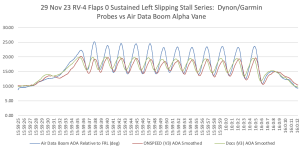
First, let's consider an edge case. I demonstrate this by putting the airplane in a condition that maximizes side slip and allows a sustainable oscillating stall condition to occur. That's a fancy way of saying I stall the airplane at very short intervals (less than 2 seconds) in a sideslip. The takeaway from this demonstration and plot is to note that even when we challenge the sensor, the physics of using differential pressure to detect stall works. In the video note that reliable stall warning occurs prior to stall (loss of stability). This is NOT the Dynon AOA solution driving the tone, but it is a Dynon sensor. All coefficient of pressure AOA systems share this characteristic. In other words, if you calibrate you can have confidence in your system:


Again, the takeaway from the demonstration is that the system accurately detects stall. What's interesting is that the condition is so dynamic, I couldn't tell you what the actual AOA accuracy is; but it doesn't matter. The system detects stall and provides warning. Here is a plot of AOA and sideslip data during the demo:
Sideslip Stalls 2.png

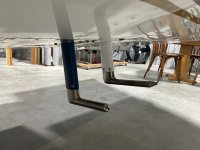
This first plot shows three different AOA solutions, the red line is the solution using the Dynon probe, the green line is the solution using the Garmin probe. Again, not the Dynon or Garmin AOA system--just the probes, both mounted in the same flow field under the left wing at about 25% chord:
IMG_5338.jpg

The big takeaway from the first plot is that all three sensors reliably detect stall. There is variability in magnitude (stall angle) and some variability in frequency due to the difference in shape of the sensors and the length of tubing from the pitot/AOA to the pressure sensors. Since measured stall angle is approximately 20 degrees, it appears from this plot that the pressure-derived systems are doing a better job than the boom mounted vane, which is likely subject to inertial effects mounted on the left wing tip. This is also the case in ground effect, where actual critical AOA changes due to upwash effect. That is one of two conditions where that is the case. The other is at extreme pitch rate change, which may be the effect occurring at the alpha vane on the boom. Any time the airplane rotates rapidly, the CL/alpha curve extends momentarily, and you can actually exceed critical AOA without stalling; but there is no free lunch, and the air molecules catch up quickly :rolleyes:.

This next plot simply compares the pressure-derived AOA solution to sideslip angle (engineers call that "beta", just like they call AOA "alpha"). Note that the stall is occurring with about 20 degrees of sideslip:
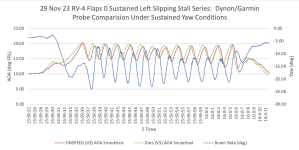
Sideslip Stalls 1.png

OK, now that we understand that a pressure-derived AOA system will reliably detect a stall if it's calibrated, let's look more specifically at the actual Dynon system. One of our early experiments was asking 10 folks to calibrate their Dynon AOA systems using the same system in similar airplanes and the manufacturer's instructions. The punch line is that all ten calibrations varied, which is exactly what's happening to folks in this thread. The takeaway is that all ten calibrations accurately captured stall, but if you were to compare visual or audio indications, they varied from airplane to airplane.

The first thing to understand, is that the Dynon AOA is a fractional lift measurement, it isn't computing AOA (or body angle) in degrees. When a wing is producing no lift, the fractional (or percent) lift is zero. The wing produces 100% lift just prior to stall. Thus, we can express the "CL/alpha" curve as either a fraction from zero to 1, or simply as a percent. This is just as effective as deriving AOA in degrees. As a matter of fact, a couple of key performance parameters are easily expressed as a % lift: maneuvering speed, stall warning, on speed and L/Dmax ASSUMING the system is accurate enough and has sufficient amplitude of usable AOA signal to do so. The Dynon % lift signal may, or may not meet this requirement depending on the airplane (see the example of the SeaRay above); and, as I said, it's not engineered to do so. It's engineered to provide progressive stall warning.

Let's drill down into this a bit. First, let's consider variation in calibration. All Dynon systems have data recording, and it's practical to download data post flight and export it to a spreadsheet (e.g., Excell, etc.) or MATLAB for some arm-chair analysis for your airplane. The data in these charts were downloaded directly from a Dynon EFIS.

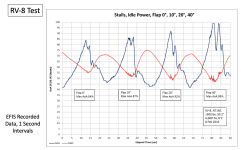
This plot shows what is arguably a perfect single-curve fractional lift calibration with a SkyView system. The "single curve" part is important, at the time of testing, Dynon did not support multiple calibrations to accommodate each flap setting. Any time this is the case, we recommend you calibrate in your normal landing configuration, but again, just looking at the chart, you can see that the system accurately captures stall in each configuration; but visual indications and audio will be different for each because the value of the peak AOA varies. The blue line is % lift, and the red line is IAS. FWIW, this calibration was achieved by an experimental test pilot. The reason I bring it up is that he was unable to duplicate results in subsequent tests.
Screenshot 2024-10-05 at 10.56.20 AM.png

Let's see what the calibration plot shows us. Notice that each stall has a peak and a valley. Notice that other than Flaps 40, the actual peak is not 100% even though we know the wing is working at 100% capacity at the stall. Also notice the valley isn't "zero lift," it's simply some "low AOA cruise condition." The difference between the valley and the peak is the "amplitude" of the AOA solution, or effectively "the range of AOA measurement." Any visual display or tone dependent on signal will vary. But to foot stomp: The system is accurately capturing stall in each configuration.

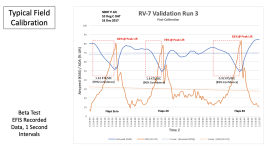
Now let's look at a typical field calibration from a different pilot and airplane:
Screenshot 2024-10-05 at 10.59.55 AM.png
Notice in this case, the pilot consistently achieved "peak lift" at about 80% and the minimum lift at about 15%. The point is, even if you use the same display and tone settings, both of these airplanes would provide slightly different cues other than stall warning; so you can't say "well, I use two yellow bars" or "the start of the chirp tone" on approach in my RV-7 and expect that it will translate to your RV-7 any more than you can compare IAS in two airplanes with a different pitot/static calibration.

So, to summarize: when calibrated, the AOA system provides reliable stall warning, but displays and tones may/will vary with differences in calibration. Calibration is highly dependent on pilot technique, the sensor used and where it is located on the airplane. Without factory or some form of standardized automatic field calibration logic, AOA will simply vary from airplane to airplane, just as IAS does without factory standardization. In no way does this lessen the value of AOA in the airplane. AOA still provides the best "how hard the wing is working right now" indication of any flight instrumentation system.

Fly safe,

Vac

 
Last edited:
displays and tones may/will vary with differences in calibration

Vac, thank you for the detailed explanation and the analytics!

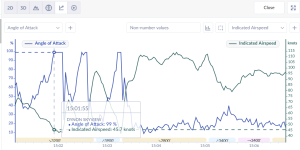
Looking at my own data it seems that AoA peaks at about 45.7 kias and the break is at 42-43 kias. I do hear the steady "stall" tone slightly ahead of the actual stall.

I'm not yet clear on how to configure Dynon so that the initial AOA slow "chirp" starts at the ON SPEED condition. That would make the Dynon aoa feature a lot more advanced than just a stall warning.

a screenshot from flysto (what a great site!):
1728193070570.png
 
So there is a way to do that...let's use your data as an example. First, excellent that the system was showing 100% lift. I don't know what your configuration is (i.e., flap setting) for each stall, but here's how you can get a bit more utility out of that calibration.

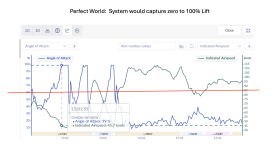
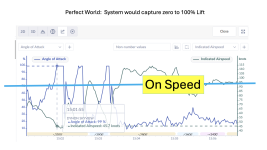
First, if the system accurately measured 0-100% lift, it would be straight forward to find L/Dmax and on speed. L/Dmax would occur when the wing was generating 50% lift, and on speed would occur when the wing is generating 60% lift:

Screenshot 2024-10-06 at 9.43.10 AM.png

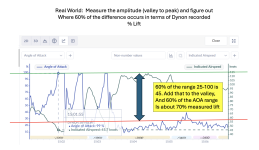
But, we can see that the minimum lift measured is about 25% (that's just a WAG, since the data box is obscuring some of the data we want to look at, but close enough to demonstrate the technique). As I said in the previous post, what we need to do is look at the range of AOA signal we have available, and that's shown here:

Screenshot 2024-10-06 at 9.43.20 AM.png

Your calibration gives us plenty of AOA measurement capability to find 60% of the available range. Once we figure out that the Dynon system is computing 70% when you are on speed, now we just need to figure out what the visual display looks like in that condition and what audible cues are available:

Screenshot 2024-10-06 at 9.43.30 AM.png

We don't have a decoder ring for the Dynon display, but based on some very old data, it appears to work like this (BTW, that would be a great question for the Dynon engineers to answer, if they are so inclined):

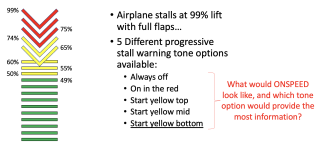
Screenshot 2024-10-06 at 9.42.19 AM.png

We THINK (heavy emphasis on think) that the display works as shown on the left. In a perfect world (i.e., the system accurately captured zero lift to 100% lift), the display makes good sense: L/Dmax would occur when the lowest yellow bar was lit, and on speed would occur at the bar/chevron display. But, in this example, we aren't working with 0-100, we are working with about 25-100, so on speed occurs somewhere between the bottom and upper yellow V lit, and close to start yellow mid for audio cueing. So that's what we'd look for on approach. If you are down to a single (upper yellow) lit, you are definitely on the slow side of on speed (back side of the power curve).

Here's a "way back" video where we are using a Dynon % lift signal from a D-10A to drive a primitive tone generator (this is NOT the Dynon audio) we originally did for proof of concept:


Again, all of this is calibration dependent. In the example we worked through above with ve0kog's data, we were able to get some more utility from the system, but in some cases, that is simply not possible. The only way to do it right 100% of the time is to accurately measure AOA from Vstall to Vmax, and the system needs to be specifically engineered to do that.

One other thing to keep in mind is that on speed is a small range of actual AOA (or % lift). It's impossible to fly a specific AOA, but properly computed, and on speed condition is going to work out to about +/- 2 to 2 1/2 knots of desired condition. Unfortunately with a system like the Dynon, this display can get "noisy" in turbulo-bumpies (that's a precise meteorological term :giggle:), so interpreting the audio would be important to ameliorate some of those effects. Of course, under those conditions, the airspeed would be jumping around as well, there is no free lunch. And there aren't "gust additives" when you fly AOA, but the technique we use is slightly fast until transition to landing. The only way you can land an airplane is when the wing stops working, so it's important to manage kinetics (velocity) and lift (stall margin). Most of the time, as folks transition from a speed cue to an AOA cue for approach, they perceive a "slow" condition, but the reality is they were generally carrying too much speed. The tactical advantage of AOA is it provides stall margin feedback real-time, which is something that you can't do with an airspeed indicator (unless you build yourself a maneuvering buffer for a combination of known g and weight parameters, which then screws up the energy equation). AOA just makes maneuvering and landing easier. It's the "how hard the wing is working" and "power required" gauge.

Fly safe,

Vac
 
Last edited:
At the WOT level flight Dynon log shows 9-11% AOA. this varies slightly depending on the power/lean settings and DA, and probably dependent on the calibration data as well.

The Alert data file logs each time the audio tone comes on. These are marked in the alert description column as AOA_NN_16, NN from 01 to 16. It looks like 01 is the continious stall tone, and 16 is the slowest chirp. So it's possible to derive the AOA of the onset tone for any given airplane

The last piece of the puzzle may be the instructions on how to set AOA_16_16 alert to start at whatever AOA we belive is the ON SPEED condition. Right now it looks like 3 choices are available in the Skyview. Mine is set to start at the yellow/red border and I guess by sheer luck this falls close to the ON speed calculations above

May be we are looking an option to set the starting tone to a specific AOA %, and a thechnote on how to determine this value using the data logs. This does look like a somewhat advanced technique :)

AOA Alerts
When AOA audio alerting is enabled, it enables a progressive tone that increases in intensity as
AOA increases. It is similar in nature to a conventional reed-type aircraft stall warning sound,
although it is much more predictable in its progression. It can be set to start its progressive
tones at either the border of the yellow/green marks on the AOA bars, the middle of the
yellow, or at the yellow/red border. The tones start at the level selected and get progressively
quicker and closer together until a solid tone is played at critical AOA (in the red)
 
Last edited:
I tried the new Dynon Config file and it didn't work for me.

I loaded the new config file sent from Dynon and took the plane out for a test flight today.

First off, something in the Config file that messed up my original AOA. The AOA was at the one bar which was 99% at 40kts and continued to sound a solid beep even at 80kts. It started to slow beat at 94-95 knots. The AOA symbol was showing one red chevron, meaning full stall. Not good. I was basically hearing the constant stall horn in the pattern. I ignored the AOA tone and flew the pattern for 3 landings. I needed the practice anyway.

I flew to practice area to redo the AOA calibration. Afterward, the behavior was the same as I observed, meaning the stall beep started to sound around 61-62kts and stalls was at 57kts. I am usually 65-67kts on short final and no beep was observed at this speed.

I recalibrated to sharply pushed the nose down at 60 kts to trick the system that my airplane stalls at a higher speed. Redid the slow speed stalls and the beep was really close to the stall speed again. I did not calibrate the AOA with any of the flap down. From previous experience during phase 1, the AOA warning sounded earlier than if I only calibrated with no flap.

One thing I found with the new configuration is I think I can set the AOA to sound sooner than at 50%. But after I changed it, the AOA beep didn't come on earlier than I hope. I didn't remember what I set but I didn't observe any appreciable change. I flew back to homebase because I was tired flying below 70kts when the OAT was 97degF. The beep at landing was like the normal Dynon behavior I described before.
 
Vac,
Are you on the EAA's AOA committee with some of the manufacturers?
Maybe it is time to support some voluntary standards for calibration.
Users also need options for progressive indications that work across the AOA range. This should be audio and visual.
 
But after I changed it, the AOA beep didn't come on earlier than I hope. I didn't remember what I set but I didn't observe any appreciable change.
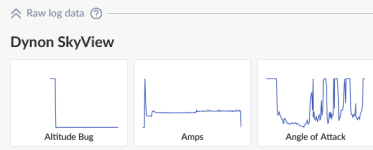
I noticed that the AOA % can jump very rapidly with just a small change in IAS especially when close to stall. overlaying the AOA and IAS data on a chart in flysto can take some of the guess work out. It's very easy to do: after opening the flight, click on the graph icon, select Raw Data/Angle of Attack

1728254019591.png


Then add IAS to the right Y axis.

1728254128103.png

it helps if the recording is at 1sec intervals
 
Vac,
Are you on the EAA's AOA committee with some of the manufacturers?
Maybe it is time to support some voluntary standards for calibration.
Users also need options for progressive indications that work across the AOA range. This should be audio and visual.
Vac consults with us on the team which actually has a somewhat fluid “membership” - so he’s an important part of the process.

We are, in fact, working on a proposed standard, which - as you suggest - is voluntary. And that voluntary nature is a little amusing because each designer for each manufacturer has a certain pride of ownership that makes them feel their system is the best…so why should they change. And of course, I get that! However, we are trying to write a “standard” that encompasses most of the popular systems. Make it too prescriptive, and no one will follow it - and since the whole idea of AoA indicators is voluntary (at this point) anyway), why should they change?

Paul
 
I noticed that the AOA % can jump very rapidly with just a small change in IAS especially when close to stall. overlaying the AOA and IAS data on a chart in flysto can take some of the guess work out. It's very easy to do: after opening the flight, click on the graph icon, select Raw Data/Angle of Attack

View attachment 71670


Then add IAS to the right Y axis.

View attachment 71671

it helps if the recording is at 1sec intervals
I don't see the AOA in Flysto, but I see it in the Savvy data. Is there any setting in Flysto to record the AOA data?
1728260330189.png
 
Vac consults with us on the team which actually has a somewhat fluid “membership” - so he’s an important part of the process.

We are, in fact, working on a proposed standard, which - as you suggest - is voluntary. And that voluntary nature is a little amusing because each designer for each manufacturer has a certain pride of ownership that makes them feel their system is the best…so why should they change. And of course, I get that! However, we are trying to write a “standard” that encompasses most of the popular systems. Make it too prescriptive, and no one will follow it - and since the whole idea of AoA indicators is voluntary (at this point) anyway), why should they change?

Paul
I understand. This thread is a reason for change.
What's the goal ? Safety or system that no better that a stall horn.
How many aircraft are shipped with AOA the never gets calibrated ?
How many are not calibrated correctly?
How does the pilot validate that the AOA indications are correct?
 
So there is a way to do that...let's use your data as an example. First, excellent that the system was showing 100% lift. I don't know what your configuration is (i.e., flap setting) for each stall, but here's how you can get a bit more utility out of that calibration.

First, if the system accurately measured 0-100% lift, it would be straight forward to find L/Dmax and on speed. L/Dmax would occur when the wing was generating 50% lift, and on speed would occur when the wing is generating 60% lift:

View attachment 71640

But, we can see that the minimum lift measured is about 25% (that's just a WAG, since the data box is obscuring some of the data we want to look at, but close enough to demonstrate the technique). As I said in the previous post, what we need to do is look at the range of AOA signal we have available, and that's shown here:

View attachment 71641

Your calibration gives us plenty of AOA measurement capability to find 60% of the available range. Once we figure out that the Dynon system is computing 70% when you are on speed, now we just need to figure out what the visual display looks like in that condition and what audible cues are available:

View attachment 71642

We don't have a decoder ring for the Dynon display, but based on some very old data, it appears to work like this (BTW, that would be a great question for the Dynon engineers to answer, if they are so inclined):

View attachment 71643

We THINK (heavy emphasis on think) that the display works as shown on the left. In a perfect world (i.e., the system accurately captured zero lift to 100% lift), the display makes good sense: L/Dmax would occur when the lowest yellow bar was lit, and on speed would occur at the bar/chevron display. But, in this example, we aren't working with 0-100, we are working with about 25-100, so on speed occurs somewhere between the bottom and upper yellow V lit, and close to start yellow mid for audio cueing. So that's what we'd look for on approach. If you are down to a single (upper yellow) lit, you are definitely on the slow side of on speed (back side of the power curve).

Here's a "way back" video where we are using a Dynon % lift signal from a D-10A to drive a primitive tone generator (this is NOT the Dynon audio) we originally did for proof of concept:


Again, all of this is calibration dependent. In the example we worked through above with ve0kog's data, we were able to get some more utility from the system, but in some cases, that is simply not possible. The only way to do it right 100% of the time is to accurately measure AOA from Vstall to Vmax, and the system needs to be specifically engineered to do that.

One other thing to keep in mind is that on speed is a small range of actual AOA (or % lift). It's impossible to fly a specific AOA, but properly computed, and on speed condition is going to work out to about +/- 2 to 2 1/2 knots of desired condition. Unfortunately with a system like the Dynon, this display can get "noisy" in turbulo-bumpies (that's a precise meteorological term :giggle:), so interpreting the audio would be important to ameliorate some of those effects. Of course, under those conditions, the airspeed would be jumping around as well, there is no free lunch. And there aren't "gust additives" when you fly AOA, but the technique we use is slightly fast until transition to landing. The only way you can land an airplane is when the wing stops working, so it's important to manage kinetics (velocity) and lift (stall margin). Most of the time, as folks transition from a speed cue to an AOA cue for approach, they perceive a "slow" condition, but the reality is they were generally carrying too much speed. The tactical advantage of AOA is it provides stall margin feedback real-time, which is something that you can't do with an airspeed indicator (unless you build yourself a maneuvering buffer for a combination of known g and weight parameters, which then screws up the energy equation). AOA just makes maneuvering and landing easier. It's the "how hard the wing is working" and "power required" gauge.

Fly safe,

Vac
The Dynon display would be impossible to fly onspeed. It is a yellow bar in the 60% lift region.
I would be hard nail that indicator due lack of unique differentiation. I am guessing the sound lacks differentiatetion too.

What onspeed gives us is a safe maneuvering speed on approach.
 
with the full flaps my AOA wakes up at about 52-53 kts which is 10 kts above Vso of my RV9A. I cross the threshold at 60kts and never hear the AOA until in the flare. Curious if 60kts is too fast and i should slow to hear some AOA chirping on short final instead of just during the flare.

It would be nice if Dynon could add some sort of on-speed tone that sounds distinct from the stall warning to aid flying the approach at the proper speed until runway is made.
60kts is probably slightly fast for most 9s, but to be honest that’s also what I’m at over the numbers most of the time. I tell myself that unless it’s a short field, it’s good to have some margin over stall speed to handle weird gusts below the tree line, etc. But most people fly final too fast and I suspect we’re among them. 😃

Lately I’m prioritizing keeping it at 70kts or above until I’m straight in for landing. I’m a believer in DEFINED minimum maneuvering speed (don’t want to enrage any aviation acronym prescriptivists like last time 🤣).
 
The Dynon display would be impossible to fly onspeed. It is a yellow bar in the 60% lift region.
I would be hard nail that indicator due lack of unique differentiation. I am guessing the sound lacks differentiatetion too.

What onspeed gives us is a safe maneuvering speed on approach.
Vac,

Thanks for the detailed tutorial. I learned a lot from it. One question- You say 60% of actual lift equates to on speed? Assuming the AoA actually measures 0-100% lift? Is that correct or did I misinterpret you? And if so, a theoretical constant or rather specific to RV type airframes?

I'm the one who started this thread, and I am very appreciative that you contributed. I'm beginning to understand my Dynon AoA better now, and with Dynon's help it does now peak out at 100% lift. I'm going to continue to experiment and analyze the data and see how close I can come to getting a audio cue correlating to on speed. Not the visual, just the audio.

Thanks again and keep up the good work!
-Ivan
 
Max,

Paul is being polite, and spot-on with his observation regarding standardization. I'm not a formal member of that committee, but I do serve on another EAA safety initiative that is developing resources for reducing risk during power-loss on takeoff and initial climb. I chime in on a thread like this for educational purposes, sharing what we've learned in the last eight years.

I agree with your assessment. We gave up experimenting with Dynon as an AOA signal source as we learned more about the system, and civilian AOA systems in general. They are designed to be stall warning devices for the most part, and all depend on some sort of field calibration. To beat a dead horse: calibration will vary, and with it, any indications or tones driven by the system. That's why we are developing automatic calibration--and taking the physics out of the pilot's hands. That means that if you fly the on speed tone in an RV-4, it's exactly the same as flying the on speed tone in a J-3 or Lancair. Actual AOA and airspeed will, of course, be different, but the condition and how you apply flight controls and power to react to the tone will be identical. That's as much standardization as we can hope for. I originally naively thought if we simply demonstrated how we did business in the military it would just translate. My RV-4 flies just like an F-15 with a prop and bit less horsepower, and airplanes are airplanes...but alas no. And other than a variometer in a glider, the concept of flying a tone is alien to GA--so much so, we just call it "green eggs and ham syndrome."

When we developed our own hardware and software, we utilized two technical papers prepared by the FAA. One dealt with the physics of accurately measuring AOA using differential pressure as well as various normalization techniques and second was an evaluation of ten commercial systems. The second is an excellent read, and became our "requirements document" by highlighting how we needed to approach engineering to avoid short-comings detailed in the report. The FAA TC server isn't currently working, but we keep a copy on our website: DOT/FAA/TC-18/19. It's a technical read, and the systems are de-identified, but it presents a great over-view of "what's out there." That is not to construe that there is not a benefit to adapting AOA: any AOA system (that's calibrated) is better than no AOA system, purely from a stall awareness/prevention stand point. And there are different ways to skin the AOA cat.

Our all-volunteer team was fortunate to receive the Eta Award for advancements in flight testing efficiency and effectiveness at the 68th Annual Symposium of the Society of Experimental Test Pilots last month. I only point that out not to blow our horn, but because we do it on a beer budget that is smaller than a rounding error in any formal organization; and if we are able to achieve this, there is no reason a manufacturer or other organization shouldn't be able to do so. We've conducted instrumented flight test of the "big two" (Garmin and Dynon) AOA systems used in the EAB community. We don't publish results of those tests because of the proprietary nature of those systems and the fact we are not the Garmin or Dynon flight test department.

Although the military does not have AOA standardization (i.e., displays and tones vary; and can you imagine the Air Force and Navy coming to terms?), they have settled on a standardized concept called "on speed" or "onspeed" (there is no correct agreed spelling for the concept) for approach AOA. An on speed condition may be a "staple" on a HUD or helmet-mounted display, it may be a tone, it may be a "doughnut" on a doughnut/chevron display. What is standardized is the way we teach pilots to fly an on speed approach and landing, and that we eschew airspeed for AOA when we land small airplanes (fighters and trainers). As I like to point out, the on speed condition is a small band of AOA that provides a 5 knot (ish) window of airspeed to fly at 1 g. Like any AOA, the band self-adjusts for g-load. I bring this up, because your observation that it's difficult to fly the Dynon (or Garmin) visual display is correct--it simply isn't practical to fly a specific angle of attack (or body angle). Visual displays also require you to look at something, so ergonomics of where the display is mounted are important. A HUD or helmet/goggle mounted visual display is optimum, and you'll note mine is dead-center above my instrument panel. This is why our "side gig" is developing inexpensive HUD and wearable displays.

One thing notably absent on this forum is participation by factory test pilots and engineers. I imagine there are legal constraints placed on that type of out-reach activity. There is quite a bit of opinion/experience discussion, some of which is quite good, but what is generally missing is the actual flight test science and engineering piece. Worse is what we call "opinion driven analysis" which simply serves to confuse.

We'll continue to press ahead with our small effort to produce an accurate, flyable AOA cue. We remain non-profit and open source and don't perceive ourselves as much of a threat to industry :); but the phone isn't ringing off the hook, either. And as I said, the basic on speed concept should serve as an example of what is in the art of the standardization "doable." What's commendable about this thread is that folks are trying to do the best they can with the system that essentially came for free with their EFIS, and they understand the benefit of having AOA information readily available. That. Is. Awesome!

This paper is written for pilots, not engineers (or physicists, I never turn at the merge with a physicist!), and describes in detail what the potential of an accurate on speed cue is, and how it provides "how hard the wing is working" and "power required" feedback to the pilot: AOA and Energy Maneuverability for Pilots. Much of it is based on the old F-4 tone (also used in the F-117 and U-2), because we still believe that is the most simple, effective means to convey the information to the pilot ergonomically; but there may, in fact, be a better way to do it! As a washed-up old guy that used to teach this for a living, I think it's an accessible approach for adopting a technical solution (AOA) to make the entire concept of energy management accessible for the average pilot. We are always looking for feedback, so if you take the time to read the paper (it's not short, but it's an easy pilot read with lots of pictures and only basic math), feel free to drop a line with comments/corrections/BS flags.

Guess I better be careful about scoffing opinion--there sure is a bunch of it in this post!

Fly safe,

Vac
 
Last edited:
Back
Top