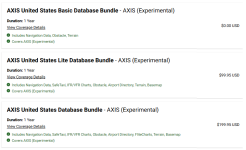
To clarify some of the requests regarding database levels and subscriptions with the AXIS displays:
Even though there are configuration modules for each display in an AXIS installation, the
system still operates on a single
system ID. Therefore, one database subscription is purchased for one system ID. This is true for past G3XT installations and current AXIS installations. For IFR equipped panels, you would typically have one system ID for the flight displays, and one system ID for the IFR navigator(s) due to these products requiring different levels of navigation databases (VFR or IFR), along with optional charting packages. In these installs you would have the choice to purchase only the required IFR navigation database subscription for the IFR navigator(s), and the charts (or not...), for the GDUs or other charting source (EFBs like Garmin Pilot/ForeFlight, or your classic paper printouts).
When there are multiple IFR navigators and PFD/MFDs in modern IFR aircraft and owners desire 'all available data on all available screens/units', the OnePak offerings are a great option to cover this need, because the a la carte priced options then become a costlier selection at that point.
Added layers of data requirements take place when we start combining IFR navigation units into PFDs along with adding expanded features like full control of flight plans from PFDs to external IFR navigators via HSDB. (Example: you can now fully control the flight plan, load and activate approaches on a GNX375 or GPS175 completely from a base experimental AXIS GDU due to this HSDB interface and one source flight plan.) This capability creates a requirement that the PFD and external IFR navigator share a consistent IFR level navigation database, so they agree on what they are actually controlling/modifying.
Now that that's out of the way, let's break down some examples. For simplicity and a much shorter post I input packages for the US.
Please visit the
FlyGarmin.com aviation database pricing page and input all installed equipment to receive available packages and other a la carte pricing. That will look like the below for the provided example groups following.
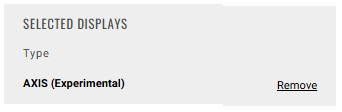
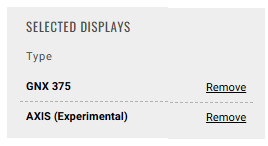
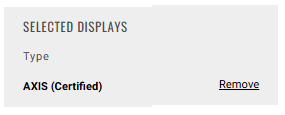
Navigation Database = All GPS waypoint information data meeting either VFR or IFR level requirements (there are different levels for these use cases)
VFR/IFR Charts = VFR Sectionals and IFR Enroute (High/Low) Charts
FliteCharts = Garmin Terminal Procedure Charts (Arrival/Departure Procedures and Approach Plates)
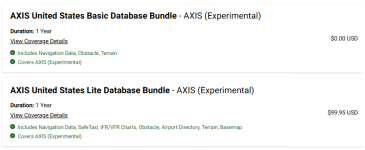
Basic AXIS Display Installation (VFR) - GDU 116Bx
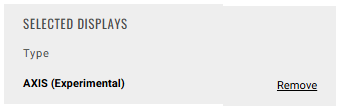
One system ID and subscription, no matter how many displays are installed. These include options for (free) VFR level basic Navigation Data, or options with advanced features like SafeTaxi, VFR sectionals, and Airport Facilities Directory.
 IFR AXIS Installation - Federated Panel (PFD + Traditional Radio Stack) - GDU 116Bx + External Navigator
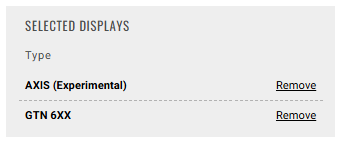
In a common base GDU (116Bx) + non-chart displaying IFR navigator install (GNX375 or GTN650Xi), there are 2 system IDs. It was previously common to update the IFR Navigation Database only on the navigator and chart packages on the PFD/MFD (previously $299 + $199), but with these systems now connected via HSDB and utilizing a one source flight plan, all units need to have an agreeing IFR level navigation database subscription (including the PFD, even if an experimental base unit). The below database package was created for this need. This provides all required IFR level navigation databases and listed information on the display
and non-chart displaying navigator.

If you had a chart displaying navigator like a GTN750Xi and desired FliteCharts on that GPS/MFD unit as well, you would likely be selecting a OnePak, similar to the next IFR example below. This would give you all available services on all units, although it would still be an option to only update the basic level navigation database and not have the mapping/charting availability (uncommon on GTN750Xi installs, but more frequent on GPS (175/375) and GTN650Xi installs).
IFR AXIS Installation - Integrated Panel (PFD acting as the IFR Navigator, one system ID, all displays) - GDU116 C/NC
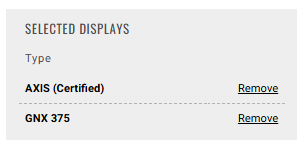
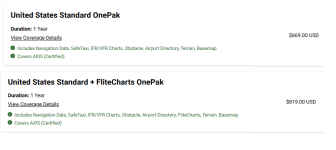
These are the wholly TSO certified flight displays, so the entire unit is a certificated piece of equipment but installed in an EAB aircraft (just like your previous GPS/GTN Xi unit was). You will need to input these devices in FlyGarmin as AXIS (Certified) units to receive proper database selections. Databases can still be a la carte for these displays, but when adding desired features together (like all IFR navigation databases and mapping/charting capability in one single display) the OnePaks are the best pricing option. The AXIS (Certified) display models that include the integrated IFR GPS capabilities do not accept the AXIS (Experimental) bundles. However if you had a supplemental GDU 116Bx experimental display installed, it's services would be included under this package.
We will have members of our Database Sales Team/Pilot Ops group available at OSH to talk through these many options for your aircraft to equip you with the best available option for your desired mission.