
When I built my 10, I began using the EAA builders log site until it failed me. I transitioned to another builder software, the name of which I cannot recall. I'm presently working on a Zenith Cruzer and have run into the same issue with the EAA builders log. What log are some of you using with success?

Van's Air Force
You are using an out of date browser. It may not display this or other websites correctly.
You should upgrade or use an alternative browser.
You should upgrade or use an alternative browser.
Builders Log
- Thread starter dspender
- Start date


Three ring notebook with notebook paper. One line per work session. Pictures in the cloud.
Or shoot, you could just use notepad that comes with your iPhone and sync that to the cloud. But it’s really hard to beat a three ring notebook with a pencil. Still have it.
The spreadsheet app (Numbers) that came with my iPhone has been used for five years to track my simulator sessions. Over 500 entries, cloud based and synced across multiple devices. That would work perfectly as a builders log IMHO. Copy and paste it into Grok once a year and tell it to summarize.
Or shoot, you could just use notepad that comes with your iPhone and sync that to the cloud. But it’s really hard to beat a three ring notebook with a pencil. Still have it.
The spreadsheet app (Numbers) that came with my iPhone has been used for five years to track my simulator sessions. Over 500 entries, cloud based and synced across multiple devices. That would work perfectly as a builders log IMHO. Copy and paste it into Grok once a year and tell it to summarize.
Last edited:

I used KitLog Pro for a short period of time until I learned of its limitations. After that I created a simple template in Powerpoint and used that for the rest of the build. I wrote a brief description of the work, logged the hours and included a few photographs. Every now and then I'd print out a few pages and put them in a 3-ring binder.When I built my 10, I began using the EAA builders log site until it failed me. I transitioned to another builder software, the name of which I cannot recall. I'm presently working on a Zenith Cruzer and have run into the same issue with the EAA builders log. What log are some of you using with success?

Microsoft Excel. Column for date, hours, task description, and drop a small picture beside (at minimum resolution to keep the file size down) Kept the pages formatted for 8 1/2x11 and fit about 4-5 sessions per page. I just send the file to a local print shop to print the new pages on their glossy paper every year or so and put in a 3 ring binder. Excel can total the hours column too but I’d rather not know!
This way it lives electronically but you can easily generate as many hard copies you want!
This way it lives electronically but you can easily generate as many hard copies you want!
I just used the EAA product. Curious how it failed you? It worked fine for me for 4 years other that one random entry that for some reason changed the date to 1969 and doesn't seem to be changeable

I use Blogger. Separate pages for major components. I print the pages for the hard copy.
My method works for me. I keep a loose leaf binder and hand write date, time in, time out and description of work. When a page fills, I transfer the data to excel. Multiple tabs total back to a main page. Every few weeks I transfer to Blogger and print. Multiple backups of everything.
I have a Basic Builder Log excel book if anyone is interested. It even has a full 7(A) inventory. Tracks time and costs.
My method works for me. I keep a loose leaf binder and hand write date, time in, time out and description of work. When a page fills, I transfer the data to excel. Multiple tabs total back to a main page. Every few weeks I transfer to Blogger and print. Multiple backups of everything.
I have a Basic Builder Log excel book if anyone is interested. It even has a full 7(A) inventory. Tracks time and costs.
I pretty much stopped working on my project in 2023, and didn't do any updates on my EAA log until recently. When I first logged on, I could n longer post any new entries, my project was essentially "archived". I contacted Don White through the email listed on the Builders Log site, he responded quickly and enabled access to my project again. You might try reaching out to him for help.When I built my 10, I began using the EAA builders log site until it failed me. I transitioned to another builder software, the name of which I cannot recall. I'm presently working on a Zenith Cruzer and have run into the same issue with the EAA builders log. What log are some of you using with success?

I use blogger.com (free) for an online version so my dad can follow along with my build, then I use Diarium (something like $7 to purchase the app if I remember right) on my PC to have as a local version if blogger ever goes away. I just write my log online and then copy/paste into Diarium. If you don't need an online version, Diarium works great for adding pictures, tags, etc. It also backs up on Google and can sync across multiple computers.

My first couple of projects )decades ago), I used an Excel spreadsheet and just wrote a note for each work session about what I did. Took pictures and kept them in a folder. In later years, I just annotate the corner of each page in the build manual - or the corner of a drawing when it is complete if there is no build manual - and then keep a folder on the computer with all the pictures I take along the way. I can prove I built it with the photos, and inspectors get an idea that I actually looked at every drawing or every page of the build manual.
Of course, I don’t bother with Repairman Certificates anymore…but for this DAR, what I describe (along with maybe a couple of questions) is plenty for me to know that you built it.
Paul
Of course, I don’t bother with Repairman Certificates anymore…but for this DAR, what I describe (along with maybe a couple of questions) is plenty for me to know that you built it.
Paul

jnorris
Well Known Member
Explain what issue you had with the EAA log. I am interested in finding out what you ran into. TIAWhen I built my 10, I began using the EAA builders log site until it failed me. I transitioned to another builder software, the name of which I cannot recall. I'm presently working on a Zenith Cruzer and have run into the same issue with the EAA builders log. What log are some of you using with success?

RVScooter
Member
Slightly unrelated, but how important is it to track every work session and total time spent working? Most of my work sessions are sporadic and really short often less than 5 minutes. Most of the time i would spend more time logging my work than actually doing the work. Would it be enough to track milestone completion dates alongside all of the timestamped pictures taken along the way?
I keep time entries in my iPhone's notes app, which get backed up to the cloud and I email them to myself from time to time. I include a very brief overview of what I did (e.g., "worked on fuselage skin rivets"). Each work session I take photos on my phone that get backed up to the cloud. I consider my real build log to be notes made with an old fashioned ball point pen directly on the build instructions printout. I check off and date each item when complete and make notes if I deviated from the plans in any way.
Logging is a gray area. Some just scribble a date in the column of the manual and take photos. Others have very comprehensive builder logs.Slightly unrelated, but how important is it to track every work session and total time spent working? Most of my work sessions are sporadic and really short often less than 5 minutes. Most of the time i would spend more time logging my work than actually doing the work. Would it be enough to track milestone completion dates alongside all of the timestamped pictures taken along the way?
I am the latter because I think it adds value. You can log whatever and however as long as you can prove you built it.
Its only importance is the importance to YOU. No one else (in officialdom) will care. But if you’re like most engineers, “if you can’t measure it, you can’t manage it”, and you’ll want to track every instant of time, how it was spent, and how it correlates to every other instant.Slightly unrelated, but how important is it to track every work session and total time spent working? Most of my work sessions are sporadic and really short often less than 5 minutes. Most of the time i would spend more time logging my work than actually doing the work. Would it be enough to track milestone completion dates alongside all of the timestamped pictures taken along the way?
Fight this urge!!!

Dan & Larry's RV-14
 dan-larry-rv14.blogspot.com
I've reached out to Don three times, and the solutions he suggested did not work. I sent some photos yesterday of what happens on my desktop but have not heard back yet.I pretty much stopped working on my project in 2023, and didn't do any updates on my EAA log until recently. When I first logged on, I could n longer post any new entries, my project was essentially "archived". I contacted Don White through the email listed on the Builders Log site, he responded quickly and enabled access to my project again. You might try reaching out to him for help.
Logging my progress is the least favorite part of my buildingIts only importance is the importance to YOU. No one else (in officialdom) will care. But if you’re like most engineers, “if you can’t measure it, you can’t manage it”, and you’ll want to track every instant of time, how it was spent, and how it correlates to every other instant.
Fight this urge!!!


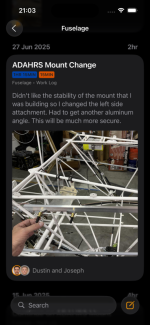
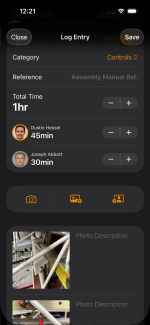
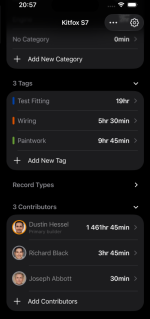
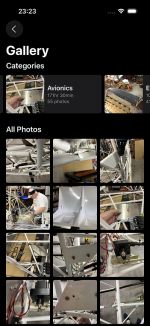
Since most of us take build photos with our phones, I built KitFlight iOS app to make it easier to keep logs without moving pictures to a computer or uploading to web app. The app works offline, syncs with iCloud, and lets you attach as many photos as you like. You own your data, nothing is locked in. No subscription since everything is stored on your own device.

 apps.apple.com
It can import logs from EAA Builder Logs and MyKitLog, and allows export to JSON, CSV, or Jekyll Markdown + pictures.
KitFlight
Kitflight is the app for experimental aircraft builders to document and track their building progress. Designed with builders in mind, Kitflight offers all the tools you need to keep a detailed log of your work and ensure every aspect of your build is organised and easily accessible. Whether...
apps.apple.com
It can import logs from EAA Builder Logs and MyKitLog, and allows export to JSON, CSV, or Jekyll Markdown + pictures.
I just use the "My Projects" section right here on VAF. It's been very reliable and I can print to PDFs easily enough and store those locally, with backups. If I wanted to destroy a small forest I could even print it out.
Dave
Dave

I did I exactly the same thing. I even hyperlinked to all my photos in another folder. Works great!Microsoft Excel. Column for date, hours, task description, and drop a small picture beside (at minimum resolution to keep the file size down) Kept the pages formatted for 8 1/2x11 and fit about 4-5 sessions per page. I just send the file to a local print shop to print the new pages on their glossy paper every year or so and put in a 3 ring binder. Excel can total the hours column too but I’d rather not know!en
This way it lives electronically but you can easily generate as many hard copies you want!
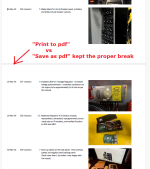
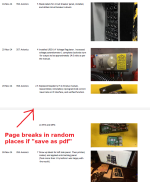
This is the easiest and more than adequate for a Builder Log. You can update your "My Project" from a phone with text, Hobbs time & photos. Entries are already time stamped. The only down side is it's ooen to comment so it can have other entries besides your log. Maybe Doug can change that to a builder preference setting. When it grows to a new page, print the previous page to pdf and save it to your Puter. Print if you want a hard copy log. Donate a little or a lot extra to Doug.I just use the "My Projects" section right here on VAF. It's been very reliable and I can print to PDFs easily enough and store those locally, with backups. If I wanted to destroy a small forest I could even print it out.
Dave
My blog/log took a lot of time. Google Blogger. It does add value and many builders use it for reference, so I'm glad I did it, but it's not necessary.
No one even opened the printed log.
If you prefer keeping your builder logs locally on your devices with full offline access, this might be a good time to check out kitflight.com. The app is currently discounted to $35 one-time purchase, and you can easily import existing logs from EAA, MyKitLog.
Attachments

jollygreenpilot
I'm New Here
Pavlo, this app is amazing! Thanks for keeping it subscription free! Highly recommended.If you prefer keeping your builder logs locally on your devices with full offline access, this might be a good time to check out kitflight.com. The app is currently discounted to $35 one-time purchase, and you can easily import existing logs from EAA, MyKitLog.

For each item in the plans, I checked off verbs in the paragraph as each task was completed, and added a date to it when every task was finished. I made an Excel document to track my time and notes. I copied the time and notes into a Word doc and added pictures, and made chapters by date to keep the size reasonable. In the end, I saved it all as a pdf and sent it to the DAR before my inspection, and he gave me good feedback on my logs.

Unfortunately, that app has no direct way to print a pdf report from your entries...Pavlo, this app is amazing! Thanks for keeping it subscription free! Highly recommended.
Kind of a bummer if you want a hard copy to stay with the aircraft.
jollygreenpilot
I'm New Here
More to come from @pchernovolenko, but he showed me a demo of a PDF export capability coming in the next app update! He has been super responsive about recommendations on other updates to the app as well.Unfortunately, that app has no direct way to print a pdf report from your entries...
Kind of a bummer if you want a hard copy to stay with the aircraft.
+1.More to come from @pchernovolenko, but he showed me a demo of a PDF export capability coming in the next app update! He has been super responsive about recommendations on other updates to the app as well.
I asked him about the ability to print as it was not available. An email reply was received very quickly. I pointed him to my RV-10 mykitlog, and by the end of that SAME day, he had imported my 1500 page kit log and and generated a printable PDF.
Very impressive!
I replied back with a couple of possible format changes but haven't head anything yet.
I think I'm going to give KitFlight a try!
Mine was simple. I checked and dated the instruction step when complete. In a separate notebook I made an entry for each day with a summary of what I worked on. I kept a digital cameral near buy and tried to take pictures every so often, more so when I thought I might need it for future reference. I took the instructions, the notebook and the printed out photos to the FAA when I applied for the Repairman certificate. When I asked about 'time' for the A&P requirement, they had a sheet with different areas on it. He was satisfied with the 'A' part, but since other than installing a few components and hanging the engine their wasn't much 'P' he said contact hi in a couple years after a few condition inspections and oil changes. I was very thankful for all those who had very elaborate builders logs, and posted them. A few of them have comments above.
If you prefer keeping your builder logs locally on your devices with full offline access, this might be a good time to check out kitflight.com. The app is currently discounted to $35 one-time purchase, and you can easily import existing logs from EAA, MyKitLog.
By storing the files locally, does that mean the storage required by the app is large? One aspect I’m considering quite nice, is a log that can allow me to remove the photos, videos, logs from from phone storage space.
Aside from satisfying the DAR inspector, why would you want to keep a log? Answer: You don't know why. You're keeping it because you don't know what information you'll want (or someone else will want) sometime in the future. You're making the log someone in the future -- maybe you-- who might want to know about how and why the airplane is built the way it is, or where you got some part, etc. -- so what will be most useful for that person? Will they have access to the computer file or cloud account? How much detail will they want?
The answer for me was to keep the Log in MS Word -- text and photos, complete with index (the most important part) -- daily, a habit from my day job (scientific research). Came to 450 pages, computer file and printed hard copy; second volume in the works since certification, but I use WordPerfect (an antique but so much better for handling photos). That's in addition to annotating the Kit Assembly Instruction pages. Has proven to be highly useful (and the DAR loved it).
The answer for me was to keep the Log in MS Word -- text and photos, complete with index (the most important part) -- daily, a habit from my day job (scientific research). Came to 450 pages, computer file and printed hard copy; second volume in the works since certification, but I use WordPerfect (an antique but so much better for handling photos). That's in addition to annotating the Kit Assembly Instruction pages. Has proven to be highly useful (and the DAR loved it).
It all depends on how many photos you want to attach. In general, the app resizes and compresses photos so they take much less space than regular iPhone photos. The app resizes images to a maximum of 1800x1800 px and then compresses them, so on average one photo is about 0.25 MB. For 2,000 photos, that’s roughly 500 MB.By storing the files locally, does that mean the storage required by the app is large? One aspect I’m considering quite nice, is a log that can allow me to remove the photos, videos, logs from from phone storage space.

I'm also using Kitflight and love the cloud sync option. I have it on my iPhone, my office computer, and an old mac in my shop. I can access the log no matter where I'm working for the day and it syncs in real time on my own resources. I also have used the jekyll export to update my very basic website: n25jp.com. It is a manual process but I can update it in less than a minute.

I check off, date and initial each step on the plans page. Will usually take a few pictures that show the work. Later, I make a new entry in the EAA Log by chapter and page number, upload the selected pics and label them. Then add a fairly detailed description of the work and save the entry. I periodically download the project as a pdf and save it on my machine and back it up to a thumb drive. I think it's enough but then I'm definitely NOT an engineer. I like this quote from some unknown source: "You're not building the Space Shuttle. You're building a Ford tractor." I also remind myself that the processes involved in our builds have been known and worked out to near perfection over a period of 80+ years.

The builders log is a part of "proof" its amateur built, pictures aid in that process. For us Jurassic builders, there was little or no internet or digital imaging. I used the builders manual provided with my kit to notate in the margin building notes and sometime completion dates of the steps. Simple pencil scribble entries. I also had a yearly pin-up calendar on my shop wall, and tried my best to make a simple entry each day I worked on the plane in the date block " Drilled spar" or similar type wording..there were 15 calendars over the years of building. I'd snap a few pics (35mm film) every so often of major steps. I believe the technobable formats out there now can be much wasted time and effort, taking away valuable build time , which is often hard to come by. When the FSDO came to inspect my plane for the pink slip, I told the inspector "here is my build manual/log ,calendars, and photo album of the last 15 years it took me build the RV-4... he never even took a look at one item. The conversation we had over the walkthrough inspection and my answers were proof enough I had built it. I'm sure the DARs may look at a different angle, or if the aircraft kit has changed hands and you are the "finisher". Ultimately, I chose to keep my time building more than documenting beyond what's required.
Any idea when there will be another discount?If you prefer keeping your builder logs locally on your devices with full offline access, this might be a good time to check out kitflight.com. The app is currently discounted to $35 one-time purchase, and you can easily import existing logs from EAA, MyKitLog.

KitFlight seems to be working for me. That said, as much as it pains me to say, I am missing the website capability of kitlog pro. I have had people ask about being able to follow my build online. Unfortunately, I can’t do that with KitFlight. It was really nice to just point folks to mykitlog page.
I have even tried to get kitlog working again but it doesn’t want to play nice with my newer computer…
I have even tried to get kitlog working again but it doesn’t want to play nice with my newer computer…

Sure, it's discounted during the Sun 'n Fun and AirVenture weeks and on Cyber MondayAny idea when there will be another discount?
KitFlight seems to be working for me. That said, as much as it pains me to say, I am missing the website capability of kitlog pro. I have had people ask about being able to follow my build online. Unfortunately, I can’t do that with KitFlight. It was really nice to just point folks to mykitlog page.
I have even tried to get kitlog working again but it doesn’t want to play nice with my newer computer…
While it’s not automatic, once setup the export and update features are pretty easy. My website n25jp.com is the export from kitflight
I personally like this one, which is (unfortunately) custom made (according to the creator)

 rv10.build
and this one
 airplane.allanglen.com
I assume both are based on Wordpress. I also started a Wordpress page but I lack the knowledge to get a counter or progress tracker going
Archives: Build Logs
rv10.build
and this one
Glen Family RV-10
airplane.allanglen.com
I assume both are based on Wordpress. I also started a Wordpress page but I lack the knowledge to get a counter or progress tracker going
Last edited:
Yeah, it becomes a time thing; I would rather be working on my build than trying to figure out how to do a website...While it’s not automatic, once setup the export and update features are pretty easy. My website n25jp.com is the export from kitflight
That is the one nice thing about kit log pro...enter you work and photos and you are done. Unfortunately, KLP seems to have been abandoned...
Has anyone ever had issue with a DAR or getting your repairman cert. when just using the builders manual for your log (with dates and notes as needed) + a record of pictures documenting the build? So far the build manual has the description of work performed and I make notes for deviations with dates for completion. If an A&P or IA was going to install an STC on a certified aircraft it wouldn’t be uncommon for them to make one entry documenting it was compete referencing the STC for the description of the work performed even if the task took several days. Also if I understand correctly there’s no need to record time unless you want to apply it towards getting your A&P, otherwise it’s just data to satisfy your desire for the info.
True but you are missing the point, in my case. It is really easy to help others by pointing them to a build log; if there is a private log, or no real log at all, passing on knowledge becomes far more difficult.Has anyone ever had issue with a DAR or getting your repairman cert. when just using the builders manual for your log (with dates and notes as needed) + a record of pictures documenting the build? So far the build manual has the description of work performed and I make notes for deviations with dates for completion. If an A&P or IA was going to install an STC on a certified aircraft it wouldn’t be uncommon for them to make one entry documenting it was compete referencing the STC for the description of the work performed even if the task took several days. Also if I understand correctly there’s no need to record time unless you want to apply it towards getting your A&P, otherwise it’s just data to satisfy your desire for the info.
Yeah, it becomes a time thing; I would rather be working on my build than trying to figure out how to do a website...
That is the one nice thing about kit log pro...enter you work and photos and you are done. Unfortunately, KLP seems to have been abandoned...
Hosting your work logs on a product's servers comes with two real risks: the service can disappear, and doing it properly adds ongoing monthly cost. With KitFlight, you own your logs and can publish them online for free using GitHub Pages. Zero dependency on a third party that may not be around in a few years. It takes less than hour to set up once, and after that you're just adding new entries as you go.
That said, KitFlight's focus is on being the best mobile-friendly, offline-first work log for builders, without too many "nice to have"s. Photos, annotations, compliance tracking, parts inventory, cross-referencing are all in the focus. Everything is stored on your own devices. No subscription, no lock-in. You can import, export, and print your logs, publish them as a static site, or analyze them in whatever tools you prefer. If you want something more custom, you can even vibe-code your own site on top of the export.
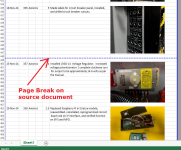
One feature worth highlighting: photo annotations. Instead of writing paragraphs trying to describe what you did, you can mark up photos directly. Label parts, point to specific areas, add notes right on the image. It makes logs far easier to read and is a much better way to pass on knowledge, especially during inspection or when helping another builder with the same kit. If you're not already using it, I'd encourage you to give it a try, it sounds like exactly what you're looking for. All exportable and printable (added a simple PDF export example, also you may check the web export https://log.traumvomfliegen.de/work log/linkes-hhenruder-skelett-weiter/).
Attachments
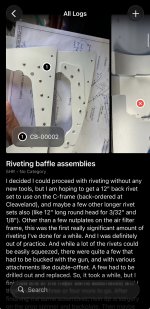
I have been using kitflight for my -15 build. It works but again, as a tech counselor, I would like to be able to point someone to my build log so they can follow along or look at specific sections. I understand your concerns about hosting on a products servers...but...looking at something like kit log pro, which has been around for a very long time, you find that the service STILL remains and there is zero ongoing cost.
I really have no interest in trying to figure out publishing on GitHub; I do not have enough time to do the things I want to do, much less anything else. I have also been continuously using my RV-10 kitlog to provide information to other -10 builders even though that log is more than a decade old and I am kind of missing that functionality.
Not sure, at this point, what I plan to do with the remainder of my -15 build log...know that I do like most of the features in kitflight.
I really have no interest in trying to figure out publishing on GitHub; I do not have enough time to do the things I want to do, much less anything else. I have also been continuously using my RV-10 kitlog to provide information to other -10 builders even though that log is more than a decade old and I am kind of missing that functionality.
Not sure, at this point, what I plan to do with the remainder of my -15 build log...know that I do like most of the features in kitflight.
