Van's Air Force

The definitive Van's Aircraft support community! Buying, building or flying an RV? Join our exclusive family of mentors and enthusiasts!

Plans / build manual display

TShort

Well Known Member
Friend
What are you all planning to use in the shop for reviewing / displaying the plans / build manual?

I'm pretty much 100% dependent on readers now, trying to decide what option is best. I have an old large ipad, thought I might use that and take an old appleTV and old TV set out there and airplay to the TV for a larger view over the build area.

I am used to the paper plans from the -8, this is going to be a lot different.

Anyone thought about this and have any good ideas?
 
What are you all planning to use in the shop for reviewing / displaying the plans / build manual?

I'm pretty much 100% dependent on readers now, trying to decide what option is best. I have an old large ipad, thought I might use that and take an old appleTV and old TV set out there and airplay to the TV for a larger view over the build area.

I am used to the paper plans from the -8, this is going to be a lot different.

Anyone thought about this and have any good ideas?
I think the airplay to a TV idea is a great one. If my walls weren't completely covered I'd be planning the same, and may have to move some things around in order to make it work. So far I have seen 1 photo from a builder where you could spot the manual sitting on the bench, it looked like it was 8 1/2 x 11, landscaped, in a binder. This seems a little easier to manage than the RV-12 manual that was 11x17, which is nice to look at but a little large on the bench when opened up. Having the smaller format to flip through or read at my desk, but a large screen to glance up at while working seems pretty good.

Imagine a time when those readers that you are wearing have an AR function that would also let you place virtual pages floating in space anywhere you wanted. Multiple pages opened, duplicated if that helps, placed where they are easy to look at and relevant to the parts and hardware that you have your hands on. For the most part the tech for this exists now and works well, it's just a little cumbersome.
 
One thing you loose with using a digital presentation is ability to make those invaluable little notes in the manual as you build.
It's a different workflow, but you can annotate digital documents just as well as you can with paper. Some people will be more comfortable or experienced with this than others. It's probably fair to say there's a 'half-step' or more work involved making a digital notation, but the return on that is something that (at least for some of us) is more legible, and can be indexed/searched, or even links out to other reference materials, voice memos, photos or videos.

Wow! Whatever happened to 24x36 full sheet plans? I love mine. I fabricated an easel that still holds the plans at the hangar.

Larger format is tough to argue against especially for more traditional blueprints. Have you taken a look at the RV-15 preview instructions yet? It's broken down into sub assemblies and individual steps such that there just isn't that much information on each page. At 24x36 you would have a lot of 'empty space' and a ton and a half of paper involved!
 
I think the airplay to a TV idea is a great one. If my walls weren't completely covered I'd be planning the same, and may have to move some things around in order to make it work. So far I have seen 1 photo from a builder where you could spot the manual sitting on the bench, it looked like it was 8 1/2 x 11, landscaped, in a binder. This seems a little easier to manage than the RV-12 manual that was 11x17, which is nice to look at but a little large on the bench when opened up. Having the smaller format to flip through or read at my desk, but a large screen to glance up at while working seems pretty good.

Imagine a time when those readers that you are wearing have an AR function that would also let you place virtual pages floating in space anywhere you wanted. Multiple pages opened, duplicated if that helps, placed where they are easy to look at and relevant to the parts and hardware that you have your hands on. For the most part the tech for this exists now and works well, it's just a little cumbersome.
Where have you seen builder photos?

I guess I didn't consider there'd be a book of paper plans / instructions. Since it seems to be somewhat of a live document, I thought it might be all digital. If paper is coming along with the kit I may keep it simple...
 
Having computer or TV screens in a dusty shop where cutting, grinding, of fibreglass and other etc going on seems like a tuff environment.
 
What are you all planning to use in the shop for reviewing / displaying the plans / build manual?

I'm pretty much 100% dependent on readers now, trying to decide what option is best. I have an old large ipad, thought I might use that and take an old appleTV and old TV set out there and airplay to the TV for a larger view over the build area.

I am used to the paper plans from the -8, this is going to be a lot different.

Anyone thought about this and have any good ideas?
I printed each of the PDF pages to a large size, greater than 50" on the width. I clipped them on the large cardboard as I built my -8. I could see all the fine prints and I could make all the comments and mark up the pages as I built my plane.
 
Print pages to 24x36", then attach to this dead simple job site board: It's just a face board screwed to two triangular side supports.

Cut list​

  • Face: 3/4" plywood, 26" × 38"
  • 2 side triangles: 3/4" plywood, right triangles (base 12", height 10")
    (This gives a nice reading angle; adjust as you like.)
  • Bottom page ledge: 36" × 1-1/2" (optional but recommended)

Build steps​

  1. Cut two identical triangles.
  2. Screw triangles to the back of the face near the left/right edges.
  3. Add bottom page ledge.
  4. Use binder clips/spring clamps at the top.
 
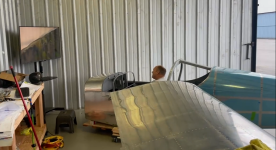
This goes on the list of things you need as a builder that's a game changer. Here is what we did:

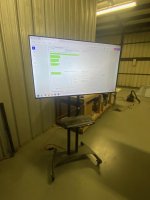
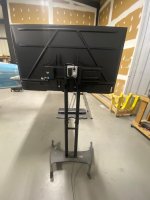
We keep the 11X17 Binder that comes with the kits as the official documentation and download all the plans to the micro computer. Once a step/page is completed it is documented in the official 11X17 binder. On the micro computer the PDF's allow you to highlight each step as it is completed an make digital notes. I will take some better pictures next time I'm at the hanger.

Parts List:
  • Mobile TV Stand with tray for Keyboard and mouse: LINK
  • 55+" TV: LINK
  • Powered by a micro computer mounted to the rear of the TV stand: LINK
  • Wireless Keyboard and Mouse: LINK
Warning, your build may be slowed down by FPV videos and your imagination.

1767456231722.png
 
Last edited:
Having computer or TV screens in a dusty shop where cutting, grinding, of fibreglass and other etc going on seems like a tuff environment.
Go to a second hand shop and get an old flat screen TV. Bigger the better. Old laptop. HDMI cable. Just need to be able to see the PDF pages. Or get a Chromecast to plug into the TV and display the PDF out from your ipad. Run a fireplace video when you don't need to see the plans. It will keep you zen. :)
 
Are the actual plans the same 97 page version that has been posted?
I may not understand the question, but I think the answer is no. There are several sections missing, and it's labeled/linked as a sample set.

I get the feeling they are still working on final edits, and we'll eventually see the real deal in the usual page in the Van's store.
 
I may not understand the question, but I think the answer is no. There are several sections missing, and it's labeled/linked as a sample set.

I get the feeling they are still working on final edits, and we'll eventually see the real deal in the usual page in the Van's store.
That is why I asked someone who has the kit in hand. While there may be more edits, I can’t believe they would let a kit leave without a full instruction set.
 
I bought the binder for my 9. It’s was extra cash but worth it. Yes, takes up a bit of space but thats fine. My emp came with full size prints. Cant remember if it was extra or not. I also had 24X36 prints done of the wing so i can go over construction of the wings too.where ever I am. Take plans with me. (Wings next shipment coming this spring) I dont have room for a TV in my garage. Too much other crap.
 
Imagine a time when those readers that you are wearing have an AR function that would also let you place virtual pages floating in space anywhere you wanted. Multiple pages opened, duplicated if that helps, placed where they are easy to look at and relevant to the parts and hardware that you have your hands on. For the most part the tech for this exists now and works well, it's just a little cumbersome.

Before I get into some seriously competitive VR mini golf this afternoon, I thought I would grab the Quest and do a quick demo of what I was describing here. This is just a minute of me opening up a couple different files and setting them in place. The hardware and software for this is still a little too clunky, but it seems like AR being practical for something like kit plans is not that far off.

 
That is why I asked someone who has the kit in hand. While there may be more edits, I can’t believe they would let a kit leave without a full instruction set.
The plans I received are pretty much the same as what is posted on the site.
I'm still unpacking, taking inventory and setting up shop. It's going to a couple weeks before I really need to work with the plans.

I think I'm kit #4 out of the factory. I'm fully expecting to not have all the parts and information while I'm working on it. I'm Ok with it as long as they answer the phone when I get stuck.

I've only unpacked 1/2 the crate so far. I can see why they had to slow down on the packing and shipping. There's a lot of pieces to keep track of....
 
The plans I received are pretty much the same as what is posted on the site.
I'm still unpacking, taking inventory and setting up shop. It's going to a couple weeks before I really need to work with the plans.

I think I'm kit #4 out of the factory. I'm fully expecting to not have all the parts and information while I'm working on it. I'm Ok with it as long as they answer the phone when I get stuck.

I've only unpacked 1/2 the crate so far. I can see why they had to slow down on the packing and shipping. There's a lot of pieces to keep track of....
Was your kit complete or were there some back orders?
 
Vans gave me a list of about a dozen back ordered part numbers…but we don’t know what they are yet! Still driving home.
 
I asked about how many will call pickups will happen in the first few weeks, I believe five kits were picked up by day’s end on the 31st, mine yesterday, and a few (3 or 4?) are scheduled for next week. I am grateful that they seem to be prioritizing will calls since we had a non refundable deposit on the trailer, dog care arranged, and we were on the road by the time the “stand down” was announced.
 
There's a few backordered parts. I haven't had a project that didn't have parts on backorder before....
Yep, no worries, just curious. They said mine will have 3 or 4 known back orders. Not likely that I will get far enough to need them before they arrive based on the current timeline.
 
New guy here..first on many dumb questions I am sure :-)

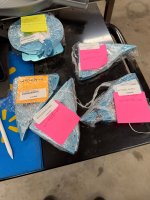
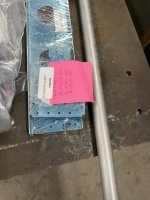
I have kit #45 picked up on the 31st and I am trying to figure out a bunch of post it notes on part packs that say “Shortages” and a list of part numbers and sometime a sub kit number

The parts in the packages don’t always match the parts on the post it, and sometime the parts listed on the overall parts list for the subkit don’t match the parts on the post it either

Are the “shortages” stuff that is missing from the kit or the specified sub kit, or are these packs of parts meant to make up for shortages in other subkits?

Is this SOP for these kits in general?
 

Attachments

  • IMG_1940.jpeg
    IMG_1940.jpeg
    2.1 MB · Views: 41
  • IMG_1942.jpeg
    IMG_1942.jpeg
    1.2 MB · Views: 41
I believe the parts on the post-it are backordered.

Did you get an inventory list in an envelope in the big crate? There are 2 columns for each line item. The 1st column is what the parts guy put in the crate. The backordered parts should be marked BO.
You need to verify that you got all of the parts on the list. It will take a couple days to go through it all. It's probably a good idea to separate the left wing parts from the right wing parts and make sure you have the right quantity for each side.
 
With paper plans, tabloid or smaller, it's worth ditching the binder and having them spiral-wire-bound. That way you can have them open or folded over as you please.

The RV-15 sample plans that I glanced at are readable in 8.5 x 11, but I'd bet that later on some of the pages will be too busy for that.

Dave
 
One thing you loose with using a digital presentation is ability to make those invaluable little notes in the manual as you build.
Open in pdf. Many/most apps allow markups. Make notes all day long… notes that won’t fade over time.
 
For me a quick note on plan or manual page in pen/pencil is intuitive. My old squash can handle this simple method.

Besides maybe not on paper plans, but restorers sometimes find builder notes inside structures build even 100 years ago.
 
I may not understand the question, but I think the answer is no. There are several sections missing, and it's labeled/linked as a sample set.

I get the feeling they are still working on final edits, and we'll eventually see the real deal in the usual page in the Van's store.
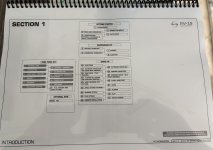
The first page of what is now available on my login store is the full index. What is currently available is only about half of the sections listed in the index. There appears to be 38 sections in total with 11 of them dedicated to slow build wing tanks.
 
<snip> "...I have kit #45 picked up on the 31st and I am trying to figure out a bunch of post it notes on part packs that say “Shortages” and a list of part numbers and sometime a sub kit number..."
Derek: You may want to check w/ Van's on how long you have to report missing items.
I believe it's only 30 days.
 
Derek: You may want to check w/ Van's on how long you have to report missing items.
I believe it's only 30 days.
I sent them my inventory results yesterday. Once I finally figured out the process, the “shortage” sticky notes for the most part were already listed on the inventory list as back ordered, with one or two minor exceptions.

I do have a couple of no-kidding missing items, most of them in one subkit (push rods / bell cranks) that I only got one of, when I think they should have thrown in two.

Overall I have enough to keep me busy for quite a while, and Vans informed everybody about the major back ordered parts before the kits got picked up, so they were not a surprise.

I am grateful for having been able to grab one of the early kits, I am sure Vans will get the process spooled up as fast as they can. Seeing the fabrication level and quality of many of these parts, that in the old days would have come as a flat sheet of aluminum and a blurry drawing, I am happy.
 
Still love the large format printed copy paper plans. (old pre-computer graphic arts man)

Printed paper holds more memories, pencil and pen notes, highlighters in various colors, spilled coffee from the mornings, spilled beer from the late evenings; oh, and the blood, lots of blood. (Not much sweat in Montana )

I utilize PDF for traveling the airlines, a.k.a.”Tube of Shame” to slowly review and annotate gotcha’s, look ahead and general dreaming.

-cappy
 
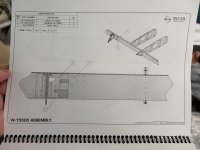
For the old guys like me who like the paper plans I just printed the 15 plans out on 8.5"X11" black and white. The plans don't have much clutter on them so 8.5X11 seems to be big enough. The font is reasonably large. Also the black and white is not an issue as the plans are only 2 color and there is enough contrast between the two black & white items to see clearly. I'm happy with this approach. I will have access to computer if needed that I can blow images.


IMG_4404.jpegIMG_4406.jpeg
 
For the old guys like me who like the paper plans I just printed the 15 plans out on 8.5"X11" black and white. The plans don't have much clutter on them so 8.5X11 seems to be big enough. The font is reasonably large. Also the black and white is not an issue as the plans are only 2 color and there is enough contrast between the two black & white items to see clearly. I'm happy with this approach. I will have access to computer if needed that I can blow images.


View attachment 106781View attachment 106782
Based on my week of experience, I'm totally with Glenn. B&W on 8.5x11printed on both sides has worked great so far (and my eyes are 73+ years old). Paul tells me that using 11"x17" is an engineering thing but those are the same people who insist on using "English" units instead of metric, so go figure. :unsure:
 
Last edited:
Based on my week of experience, I'm totally with Glenn. B&W on 8.5x11printed on both sides has worked great so far (and my eyes are 73+ years old). Paul tells me that using 11"x17" is an engineering thing but those are the same people who insist on using "English" units instead of metric, so go figure. :unsure:

Louise or anyone else who is into the 15 wing build have you found any glaring errors in the plans that you haven't mentioned yet? I am wanting to print them but wondering how many revisions there may be.
 
As I built my Cubcrafters EX-3, I went through this same debate with myself. In spite of my preference for printed plans, it became a problem to keep up with the updates and revisions. By the end of the two year build time, I had abandoned the paper plans, and referred only to the online, updated version, even though I had to download from Dropbox every time. I just couldn't trust the older versions.

So, I plan to come up with a nice display I can hang from above the workbench, update frequently, and keep my notes in a separate build log.
 
This goes on the list of things you need as a builder that's a game changer. Here is what we did:

We keep the 11X17 Binder that comes with the kits as the official documentation and download all the plans to the micro computer. Once a step/page is completed it is documented in the official 11X17 binder. On the micro computer the PDF's allow you to highlight each step as it is completed an make digital notes. I will take some better pictures next time I'm at the hanger.

Parts List:
  • Mobile TV Stand with tray for Keyboard and mouse: LINK
  • 55+" TV: LINK
  • Powered by a micro computer mounted to the rear of the TV stand: LINK
  • Wireless Keyboard and Mouse: LINK
Warning, your build may be slowed down by FPV videos and your imagination.

View attachment 106308
This photo looks like my (rough) suggestion for a Garmin simulator mode for practice. G has command of a full panel, even the servos. All needed is the screen scene, google earth? Only thing missing is the external motion of the red bird. Maybe link the visual to x-Plane.
 
Louise or anyone else who is into the 15 wing build have you found any glaring errors in the plans that you haven't mentioned yet? I am wanting to print them but wondering how many revisions there may be.
There have been several "mistakes" along the way but all easy to figure out. I am sending all catches to the Vans folks and hope they quickly correct them . As a current "leader of the pack" beta builder, I am only printing out the Sections I expect to use in the next day or two. That's another reason to keep it simple and just print on 8.5" x 11" on my home printer. Most the time I have mentioned the issues that have arisen in the My Project thread, under the pertinent section.
 
There have been several "mistakes" along the way but all easy to figure out. I am sending all catches to the Vans folks and hope they quickly correct them . As a current "leader of the pack" beta builder, I am only printing out the Sections I expect to use in the next day or two. That's another reason to keep it simple and just print on 8.5" x 11" on my home printer. Most the time I have mentioned the issues that have arisen in the My Project thread, under the pertinent section.
As a first time builder, I greatly appreciate you and others being the "pathfinders" for this airplane.
 
There have been several "mistakes" along the way but all easy to figure out. I am sending all catches to the Vans folks and hope they quickly correct them . As a current "leader of the pack" beta builder, I am only printing out the Sections I expect to use in the next day or two. That's another reason to keep it simple and just print on 8.5" x 11" on my home printer. Most the time I have mentioned the issues that have arisen in the My Project thread, under the pertinent section.
I think I’m going to print a review and notes edition as I already see a few areas where I know in the heat of a building frenzy I could easily see something sideways and box myself in to stupid.
 
Here are the updated pictures of the display. I forgot I added a 2 gang box to the back so I could plug in an extension cord and easily move around the hanger
 

Attachments

  • Display Front.jpg
    Display Front.jpg
    72.3 KB · Views: 35
  • Display Rear.jpg
    Display Rear.jpg
    69.8 KB · Views: 31
Back
Top