PilotjohnS
Well Known Member
Starlink review was by Walter White from New Mexico


Starlink review was by Walter White from New Mexico

That's another consideration as well. If it's generating a WiFi hotspot, it's probably intending that to work over a range sufficient to cover an area a lot larger than the cockpit of an RV, and not with a focused beam.The only limit in consumer facing Starlink materials that i could find was an 11" limit between radiator and body, but that's actually for the wifi signal, not the uplink.

Well, actually, there have been... This is older information, but the lesson is still true today; what you're seeing may be older than you think, and using Wx radar to try to dodge trouble can be a bad idea.

Nexrad Weather Radar Linked to Small Plane Crash Deaths
Federal transportation experts are warning that a weather radar system used in many small planes may have caused the deaths of at least two pilots whowww.aboutlawsuits.com

Even with noahhl's better analysis, I have to admit that I'm reluctant to put either the satellite RF or wifi RF that close to my head in the RV-7 cockpit. It's not necessarily rational, it just is.Of course I say that typing on my laptop with my cell phone sitting next to me on the table. Both are >12" away from my body, so who knows.


Same here. I'm axiously awaitingMusk's cell phone (satellite-based) service for all the same reasons.I have a mini on the roam plan, it's great, we use it at the airport and plan to throw it in the back of the plane for trips, but no plans to try to use it in flight. It's going to let me/us take longer trips from work into more remote areas and fly-ins and still be able to have an effective internet connection for work. It's frankly just what we've been waiting for.

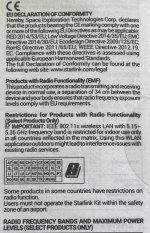
Looks like 13.4 inches is needed.How much power does this thing transmit with? Is it safe that close to your head?

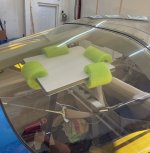
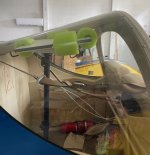
I remember him in that video mentioning that he does not run it while he is in the plane due to concerns with being directly under/near it during operation as a potential health concern. He basically said he powers it on after landing to get service while in a remote location. I’m not educated enough on the topic to give an opinion on whether it being in your immediate vicinity while operating is harmful to your health, but I’m sure someone here may have some input.I thought the mini was designed to stop working when it detects motion to keep users from using it mobile. Trent Palmer installed Starlink in his Kitfox with the antenna mounted in the skylight.
Part of the snip you nicely attached states "Users must not operate the Starlink Kit within the safety zone of an airport."Looks like 13.4 inches is needed.
My educated guess is that the perceived issue is with 2.4 GHz/5 GHz wifi signal interference with GPS, TCAS, ATC radar, ADS-B, and most importantly, aircraft radar altimeters that operate around those frequencies. For example, existing radar altimeters have such poor RF filtering that they're vulnerable to RF interference several hundred megahertz away from their operating frequencies; that's the reason for all those 5G RADALT NOTAMs you see in your preflight briefings.In any event, can anyone indicate what the actual specific issue is/might be for such a "must not operate" statement?
OK now we are finally talking about something in my wheel house.RF safety is not my specialty and authoritative safe distance numbers should come from SpaceX. But as an engineering exercise I did some resarch and ran some numbers.
SpaceX says in their FCC filing that the effective transmit power (transmitter power plus antenna gain) at 14 GHz is 33.2 dBW, or around 2 kilowatts, at when the beam is pointing directly away from the antenna face. It’s a little less when the beam is pointing off-broadside.
In the absence of any distance numbers from SpaceX, plugging the above numbers into an RF exposure calculator says that the minimum safe distance in the beam is around 5 to 11 feet assuming an always-on transmit duty cycle. Because this is a phased array antenna there’s likely to be a lot less RF outside of the transmit beam but to know exactly how much, you’d need information that SpaceX didn’t provide.
Perhaps a Mini owner on this thread can look in the user manual and see if it lists anything about RF safety.
HTH
Dave
Do you want to quantify this assessment based on the published numbers? Starlink does have radiation warnings on their larger more powerful antennas, though not on the smaller consumer oriented terminals.OK now we are finally talking about something in my wheel house.
Given the small size of the antenna, there will probably be considerable side lobes. This means that there will be considerable radiaition directed to your head. I would put a small metal shield between the antenna and your head. (Tin foil hat, seriously)
It one gets head aches, or prone to cancer or starts seeing red areas of the skin on the back of thier neck, then this is too much exposure. Unfortunately, the worst problem will be cancer from the exposure, and this is not detectable until its too late. I would heed the Starlink warning and put it in a wing tip. Gosh, cant believe there are people putting this in the baggage compartment.


Nope, that was Lightsquared, now known as Ligado. The concern was that because their signals were adjacent to GPS operating frequencies, they might bleed over and cause all sorts of problems with navigation systems.There was an issues a few years back about a huge low level orbit satellite constellation that was opposed by the FAA due to the closeness in frequency to some major aviation used frequencies and therefore could potentially cause interference. If I remember right the FCC approved the frequency allocation anyway over the FAA’s objection. Was that Starlink?
Just makes me wonder about potential issues with all my other RF I use in the cockpit.
This was actually worst than you describe. There claim was that all old GPS receivers, were defective in that they would respond ( get interference) from their “legal” new system; therefore all old gps receivers would need to be replaced at owners expense.Nope, that was Lightsquared, now known as Ligado. The concern was that because their signals were adjacent to GPS operating frequencies, they might bleed over and cause all sorts of problems with navigation systems.
HTH
ds
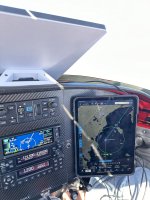

You call that situation a CON while others might put it in the PRO column of the Starlink features section.I already can't get my wife off of FB long enough to have a normal conversation with her at home, now you want to take that away from me in the airplane too


I was reading all these giddy replies and said, "No, really not sure I need this." But then, a couple of days ago, when I read about this T-Mobile deal, I did get a little giddy in anticipation.Just FYI it appears T-Mobile cell phone users will have access to the Star Link sats by year end. For the last few months all sats have the hardware to do this.

If you don't have ~3.5 amps to spare this or various other home brews would work well. Uses on average 40 watts.How are you all planning on powering this thing? I saw one poster get it to work with plane power but I’m taxing my 40A alternator as it is with my panel etc. power banks?

 outerspacesupply.com

It does look like the data speeds on direct-to-cell will be significantly lower. Not sure how that would affect some of our possible use cases, but worth noting,I was reading all these giddy replies and said, "No, really not sure I need this." But then, a couple of days ago, when I read about this T-Mobile deal, I did get a little giddy in anticipation.

People on this forum have tested it in flight. Do you think they changed something?I'm seeing reports on another forum that Starlink bans use above 100mph, and the terms of service ban Aviation use unless it's on a plan a with a device that they've designated for aviation use.
The StarLink mini plan is different, and specifically allows use up to 250mph.I'm seeing reports on another forum that Starlink bans use above 100mph, and the terms of service ban Aviation use unless it's on a plan an with a device that they've designated for aviation use.
Yep...this just happened in the last few days...they have a 100 MPH limit on it nowI'm seeing reports on another forum that Starlink bans use above 100mph, and the terms of service ban Aviation use unless it's on a plan an with a device that they've designated for aviation use.


If true it will be sent back. They have a 30 day return policy.I'm seeing reports on another forum that Starlink bans use above 100mph, and the terms of service ban Aviation use unless it's on a plan an with a device that they've designated for aviation use.
Sometime between Thursday and today they imposed a speed limit -- flew ~3 hours with it on Thursday and worked great, today it says I'm moving to fast (at ~125 knots groundspeed at that point) and shuts off after five minutes.People on this forum have tested it in flight. Do you think they changed something?


Most people have understood that the account terms for the mini roam plan clearly excludes aviation use, and that if it worked they were essentially getting away with something. It looks like that didn't last long.If true it will be sent back. They have a 30 day return policy.
The terms explicitly prohibit ALL kits from aviation use, yet they now have aviation availability on Mobile Regional and Mobile Priority, and only recently advertised the Roam 50GB plan as non-aviation, so the terms do not fall in line with what they're currently selling. The speed limit of the plan is explicit. The 250 mph limit was intentional and the change to 100 mph likewise. Starlink moved the goal post...I'm guessing they get a bunch of returns and cancelations until they sort out the aviation use market. It seems they made the same moves with the nautical market.Most people have understood that the account terms for the mini roam plan clearly excludes aviation use, and that if it worked they were essentially getting away with something. It looks like that didn't last long.
The terms of service provided with the mini did prohibit in-motion usage (3.3) but then the next paragraph (3.4) stated install requirements and install warnings for "Moving Vehicles". MOST of us felt mini was going to be different and not lock out movement capability like previous Starlink antennas. Seems the marketing department has decided if you can afford a plane or boat you can afford to pay 3+ times more, safety be dammed. (Similar to Sirius for aviation products) What's next for Starlink block any movement over 10 mph?Most people have understood that the account terms for the mini roam plan clearly excludes aviation use, and that if it worked they were essentially getting away with something. It looks like that didn't last long.
The terms of service provided with the mini did prohibit in-motion usage (3.3) but then the next paragraph (3.4) stated install requirements and install warnings for "Moving Vehicles". MOST of us felt mini was going to be different and not lock out movement capability like previous Starlink antennas. Seems the marketing department has decided if you can afford a plane or boat you can afford to pay 3+ times more, safety be dammed. (Similar to Sirius for aviation products) What's next for Starlink block any movement over 10 mph?
The terms explicitly prohibit ALL kits from aviation use, yet they now have aviation availability on Mobile Regional and Mobile Priority, and only recently advertised the Roam 50GB plan as non-aviation, so the terms do not fall in line with what they're currently selling. The speed limit of the plan is explicit. The 250 mph limit was intentional and the change to 100 mph likewise. Starlink moved the goal post...I'm guessing they get a bunch of returns and cancelations until they sort out the aviation use market. It seems they made the same moves with the nautical market.

TOS were clear in excluding aviation unless authorized. I'm not disputing the recent changes, just stating that aviation was an exemption on the mini roam plans. They made changes to authorize aviation on more expensive plans.. The aviation plans are too expensive for my needs, but I'll probably keep the unit because it works well at my hangars and I like to work there.
I'm not talking about in motion...specially aviation was an exception and it was published if anyone was interested enough to actually look. Social media blew up over the last few weeks with aviation uses and Starlink made their move to 100mph to restrict unauthorized aviation use, which was always a risk. Nobody but pilots will care about the change from 250 to 100.
I don't disagree that this will lead to returns. People expected to get away with something forever just because they were getting away with it at the time.
Section 3.3 of the TOS, this is not new language.
IN-MOTION USE PROHIBITED FOR UNDESIGNATED KITS, COUNTRIES AND USES. YOU ARE PROHIBITED FROM INSTALLING OR USING A KIT ON A MOVING VEHICLE OR VESSEL UNLESS STARLINK HAS DESIGNATED YOUR SPECIFIC KIT MODEL AND/OR MOUNT FOR IN-MOTION USE AND HAS OBTAINED ALL REQUIRED IN-MOTION APPROVALS IN THE COUNTRY OF USE. NOTWITHSTANDING THE FOREGOING, USE OR INSTALLATION OF A KIT ON AN AIRCRAFT OF ANY KIND IS PROHIBITED IN ALL CASES. SERVICES IN-MOTION ON AN AIRCRAFT, VEHICLE OR VESSEL (e.g., CARS, VANS, RVs, BOATS) VIA AN UNAUTHORIZED KIT OR COUNTRY IS PROHIBITED, WILL VOID THE LIMITED WARRANTY OF YOUR KIT, AND MAY BE GROUNDS FOR TERMINATION OF YOUR AGREEMENT WITH STARLINK PER SECTION 6.6 OF THESE TERMS. Visit https://www.starlink.com/specifications for a description of the Starlink Kit models designated for in-motion use.
)
I'm shocked!I don't care what they do, or what they charge. My beef is the fact they moved the goal posts.

TOS 3.3, is what I was talking about when they explicitly prohibit ALL kits from being used in aviation use or installation...
This emphasized statement means every single kit is prohibited from use in aircraft, even if the kit designated for said use (notwithstanding the foregoing). I believe this statement is to solely to limit liability in the event the kit is not properly installed...it was never intend to prohibit use in aviation, obviously, since they have explicit plans and speed limits for aviation use. The plan comparison table was only recently changed to include Roam 50GB prohibition, and Mobile Regional and Priority inclusion.
They move the goalposts...they said as much, out load, by explicitly changing the limit from 250 mph to 100 mph.
I don't care what they do, or what they charge. My beef is the fact they moved the goal posts. I have a couple more weeks to decide to keep a very expensive device. If I decide to keep it, and pay for aviation use, will they move the goal post again and I have a $600 paper weight? That's why I'm calling BS! (bait and switch
I think mine is going back too...I would do Mobile Priority, which still has the 250 mph limit, but there is nothing explicit that allows aviation use and the TOS prohibits it. I'm guessing they will move that goalpost soon also. It would be nice to know what you're buying.They also just bumped unlimited $165. I think mine is going back too.
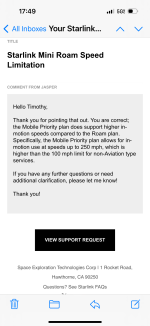

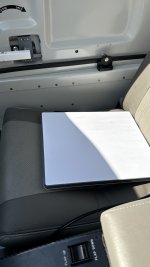
As long as the terms of service restrict aviation (They specifically call out greater than 100 mph up to 250 mph for non-aviation usage is ok), we will always have at risk discontinuation of service (and a $600 paperweight) and if it does continue to work 3 times + the previous cost. Mine is going back. Did work well before they capped the speed at 100 mph.I can now confirm that they are advertising Mobile Priority to work up to 250…
View attachment 70393