Van's Air Force
You are using an out of date browser. It may not display this or other websites correctly.
You should upgrade or use an alternative browser.
You should upgrade or use an alternative browser.
RV-8 Rear seat display
- Thread starter Pixair
- Start date


rondawes
Well Known Member
Cheaper option might be a 7” IPad bluetoothed from the front. Data is only GPS but fine for general use and the can split it with the ForeFlight map.
Yep, FF has a specific app for passengers.
https://foreflight.com/products/passenger/

Maybe G3Xpert can weigh in but...
I don't see why the G3X doesn't have the ability to Bluetooth it's data to an iPad as a repeater display for the backseat. The information is readily available, just send the data to the iPad.
I don't want my back seater to have to rely on GPS data when Air Data should be so easily available.
Currently the only option for a true aft cockpit display is to wire up a G3X to the aft setback. Danny King did that in his -8, and has a thread on here documenting it from a while back.
I don't see why the G3X doesn't have the ability to Bluetooth it's data to an iPad as a repeater display for the backseat. The information is readily available, just send the data to the iPad.
I don't want my back seater to have to rely on GPS data when Air Data should be so easily available.
Currently the only option for a true aft cockpit display is to wire up a G3X to the aft setback. Danny King did that in his -8, and has a thread on here documenting it from a while back.
bspellerin
Member
I have a Garmin 760 in the back for my passenger, bluetoothed to a GDL50.
It can be done
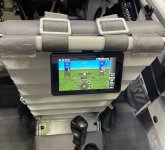
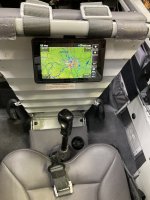
With very little effort and is pretty straight forward. Here are shots of mine (flying now). I did install an independent shutoff switch so it could be disabled if not used or abused.
First shot is the mock up and second is live. I did do some minor adjustments later, but it works well. Very convenient to have the GIB handle the radios, watch for traffic, change squawk....or just fly the plane without having to look over the shoulder.
With very little effort and is pretty straight forward. Here are shots of mine (flying now). I did install an independent shutoff switch so it could be disabled if not used or abused.
First shot is the mock up and second is live. I did do some minor adjustments later, but it works well. Very convenient to have the GIB handle the radios, watch for traffic, change squawk....or just fly the plane without having to look over the shoulder.
Attachments

RV8 BackSeat Display
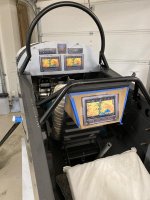
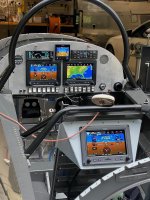
I have a 7" display in my RV8 BackSeat as shown Below, it is fully connected via CANBUS to my front display so can navigate, access attitude and engine data, display Aircraft cameras, has full moving map, etc. Unit only needs Power and CANBUS connection, so wiring is simple. What is of note is the way I installed it (Leg Cut Outs) so climbing in/out of the RV8 Back Seat is still humanely possible for adults.
Also shown below is Vern Littles displays that can process several EFIS data out formats, based on an Arduino CPU), of note here is that these displays can can cycle through multiple data display options as shown (not single purpose) just using the G3x data.
>> http://www.huvver.tech/arduino-libraries/
M5 Stack Displays as shown can be found at
>>https://www.amazon.com/M5Stack-ESP3...onics&sprefix=m5+stick,electronics,127&sr=1-5
Larger displays using same Software and other products can be found at https://store.makerplane.org/
We also have a HUD project that can be used to display G3x data (& other EFIS Formats as well) on a small computer display (including touch screen) based on a Raspberry Pi CPU. Using this display option allows you to design your own display format.
I have a 7" display in my RV8 BackSeat as shown Below, it is fully connected via CANBUS to my front display so can navigate, access attitude and engine data, display Aircraft cameras, has full moving map, etc. Unit only needs Power and CANBUS connection, so wiring is simple. What is of note is the way I installed it (Leg Cut Outs) so climbing in/out of the RV8 Back Seat is still humanely possible for adults.
Also shown below is Vern Littles displays that can process several EFIS data out formats, based on an Arduino CPU), of note here is that these displays can can cycle through multiple data display options as shown (not single purpose) just using the G3x data.
>> http://www.huvver.tech/arduino-libraries/
M5 Stack Displays as shown can be found at
>>https://www.amazon.com/M5Stack-ESP3...onics&sprefix=m5+stick,electronics,127&sr=1-5
Larger displays using same Software and other products can be found at https://store.makerplane.org/
We also have a HUD project that can be used to display G3x data (& other EFIS Formats as well) on a small computer display (including touch screen) based on a Raspberry Pi CPU. Using this display option allows you to design your own display format.
Attachments
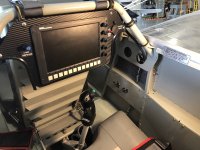
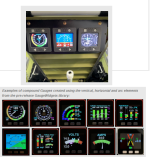
I also have a G3X Display in the back. Also a Flap Switch is mounted there so a Passenger / Copilot can fly from the rear. In case I fly with a child I have a switch in the front to disable all the stick and flap switch functions.
I used some 4130 flat material and welded it to the rollbar. Then I made a panel which screws into the flat material which also acts a a spacer for the seatbelts of the Pilot. Works quite well and if I fly with a pilots frined he can adapt the flightplan, switch frequencies and use the autopilot. I would do it again.
Pictures can be seen here:
https://vansairforce.net/community/showpost.php?p=1461235&postcount=835
Cheers Yves
I used some 4130 flat material and welded it to the rollbar. Then I made a panel which screws into the flat material which also acts a a spacer for the seatbelts of the Pilot. Works quite well and if I fly with a pilots frined he can adapt the flightplan, switch frequencies and use the autopilot. I would do it again.
Pictures can be seen here:
https://vansairforce.net/community/showpost.php?p=1461235&postcount=835
Cheers Yves
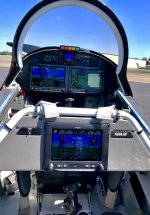

Yet Another Approach
???? Can anyone tell me why the photos are not showing here? I went back and I THINK, followed instructions to the letter. Assistance in finding the error of my ways is much appreciated. ???
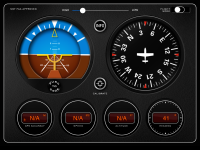
Not Dynon nor Garmin, but here is something I got working last night for almost "no cost" ...
...
[I already had bought the iLevil as my ADSB receiver to provide weather and traffic to my GRT HXr and had the iPad for multiple uses.]
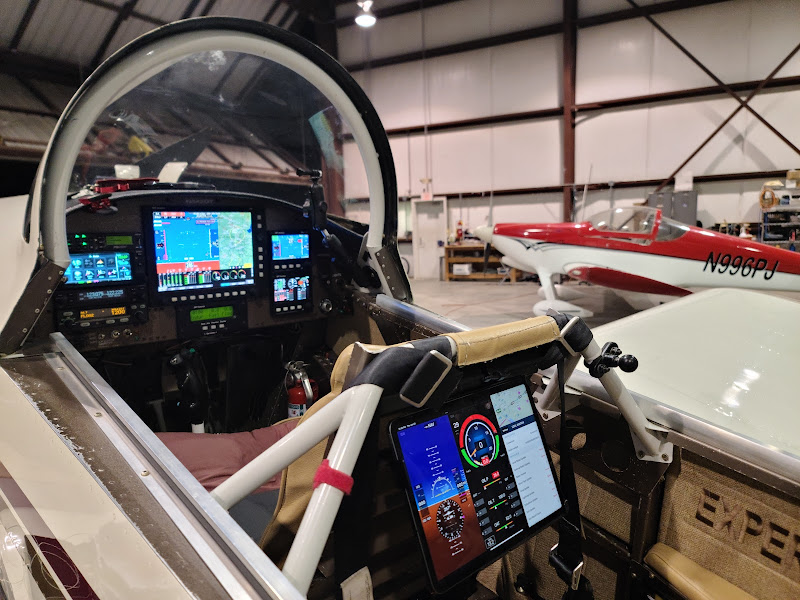
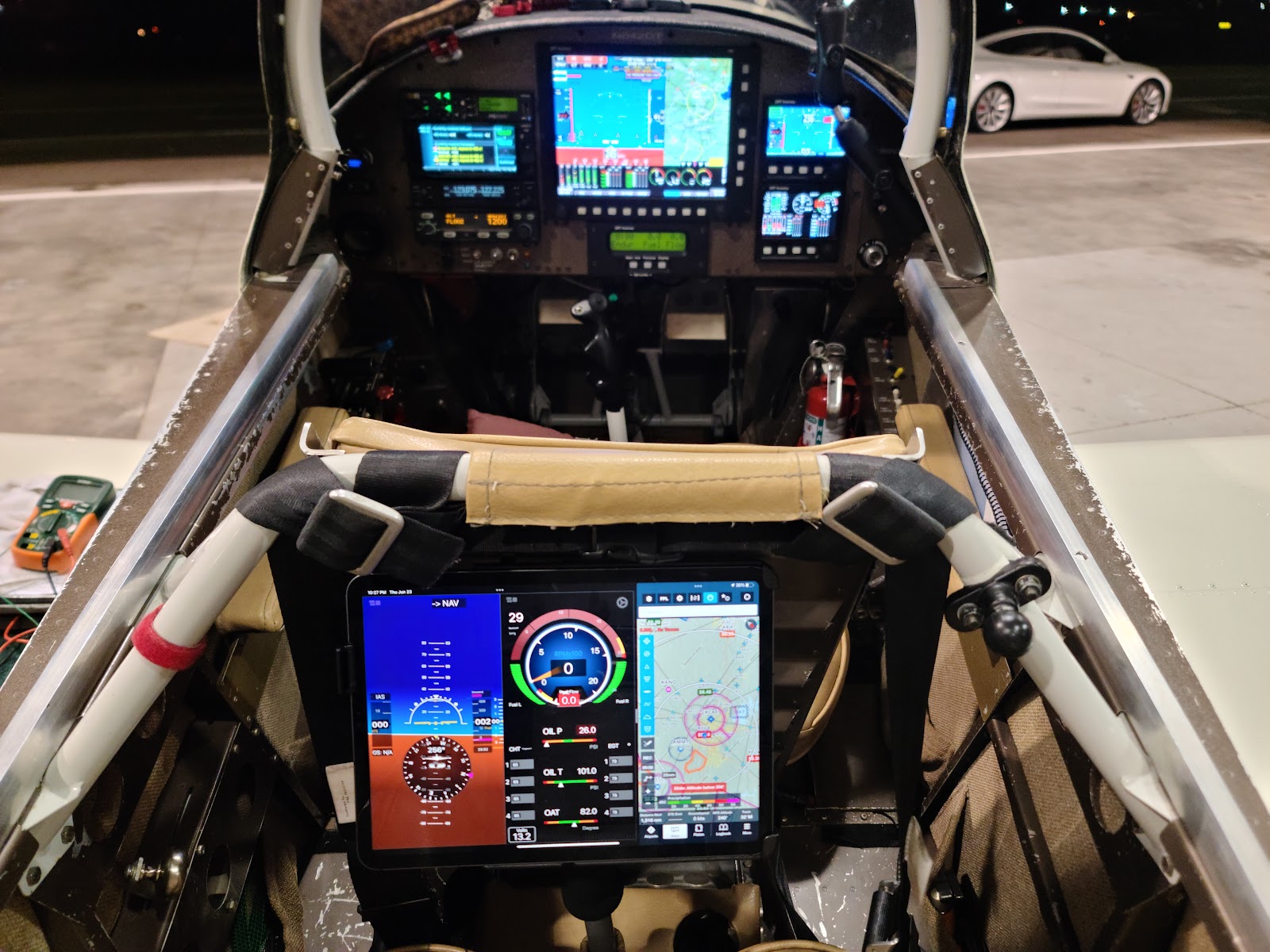
PFD provided by iLevil App on iPad with WiFi data from ILevil 3AW using built in AHRS, Pitot and Static ports
ENG provided by iLevil App on iPad with WiFi data from iLevil 3AW using engine data from GRT Engine monitor via serial port to ILevil 3AW
MAP provided by Foreflight on iPad
TRAFFIC and WEATHER ADSB data provided to Foreflight via WiFi from the iLevil 3AW.
The mounting (RAM Mount) is not perfectly aligned yet but will get corrected.
There are NO WIRES to the back seat (unless you choose to connect a charging cable to the charging port on the right side).
Yes, there is adequate stick clearance and no interference with passenger in back seat.
https://photos.app.goo.gl/NH65f8Y3kugmvTtdA
Just wondering out loud.
Has anybody mounted a Dynon or Garmin style flat panel display behind the pilot seat, so the back seater has instruments, in a RV-8/8A?
Looks like a Skyview HDX might fit there with out much issue, mounted to the seat back cross bar.
???? Can anyone tell me why the photos are not showing here? I went back and I THINK, followed instructions to the letter. Assistance in finding the error of my ways is much appreciated. ???
Not Dynon nor Garmin, but here is something I got working last night for almost "no cost"
...[I already had bought the iLevil as my ADSB receiver to provide weather and traffic to my GRT HXr and had the iPad for multiple uses.]
PFD provided by iLevil App on iPad with WiFi data from ILevil 3AW using built in AHRS, Pitot and Static ports
ENG provided by iLevil App on iPad with WiFi data from iLevil 3AW using engine data from GRT Engine monitor via serial port to ILevil 3AW
MAP provided by Foreflight on iPad
TRAFFIC and WEATHER ADSB data provided to Foreflight via WiFi from the iLevil 3AW.
The mounting (RAM Mount) is not perfectly aligned yet but will get corrected.
There are NO WIRES to the back seat (unless you choose to connect a charging cable to the charging port on the right side).
Yes, there is adequate stick clearance and no interference with passenger in back seat.
https://photos.app.goo.gl/NH65f8Y3kugmvTtdA
Last edited:
My images did not appear. What did I do wrong?
I know that at the end was just a link but I came back later and did "Insert Image" using link for each image.
I must have missed the class and not done my homework on getting pictures to work.
THANKS to anyone who can inform me or fix for me.
I know that at the end was just a link but I came back later and did "Insert Image" using link for each image.
I must have missed the class and not done my homework on getting pictures to work.
THANKS to anyone who can inform me or fix for me.
downundarv8builder
Member
Here is a picture of a Garmin G5 that I installed for the back seat occupant on my RV8 with a fastback conversion. It's in the very initial stages of the fitout in the photo and I subsequently trimmed away the .063 aluminium so that there's no loss of view. It's secured with double sided tape and cable ties to preserve the integrity of the roll bar. I measured very carefully and it doesn't impinge on the front seat at all and the knobs miss the gas struts on the canopy. I went for the G5 because I thought that a bigger display set lower might not work so well. But seeing some of the other good looking setups on the thread, I might have been mistaken and that might have been a better way to go. The disadvantage is that as backup instrument it needs it's own pitot and static connections but it does work well and talks to the G3X up the front without issue. I had hoped that I could configure it to repeat the airspeed and altitude from the front but that's not the way it worked.
Attachments
???? Can anyone tell me why the photos are not showing here? I went back and I THINK, followed instructions to the letter. Assistance in finding the error of my ways is much appreciated. ???
Not Dynon nor Garmin, but here is something I got working last night for almost "no cost"
[I already had bought the iLevil as my ADSB receiver to provide weather and traffic to my GRT HXr and had the iPad for multiple uses.]
PFD provided by iLevil App on iPad with WiFi data from ILevil 3AW using built in AHRS, Pitot and Static ports
ENG provided by iLevil App on iPad with WiFi data from iLevil 3AW using engine data from GRT Engine monitor via serial port to ILevil 3AW
MAP provided by Foreflight on iPad
TRAFFIC and WEATHER ADSB data provided to Foreflight via WiFi from the iLevil 3AW.
The mounting (RAM Mount) is not perfectly aligned yet but will get corrected.
There are NO WIRES to the back seat (unless you choose to connect a charging cable to the charging port on the right side).
Yes, there is adequate stick clearance and no interference with passenger in back seat.
https://photos.app.goo.gl/NH65f8Y3kugmvTtdA
See call for help above regarding getting (Google) photos to show up.
Thanks.
I deleted "-no?authuser=0" at the end of each pics address to get the them to show in the post.
I also rescaled the second pic to "w800-h600" from "w1600-h1200", which is too large IMO.
You can always see what someone has done in their post by using the "Quote" button to examine their post (but then backing out and not actually posting anything while in the "Quote" mode if you don't care to).
Hope that helps.
AHA!!!!
I had rescaled one of the photos and forgot to do the other.
But I totally missed the deletion instruction.
Again, thanks! I will now try a few more pics.
Gerry_Robertson
I'm New Here
Hi Hwood,It can be done
With very little effort and is pretty straight forward. Here are shots of mine (flying now). I did install an independent shutoff switch so it could be disabled if not used or abused.
First shot is the mock up and second is live. I did do some minor adjustments later, but it works well. Very convenient to have the GIB handle the radios, watch for traffic, change squawk....or just fly the plane without having to look over the shoulder.
Just found this thread which is where I am now, installing a GDU470 in the rear for the reasons that you list.
Re power switch:
I take it that when the rear G3X screen is powered down the system is quite happy and no untoward errors are raised or remain persistent?
I was thinking that if the system complained that GDU470 was offline there would be a message in the Crew Alerting System. Since I plan to install a Master Warning and Master Caution lamps I'd not want one of these to be on permanently just because the back seat was empty and/or the GDU470 turned off.
Just wondering if there would be any practical issues with this as I too thought that a power switch for the rear screen would be a good idea for when the back seat was empty. I'd planned to put the switch on the rear panel itself but never thought about possibility of screen functions/radio/transponder etc being abused by say grandchildren!
Gerry
Attachments

I did it with old AFS Screen

I wouldn’t mind having stand alone IPAD mini flight Instruments in the back seat, I have a mount that works with my Mini. I couldn’t find the one you mentioned on the App Store. The GDL-393D I have has an Adhars that supposedly works with my front seat Aera 660 backup GPS. The Aera 660 is hardwired to the GDL-393D and works great to receive ADSB traffic and weather but the attitude indicator precesses frequently whether it’s using the wired function or bluetooth.I use the KISS method if someone wants to View attachment 27244look at gauges from the back.
Classic Gyro, free on the App Store��
Last edited:

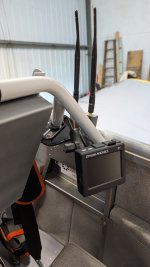

Just wondering out loud.
Has anybody mounted a Dynon or Garmin style flat panel display behind the pilot seat, so the back seater has instruments, in a RV-8/8A?
Looks like a Skyview HDX might fit there with out much issue, mounted to the seat back cross bar.
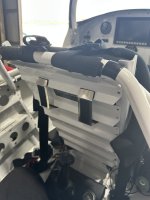
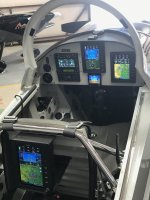 I made a retractable mount for the back seat's GDU 470. It will provide a PFD or multi flight display, and retracts up against the back of the pilot seat.
Since I had a Garmin 796, it was a logical choice. Gets the Bluetooth from up front and only needed power to be fully functional in the rear.
Used a mount with hard aluminum tubes like those used for hand grips on the roll bar and ran the wire thru the seat back.
Used a mount with hard aluminum tubes like those used for hand grips on the roll bar and ran the wire thru the seat back.
Attachments
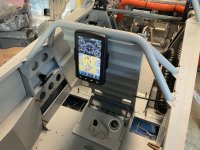
Webb,
- Does the Bluetooth for the 796 receive data from what I assume is a G3X up front?
- Does the Bluetooth provide Adhars data for the 796 flight display PFD or is it using GPS data
- Is the 796 using stand alone maps or simply a repeater of the front display?
I have my front seat Aera 660 backup GPS hardwired to the GDL-39 3D which supposedly had an Adhars to provide flight data for the Synthetic vision and it doesn’t work all that well and frequently precesses requiring recharging. Also tried Bluetooth it the GDL-39 3D to the Aer 660 but with the same results unfortunately.
- Does the Bluetooth for the 796 receive data from what I assume is a G3X up front?
- Does the Bluetooth provide Adhars data for the 796 flight display PFD or is it using GPS data
- Is the 796 using stand alone maps or simply a repeater of the front display?
I have my front seat Aera 660 backup GPS hardwired to the GDL-39 3D which supposedly had an Adhars to provide flight data for the Synthetic vision and it doesn’t work all that well and frequently precesses requiring recharging. Also tried Bluetooth it the GDL-39 3D to the Aer 660 but with the same results unfortunately.
Last edited:
The ADHARS comes from the G3X.
When I use it in my bonanza the ADSB comes from my transponder. There is not ADHARS but the six pack works fine. The 3D view with tapes work but without ADHARS, the unit shows the plane slightly in a turn pictorially on the 3D page.
The map function is only from the 796 itself.
When in the RV and with a ADHARS source, it’s spot on. I do have a Flightstream 510 card in the RV so I don’t know if that is needed to get the G3X to send info to the 796 or it will do so without the card. I’m sure one of the Garmin gurus can best answer that.
However, my coach in the backseat uses the 6 pack and map view which is really all he needs.
When I use it in my bonanza the ADSB comes from my transponder. There is not ADHARS but the six pack works fine. The 3D view with tapes work but without ADHARS, the unit shows the plane slightly in a turn pictorially on the 3D page.
The map function is only from the 796 itself.
When in the RV and with a ADHARS source, it’s spot on. I do have a Flightstream 510 card in the RV so I don’t know if that is needed to get the G3X to send info to the 796 or it will do so without the card. I’m sure one of the Garmin gurus can best answer that.
However, my coach in the backseat uses the 6 pack and map view which is really all he needs.
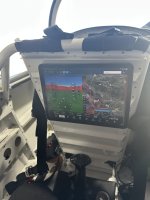

I really like that mounting method!!! I think I'll borrow that... How does that Apple product hold up? Everything Apple I try to use in the -8 overheats or auto dims to the point of being very unreliable.Another idea. iPad with data from a ForeFlight Sentry. View attachment 121189View attachment 121190

I really like that mounting method!!! I think I'll borrow that... How does that Apple product hold up? Everything Apple I try to use in the -8 overheats or auto dims to the point of being very unreliable.
Obviously not a perfect solution but I’ve been using newer iPads with ForeFlight for 4 years. I’ve not had a temperature problem except when the plane is parked.
Last edited:
Maybe the answer is, it depends on who the back seater is. A pilot might need something different than a pax that just wants to have a general idea of where you are. Kinda like the seat back in a airliner. Ipad sounds like to cheapest option unless you need something more complex than that.Just wondering out loud.
Has anybody mounted a Dynon or Garmin style flat panel display behind the pilot seat, so the back seater has instruments, in a RV-8/8A?
Looks like a Skyview HDX might fit there with out much issue, mounted to the seat back cross bar.