Van's Air Force

The definitive Van's Aircraft support community! Buying, building or flying an RV? Join our exclusive family of mentors and enthusiasts!

Non-Functioning Trim and Autopilot

jsalley

Well Known Member
Patron
I’m nearing the end of my RV-12iS build. Garmin VFR dual screen, autopilot with GMC 507 panel controller. When I completed the electrical and avionics installation months ago and first powered it up, the pitch trim initially worked normally on both sticks, but after cycling it several times it stopped functioning. In addition, none of the buttons or controls on the GMC 507 function, although the unit lights up when the master is turned on and the backlights on the controls remain on. The trim motor works normally in both directions when a 9V battery is connected to the appropriate pins on the db9 connector that plugs into the back of the AV-60000 power module. Fuses are all ok (and tried new replacements as well). There are no loose or bent pins in the connectors, and I confirmed that the builder-installed pins in the db9 connector are wired correctly. The G3x recognizes that the autopilot is present on the configuration screens, but none of the controls function on the GMC 507. The trim and AP issues are likely related, since the trim is run through the autopilot.

I’ve worked with Van’s builder support for months to troubleshoot this. The last thing they suggested was that the AV-60000 might be bad; they requested that I remove it and send it back to Van’s for testing. I found out today that it tested normally, and is being sent back to me. Meanwhile, the Van’s builder support tech I was working with has retired, so I’m now back to square one. And did I say I’m frustrated?

If anyone has thoughts, suggestions, or further troubleshooting ideas, they would be much appreciated. My situation is complicated by the fact that the airplane is 4 hours away, so I’m not able to run out and try quick fixes. Thanks to all!
 
When I completed the electrical and avionics installation months ago and first powered it up, the pitch trim initially worked normally on both sticks, but after cycling it several times it stopped functioning.
Based on what you wrote (above):
Follow the pitch trim wires out of the stick. They must go into some ‘box’. That box must have circuitry or relays that prevent a direct short if the pilot commands trim up while the copilot commands trim down. I’d look for a problem in that box, or its wiring.
 
Start by posting screenshots of the relevant devices on the System Information page, any system status messages that are being displayed, and any abnormal indications on the PFD.
 
Have you calibrated the magnetometer and ADAHRS yet? The 507 won't function till then.

It would be more accurate to say that without valid attitude displayed on the PFD, the autopilot and flight director will not operate. There is also an attitude calibration step for the GMC 507, which is not required in all installations, but might be in this one, if the configuration requires it.

Would that affect the trim not functioning?

No, lack of attitude data does not affect the operation of manual electric trim.

Pictures would help greatly here. In addition to the requests above, look at the pitch servo device info on the System Information page, and see if the trim inputs show activity when you activate the pitch trim buttons on the control stick.
 
Pictures would help greatly here. In addition to the requests above, look at the pitch servo device info on the System Information page, and see if the trim inputs show activity when you activate the pitch trim buttons on the control stick.
Thanks, Matt. Until I get the power module PCB back from Van’s and reinstalled, I can’t power up the avionics. (Also, when I last left the build, I was in the process of fabricating the fiberglass canopy fairing, and can’t get in the cockpit until that’s sanded out and the canopy removed). I’ll get and post some pictures as soon as I have that done.
 
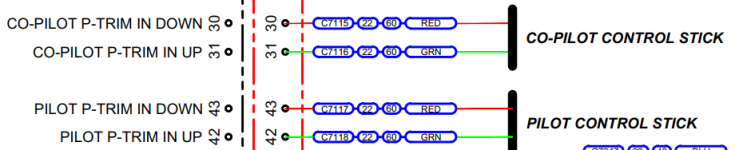
One thing you can easily check before you get the AV-60000 back from Van's is the control stick trim button wiring. At the 50-pin DB connector that attaches to the rear of the AV-60000 find the pins illustrated below and test for continuity to ground with your ohmmeter buzzer function while pressing the appropriate stick buttons. This will prove the stick buttons function properly.

AV-60000 stick trim connections.png

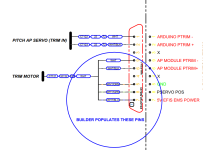
The next thing to check is the 9-pin DB connector that attaches to the rear of the AV-60000 and verify you have it wired as per this diagram.

AV-60000 Trim Connector.png

Both of these diagrams are from page 8 of the WH-00134-3 Schematic, which shows the AV-60000 Power Module.

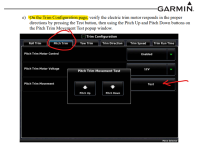
If these all check out okay, after you receive the AV-60000 and reinstall it, check the trim movement from the G3X Configuration "TRIM" page. Refer to section 30.4.13 in the G3X Touch Installation Manual.

G3X Trim Test.png

If ALL of the above works okay then I would say that all the trim wiring in correct and functional.

That leaves one thing to test, and that is the Arduino installed on the back of the AV-60000. It controls the following items;
  • TRIM SPEED AND DIRECTION
  • STALL WARNING TONE
  • SWITCH AND SCREEN BACKLIGHTING LEVEL
One easy way to test this Arduino is, switch the Master and Nav Lights on (the wings don't need to be installed) then rotate the dimmer knob (the one between the cockpit heat knobs) and watch the backlighting in any of the switches that are lit. If the brightness of the little green switch LEDs changes with the dimmer level then the Arduino is functioning properly and your trim problem is somewhere else. If the Switch LED's don't change brightness then I would replace the AV-60000 Arduino.

Unfortunately, it is not an item in Van's webstore, therefore you'll have to call and order an ES-60016-0.0 for the AV-60000.

Good Luck and be sure to report back here as to what fixed the problem.
 
One thing you can easily check before you get the AV-60000 back from Van's is the control stick trim button wiring. At the 50-pin DB connector that attaches to the rear of the AV-60000 find the pins illustrated below and test for continuity to ground with your ohmmeter buzzer function while pressing the appropriate stick buttons. This will prove the stick buttons function properly.
Thanks, Tony - I was hoping to hear from you! I spoke to Josh Goldschmidt at Van’s yesterday, and although he didn’t use your name, he implied they lost a lot of RV-12 avionics expertise when you retired!
 
After checking all of the above, (maybe you have done this already), if you have trim on two sticks, try disconnecting one of them and try again.

Just a long shot throw of something against the wall.
 
One thing you can easily check before you get the AV-60000 back from Van's is the control stick trim button wiring. At the 50-pin DB connector that attaches to the rear of the AV-60000 find the pins illustrated below and test for continuity to ground with your ohmmeter buzzer function while pressing the appropriate stick buttons. This will prove the stick buttons function properly.

View attachment 94831

The next thing to check is the 9-pin DB connector that attaches to the rear of the AV-60000 and verify you have it wired as per this diagram.

View attachment 94832
Ok - did all this. Got no continuity between any of the indicated pins while holding down the appropriate trim buttons (this was with one DVM lead grounded to the airframe and using a spare pin inserted in the other lead). Tried disconnecting the DB9 at the base of the stick to the AV 60000 and no continuity from there either. Opened the harness-end DB9 and it is wired correctly. Could Stein have miswired the DB50 plug? Not really looking forward to taking that apart.
 
Are you positive you are testing the correct sockets in the 50-pin connector? Sorry, I had to ask. I've seen a wire or two mis-pinned, but not all four in a particular circuit.

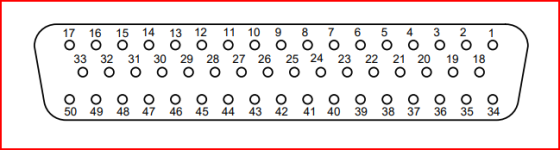
This is the 50-pin connector numbering if you are holding the assembled backshell that plugs into the AV-60000.

50-pin face view.png

It won't hurt anything to tone-out the other pins in the connector until (if) you find the pins that do have continuity. The nice thing is they are color coded and numbered if you do have to open it up and swap wires.

Another thing to check is the Stick Grip Grounds, each stick has one. You won't get continuity to ground of they aren't connected.

Stick Grip Ground.png

The saga continues...
 
So - some unexpected findings (aren’t they always?). I pulled up the seat angle panels on both sides and checked continuity again. No issues in wiring harness to 50 pin AV-60000 connector. Checked stick wiring for continuity at the DB9 connectors at the bases of the sticks. After disassembling the connectors, found a broken ground wire at the pin crimp on the copilot stick, and a broken ”down” trim wire at the pin crimp on the pilot stick. I checked all the other pins and button functions on both sticks, and they all are working. I think I must have been a little too vigorous with my crimps when I installed these connectors 8 months ago. All back together now and waiting for reinstallation of the AV-60000, which arrived from Van’s yesterday. Unfortunately, it’s at my home in Virginia and I’m at the airplane build in NC, so will be a couple of weeks before that happens.

Thanks to all, especially Tony, for your help!
 
Last edited:
Update - I have the AV-60000 reinstalled , so can power back up again. Trim is now working normally on both sticks. Still don’t have any response on the GMC 507, but the airplane is inside a metal building so can’t configure or calibrate the magnetometer or ADAHRS. We’re moving to a hangar in 2 weeks, so hopefully can complete the calibration then.

On a different note, I put a gallon of fuel in the tank today and ran the fuel pumps. 45 psi, and no leaks anywhere, including the firewall fittings. I’ve lost sleep worrying over that ever since reading about Bob’s debacle. Plan to work on my sleep deficit tonight. 😄
 
Final update. Now that the plane is in a hangar and can be easily rolled outside to “see” the GPS satellites, I was able to do most of the on-ground configuration of the G3X and its LRUs. Flight director and autopilot now work, with all GMC 507 controls functioning. I’ll finish the configuration after I have the radiator (shipped today) installed and can start the engine. Appreciate everyone’s input and support!
 
Any chance you have trim enabled and the autopilot is looking for a Garmin trim servo instead of another type like Ray Allen? I had this issue and when disabled. The trim servos and autopilot pilot worked.
 
Any chance you have trim enabled and the autopilot is looking for a Garmin trim servo instead of another type like Ray Allen? I had this issue and when disabled. The trim servos and autopilot pilot worked.
No, the G3X just needed to have the configuration completed. It all works as it should now. The earlier trim issue turned out to be broken wires in the control sticks and is also resolved.
 
Back
Top