


Van's Air Force

The definitive Van's Aircraft support community! Buying, building or flying an RV? Join our exclusive family of mentors and enthusiasts!

Help me understand my co-pilot stick enable switch

bertschb

Where's my engine????
Sponsor
So I have a co-pilot stick enable switch but it isn't working like I expect it to. I ran a wire from the switch (WHT/BLK) to the factory co-pilot stick grounding location (shown below).

The problem is the stick is enabled regardless of the switch position. I tried swapping the BLK ground wire with the WHT/BLK co-pilot stick ground wire. No change. Thoughts????
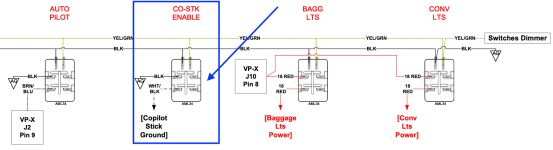
Screenshot 2026-05-02 at 2.52.22 PM.png

This image from the RV-14 plans shows the location of the pilot control stick ground but the co-pilot stick has a ground as well.
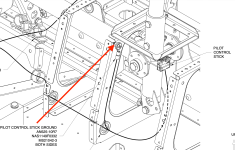
Screenshot 2026-05-02 at 5.04.20 PM.png
 
Last edited:
Well, we need a little more to go on. Is this for trim or some other function?

Let's assume it's for trim, so there's some basic troubleshooting to do. First off, pull both the BLK ground and the WHT/BLK wires off the Enable switch contacts. Does the co-pilot stick still work now? If it does, it's getting a ground from something else and you'll need to find where. If it doesn't work, then the next step would be to test the switch. With everything powered down, put an ohmmeter on each side of the switch (top and bottom). Flip the switch and see if it shows continuity on and off. It's unlikely a new switch is bad, but you gotta make sure. If it's a DPST switch, you can use either side of the switch's contacts, just don't do two tops or two bottoms. Hopefully, if you're this far into the build, we don't need to go there, but I'm covering all bases just in case. I've said it on this forum before, we were ALL new at this stuff at one time, but I don't know where you fall on the experience level.

And while we're there, a GOOD volt/ohmmeter is indispensable. I've got an old school Simpson (young guys will chuckle, but I like the needle swing sometimes) and a Fluke digital multimeter. Don't go cheap, as a quality meter is well worth the extra dollars. A set of alligator clip leads will free up a hand when you need it.
 
Well, we need a little more to go on. Is this for trim or some other function?

...but I don't know where you fall on the experience level.
It is supposed to enable/disable all functions on the co-pilot stick (trim, PTT, flaps, AP disconnect).

As for experience...do you have any grandchildren? If so, they probably know more about writing than I do. I do have two multi meters. I'll remove the switch from the panel and check it out tomorrow.
 
So I have a co-pilot stick enable switch but it isn't working like I expect it to. I ran a wire from the switch (WHT/BLK) to the factory co-pilot stick grounding location. The problem is the stick is enabled regardless of the switch position. I tried swapping the BLK ground wire with the WHT/BLK co-pilot stick ground wire. No change. Thoughts????

View attachment 116547
Rhis circuit works by providing the ground path for all of the copilot stick functions. The white/black wire should be connected to the common ground wire on the stick / the black wire coming out of the molex at the base of the stick. The connection should be completely isolated from ground. If you have anything connected to ground (the airframe) then the stick will always be enabled.
 
Ohhhhh. My guess without looking is that one of those other functions is giving you an unintended ground path.
 
Rhis circuit works by providing the ground path for all of the copilot stick functions. The white/black wire should be connected to the common ground wire on the stick / the black wire coming out of the molex at the base of the stick. The connection should be completely isolated from ground. If you have anything connected to ground (the airframe) then the stick will always be enabled.
Hi Josh

I connected the white/black wire to the same ground location (same screw) as the factory co-pilot ground wire. I added a photo to the first post showing that location.

I'm not sure what you mean by "the connection should be completely isolated from ground". If I use the factory co-pilot ground wire (which is grounded to the airframe), how can it be isolated from ground. Head spinning....
 
Hi Josh

I connected the white/black wire to the same ground location (same screw) as the factory co-pilot ground wire. I added a photo to the first post showing that location.
Unconnected that wire from the screw and splice those two wires togethe. touching the airframe provides a ground and allows the stick to work regardless of switch position.
 
Unconnected that wire from the screw and splice those two wires togethe. touching the airframe provides a ground and allows the stick to work regardless of switch position.
Ohhhh, just splice the two wires and secure them but no grounding of either. Ok, that makes sense. It actually makes too much sense now that I think about it. At my current pace, I'll have wiring figured out in about 30 years.
 
Ohhhh, just splice the two wires and secure them but no grounding of either. Ok, that makes sense. It actually makes too much sense now that I think about it. At my current pace, I'll have wiring figured out in about 30 years.
Nah, one wire at a time. you'll have this done before you know it! 😁
 
If it's not "above ground", you've got much, much bigger problems. 😁 But AG in the little triangle refers to Avionics Ground. In some contexts, it could be Aircraft Ground.
 
This looks like a Stein wiring diagram. I assume they figured it out. ;) Always good to discuss with the panel builder.
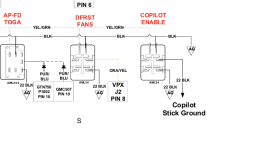
Screenshot 2026-05-04 191148.png
 
Back
Top
