Van's Air Force

The definitive Van's Aircraft support community! Buying, building or flying an RV? Join our exclusive family of mentors and enthusiasts!

Garmin SmartCharts Now Available (5/28/2025)

g3xpert

Well Known Member
Advertiser
Good Morning VAF!

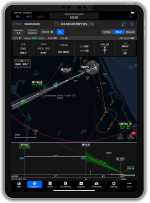
Terminal procedure chart formatting has not changed much since their inception in the early 20th century. These traditional charts have to account for all runways, transitions, approach minimums, etc. which can make charts congested and hard to quickly analyze. The Garmin Team has revolutionized how we view and process chart data with data-driven SmartCharts that declutter, simplify information, and help to reduce mental math in a high workload environment. SmartCharts serve as a primary charting tool with enhanced airport diagrams, departure procedures, arrival procedures, and instrument approaches to help pilots visualize the flight environment right from their iPad or iPhone.
1748438519608.png
Enhanced Airport Diagrams

SmartCharts airport diagrams utilize the foundation of the SafeTaxi chart and incorporate additional details that enhance the amount of information at your fingertips. Pilots can visually see detailed runway and taxiway markings, approach lighting systems, and airport iconography such as VORs and wind sock location. Each airport diagram has imbedded hot spot, takeoff minimum, and alternate minimum chart data to prevent swapping back and forth between charts to find relevant details. With the one touch buttons around the perimeter of these charts, pilots can quickly view COM frequencies, NOTAMs, and traditional government charts.

Departure and Arrival Charts

Traditional departure and arrival charts provide pilots with way more information than they will need for their flight. By filtering aircraft type, route transition, and runway of intended use on SmartCharts, pilots can utilize a decluttered chart which shows only the applicable route, fixes, and crossing restrictions. Departure and arrival procedures become much simpler to brief with the details button and quick access COMs/Routes buttons.

Instrument Approach Charts

Finding, briefing, and executing approaches becomes a breeze with SmartCharts technology. With the ability to filter all approaches by height, visibility, and approach lighting systems, pilots can get their ATIS information and quickly decide on which approach will work best for their flight. The set minima tab also helps reduce mental math by allowing pilots to select their approach category, specific approach type, and toggling on applicable non-standard conditions at the airport to automatically correct ceiling and visibility requirements. SmartCharts is the first to provide a georeferenced vertical profile view of approaches to help visualize aircraft position relative to the approach path, terrain, and obstacles. With quick access to COMs, briefing details, and missed approach procedures, pilots can spend less time heads down when in a high workload environment.

Getting Started

SmartCharts are available in the US and Bahamas for Garmin Pilot Premium iOS users. Current Garmin Pilot Standard subscribers in all regions have received a complimentary Premium upgrade through August 31st. Subscribers that have completed a trial in the past have received a complimentary 30-day trial of Garmin Pilot Premium starting today. If you have never tried Garmin Pilot before, we invite you to try it any time with a complimentary 30-day Premium trial. This complimentary upgrade unlocks all Garmin Pilot features and functionality in the app as well as Garmin Pilot Web, so give them both a try today!

If your app hasn’t automatically updated yet, please go to the app store, search for Garmin Pilot, click on the Garmin Pilot app, and select the update button next to the Garmin Pilot icon.

For more details about SmartCharts, head over to garmin.com/smartcharts.

We are excited to be sharing SmartCharts with you all today and look forward to hearing your feedback.

Thanks,

Justin
 
Good Morning VAF!

Terminal procedure chart formatting has not changed much since their inception in the early 20th century. These traditional charts have to account for all runways, transitions, approach minimums, etc. which can make charts congested and hard to quickly analyze. The Garmin Team has revolutionized how we view and process chart data with data-driven SmartCharts that declutter, simplify information, and help to reduce mental math in a high workload environment. SmartCharts serve as a primary charting tool with enhanced airport diagrams, departure procedures, arrival procedures, and instrument approaches to help pilots visualize the flight environment right from their iPad or iPhone.
View attachment 88758
Enhanced Airport Diagrams

SmartCharts airport diagrams utilize the foundation of the SafeTaxi chart and incorporate additional details that enhance the amount of information at your fingertips. Pilots can visually see detailed runway and taxiway markings, approach lighting systems, and airport iconography such as VORs and wind sock location. Each airport diagram has imbedded hot spot, takeoff minimum, and alternate minimum chart data to prevent swapping back and forth between charts to find relevant details. With the one touch buttons around the perimeter of these charts, pilots can quickly view COM frequencies, NOTAMs, and traditional government charts.

Departure and Arrival Charts

Traditional departure and arrival charts provide pilots with way more information than they will need for their flight. By filtering aircraft type, route transition, and runway of intended use on SmartCharts, pilots can utilize a decluttered chart which shows only the applicable route, fixes, and crossing restrictions. Departure and arrival procedures become much simpler to brief with the details button and quick access COMs/Routes buttons.

Instrument Approach Charts

Finding, briefing, and executing approaches becomes a breeze with SmartCharts technology. With the ability to filter all approaches by height, visibility, and approach lighting systems, pilots can get their ATIS information and quickly decide on which approach will work best for their flight. The set minima tab also helps reduce mental math by allowing pilots to select their approach category, specific approach type, and toggling on applicable non-standard conditions at the airport to automatically correct ceiling and visibility requirements. SmartCharts is the first to provide a georeferenced vertical profile view of approaches to help visualize aircraft position relative to the approach path, terrain, and obstacles. With quick access to COMs, briefing details, and missed approach procedures, pilots can spend less time heads down when in a high workload environment.

Getting Started

SmartCharts are available in the US and Bahamas for Garmin Pilot Premium iOS users. Current Garmin Pilot Standard subscribers in all regions have received a complimentary Premium upgrade through August 31st. Subscribers that have completed a trial in the past have received a complimentary 30-day trial of Garmin Pilot Premium starting today. If you have never tried Garmin Pilot before, we invite you to try it any time with a complimentary 30-day Premium trial. This complimentary upgrade unlocks all Garmin Pilot features and functionality in the app as well as Garmin Pilot Web, so give them both a try today!

If your app hasn’t automatically updated yet, please go to the app store, search for Garmin Pilot, click on the Garmin Pilot app, and select the update button next to the Garmin Pilot icon.

For more details about SmartCharts, head over to garmin.com/smartcharts.

We are excited to be sharing SmartCharts with you all today and look forward to hearing your feedback.

Thanks,

Justin
Freaking amazing! Now I start to question my option to use Forelight. This is an amazing breakthrough! Congrats Garmin! I just wish subscriptions stopped pilling up. Any chance we could have a bundle pack "Avionics OnePack + Smart Charts + Garmin Pilot Premium" ?
 
Freaking amazing! Now I start to question my option to use Forelight. This is an amazing breakthrough! Congrats Garmin! I just wish subscriptions stopped pilling up. Any chance we could have a bundle pack "Avionics OnePack + Smart Charts + Garmin Pilot Premium" ?
There are not any additional subscriptions associated with SmartCharts. SmartCharts is available as an additional feature as of today for those who were already using Garmin Pilot Premium.

If you buy a Onepak for your avionics database subscriptions, the cost of the premium upgrade is covered under that package.

Thanks,

Justin
 
Good Morning VAF!

Terminal procedure chart formatting has not changed much since their inception in the early 20th century. These traditional charts have to account for all runways, transitions, approach minimums, etc. which can make charts congested and hard to quickly analyze. The Garmin Team has revolutionized how we view and process chart data with data-driven SmartCharts that declutter, simplify information, and help to reduce mental math in a high workload environment. SmartCharts serve as a primary charting tool with enhanced airport diagrams, departure procedures, arrival procedures, and instrument approaches to help pilots visualize the flight environment right from their iPad or iPhone.
View attachment 88758
Enhanced Airport Diagrams

SmartCharts airport diagrams utilize the foundation of the SafeTaxi chart and incorporate additional details that enhance the amount of information at your fingertips. Pilots can visually see detailed runway and taxiway markings, approach lighting systems, and airport iconography such as VORs and wind sock location. Each airport diagram has imbedded hot spot, takeoff minimum, and alternate minimum chart data to prevent swapping back and forth between charts to find relevant details. With the one touch buttons around the perimeter of these charts, pilots can quickly view COM frequencies, NOTAMs, and traditional government charts.

Departure and Arrival Charts

Traditional departure and arrival charts provide pilots with way more information than they will need for their flight. By filtering aircraft type, route transition, and runway of intended use on SmartCharts, pilots can utilize a decluttered chart which shows only the applicable route, fixes, and crossing restrictions. Departure and arrival procedures become much simpler to brief with the details button and quick access COMs/Routes buttons.

Instrument Approach Charts

Finding, briefing, and executing approaches becomes a breeze with SmartCharts technology. With the ability to filter all approaches by height, visibility, and approach lighting systems, pilots can get their ATIS information and quickly decide on which approach will work best for their flight. The set minima tab also helps reduce mental math by allowing pilots to select their approach category, specific approach type, and toggling on applicable non-standard conditions at the airport to automatically correct ceiling and visibility requirements. SmartCharts is the first to provide a georeferenced vertical profile view of approaches to help visualize aircraft position relative to the approach path, terrain, and obstacles. With quick access to COMs, briefing details, and missed approach procedures, pilots can spend less time heads down when in a high workload environment.

Getting Started

SmartCharts are available in the US and Bahamas for Garmin Pilot Premium iOS users. Current Garmin Pilot Standard subscribers in all regions have received a complimentary Premium upgrade through August 31st. Subscribers that have completed a trial in the past have received a complimentary 30-day trial of Garmin Pilot Premium starting today. If you have never tried Garmin Pilot before, we invite you to try it any time with a complimentary 30-day Premium trial. This complimentary upgrade unlocks all Garmin Pilot features and functionality in the app as well as Garmin Pilot Web, so give them both a try today!

If your app hasn’t automatically updated yet, please go to the app store, search for Garmin Pilot, click on the Garmin Pilot app, and select the update button next to the Garmin Pilot icon.

For more details about SmartCharts, head over to garmin.com/smartcharts.

We are excited to be sharing SmartCharts with you all today and look forward to hearing your feedback.

Thanks,

Justin
When will the Garmin Aera 760 be able to run Garmin Pilot?
 
I have been working hard on my instrument rating since November, flying twice a week. I have been using the FAA approach plates and have struggled mightily to sift through all of the relevant information necessary for imminent approaches through rough air.
I thank God for Captain Jepson and his successors for all their work, but this is a revolutionary change in the way to assimilate vital approach information.
There are tears on my IPad.
 
When will the Garmin Aera 760 be able to run Garmin Pilot?
Sort of plus one, will smart charts be available for the 760 in place of the current Flitecharts as part of the bundled database subscription package. The 760 is a great addition to the GNX375 for display of approach plates etc.
Figs
 
There are not any additional subscriptions associated with SmartCharts. SmartCharts is available as an additional feature as of today for those who were already using Garmin Pilot Premium.

If you buy a Onepak for your avionics database subscriptions, the cost of the premium upgrade is covered under that package.

Thanks,

Justin
I just renewed my avionics databases for the G3X and GTN650 a couple of months ago. Is there a way to purchase Garmin Pilot now and be able to take advantage of the premium upgrade now?
 
I just renewed my avionics databases for the G3X and GTN650 a couple of months ago. Is there a way to purchase Garmin Pilot now and be able to take advantage of the premium upgrade now?
Good Morning VAF!

Terminal procedure chart formatting has not changed much since their inception in the early 20th century. These traditional charts have to account for all runways, transitions, approach minimums, etc. which can make charts congested and hard to quickly analyze. The Garmin Team has revolutionized how we view and process chart data with data-driven SmartCharts that declutter, simplify information, and help to reduce mental math in a high workload environment. SmartCharts serve as a primary charting tool with enhanced airport diagrams, departure procedures, arrival procedures, and instrument approaches to help pilots visualize the flight environment right from their iPad or iPhone.
View attachment 88758
Enhanced Airport Diagrams

SmartCharts airport diagrams utilize the foundation of the SafeTaxi chart and incorporate additional details that enhance the amount of information at your fingertips. Pilots can visually see detailed runway and taxiway markings, approach lighting systems, and airport iconography such as VORs and wind sock location. Each airport diagram has imbedded hot spot, takeoff minimum, and alternate minimum chart data to prevent swapping back and forth between charts to find relevant details. With the one touch buttons around the perimeter of these charts, pilots can quickly view COM frequencies, NOTAMs, and traditional government charts.

Departure and Arrival Charts

Traditional departure and arrival charts provide pilots with way more information than they will need for their flight. By filtering aircraft type, route transition, and runway of intended use on SmartCharts, pilots can utilize a decluttered chart which shows only the applicable route, fixes, and crossing restrictions. Departure and arrival procedures become much simpler to brief with the details button and quick access COMs/Routes buttons.

Instrument Approach Charts

Finding, briefing, and executing approaches becomes a breeze with SmartCharts technology. With the ability to filter all approaches by height, visibility, and approach lighting systems, pilots can get their ATIS information and quickly decide on which approach will work best for their flight. The set minima tab also helps reduce mental math by allowing pilots to select their approach category, specific approach type, and toggling on applicable non-standard conditions at the airport to automatically correct ceiling and visibility requirements. SmartCharts is the first to provide a georeferenced vertical profile view of approaches to help visualize aircraft position relative to the approach path, terrain, and obstacles. With quick access to COMs, briefing details, and missed approach procedures, pilots can spend less time heads down when in a high workload environment.

Getting Started

SmartCharts are available in the US and Bahamas for Garmin Pilot Premium iOS users. Current Garmin Pilot Standard subscribers in all regions have received a complimentary Premium upgrade through August 31st. Subscribers that have completed a trial in the past have received a complimentary 30-day trial of Garmin Pilot Premium starting today. If you have never tried Garmin Pilot before, we invite you to try it any time with a complimentary 30-day Premium trial. This complimentary upgrade unlocks all Garmin Pilot features and functionality in the app as well as Garmin Pilot Web, so give them both a try today!

If your app hasn’t automatically updated yet, please go to the app store, search for Garmin Pilot, click on the Garmin Pilot app, and select the update button next to the Garmin Pilot icon.

For more details about SmartCharts, head over to garmin.com/smartcharts.

We are excited to be sharing SmartCharts with you all today and look forward to hearing your feedback.

Thanks,

Justin
Does this do the computations for cold weather correction?
 
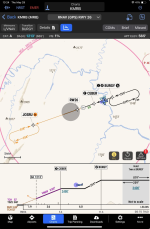
this is just insanely good. The geo-referenced profile view with the step down and obstacle visualization is pretty amazing. I don't think even Jeppesen plates come anywhere close. I'm curious what the grey circle over the runway depicts (have not RTFM yet)

1748539537795.png
 
I am very impressed by Smart Charts. I downloaded the free trial and have been playing with the app. The new videos on how to use Smart Charts are great. However, I need some basic Garmin Pilot training.

I found a bunch of Garmin Pilot videos on YouTube but it couldn’t decide which ones to watch. A lot of them are very old.

Is there a good link to some basic Garmin Pilot videos?

I know my way around ForeFlight, but Garmin Pilot is new experience.
 
this is just insanely good. The geo-referenced profile view with the step down and obstacle visualization is pretty amazing. I don't think even Jeppesen plates come anywhere close. I'm curious what the grey circle over the runway depicts (have not RTFM yet)

View attachment 88856
I haven't read the manual either but the grey circle appears to be the protected circling approach boundary.
 
I haven't read the manual either but the grey circle appears to be the protected circling approach boundary.

edit: GP does create a circling shape when circling minimums are selected. the darker circle for straight in approaches must be something else. I didn't catch what in the video.

1748550427518.png

1748550744757.png
 
Last edited:
I am very impressed by Smart Charts. I downloaded the free trial and have been playing with the app. The new videos on how to use Smart Charts are great. However, I need some basic Garmin Pilot training.

I found a bunch of Garmin Pilot videos on YouTube but it couldn’t decide which ones to watch. A lot of them are very old.

Is there a good link to some basic Garmin Pilot videos?

I know my way around ForeFlight, but Garmin Pilot is new experience.

Videos are at the bottom of the page in the link:
 
It's nice to see technology progress like this. Jepp charts are great but it's also a fairly old way of presenting data.

Makes me wonder how long it will be before the empire (FF/Boeing) strikes back. Or is Garmin the empire? It's so hard to keep track these days... :LOL:
 
Videos are at the bottom of the page in the link:
The videos are all about Smart Charts. I need the learn the basics.
 
The videos are all about Smart Charts. I need the learn the basics.
another way is to click on the three dots in a tiny circle on the top right of the GP screen and select Help. It opens up a 622 page manual. The current revision is a bit old from Jan 2025
 
When will the Garmin Aera 760 be able to run Garmin Pilot?
Garmin shares your interest in having SmartCharts on flight displays and portables, though we do not have a plan for this today. The team is focused on getting this into as many hands as possible with the Garmin Pilot app.
I just renewed my avionics databases for the G3X and GTN650 a couple of months ago. Is there a way to purchase Garmin Pilot now and be able to take advantage of the premium upgrade now?
Yes, new subscribers will get a 1 month free trial of premium. Current standard users get a 3 month trial of premium.
Garmin, please advise if/when this will be supported on Android version and if Android version will ever support 3rd party ADSB receivers such as Stratux.
At this time we are focused on iOS and expanding our coverage to get this technology in more hands. We do not have a schedule for Android at the moment, we appreciate your feedback and have shared it with the team. 
Does this do the computations for cold weather correction?
SmartCharts allows pilots to apply cold weather adjustments like uncompensated Baro-VNAV systems with the adjustments toggles in the set minima window.
this is just insanely good. The geo-referenced profile view with the step down and obstacle visualization is pretty amazing. I don't think even Jeppesen plates come anywhere close. I'm curious what the grey circle over the runway depicts (have not RTFM yet)

View attachment 88856
This is the airport locator, an emphasized depiction of the procedure airport.

Thanks,

Justin

 
Last edited:
Hi everyone,

We are grateful for all your feedback about SmartCharts! To get a more in-depth look at the SmartCharts technology, check out this new video tutorial that walks through a scenario flight:

Flight Planning with SmartCharts – Garmin Pilot App

This video has chapters for each chart type, making it easy to view the sections you want to learn more about.

Additionally, for those who asked, here is a video series describing basic Garmin Pilot functionality:

Garmin Pilot Introduction

Thanks,

Justin
 
Hi everyone,

We are grateful for all your feedback about SmartCharts! To get a more in-depth look at the SmartCharts technology, check out this new video tutorial that walks through a scenario flight:

Flight Planning with SmartCharts – Garmin Pilot App

This video has chapters for each chart type, making it easy to view the sections you want to learn more about.

Additionally, for those who asked, here is a video series describing basic Garmin Pilot functionaThe video says you beed Garmin navigation database
 
Can the GP talk to Dynon? ( send Flight plan, receive ADSB).
Everything I’ve read shows that it’s only compatible with Garmin avionics. I hope @g3xpert can tell me I’m wrong.

With ForeFlight I receive adsb from AFS and gps data from AFS or Avidyne.

While this feature looks great, not having broad avionics support and pilot notes for fbo and airports will keep me away.
 
Dynon flight plans work in a round-about fashion with a garmin navigator in the mix. I send plans to GPS175 which in turn updates the Dynon's FP. It's a one way operation (can't edit the FP directly on the Dynon and send it back. Garmin disabled that path in one of the FW updates).

The traffic works best with a GDL device - you get TargetTrend. that was the original reason I switched to GP.

Agree on pilot's notes - we need that feature moved from Fltplan.go to GP native interface real fast! Prepopulate with the FF notes please. And I'd like a pony for my birthday! :D
 
Trying out GP and smartcharts and wondered if anyone knows how to build a flight plan in GP that includes multiple approaches into different airports along a round robin route? Seems like procedure entries are only allowed for the origin and destination airports, everything else is just treated as a waypoint. Similar situation in Foreflight.
 
Seems like procedure entries are only allowed for the origin and destination airports, everything else is just treated as a waypoint. Similar situation in Foreflight.
I use ForeFlight and just make a flight for each leg. Once flying again and at a safe altitude I pull up the next flight (leg) on ForeFlight and send to Garmin/panel and make active. I just did this yesterday at three airports, three approaches.

I agree it would be much easier to have it all in one flight plan!
 
Does GP allow uploading/storage of documents such as pilot guides for avionics?
Yes, you can store the documents in a Garmin Pilot folder on iCloud or dropbox and they will sync, you can then add the documents to specific custom folders for direct access under the documents icon
 
I use ForeFlight and just make a flight for each leg. Once flying again and at a safe altitude I pull up the next flight (leg) on ForeFlight and send to Garmin/panel and make active. I just did this yesterday at three airports, three approaches.

I agree it would be much easier to have it all in one flight plan!
Very smart!
 
Back
Top