Good Morning VAF!
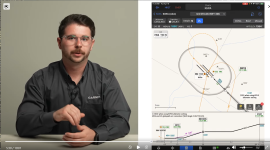
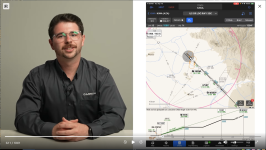
Terminal procedure chart formatting has not changed much since their inception in the early 20th century. These traditional charts have to account for all runways, transitions, approach minimums, etc. which can make charts congested and hard to quickly analyze. The Garmin Team has revolutionized how we view and process chart data with data-driven SmartCharts that declutter, simplify information, and help to reduce mental math in a high workload environment. SmartCharts serve as a primary charting tool with enhanced airport diagrams, departure procedures, arrival procedures, and instrument approaches to help pilots visualize the flight environment right from their iPad or iPhone.
Enhanced Airport Diagrams
SmartCharts airport diagrams utilize the foundation of the SafeTaxi chart and incorporate additional details that enhance the amount of information at your fingertips. Pilots can visually see detailed runway and taxiway markings, approach lighting systems, and airport iconography such as VORs and wind sock location. Each airport diagram has imbedded hot spot, takeoff minimum, and alternate minimum chart data to prevent swapping back and forth between charts to find relevant details. With the one touch buttons around the perimeter of these charts, pilots can quickly view COM frequencies, NOTAMs, and traditional government charts.
Departure and Arrival Charts
Traditional departure and arrival charts provide pilots with way more information than they will need for their flight. By filtering aircraft type, route transition, and runway of intended use on SmartCharts, pilots can utilize a decluttered chart which shows only the applicable route, fixes, and crossing restrictions. Departure and arrival procedures become much simpler to brief with the details button and quick access COMs/Routes buttons.
Instrument Approach Charts
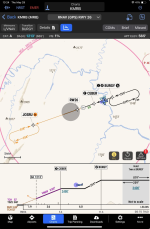
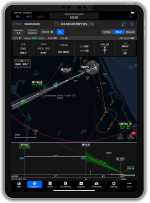
Finding, briefing, and executing approaches becomes a breeze with SmartCharts technology. With the ability to filter all approaches by height, visibility, and approach lighting systems, pilots can get their ATIS information and quickly decide on which approach will work best for their flight. The set minima tab also helps reduce mental math by allowing pilots to select their approach category, specific approach type, and toggling on applicable non-standard conditions at the airport to automatically correct ceiling and visibility requirements. SmartCharts is the first to provide a georeferenced vertical profile view of approaches to help visualize aircraft position relative to the approach path, terrain, and obstacles. With quick access to COMs, briefing details, and missed approach procedures, pilots can spend less time heads down when in a high workload environment.
Getting Started
SmartCharts are available in the US and Bahamas for Garmin Pilot Premium iOS users. Current Garmin Pilot Standard subscribers in all regions have received a complimentary Premium upgrade through August 31st. Subscribers that have completed a trial in the past have received a complimentary 30-day trial of Garmin Pilot Premium starting today. If you have never tried Garmin Pilot before, we invite you to try it any time with a complimentary 30-day Premium trial. This complimentary upgrade unlocks all Garmin Pilot features and functionality in the app as well as Garmin Pilot Web, so give them both a try today!
If your app hasn’t automatically updated yet, please go to the app store, search for Garmin Pilot, click on the Garmin Pilot app, and select the update button next to the Garmin Pilot icon.
For more details about SmartCharts, head over to garmin.com/smartcharts.
We are excited to be sharing SmartCharts with you all today and look forward to hearing your feedback.
Thanks,
Justin
Terminal procedure chart formatting has not changed much since their inception in the early 20th century. These traditional charts have to account for all runways, transitions, approach minimums, etc. which can make charts congested and hard to quickly analyze. The Garmin Team has revolutionized how we view and process chart data with data-driven SmartCharts that declutter, simplify information, and help to reduce mental math in a high workload environment. SmartCharts serve as a primary charting tool with enhanced airport diagrams, departure procedures, arrival procedures, and instrument approaches to help pilots visualize the flight environment right from their iPad or iPhone.
Enhanced Airport Diagrams
SmartCharts airport diagrams utilize the foundation of the SafeTaxi chart and incorporate additional details that enhance the amount of information at your fingertips. Pilots can visually see detailed runway and taxiway markings, approach lighting systems, and airport iconography such as VORs and wind sock location. Each airport diagram has imbedded hot spot, takeoff minimum, and alternate minimum chart data to prevent swapping back and forth between charts to find relevant details. With the one touch buttons around the perimeter of these charts, pilots can quickly view COM frequencies, NOTAMs, and traditional government charts.
Departure and Arrival Charts
Traditional departure and arrival charts provide pilots with way more information than they will need for their flight. By filtering aircraft type, route transition, and runway of intended use on SmartCharts, pilots can utilize a decluttered chart which shows only the applicable route, fixes, and crossing restrictions. Departure and arrival procedures become much simpler to brief with the details button and quick access COMs/Routes buttons.
Instrument Approach Charts
Finding, briefing, and executing approaches becomes a breeze with SmartCharts technology. With the ability to filter all approaches by height, visibility, and approach lighting systems, pilots can get their ATIS information and quickly decide on which approach will work best for their flight. The set minima tab also helps reduce mental math by allowing pilots to select their approach category, specific approach type, and toggling on applicable non-standard conditions at the airport to automatically correct ceiling and visibility requirements. SmartCharts is the first to provide a georeferenced vertical profile view of approaches to help visualize aircraft position relative to the approach path, terrain, and obstacles. With quick access to COMs, briefing details, and missed approach procedures, pilots can spend less time heads down when in a high workload environment.
Getting Started
SmartCharts are available in the US and Bahamas for Garmin Pilot Premium iOS users. Current Garmin Pilot Standard subscribers in all regions have received a complimentary Premium upgrade through August 31st. Subscribers that have completed a trial in the past have received a complimentary 30-day trial of Garmin Pilot Premium starting today. If you have never tried Garmin Pilot before, we invite you to try it any time with a complimentary 30-day Premium trial. This complimentary upgrade unlocks all Garmin Pilot features and functionality in the app as well as Garmin Pilot Web, so give them both a try today!
If your app hasn’t automatically updated yet, please go to the app store, search for Garmin Pilot, click on the Garmin Pilot app, and select the update button next to the Garmin Pilot icon.
For more details about SmartCharts, head over to garmin.com/smartcharts.
We are excited to be sharing SmartCharts with you all today and look forward to hearing your feedback.
Thanks,
Justin