Van's Air Force

The definitive Van's Aircraft support community! Buying, building or flying an RV? Join our exclusive family of mentors and enthusiasts!

Garmin Comm Issue

cjs

Well Known Member
Sponsor
Patron
IMG_9277.jpeg

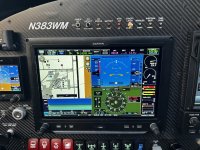
As illustrated on the pic above, I had an issue about a week ago with my #1 comm (top left of G3x screen). You can see it reads that 1215 (emergency frequency) is active, but it also displays the word “FAULT” directly below the frequency.

This occurred on an IFR departure when tower instructed me to contact ATC. I used the frequency swap button on my Tosten stick grip to change frequency to the ATC frequency I had preloaded on the comm.

I’ll skip the detail about how ATC and I figured out there was a problem and how we did a work around in some very crowded airspace in a major metro area and simply get to the take-aways.

After working w Jason at Aerotronics, Figured out that I held down the Freq Swap button too long (2 secs) - which automatically activates the emergency freq (121.5) and LOCKS it in so it cannot be changed UNTIL ONE HOLDS THE FREQ SWAP DOWN FOR ANOTHER 2 SECS. Side note - I should not have held the button down for 2 secs. Likely I did this almost sub-consciously due to a high work load (single pilot IFR departure in IMC, initiating a climbing turn to a VOR whilst avoiding traffic, and then attempting to comply with tower instructions to swap frequencies).

I bold/emphasized the sentence above since this procedure to cure the (inadvertent) swap to 121.5 along with the FAULT message (as opposed to it saying LOCKED) caused a lot stress and kept me from fixing the issue much more rapidly.

Because I saw the FAULT (as opposed to LOCKED) I assumed I had a radio failure . Additionally, ATC was not hearing my transmissions on either 121.5 or my second comm. I ultimately ended up powering down my avionics (killing everything - gps, moving map, comms, Auto-pilot, etc) and restarting them which reset the comms and solved the problem. Not an ideal solution in an IFR situation (I did have my iPad linked to a Sentry so I still had situational awareness).

Skipping so much detail on all this - but, what I wanted to share was mostly these take-aways

1. Be aware you can inadvertently activate 121.5 (emergency freq) and LOCK it on by holding down the Freq Swap button too long (2 secs).

2. If you do this, the message displayed below the frequency does not say “LOCKED”, it reads “FAULT” which may lead you to think as I did. Namely, that there is a problem with your equipment. And, thus lead to less than ideal solution choices.

3. If you do inadvertently activate the emergency frequency, simply push and hold the swap button for a couple secs to deactivate it

4. Lastly, and this is important, apparently if one activates the emergency frequency in this manner, it renders the #2 comm ineffective. I’m still looking into this.
But, I was not able to comm with ATC on my #2 comm. I selected it for both receiving and transmitting to no avail whilst the #1 comm was locked and read FAULT. Side note - I’m note sure why ATC wasnt reading my transmissions on the emergency channel. I can’t be sure, but I believe some Commercial pilots did hear them. And, my transponder still worked - this is how I was able to acknowledge ATC’s instructions (I’d hit the IDENT button to let them know I’d heard their instructions).
 
View attachment 101295

As illustrated on the pic above, I had an issue about a week ago with my #1 comm (top left of G3x screen). You can see it reads that 1215 (emergency frequency) is active, but it also displays the word “FAULT” directly below the frequency.

This occurred on an IFR departure when tower instructed me to contact ATC. I used the frequency swap button on my Tosten stick grip to change frequency to the ATC frequency I had preloaded on the comm.

I’ll skip the detail about how ATC and I figured out there was a problem and how we did a work around in some very crowded airspace in a major metro area and simply get to the take-aways.

After working w Jason at Aerotronics, Figured out that I held down the Freq Swap button too long (2 secs) - which automatically activates the emergency freq (121.5) and LOCKS it in so it cannot be changed UNTIL ONE HOLDS THE FREQ SWAP DOWN FOR ANOTHER 2 SECS. Side note - I should not have held the button down for 2 secs. Likely I did this almost sub-consciously due to a high work load (single pilot IFR departure in IMC, initiating a climbing turn to a VOR whilst avoiding traffic, and then attempting to comply with tower instructions to swap frequencies).

I bold/emphasized the sentence above since this procedure to cure the (inadvertent) swap to 121.5 along with the FAULT message (as opposed to it saying LOCKED) caused a lot stress and kept me from fixing the issue much more rapidly.

Because I saw the FAULT (as opposed to LOCKED) I assumed I had a radio failure . Additionally, ATC was not hearing my transmissions on either 121.5 or my second comm. I ultimately ended up powering down my avionics (killing everything - gps, moving map, comms, Auto-pilot, etc) and restarting them which reset the comms and solved the problem. Not an ideal solution in an IFR situation (I did have my iPad linked to a Sentry so I still had situational awareness).

Skipping so much detail on all this - but, what I wanted to share was mostly these take-aways

1. Be aware you can inadvertently activate 121.5 (emergency freq) and LOCK it on by holding down the Freq Swap button too long (2 secs).

2. If you do this, the message displayed below the frequency does not say “LOCKED”, it reads “FAULT” which may lead you to think as I did. Namely, that there is a problem with your equipment. And, thus lead to less than ideal solution choices.

3. If you do inadvertently activate the emergency frequency, simply push and hold the swap button for a couple secs to deactivate it

4. Lastly, and this is important, apparently if one activates the emergency frequency in this manner, it renders the #2 comm ineffective. I’m still looking into this.
But, I was not able to comm with ATC on my #2 comm. I selected it for both receiving and transmitting to no avail whilst the #1 comm was locked and read FAULT. Side note - I’m note sure why ATC wasnt reading my transmissions on the emergency channel. I can’t be sure, but I believe some Commercial pilots did hear them. And, my transponder still worked - this is how I was able to acknowledge ATC’s instructions (I’d hit the IDENT button to let them know I’d heard their instructions).
Thank you
 
Btw - all my avionics are Garmin. It’s a full IFR panel. G3x, GTN750 (comm #1 is in this), comm #2, transponder and audio panel are all remote. Garmin auto-pilot. G5 back up.

IMG_6121.jpeg
 
Yes, as explained in the GTN 750/750Xi Pilot Guide:

Remote COM Lock
If configured, pressing and
holding the remote COM transfer
key for two seconds locks the
COM at 121.50 MHz, preventing
further changes in frequency. A
message informs you of the
change in status. To unlock, press
and hold the remote key again.

When this happens, there is a message on the GTN explaining that you can clear the COM Lock by pressing and holding the remote frequency swap button.

“COM LOCKED TO 121.5 MHZ. HOLD REMOTE COM TRANSFER KEY TO EXIT.”

There is no COM Lock function on the GTR 20/200 radio (which might be your COM2), so presumably your COM2 radio was never affected by the GTN COM Lock condition, so resuming communication with ATC should have been as simple as switching to your COM #2 and re-entering the needed frequency.

Unless the audio panel was not selected to COM2, there is no reason that it would not be operating normally in this situation. You can repeat the GTN COM Lock condition on the ground and verify that COM2 is operating normally.

Steve
 
Last edited:
Btw - all my avionics are Garmin. It’s a full IFR panel. G3x, GTN750 (comm #1 is in this), comm #2, transponder and audio panel are all remote. Garmin auto-pilot. G5 back up.

View attachment 101320
Did your G5 continue to display properly, so that other than traffic, you had everything you need to fly and even use the autopilot? I am asking, because that is what I have planned to do in such a situation. 🤔
 
Good job successfully working the problem in real time. I’ve long suspected that a non-trivial subset of IFR accidents flow from “unexpected avionics moments” like this, in addition to glitches and failures that can’t be diagnosed post-crash. This is complicated stuff we are using.
 
Three most common phrases in a computerized crewed cockpit….

1) “I didn’t know it could do that!”
2) “What’s it doing now?!”
3) “What do you think it’s going to do next?!!

———end of CVR recording———

😉
 
Com swap, freq swap, ident, CWS, starter, fuel pump, etc..on the stick will eventually bite you.
I am interested in knowing how the frequency swap button on the Tosten grip is wired in this plane.

The GMA 245R audio panel supports a COM Swap discrete, but not a frequency swap discrete. We know from the description that the Tosten frequency swap button is wired to the GTN COM1 radio. Hopefully it is not also wired to the COM2 radio because it wouldn't make sense to frequency swap both radios at once.

If you switch COM radios to COM2 (using a COM swap button on the grip or the MIC button on the GDU), and then forget that pressing the COM1 frequency swap button on the grip does nothing when COM2 is selected, this is another source of confusion. This is particularly true if you seldom use COM2 because COM1 has the frequency swap button wired to the grip.

Steve
 
There is no COM Lock function on the GTR 20/200 radio (which might be your COM2), so presumably your COM2 radio was never affected by the GTN COM Lock condition, so resuming communication with ATC should have been as simple as switching to your COM #2 and re-entering the needed frequency.

Unless the audio panel was not selected to COM2, there is no reason that it would not be operating normally in this situation. You can repeat the GTN COM Lock condition on the ground and verify that COM2 is operating normally.

Yes, Steve is all correct here. It might be that your G3X system displays an ambiguous label when your GTN 750 is in this condition, but there should be no effect on your other COM radio, nor on your ability to switch to that COM radio using your audio panel.

The GMA 245R audio panel supports a COM Swap discrete, but not a frequency swap discrete. We know from the description that the Tosten frequency swap button is wired to the GTN COM1 radio. Hopefully it is not also wired to the COM2 radio because it wouldn't make sense to frequency swap both radios at once.

If you switch COM radios to COM2 (using a COM swap button on the grip or the MIC button on the GDU), and then forget that pressing the COM1 frequency swap button on the grip does nothing when COM2 is selected, this is another source of confusion. This is particularly true if you seldom use COM2 because COM1 has the frequency swap button wired to the grip.

Yes, I agree with this too. In installations with a GMA 245(R) and dual COM radios, I'm an advocate of using the "COM Freq Swap" discrete function of the G3X system rather than the "Frequency Swap" discrete input on an individual radio, because it avoids this type of confusion.
 
Three most common phrases in a computerized crewed cockpit….

1) “I didn’t know it could do that!”
2) “What’s it doing now?!”
3) “What do you think it’s going to do next?!!

———end of CVR recording———

😉
This is very true. I have done work for the FAA concerning the effects of cockpit automation on accidents and incidents. #2 and #3 above were very common in the voice recorders. The conclusion was that pilots often don't understand how to use the automation or make a mistake using it and don't recognize the error. With the extremely sophisticated avionics availabe to us coupled with the ability to configure the same hardware to act very differently in our airplanes, it is extremely important for the pilot to understand how the avionics are configured. Identical hardware installed by different avoinics shops can behave very differently.
 
Did your G5 continue to display properly, so that other than traffic, you had everything you need to fly and even use the autopilot? I am asking, because that is what I have planned to do in such a situation. 🤔
Yes, all else in the display continued to operate normally. That is until I powered down everything to ‘reset’. Then I had nothing - including the auto-pilot. But, as I mentioned, I was running foreflight on a panel mounted iPad connected to a Sentry - so even without my panel, I had good situational awareness via the map and ADAHRS displays on the iPad.
 
Last edited:
I am interested in knowing how the frequency swap button on the Tosten grip is wired in this plane.

The GMA 245R audio panel supports a COM Swap discrete, but not a frequency swap discrete. We know from the description that the Tosten frequency swap button is wired to the GTN COM1 radio. Hopefully it is not also wired to the COM2 radio because it wouldn't make sense to frequency swap both radios at once.

If you switch COM radios to COM2 (using a COM swap button on the grip or the MIC button on the GDU), and then forget that pressing the COM1 frequency swap button on the grip does nothing when COM2 is selected, this is another source of confusion. This is particularly true if you seldom use COM2 because COM1 has the frequency swap button wired to the grip.

Steve
As far as I know from my experience, the frequency swap on the Tosten grip works only with comm1 (from the GTN 750).
 
Last edited:
Yes, as explained in the GTN 750/750Xi Pilot Guide:

Remote COM Lock
If configured, pressing and
holding the remote COM transfer
key for two seconds locks the
COM at 121.50 MHz, preventing
further changes in frequency. A
message informs you of the
change in status. To unlock, press
and hold the remote key again.

When this happens, there is a message on the GTN explaining that you can clear the COM Lock by pressing and holding the remote frequency swap button.

“COM LOCKED TO 121.5 MHZ. HOLD REMOTE COM TRANSFER KEY TO EXIT.”

There is no COM Lock function on the GTR 20/200 radio (which might be your COM2), so presumably your COM2 radio was never affected by the GTN COM Lock condition, so resuming communication with ATC should have been as simple as switching to your COM #2 and re-entering the needed frequency.

Unless the audio panel was not selected to COM2, there is no reason that it would not be operating normally in this situation. You can repeat the GTN COM Lock condition on the ground and verify that COM2 is operating normally.

Steve
Steve,
Thanks for the feedback. I will need to confirm comm2 is operating properly - possibly something is amiss.

I can say with certainty that I was unable to transmit on comm2 (the remote comm). I could hear ATC’s transmissions clearly (via comm2), but they were unable to hear mine.

The first thing I did when i realized there was an issue with comm1 was to select both the MIc2 and the Com2 via the audio panel interface on the G3X and try to establish contact. I actually cycled through the selection process repeatedly trying to resolve the situation (to no avail).

Until I read your comments, my take-away had been that activating the emergency frequency on comm1 had shut out my ability to transmit on comm2. Now I am wondering if something is wrong with comm2’s transmitter. Frankly, I cannot recall the last time I transmitted on comm2. I generally just use it for monitoring (eg ATIS). So, maybe its transmitter has been inoperable for a while and I just didn’t notice?
 
Yes, all else in the display continued to operate normally. That is until I powered down everything to ‘reset’. Then I had nothing - including the auto-pilot. But, as I mentioned, I was running foreflight on a panel mounted iPad connected to a Sentry - so even without my panel, I had good situational awareness via the map and ADAHRS displays on the iPad.
I am guessing your G5 does not have the built-in back-up battery. Otherwise, it should have continued to operate after everything else was powered down. Automation confusion is one of my fears. Glad you got it sorted.
 
Steve,
Thanks for the feedback. I will need to confirm comm2 is operating properly - possibly something is amiss.

I can say with certainty that I was unable to transmit on comm2 (the remote comm). I could hear ATC’s transmissions clearly (via comm2), but they were unable to hear mine.

The first thing I did when i realized there was an issue with comm1 was to select both the MIc2 and the Com2 via the audio panel interface on the G3X and try to establish contact. I actually cycled through the selection process repeatedly trying to resolve the situation (to no avail).

Until I read your comments, my take-away had been that activating the emergency frequency on comm1 had shut out my ability to transmit on comm2. Now I am wondering if something is wrong with comm2’s transmitter. Frankly, I cannot recall the last time I transmitted on comm2. I generally just use it for monitoring (eg ATIS). So, maybe its transmitter has been inoperable for a while and I just didn’t notice?
Craig,

Agree that you will want to test your COM2 radio to make sure that it is capable of transmitting.

Secondly, if the frequency swap button on your Tosten grip is indeed wired directly to a frequency swap discrete input on the GTN, you will want to re-wire that to an available discrete input on your GEA 24 and configure it for "COM Freq Swap".

As Matt mentioned, and as shown below and explained on page 30-214 of the Rev. AZ G3X Touch Installation manual, the G3X Touch system has a great feature to support remote frequency swap for both radios in your G3X Touch system without connecting a frequency swap hard wire to either COM radio. As far as I know, this should prevent your GTN from ever being placed into COM Lock mode and will give you the added benefit of having a frequency swap button on the grip that works for either COM radio regardless of which is selected.

COM Freq Swap - Used with a GMA 245/245R audio panel and a connected COM radio to swap the active and standby frequencies on the currently selected COM. The audio panel's selected microphone channel is used to find which radio receives the frequency swap command.

Let us know if you have further questions.

Steve
 
Craig,

Agree that you will want to test your COM2 radio to make sure that it is capable of transmitting.

Secondly, if the frequency swap button on your Tosten grip is indeed wired directly to a frequency swap discrete input on the GTN, you will want to re-wire that to an available discrete input on your GEA 24 and configure it for "COM Freq Swap".

As Matt mentioned, and as shown below and explained on page 30-214 of the Rev. AZ G3X Touch Installation manual, the G3X Touch system has a great feature to support remote frequency swap for both radios in your G3X Touch system without connecting a frequency swap hard wire to either COM radio. As far as I know, this should prevent your GTN from ever being placed into COM Lock mode and will give you the added benefit of having a frequency swap button on the grip that works for either COM radio regardless of which is selected.

COM Freq Swap - Used with a GMA 245/245R audio panel and a connected COM radio to swap the active and standby frequencies on the currently selected COM. The audio panel's selected microphone channel is used to find which radio receives the frequency swap command.

Let us know if you have further questions.

Steve
Learned something new today, didn't realize you could do freq swap via a discreet input to the G3X!
Still less confusing to just hit the com display though, at least for my peanut brain.
 
I also didn’t realize the G3X had a discrete for this and will be rewiring the COM swap I had to the 750xi for this. I note the GMA245 has a discrete pin for this as well. Is there any reason to use the discrete on the GEA24 rather than the GMA245? I have a 750xi and GTR205xR.
 
I also didn’t realize the G3X had a discrete for this and will be rewiring the COM swap I had to the 750xi for this. I note the GMA245 has a discrete pin for this as well. Is there any reason to use the discrete on the GEA24 rather than the GMA245? I have a 750xi and GTR205xR.

The frequency swap discrete input on a COM radio causes that radio to swap its frequencies.

The radio swap discrete input on an audio panel causes the audio panel to swap its mic selection.

The "COM Freq Swap" discrete input provided by the G3X system causes the currently-selected COM radio (as determined by the audio panel mic selection) to swap its frequencies.
 
The frequency swap discrete input on a COM radio causes that radio to swap its frequencies.

The radio swap discrete input on an audio panel causes the audio panel to swap its mic selection.

The "COM Freq Swap" discrete input provided by the G3X system causes the currently-selected COM radio (as determined by the audio panel mic selection) to swap its frequencies.
Got it, COM swap != COM freq swap. Glad I asked. Thanks for the clarification @mburch.
 
Curious that the GTN and GTR manuals refer to this discrete as "REMOTE COM TRANSFER", but the G3X refers to it as "COM Freq Swap". Maybe this is clear to others that it's the same thing, but it certainly wasn't clear to me.
 
Yes, as explained in the GTN 750/750Xi Pilot Guide:

Remote COM Lock
If configured, pressing and
holding the remote COM transfer
key for two seconds locks the
COM at 121.50 MHz, preventing
further changes in frequency. A
message informs you of the
change in status. To unlock, press
and hold the remote key again.

When this happens, there is a message on the GTN explaining that you can clear the COM Lock by pressing and holding the remote frequency swap button.

“COM LOCKED TO 121.5 MHZ. HOLD REMOTE COM TRANSFER KEY TO EXIT.”

There is no COM Lock function on the GTR 20/200 radio (which might be your COM2), so presumably your COM2 radio was never affected by the GTN COM Lock condition, so resuming communication with ATC should have been as simple as switching to your COM #2 and re-entering the needed frequency.

Unless the audio panel was not selected to COM2, there is no reason that it would not be operating normally in this situation. You can repeat the GTN COM Lock condition on the ground and verify that COM2 is operating normally.

Steve
All,
Additional update. As per the thread w Steve above I did a comm2 test today. Here’s a relevant screen shot from the test.

IMG_9449.jpeg

The short version take-away is I suspect I have a bad Comm2 (remote unit, GTR20).

As you can see in the pic above, I isolated comm2 (only Mic2 and Comm2 are selected on the audio panel) and tested transmission by radioing ground control at KEUG after verifying they could hear me on Comm1 (the GTN750 comm). Even though I could hear ground control on Comm2, they could not hear me. And, as is visable in the pic above, the unit thinks it’s transmitting (tx next to freq). They did think they might have heard a “click” - but, they were certain no voice was audible.
This validates that I was not imagining what happened with ATC down in the Bay Area. I was able to hear them just fine but they could not hear me.

So, talk about a ‘series of unfortunate events’ - by inadvertently activating the emergency freq (holding the Freq Swap switch too long), I got the FAULT message (which really means LOCKED), which made me think I had a problem with my avionics, which was reinforced when I switched to Comm2 and it wouldn’t transmit. But, alas, the two apparently are not related.

An aside on the comm2 transmitter issue - I dont recall the last time I tried to transmit on Comm2 - years ago? I only use comm2 to monitor freqs (eg ATIS). So, it may have been inop for quite sometime (at least the transmit function).

Spoke w Jason at Aerotronics on all this (he’s been in the loop from the beginning and helping me diagnose all this), and he’s sending me a temp replacement GTR20 to plug in so we can see if this indeed solves the issue.

So, all that said….

Steve,
Thanks for your thorough, informed and useful feedback. It’s very much appreciated and I suspect you know a bit more about Garmins than the average builder.

Secondly - for all on this thread - I am a big Garmin fan and overall have been very pleased with the design, functionality, and performance of their products. And, the service. Don’t let my comments on this issue/thread lead you to believe otherwise. I have had 6 panels completed and put in planes of mine using Garmins avionics and have been overall very pleased with them. I am also putting them in the new DeltaHawk RVs as well - in fact, the panel Aerotronics just finished for the #2 DeltaHawk RV14 just arrived today - and we’re already fleshing out the layout/specs for the RV10 and RV15.
 
Back
Top