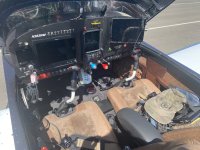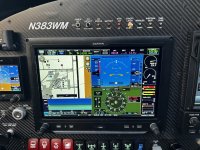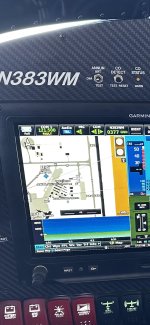
As illustrated on the pic above, I had an issue about a week ago with my #1 comm (top left of G3x screen). You can see it reads that 1215 (emergency frequency) is active, but it also displays the word “FAULT” directly below the frequency.
This occurred on an IFR departure when tower instructed me to contact ATC. I used the frequency swap button on my Tosten stick grip to change frequency to the ATC frequency I had preloaded on the comm.
I’ll skip the detail about how ATC and I figured out there was a problem and how we did a work around in some very crowded airspace in a major metro area and simply get to the take-aways.
After working w Jason at Aerotronics, Figured out that I held down the Freq Swap button too long (2 secs) - which automatically activates the emergency freq (121.5) and LOCKS it in so it cannot be changed UNTIL ONE HOLDS THE FREQ SWAP DOWN FOR ANOTHER 2 SECS. Side note - I should not have held the button down for 2 secs. Likely I did this almost sub-consciously due to a high work load (single pilot IFR departure in IMC, initiating a climbing turn to a VOR whilst avoiding traffic, and then attempting to comply with tower instructions to swap frequencies).
I bold/emphasized the sentence above since this procedure to cure the (inadvertent) swap to 121.5 along with the FAULT message (as opposed to it saying LOCKED) caused a lot stress and kept me from fixing the issue much more rapidly.
Because I saw the FAULT (as opposed to LOCKED) I assumed I had a radio failure . Additionally, ATC was not hearing my transmissions on either 121.5 or my second comm. I ultimately ended up powering down my avionics (killing everything - gps, moving map, comms, Auto-pilot, etc) and restarting them which reset the comms and solved the problem. Not an ideal solution in an IFR situation (I did have my iPad linked to a Sentry so I still had situational awareness).
Skipping so much detail on all this - but, what I wanted to share was mostly these take-aways
1. Be aware you can inadvertently activate 121.5 (emergency freq) and LOCK it on by holding down the Freq Swap button too long (2 secs).
2. If you do this, the message displayed below the frequency does not say “LOCKED”, it reads “FAULT” which may lead you to think as I did. Namely, that there is a problem with your equipment. And, thus lead to less than ideal solution choices.
3. If you do inadvertently activate the emergency frequency, simply push and hold the swap button for a couple secs to deactivate it
4. Lastly, and this is important, apparently if one activates the emergency frequency in this manner, it renders the #2 comm ineffective. I’m still looking into this.
But, I was not able to comm with ATC on my #2 comm. I selected it for both receiving and transmitting to no avail whilst the #1 comm was locked and read FAULT. Side note - I’m note sure why ATC wasnt reading my transmissions on the emergency channel. I can’t be sure, but I believe some Commercial pilots did hear them. And, my transponder still worked - this is how I was able to acknowledge ATC’s instructions (I’d hit the IDENT button to let them know I’d heard their instructions).