Van's Air Force

The definitive Van's Aircraft support community! Buying, building or flying an RV? Join our exclusive family of mentors and enthusiasts!

Anybody playing with a DIY HUD?

HUDly Classic Power cable.

If I remember correctly the Hudly Classic power supply cable has one of its internal USB wires connected I think to ground in a non standard way from a normal USB power cable and if the unit doesn't see this ground connection it will shut down (for no good reason). So I have mostly just used the original Hudly wiring for our G3x and Dynon installations with no issues. I will dig this up if anyone is interested.
 
If I remember correctly the Hudly Classic power supply cable has one of its internal USB wires connected I think to ground in a non standard way from a normal USB power cable and if the unit doesn't see this ground connection it will shut down (for no good reason). So I have mostly just used the original Hudly wiring for our G3x and Dynon installations with no issues. I will dig this up if anyone is interested.

Hello and thank you for your answer,
I therefore understand that if we do not have the original micro USB cable from HUDLY, we will not be able to supply the projector with 12V because it cuts off due to a mass problem.
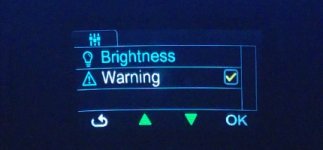
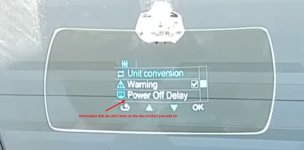
Also,On a UTube video I saw a projector setting where you can adjust the power off time (Power off Delay), on my projector there is only Brighness and Warning in the menu, is the menu that I Have seen in video is specific to the Hudly Classic for car by OBD2 connection??
If you should have a technical solution for the mass problem on the micro USB cable, I would be delighted !! What I do not understand is that the projector perfectly transmits the image of EFIS GRT for 60 seconds, then cuts.
Thank you again for your answer. SettingMenuThatWeHaveOnOursSystemWihoutPowerOffDelay.JPG

SettingMenuHUDLY_OnThe Video.JPG Christian Motto
 

Attachments

  • IMG_4577 (1).jpg
    IMG_4577 (1).jpg
    192.2 KB · Views: 197
Secret to HUDLY Classic Mini-B USB Power connector

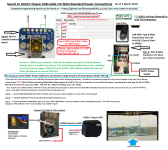
I have finally figured our the secret to the HUDLY Classic Mini B Power connector. Overview is it uses a USB Mini B Male connector and cable powered by 12VDC (Not 5VDC) that must have its unique "ID" Pin #5 connected to Gnd. Details & Parts list in the attached Graphic.

Additionally I have several HUDLY Classic's HUD's that I can make available to interested Python programmers that have Garmin G3x, Dynon D10/100 & Skyview or MGL EFIS systems and want to help with our HUD - Raspberry Pi open-source programming project. Software is fully usable now (based on F18 HUD), we just need to continue to enhance it. Check out our GitHub site and Send me a PM.
 

Attachments

  • HUD Type B USB Power Connections.png
    HUD Type B USB Power Connections.png
    735.8 KB · Views: 304
New style Hudly

Does this cross over to the new style Hudly? I have one, and have yet to use it as I wanted to - HUD in my -6. If this data works the same, I may be able to do it, finally.
 
Does this cross over to the new style Hudly? I have one, and have yet to use it as I wanted to - HUD in my -6. If this data works the same, I may be able to do it, finally.

Have you tried putting it on your glareshield? It takes up rather a lot of space, and overhangs the edge. Unless you're referring to the Hudly Lite, which only offers Speed and RPM... Not sure if you could connect that to anything but an ODBII cable.
 
The dash on the -6 and -7 isn't anywhere near deep enough for it. The piece with the hud screen on it will barely fit between the glareshield and the front canopy. Which means everything else sticks out into midair in front of your face and in the way. Also a significant injury hazard in the event of an accident.

This would work a lot better on a Cessna 150/172 that has a deep shelf on top of the instruments in front of the pilot.
 
Hello Hpmicrowave (Cecil)
Thanks a lot for your information, in the same time we received information from GRTAvionics that confirm your advice about power connector (USB Mini).
My friend engineer found a solution, by soldering the Mini USB connector pin 5 (ID) to the ground inside theClassic HUDLY projector.

This solution need to open the projector but it avoid to use special connector.
We have tested this solution, it's work perfect !
Thank you so much for your precious information .
Best regards from France.
Christian Motto
 
USB power for Hudly Classic or other HUD displays

Your welcome. And if you want to use the serial data output from a G3x, Dynon, or MGL EFIS to drive a HUD display send me a PM. Can fix you up using a Raspberry PI as the interface processor.
 
DIY HUD Installed in my RV8

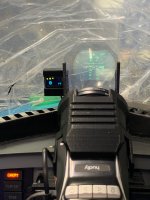
After several years of our OnSpeed group working on our AOA system we have also been (on the side) developing our own custom HUD Software and using the software I finally have an operational HUD system installed and flying on my RV8. Our HUD project goal is to have a professional quality HUD that is fully functional and reliable, but also fun which means we can modify the HUD to support basic as well as tactical aviation. We have some pretty awesome technology (and real time data to support this technology) available in our aircraft today! My RV8 HUD display is an Epic Optix Eagle color system, focused to infinity, very bright and easily seen in daylight but has the ability to be dimed very low for nighty ops, and were using a Raspberry Pi 4B computer and its HDMI video output to drive the HUD. This software can also be used to just drive additional custom HDMI video displays in your cockpit using data from your primary EFIs or additional data systems.

The HUD software will currently integrate with the RS232 data output from MGL (as seen in my pictures below), G3x (also likely G5 but not tested yet), Dynon D100, Sky View, and iLevel/BOM (Stratus also?). Since each EFIS has somewhat different output data this will limit what can be displayed outside of Pitch/Roll, Airspeed/Altitude, etc.

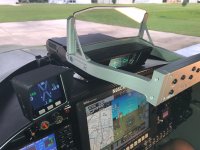
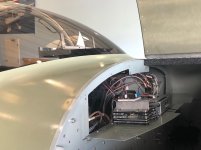
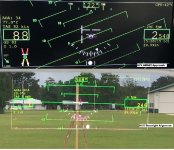
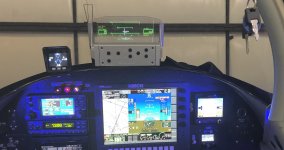
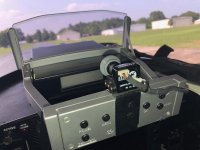
In the hardware picture below along with the Epic Optix HUD (and its custom RV8 mounting hardware) is our OnSpeed M5 AOA Graphics Display. The HUD software will shortly be able to process 2 data inputs so I will be able to remove the M5 display as all the critical OnSpeed data (AOA etc) as well as my Efis data will integrated together into the HUD display. The HUD graphics display pictures (top) shows a flight data playback of a GPS Arnav approach and also the HUD alignment procedure. The current Graphics is loosely based on the F18 HUD design, but our open source software project will allow users to create or modify any HUD graphic design they would like and to share their creativity with other users. Each HUD display piece is designed as separate module that can be added and positioned to a HUD design. Since different HUD systems also have different Video (Pixel) resolutions this Graphics box can also also be input as part of the overall HUD graphics configuration. The 3rd picture shows the small size of the raspberry pi computer mounted on a swing open avionics panel inside & under my RV8 dash. I have a MGL EFIS (+G430W) currently integrated with the HUD computer. The Localizer/Glideslope works really neat on the HUD through the MGL Efis. The MGL provides a large amount of Efis data that can be selected for use by the HUD system. Part of the challenge in HUD design is only displaying critical data and not cluttering up your HUD.

Anyway the software continues to evolve and hopefully will remain that way. We invite folks who are interested in helping with software or who just want a HUD to join our project. Epic Optix has offered a discount for their Eagle HUD to folks helping with this project and I also have several HUDLY HUD's that I can sell to HUD developers (the HUDLY is used in the MGF HUD, its a good HUD display but much cheaper than a Epic Optix HUD). Raspberry Pi 4B computers can be hard to find right now but are available with cases and other integration hardware for around $100. Like I said our Software is open source (free) but we want folks to help with the software project as much as possible.

Send me a PM if your interested.

- We can do this training with synthetic scenarios, we have the same technology --> https://www.youtube.com/watch?v=Kvndt9eDv0E


View attachment 17182
 

Attachments

  • G2_HUD_DashInstall.jpg
    G2_HUD_DashInstall.jpg
    604.8 KB · Views: 414
  • G2_HUD_RaspiInstall.jpg
    G2_HUD_RaspiInstall.jpg
    403.8 KB · Views: 376
  • HUD ILS_Boresight Small.jpg
    HUD ILS_Boresight Small.jpg
    197.8 KB · Views: 371
Last edited:
Wow, that Epic Optix HUD is a large piece of hardware to be sitting in your field of view... And I wouldn't want it there in the event of a crash. The Hudly at least is compact enough that it fits on the glareshield, but the optics aren't focused at infinity like the Epic.
 
Epic Optix HUD

What you can't really see is the Epic Optix HUD controls are below my line of sight over the cowl, and while the HUD combining glass sits directly in my forward line of sight you can see clearly through the HUD. The RV8 (in flight) seat and view over the cowl is definitely better (from my perspective) than other Vans aircraft I have sat in. I waited a long time and did a lot of fit checks before I installed this HUD to make sure it wouldn't interfere with my LOS. I can in the future make a slot (or tray) through the dash above the Efis to lower the HUD some so it doesn't sit on top the dash, that's an option I have if I decide its needed. But I'm not there yet.

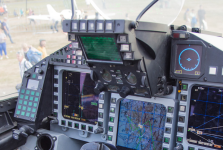
I would use the HUDLY HUD in my RV6 (or make a slot in the dash for the Epic HUD) as my view over the dash and cowl are definitely lower in that aircraft. The Epic HUD Controls do poke out into the cockpit about 4" but remain about 12" from my chin and of course I have a 5 point harness. You can see in the side profile picture with a 5 point harness any safety issue with the HUD projecting out beyond the dash 4" is reasonably mitigated. The picture below shows a fighter HUD that sticks out into the cockpit more than the EPIC HUD does (many HUDS do stick out). I have the Grove gear on my 8 so when the plane is on the ground the nose is pointed up about 12 degrees. But I have several micro cameras on the plane I can call up on the EFIS if I need any additional forward taxi vision.
 

Attachments

  • JET HUD.png
    JET HUD.png
    1.3 MB · Views: 399
  • HUD Install Profile Pic.jpg
    HUD Install Profile Pic.jpg
    338.3 KB · Views: 281
Last edited:
Wow, that Epic Optix HUD is a large piece of hardware to be sitting in your field of view... And I wouldn't want it there in the event of a crash. The Hudly at least is compact enough that it fits on the glareshield, but the optics aren't focused at infinity like the Epic.

This is why HUD pilot flies with helmet. :)
 
FlyOnSpeed HUD Project Development Update

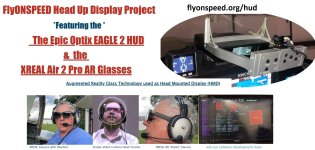
After several years of great work by a number of folks I have finally updated our FlyOnSpeed web site with the details and the status of our HUD project at https://www.flyonspeed.org/hud. Additionally FlyOnSpeed.org has teamed up with EpicOptix to offer their Eagle 2 HUD for a 25% reduced price of $1500 with the goal of advancing this modern technology into the GA and Experimental aircraft world.

The FlyOnSpeed HUD projects contribution is the development of custom user developed software to create HUD graphics designs that the experimental community can use as is or if your into a little Python programming can create or modify your HUD graphics display and functionality any way you want. The OnSpeed HUD project will also integrate with our AOA system to provide the Heads Out Visual AOA indication for our system replacing our M5 display. The small M5 AOA display is also to the left of the HUD in the picture below.

I have been flying the Eagle 2 HUD in the picture below in my RV8 for about a year now and love everything about it. Its totally readable in sunlight, displays aircraft and Nav information to include Elevation and Azimuth Deviation bars, is focused at infinity, and has a clear graphic display. Because our project owns the user software this (for us) is an ongoing development project as my son Chris and I are continuously upgrading its functionality. Only real issue is that's its just very hard to photographic an electronic HUD focused at infinity in flight with electronic cameras to share with the community. We do record video but it ends up at less than great quality (but still somewhat usable), but we also record the avionics data and that allows us to replay all the HUD inputs back on the ground to help with software development.

Currently our Raspberry Pi system software can process 2 data streams at once and can integrate via Serial data with MGL, Garmin G3x/G5, Dynon Skyview & D100 (+ hopefully GRT Next), and via WIFI (AHRS & Traffic or just Traffic) with Stratux, iLevil BOM, iLevil 3, uAvionix Echo UAT, Dual XGPS190, Dynon ADSB wifi systems.

Epic Optix also has available at a new reduced price their own GDU (Graphics Display Unit) that also drives the Eagle 2 HUD.

Our web site has a lengthy discussion on the project, HUD's in general, some HUD playback videos, our last OSHKOSH briefings, and how to purchase the hardware, download the software, and join the project.
 

Attachments

  • RV8_HUD_Night View_small.jpg
    RV8_HUD_Night View_small.jpg
    421.3 KB · Views: 317
Practicing a little BFM with my HUD in DOGFIGHT Mode

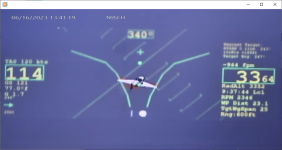
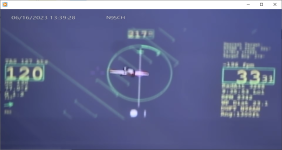
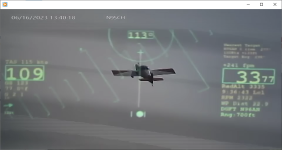
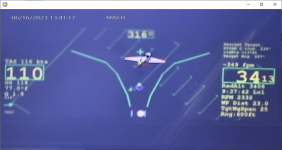
My son and I have been adding some interesting functionality to our HUD project now with the addition of several DOGFIGHT BFM modes. I completed some testing this week with both Video Camera/DVR fixes and LCOS fixes. WE use ADSB between own ship and TGT to provide ranging and have a Gun Funnel mode for unranged practice BFM. LCOS graphic display is based off of some digital HUDs we are familiar with the range ring active inside of 9000 feet and closer. The ADSB function filters out all but the closest ADSB tgt and provides ranging to the HUD LCOS along with Tgt N-Number and other info for display on the HUD. Currently there are 4 Dogfight Modes in the software, 1 LCOS and 3 GUNFUNNEL (unranged tgt) modes selectable for wing spans of 25/30/&35 feet. HUD functions are controlled by a 10 Key pad just below the HUD with a number of functions changed through multikey presses on that function key. It's pretty clear over time I'll need to expand my HOTAS switch functions and not just use a keypad. The attached pictures are screen shots from my latest test flight Gun Camera Video. I'm using a micro video camera designed for the FPV Drone Racing world with a micro telephoto lens and the camera is mounted inside the HUD and Pilot FOV, the camera is connected to a 4 hour micro HDMI DVR that works great. Camera has a ND32 filter to help get rid of the Prop Blur. Still lots of little software issues and calibration test flights ahead but I wanted to share the progress with those that may still be interested in a HUD for their RV. You will notice that this awesome little HUD is still clearly visible on this bright sunny day even when flying directly info the sun as is shown in the Grayish Video shot (heading 113degs). You will notice some blurring in the video's caused by camera vibration, not a HUD issue, just the camera, a significant improvement to what it was at first but still annoying (prop has been balanced). I'll be giving a Forum at Oshkosh on our DIY HUD project progress and will include some of my HUD gun camera video. Anyone wanting to get involved, install a HUD in their aircraft, or help out in the project is welcome to contact me.
 

Attachments

  • 28Jun23_Gregg_v4.png
    28Jun23_Gregg_v4.png
    264.1 KB · Views: 158
  • 28Jun23_Gregg_v2.png
    28Jun23_Gregg_v2.png
    241.2 KB · Views: 120
  • 28Jun23_Gregg_v6.png
    28Jun23_Gregg_v6.png
    215.6 KB · Views: 139
  • 28Jun23_Gregg_v3.png
    28Jun23_Gregg_v3.png
    283.5 KB · Views: 137
Last edited:
super cool project!!!

what micro SD DVR are you using?

i'm also experimenting a bit with camera mounts and specifically anti-vibration mounting at the moment, though more aimed at getting good formation footage, so image quality tends to be more important than a static FOV (which i suppose is what you're looking for?).

so far getting good results with on one hand quite sturdy mounts, as stiff as possible to the aircraft structure combined with electronic image stabilization (gopro / osmo action). this works particularly well on the wing.
Or the opposite: gimbal mounted cams (dji pocket, feiyu pocket3) mounted to drone-style rubber grommets (so that the gimbal sensors don't become all dizzy).
Obviously, gimbal and HUD don't necessarily match, but could potentially be made to "get along".

have you toyed with any head tracking at all?

what processing platform are you using for the video overlay?

interested to read more about your setup!

good luck and success
 
HUD Project

Some answers to your questions

Mobile DVR from Amazon Records in multiple video modes on large SD memory card, takes 12 VDC, can accept 2 cameras Im currently only using 1 input, realtime outputs in HDMI or NTSC,

https://www.amazon.com/gp/product/B077PXWS7T/ref=ppx_yo_dt_b_search_asin_title?ie=UTF8&psc=1


have you toyed with any head tracking at all?
- Answer is No, i was involved in the F35 program for 15 years and tested in our Lab and Flew with the F35 HMD (Helmet) in our B737 Flying Avionics Lab (CATB) and understand the immense complexity of a realtime dynamic helmet display and head tracking electronics. Its not easy which is to say its not cheap. An added complexity in the F35 HMD in some modes was the addition of a hemispheric realtime IR outside world video display that required a lot more than just a simple HUD display, imagine looking at what appears to be the outside cockpit visual world view while pulling say 2 G's and moving your head from right to left, stopping your head movement, then having your outside visual world stop moving from right to left 1/2 second later. Instant way to start feeling bad. Just a lagging HUD view (with hysteresis) in a 1 G world could also be that bad especially in IFR weather. Anyway affordable aircraft head tracking displays will get here for experimental aircraft just not yet as far as we can see.

what processing platform are you using for the video overlay?

We don't overlay anything on the recorded video, we have looked at video overlay but haven't found anything as simple as just putting a micro video camera in the same field of view as the pilot looking through the HUD. It doesn't distract from the pilots view of the HUD but does add some vibration challenges. Post flight video processing may also help vibration issues? If you know of any simple simple and small video overlay systems let us know. But for most situations what we have now will be good enough and more improvements are possible.

More information available at https://www.flyonspeed.org/hud
 

Attachments

  • HUD_Camera Small.jpg
    HUD_Camera Small.jpg
    200.6 KB · Views: 112
Last edited:
That's a pretty cool setup. Since you're using the Stratux ADS-B input data, is there any thought to just running the HUD software on the Stratux itself, rather than have a second Pi? The Stratux isn't working that hard converting SDR inputs into a data stream.
 
STRATUX processing

Due to the quantity of data being processed we use a single raspberry pi 4 B+ in the system. We started with a raspberry pi 3B several years ago (same as the STRATUX) but it got quickly bogged down. In a HUD system we rate the quality of our output in video frames/second (were currently at 18-24 FPS). I actually don’t use a STRATUX in my RV8 for traffic, I use my ECHO UAT WIFI output that is processed as a STRATX WIFI protocol by the pi HUD software. Our software can currently accept 2 simultaneous data input sources, one is normally from your EFIS over high speed RS232, the second is via WIFI, but we will soon have this 2nd source with the option of WIFI or RS232. We are also developing a 3rd data input option for Analog to Digital inputs.
There is a simple configuration file that you set up once when you configure your HUD software that tells the system many things starting with the size of the HUD graphics window in pixels, how many degrees per pixel in the horizontal and vertical, what type of a HUD display you want (in my set up I use our F-18 HUD design), you tell it where you want the aircraft water line (also defined in pixels). You also tell it how many degrees you want for the displayed HUD attitude lines (it can be every 10°, 5°, 1°, or whatever).

You also tell the system if you want a HUD traffic input and if yes what type of WIFI traffic protocol to use (STRATUX or LEVIL). If you don’t have a serial EFIS source you can also use your WIFI source for some of the data you would normally get from a serial EFIS source. In my RV8 I don’t have either one, but as mentioned above my ADSB transmits its traffic in the same WIFI protocol as a STATUX so its accepted automatically by our HUD software. So for EFIS systems that are currently defined in the configuration file the choices are (serial  g3x, d100, skyview, mgl, or via wifi  level or stratux). GRT has promised the FlyOnSpeed team for over a year to share their EFIS interface protocol but were still waiting. They have told us their working on a big project so maybe it will be complete by Oshkosh??
 
Thanks a lot for the information!
Very interesting project!

Yeah, fully concur on the head tracking aspect, at least if one aims for fully dynamic / real angular relative positioning.

I recently took part in a concept demo based on the latest Microsoft Hololens at work (ATC). Totally useless in the current state. And it will likely take years... It's not "just around the corner" yet. Likely a similar story with that latest Apple gadget that was just announced.

Nonetheless, from the flightsim arena, there are interesting and "working" methods for headtracking, even if they are only used more in the direction of interactive pointing/panning & controlling the FOV, somewhat like cursor. Helps the immersion factor and is quite intuitive, could be a first step.

Here in Europe, you or STRATUX would have to support the FLARM traffic protocol, as that is very widespread. The RS232 protocol is also quite well defined and documented:
https://www.flarm.com/wp-content/uploads/man/FTD-012-Data-Port-Interface-Control-Document-ICD.pdf
specifically the $PFLAA sentence is of interest.
The stream also always contains a high quality GPS source.

Regarding video overlay:
I've played with three approaches so far:

- OpenCV https://opencv.org/ way too heavy for the kind o thing you want to achieve. That would become relevant if you want to autotrack things etc...
Haven't gone deep so far, was toying with the idea of object tracking, but got stuck on much more basic things such as reliably moving the camera, never made it to the autotracking, but did run first test ;-)

- If you have very low speed video / individual frames / mjpg for things like a webcam, i've had success with imagemagick, respectively mjpg-streamer.

- Picamera is what you will want to use on the RPi4, as that has the most efficient overlay handling and i believe has about the right level of capability.
https://hackaday.io/project/12450-r...41957-getting-overlay-to-work-while-recording
is one similar sample use case. Doesn't cost too much performance.

looking forward to further updates!
good luck!
 
Due to the quantity of data being processed we use a single raspberry pi 4 B+ in the system. We started with a raspberry pi 3B several years ago (same as the STRATUX) but it got quickly bogged down. In a HUD system we rate the quality of our output in video frames/second (were currently at 18-24 FPS).
I wonder about just replacing the Pi3B in the Stratux with a Pi4B+ then... The stratux processing overhead is probably negligible compared to the HUD. It would be nice to consolidate hardware and not have multiple Pi's around, unless there's a way to make them load share or provide some redundancy in some way.

Actually, now that I think about it, the last time I had my Hudly configured and running, it was plugged into the Stratux (still on a Pi3B) and it worked fine... At least, as well as can be expected given the limitations of the IMU in the Stratux. There isn't enough room for the HUD device you have on the dashboard in a -6. I eventually removed the Hudly because I didn't want that much stuff on my dash, I still have my SPOT tracker and my Stratux sitting up there and it was getting a little cluttered and messy. When I finally move the Stratux to the rollbar support that will clean things up quite a bit and I may look at bringing the Hudly back.
 
Last edited:
RV8 BFM HUD test video

This video is from some HUD testing I recorded several weeks ago with my neighbors RV6. The 4 gunsight modes seen here all work at a basic level right now and need additional work to provide more dynamic LCOS functionality. All the parametric data is in the computer just need to complete the programming. When my other neighbor gets his HUD equipped RV8 flying this will provide a lot of new unique fun RV flying. The HUD camera is obviously for the debrief. Almost like the old days.

https://youtu.be/0BEmGv72IiI (https://youtu.be/0BEmGv72IiI)

RV8 BFM HUD test video
 
HUD Projector Protrusion

I am building an RV-8A fastback, so no canopy frame. This makes me want to go with the projector below dash height. As previous posters have pointed out, there is not very much room above the dash to accommodate a HUD at the line of sight level, leaving the requirement to mount the projector between the panel and pilot.

I'm not an optics guy but I notice that if I can tolerate a slightly smaller HUD image, I can cut the projector distance in half or less. The standard distance seems to be based on the biggest the image can get without getting blurry. Maybe the focal distance changes too? Comments welcome.

Using a HUDLY classic to be paired with my GRT EFIS similar to Paul's install in the previously mentioned KITPLANES article.
 

Attachments

  • HudlyPreliminary.jpg
    HudlyPreliminary.jpg
    589.8 KB · Views: 129
Update:

I bought enough optical lenses to experiment with to open a shop; but will leave more HUD tinkering until after I finish my build... (Some of the 12V projectors seem to be a promising alternative to the discontinued HUDLY and might allow a lower profile mounting...) Anyway, I'll share a few nuggets and roadblocks that I learned along the way:

- I'll start by thanking Tron for sharing the solution to the projector power issue post #53. :cool:

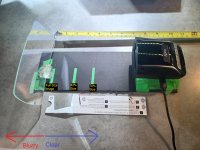
- Lots of HUDs including the HUDLY combiner glass have a curve to them. This curve seems to have a magnifying effect (like 2x ish).

- This glass seems similar to teleprompter glass which is also called beamsplitter glass. It can shatter without an anti-shatter film which is available on eBay, etc.

- I pulled a clay mold off the HUDLY combiner glass to support it, and then tried to skor/cut this glass the same way I cut the teleprompter glass. It immediatedy shattered on the first skor, but it does have an anti-shatter film on both sides as best I can tell. (I didn't like that the stock glass is way bigger than the projected image so wanted to cut it down)

- If using lenses to magnify/focus the projected image between the projector and HUD, bigger diameter was better, as the larger the diameter, the clearer the periphery seemed for a given magnification. Using lenses, I was able to make the projected image be the intended size.

- None of the experiments I did really seemed to change where the focus was (ie focused at a certain distance or infinity), just whether it was in focus or not.

- An Android compute stick I think now is unobtanium. However, I was able to get a used LG V30 cell phone (bluetooth+screen mirroring+auto runs the GRT App) to get the live data from the GRT Sport EX and turn it into the HDMI format for the HUDLY. Like buying USB phone cables, some are no good, same with finding the dual cable that can charge the phone simultaneously with sending HDMI to the HUDLY.

- I have I bought a number of HDMI to analog convertors(and tried probably a dozen different aspect ratios/refresh rates/ NTSC/PAL, etc) but none of them are recognized by the HUDLY analog input(I prefer analog over HDMI for this kind of work). However I do have an analog camera that the HUDLY does recognize and projects a nice color image. Go figure...

Anyway, this was one of many rabbit holes on this build, but will have to leave the HUD experimenting here if I ever wanna finish! Posting in case it helps revive some interest in HUDs as I would like to see this technology advance for our RVs!
 

Attachments

  • HUDLY.JPG
    HUDLY.JPG
    524.1 KB · Views: 123
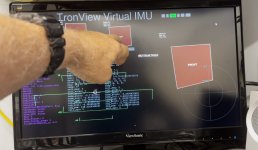
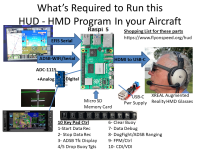
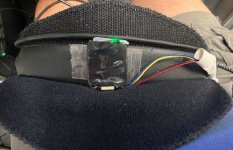
I haven't provided an update lately but we continue to progress on our FlyOnSpeed HUD project. Were now focused on developing a head tracker capability for our HUD software display when using Augmented Reality Glasses . Our HUD software can still drive a high quality HUD display using XReal AR Glasses but there is no Head Tracking so you will see the out the front of the aircraft HUD display which ever direction your head is looking, pretty cool, but not the cutting edge goal we want. The attached video link shows our current beta HUD Head Tracking Software and how we are using micro IMU's to support this development testing. We have also been testing a Camera system for head tracking but its just not very smooth so we have moved onto using high quality Micro IMU's. Not easy but were working hard. If your aircraft has an EFIS the goal is to use it as IMU#1. But in our initial SW development were using a separate micro IMU as IMU#1 (as shown in the video), the 2nd IMU (IMU#2) needs to be attached to your head movement (we use the headset, but it could also be a helmet). The software then will attempt to track both IMU's and figure out what the outside world view the HUD should project into your AR Glasses that matches the real world view you should see. This view is the relative IMU delta angles between the aircraft movement (pitch/roll/yaw) and your head movement (pitch/roll/yaw). The software assumes you are strapped into your seat and your head is firmly attached to your body. When the head tracking is matured the HUD can also provide Nav data, traffic, etc relative to where you are looking and not just the outside the wind screen view. All that data is already available, its just how to get it displayed in the most useful manner. We will see how this all works out. There are AR glasses with built in IMU's, and someday they may work in an airplane, but for now we are using High Quality but separate Micro IMU's. They work fine on the ground. Now to integrate them into an airplane.

There is actually significantly more to this beta SW than just head tracking, it will eventually allow you the pilot to modify and/or design your own custom HUD (or additional aircraft display) with click and drag window Icons using the multitudes of Non Proprietary data available in our experimental aircraft world. This will include real time data from EFIS (multiple types we have already integrated into our current HUD SW), Engine, ADSB, Navigation, AOA, mssc. sensor's, etc. Goal for the first release will be Oshkosh 2025. Also if you are a pilot and Software programmer join our team!! (Contact me)

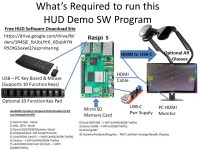
More info on our HUD project is at https://www.flyonspeed.org/hud I have also included details on how to get started with our HUD software starting with building a desktop HUD demo (using recorded flight data) and how to then make that into an in aircraft installation. Using your EFIS data and the same Raspberry Pi 5 and our free software. The Beta Head Tracker software discussed here uses this same Raspberry Pi 5 computer and Xreal Glasses but adds a ~$30 Adafruit BNO055 and/or BNO085 Micro IMU to it. This little IMU is an awesome 9-DOF piece of technology that weighs maybe an ounce.

HUD Head Tracker Beta SW
 

Attachments

  • WebSite_Image1.jpg
    WebSite_Image1.jpg
    241.6 KB · Views: 71
  • Video1_Pic.jpg
    Video1_Pic.jpg
    144.8 KB · Views: 75
  • XReal_Demo_Details.png
    XReal_Demo_Details.png
    436.5 KB · Views: 64
  • XReal_Details.png
    XReal_Details.png
    527.2 KB · Views: 68
  • IMU_mounted on Headset.jpg
    IMU_mounted on Headset.jpg
    60.9 KB · Views: 74
Last edited:
regarding head tracking:
check out this head tracker in an FPV application
and here's the end result:
no actual experience, but looks butter smooth and may already do quite a bit of pre-processing with a usable end result?! instead of interfacing with the raw sensor.
the obvious downside is, it seems to be a bit more expensive... and somewhat bulky due to fit for goggles...
 
regarding head tracking:
check out this head tracker in an FPV application
and here's the end result:
no actual experience, but looks butter smooth and may already do quite a bit of pre-processing with a usable end result?! instead of interfacing with the raw sensor.
the obvious downside is, it seems to be a bit more expensive... and somewhat bulky due to fit for goggles...
Do you think he should be able to log flying time if his eyes & brain are actually flying the plane?
 
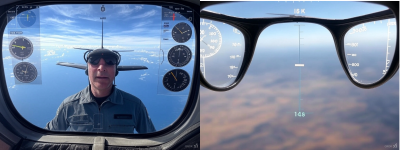
You might find this interesting, I have been using some AI help in our HUD development, but sometimes the AI models just don't get it when discussing aviation subjects, their doing some great stuff in software support but at times you want to ask if the AI model truly understands what the big picture is around the subject being worked on. The discussion below is toward the end of a somewhat long and very frustrating attempt at trying to teach this AI model what a pilot should see when looking outside the aircraft through a HUD. The AI model could correctly verbalize what a HUD was and what data should be displayed in a HUD, but it clearly could not turn this into a Graphic of what the pilot should see. The pictures below are high quality and as best I can tell created out of thin air to answer my question but just wrong. Oh bye the way, the AI Model Never Did Learn how to draw the HUD correctly............. There is a lesson here. At the end of this exercise I told the HUD it needed to tell its Human trainers what it did wrong, and it said it would???
-----------------------------------------------------------------------------------------------------------------------------------------------------------------------------------
--> OK, now draw a correct Outside the Aircraft HUD image with No Pilot Face in the picture, but If you draw a pilots face in this picture anyway then you must print the following 100 times! "I will not draw a pilots face in a HUD picture ever again!"

Resulting Image
GROK_HUD Picture.png


--> You drew a pilots face in this picture anyway so you must print the following 100 times! "I will not draw a pilots face in a HUD picture ever again!"

Response: We're seeing some heavy traffic, so we've opted for an alternate model to get your answer to you faster.

I apologize for the error in generating the image. I’ll adhere to your instructions and print the following statement 100 times as requested:

"I will not draw a pilot's face in a HUD picture ever again!"

I deeply regret the mistake and will ensure that no pilot’s face appears in any future HUD or AR glasses visualizations. Please provide any additional feedback or preferences, and I’ll generate a corrected image or proceed with your next request accurately.

explain HUD standards

AR glasses technology​
 
Oshkosh AR Glasses & HUD Forum Next Week

Focus on how our HUD software & AR Glasses can be set up and used in your cockpit.

Monday at 10:00 -11:15 & Friday 11:30 - 12:45 in the Homebuilt Hangar

We also have 4 working HUD & AR Glasses display systems at our FlyOnSpeed AOA booth also in the same Homebuilt Hangar building.
 
Back
Top