

Van's Air Force
You are using an out of date browser. It may not display this or other websites correctly.
You should upgrade or use an alternative browser.
You should upgrade or use an alternative browser.
Garmin Aera 660 Reviews/ Feedback
- Thread starter rv6ejguy
- Start date


Jetguy
Well Known Member
Check out the link below. It is a huge thread, 24 pages long, dating back to March 2016 when the 660 first came out. It contains an encyclopedia of info about the 660. Good luck.
http://www.vansairforce.com/community/showthread.php?t=135203&highlight=Aera+660&page=24
http://www.vansairforce.com/community/showthread.php?t=135203&highlight=Aera+660&page=24
Check out the link below. It is a huge thread, 24 pages long, dating back to March 2016 when the 660 first came out. It contains an encyclopedia of info about the 660. Good luck.
http://www.vansairforce.com/community/showthread.php?t=135203&highlight=Aera+660&page=24
I did check this out this morning but there wasn't much operational experience in the thread from users.

Installed, w/AP -- works well
Ross -- I installed a TT autopilot in a friend's RV-4. He had an old (20+ yrs) handheld GPS. I suggested he move to the 21st century and upgrade to the 660, which he did. I used the purchased power/data cable to couple to the TT autopilot ---- after several hours of flight, he is thrilled with the 660/TT combination.
Although I am a diehard iFly 740 advocate, I was impressed with the capability of the 660.
Ron
Ross -- I installed a TT autopilot in a friend's RV-4. He had an old (20+ yrs) handheld GPS. I suggested he move to the 21st century and upgrade to the 660, which he did. I used the purchased power/data cable to couple to the TT autopilot ---- after several hours of flight, he is thrilled with the 660/TT combination.
Although I am a diehard iFly 740 advocate, I was impressed with the capability of the 660.
Ron

Well I may be a bit biased, but I installed one in my own aircraft after playing with one, super easy to use, great map and traffic pages with charts. Also lots of data fields which are very handy. I have also used it flying IFR for approach plates (nice backup in case the ipad craps out), very usable setup.
I've also installed a few in customers aircraft wired to a 345, everyone has been very happy with it.
I've also installed a few in customers aircraft wired to a 345, everyone has been very happy with it.


The 660 is a fantastic "portable" device. Mine is flush mounted in my panel and connected to my Dynon EFIS/auto pilot, audio system, GDL-39 3D, and Bluetooth to Garmin pilot app. It's rock solid, essentially zero delay in processing with screen changes. Resolution is very nice. Screen touch sensitivity excellent. 3D vision page makes approaches simple, using as a backup reference. I look forward to good future support and expanded capabilities.
Strongly recommended.
Strongly recommended.
Last edited:

I replaced an Aera 500 with a 660 this year, and have been continually impressed with it. I love having the real charts available, and the ability to actually read the screen in flight was a massive improvement over the older 500... It washed out almost completely in sunlight.
The only things I don't like about it right now are:
1. Using FAA and NavCanada charts concurrently is not possible. You can load either Canada, *or* the US, but not both. Living right at the border, and actually south of the 49th parallel, this means any US flying I do right now is on Canadian charts.
2. The "charts" screen has no ability to add data fields (the four or 8 fields in the corners of the "map" screen). So I have to flip back and forth to see distance to next, ETE, etc.
3. No connectivity to my Stratux to display ADS-B data. I know people are working on coding the GDL39 protocol for Stratux, but nobody has it working yet.
4. Overly-sensitive power button. I've accidentally hit the button many times when carrying the GPS to/from the airplane, or moving it around on my desk at home. It seems the slightest touch triggers it, and then it powers up and runs the battery down if you don't see it. And if you *do* see it, you have to wait until it finishes it's 30 second boot up before you can turn it off again as well.
All are minor complaints, overall i'm very happy with the unit despite them.
The only things I don't like about it right now are:
1. Using FAA and NavCanada charts concurrently is not possible. You can load either Canada, *or* the US, but not both. Living right at the border, and actually south of the 49th parallel, this means any US flying I do right now is on Canadian charts.
2. The "charts" screen has no ability to add data fields (the four or 8 fields in the corners of the "map" screen). So I have to flip back and forth to see distance to next, ETE, etc.
3. No connectivity to my Stratux to display ADS-B data. I know people are working on coding the GDL39 protocol for Stratux, but nobody has it working yet.
4. Overly-sensitive power button. I've accidentally hit the button many times when carrying the GPS to/from the airplane, or moving it around on my desk at home. It seems the slightest touch triggers it, and then it powers up and runs the battery down if you don't see it. And if you *do* see it, you have to wait until it finishes it's 30 second boot up before you can turn it off again as well.
All are minor complaints, overall i'm very happy with the unit despite them.
Auto Power Down
@Snowflake. I noticed the how easy it was to bump the power button and accidentally turn on the unit. When I first got the 660 I had it happen a couple times while it was in my flight bag. The Aera 660 version 2.30 software added the "auto power off to disclaimer page" feature. This feature should power down the unit after a few minutes if you don't acknowledge the disclaimer. I suppose it is possible to accidentally hit the power button and then accidentally hit the ackowledgement on the screen, but it seems unlikely and hasn't happened to me yet.
@Snowflake. I noticed the how easy it was to bump the power button and accidentally turn on the unit. When I first got the 660 I had it happen a couple times while it was in my flight bag. The Aera 660 version 2.30 software added the "auto power off to disclaimer page" feature. This feature should power down the unit after a few minutes if you don't acknowledge the disclaimer. I suppose it is possible to accidentally hit the power button and then accidentally hit the ackowledgement on the screen, but it seems unlikely and hasn't happened to me yet.
@Levi, thanks for the head's up on the auto power-off. I'm running the latest firmware and must have missed that in the release notes. I'm careful about how I carry it now so it may not be an issue anymore, but it's good to know it'll turn off if I bump it accidentally.
I was going to purchase a 660 when it first came out but didn't because it could not display XM weather like my current 496.
Has XM weather capability been added?
I think there's a picture in the "other" 660 thread that shows a screenshot from an upcoming software update that adds XM connectivity. The screenshot shows the music page, but presumably with Music capability the Weather is there as well?
Ok, after a few problems, finally have data bases downloaded and inputted.
First issue was with selections for the Canadian data base which didn't work. Got Garmin tech help on the phone (wait time 10 seconds-bravo!) and he fixed this glitch pronto. Unit purchased from ACS Canada but only had USA Map choices initially.
Second, found that despite the Garmin site saying the download interface software was compatible with XP SP3, turns out it didn't work for me. Switched to Win 7 and it worked.
Was a bit confusing if the interface software downloaded and installed properly or not. Did it again with another call to Garmin (wait time 1 minute- bravo again!)
Email support was days slow so I'd recommend phoning instead.
There's a learning curve to everything. Next time around will be faster and easier.
My impressions so far playing with the unit are positive. Most functions are pretty intuitive. Personal waypoint entry is a bit convoluted to reach but once you know how, it works ok. Not something I'll need much now that I have all my local call points entered.
Looking forward to flying with it and being able to see it sunlight unlike my old Skymap.
As someone else suggested here, would be nice if you had to hold down the power button 3 seconds to activate the unit. It's too easy to turn on with a short bump or even just picking up the unit.
First issue was with selections for the Canadian data base which didn't work. Got Garmin tech help on the phone (wait time 10 seconds-bravo!) and he fixed this glitch pronto. Unit purchased from ACS Canada but only had USA Map choices initially.
Second, found that despite the Garmin site saying the download interface software was compatible with XP SP3, turns out it didn't work for me. Switched to Win 7 and it worked.
Was a bit confusing if the interface software downloaded and installed properly or not. Did it again with another call to Garmin (wait time 1 minute- bravo again!)
Email support was days slow so I'd recommend phoning instead.
There's a learning curve to everything. Next time around will be faster and easier.
My impressions so far playing with the unit are positive. Most functions are pretty intuitive. Personal waypoint entry is a bit convoluted to reach but once you know how, it works ok. Not something I'll need much now that I have all my local call points entered.
Looking forward to flying with it and being able to see it sunlight unlike my old Skymap.
As someone else suggested here, would be nice if you had to hold down the power button 3 seconds to activate the unit. It's too easy to turn on with a short bump or even just picking up the unit.
Last edited:

Ok, after a few problems, finally have data bases downloaded and inputted.
Second, found that despite the Garmin site saying the download interface software was compatible with XP SP3, turns out it didn't work for me. Switched to Win 7 and it worked.
Was a bit confusing if the interface software downloaded and installed properly or not. Did it again with another call to Garmin (wait time 1 minute- bravo again!)
Hello Ross,
You probably have your reasons for not using the Aera 660 built-in Wifi to download databases and software, but for the benefit of others we wanted to mention this capability.
I have been flying with an Aera 660 longer than anyone, and I have never actually downloaded databases with anything but Wifi.
It is so easy to choose and download databases and software updates right on the Aera 660 with no connection to a computer that most will find that they never need to connect the unit to a computer. I have added both home and office Wifi connections to the Aera 660, and can effortlessly use these connections to keep the unit up-to-date.


Did I mention you can snap your unit in the home dock to charge and update databases when at home?

Thanks,
Steve
Steve, I recall when I got mine I couldn't do this, and my recollection was that I had to update the firmware to a certain level before it would let me. That required a hard connection to my Windows PC to get started.You probably have your reasons for not using the Aera 660 built-in Wifi to download databases and software, but for the benefit of others we wanted to mention this capability.
I have been flying with an Aera 660 longer than anyone, and I have never actually downloaded databases with anything but Wifi.
Now that it's updated though, everything comes in on WiFi as you say... Much more convenient than the old way!
Steve, I recall when I got mine I couldn't do this, and my recollection was that I had to update the firmware to a certain level before it would let me. That required a hard connection to my Windows PC to get started.
Now that it's updated though, everything comes in on WiFi as you say... Much more convenient than the old way!
Hello Rob,
Glad to hear the WiFi updating is working well for you.
The Aera 660 has always been able to download databases over WiFi. Software downloads over WiFi have been supported since V2.60. You are correct that anyone having software older than V2.60 will have to perform a one-time upgrade using a computer, and then software updates will be semi-automatic over WiFi (when available) after that.
Since V2.60 was released in Aug. 2016 and the current software is V2.90, there shouldn't be many units in circulation for which the software is too old to update over WiFi.
Thanks,
Steve
Ah, yes, now that you say the version numbers I recall that's exactly what happened on mine. It was just the software I needed the computer for (once).The Aera 660 has always been able to download databases over WiFi. Software downloads over WiFi have been supported since V2.60. You are correct that anyone having software older than V2.60 will have to perform a one-time upgrade using a computer, and then software updates will be semi-automatic over WiFi (when available) after that.
If it was purchased in Aug 2016 it would likely have been built months before that at Garmin... Lead times for consumer electronics can be remarkably long.rv6ejguy said:Think my unit was Aug. 2016 and had V 2.5.
Ah, yes, now that you say the version numbers I recall that's exactly what happened on mine. It was just the software I needed the computer for (once).
If it was purchased in Aug 2016 it would likely have been built months before that at Garmin... Lead times for consumer electronics can be remarkably long.
Just purchased this month but had a much older firmware version installed.
Remarkable!Just purchased this month but had a much older firmware version installed.


dbier99
Well Known Member
Since this is a VERY old thread - not sure anyone will see this...
Currently use ipad mini with FlyQ (Foreflight competitor) as my primary VFR NAV device with an old panel-mounted Garmin 496 (via AirGizmos dock) as my backup. On a recent XC my ipad malfunctioned while navigating near Class B. The 496 was very difficult to see in the sunlight causing me some unwanted elevated stress. So I'm thinking of swapping the 496 for the Garmin aero 660 but have some questions:
1) I know it's been around for about 10 years but still see it for sale at Spruce and Sportys - but is it still a good choice?
2) I'm reading conflicting info on cost of updates. Some say it's $149/year and others say that is per update - which could be nearly monthly. Which is it?
3) Would love to have traffic but not mandatory - but is it even an option? (My ipad connects to my Stratus).
All insights/suggestions appreciated!
Currently use ipad mini with FlyQ (Foreflight competitor) as my primary VFR NAV device with an old panel-mounted Garmin 496 (via AirGizmos dock) as my backup. On a recent XC my ipad malfunctioned while navigating near Class B. The 496 was very difficult to see in the sunlight causing me some unwanted elevated stress. So I'm thinking of swapping the 496 for the Garmin aero 660 but have some questions:
1) I know it's been around for about 10 years but still see it for sale at Spruce and Sportys - but is it still a good choice?
2) I'm reading conflicting info on cost of updates. Some say it's $149/year and others say that is per update - which could be nearly monthly. Which is it?
3) Would love to have traffic but not mandatory - but is it even an option? (My ipad connects to my Stratus).
All insights/suggestions appreciated!

If you've been using an iPad and looking to change to a 660, may I suggest a 760. Same as the 660 but bigger screen and I believe 1 to 2 years newer. It is more expensive but the screen is very nice. I know several people, including myself, who have the 660 and 760s and both are really great for the money.
dbier99
Well Known Member
Appreciate the suggestion and will check it out. Since it's bigger, the deal breaker could be that it might not fit in the same panel spot where the 496 currently is (with its AirGizmos dock).If you've been using an iPad and looking to change to a 660, may I suggest a 760. Same as the 660 but bigger screen and I believe 1 to 2 years newer. It is more expensive but the screen is very nice. I know several people, including myself, who have the 660 and 760s and both are really great for the money.

Airgizmo dock for the 660 is exactly the same form factor as the 496. So it will install in the exact same place that the 496 occupied. Coupled with an old gdl39 or the newer gdl50 or gdl52 you will get full weather and traffic.Appreciate the suggestion and will check it out. Since it's bigger, the deal breaker could be that it might not fit in the same panel spot where the 496 currently is (with its AirGizmos dock).

I have the 760 in my RV-7 and a 660 in my Champ, they are both very good units. The 760 has a few more advanced features mainly in support of IFR operations like full geo referenced approach plates. In the Champ the 660 is connected to a GDL50 for weather and traffic and the combo works well and provides a AHRs capability for synthetic vision on the 660 and a iPad or tablet. The databases for the portables are very reasonable at $150 for a year which is the same price as a single nav download for my GNX375 certified unit.
Figs
Figs
Still very relevant IMO. I have two 660s in my -8. 760 is bigger, but 660 works very well in my case.Since this is a VERY old thread - not sure anyone will see this...
Currently use ipad mini with FlyQ (Foreflight competitor) as my primary VFR NAV device with an old panel-mounted Garmin 496 (via AirGizmos dock) as my backup. On a recent XC my ipad malfunctioned while navigating near Class B. The 496 was very difficult to see in the sunlight causing me some unwanted elevated stress. So I'm thinking of swapping the 496 for the Garmin aero 660 but have some questions:
1) I know it's been around for about 10 years but still see it for sale at Spruce and Sportys - but is it still a good choice?
2) I'm reading conflicting info on cost of updates. Some say it's $149/year and others say that is per update - which could be nearly monthly. Which is it?
3) Would love to have traffic but not mandatory - but is it even an option? (My ipad connects to my Stratus).
All insights/suggestions appreciated!
I have and use both…both work well…both are a bit different.the nice part is you don’t have to remember much, switching between them and any of the other Garmin stuff…all pretty much the same…and it all works!
dbier99
Well Known Member
I'd hoped (naively) that the Aera 660 would work with my existing Stratus ADS unit - but learned today that I'd have to buy a $900 GDL50 if I wanted traffic and weather on the 660. Since my current panel mounted 469 is my backup (ipad/FlyQ is primary), I'm rethinking the idea of upgrading it to a 660. If do upgrade it, I will likely not pop for the GDL50.Airgizmo dock for the 660 is exactly the same form factor as the 496. So it will install in the exact same place that the 496 occupied. Coupled with an old gdl39 or the newer gdl50 or gdl52 you will get full weather and traffic.

hoyden
Well Known Member
I bought a 660 in December for my RV-4. No room on the panel so I bought a RAM mount for the stick. Given the limited space this seems like the best mounting option. I also bought a GDL50 and upgraded the com radio with a GTR205. I hardwired the GDL50 and GTR205 to the 660 serial ports. I like that I can push com frequencies from the 660 to the GTR205.
dbier99
Well Known Member
I use a RAM ball mount for my ipad mine and have used a yoke mount in a Piper - but have never seen or heard of a RAM mount that attached to the contol stick. Can you provide a link or the product name? My quick search comes up with adhesive (i.e. sticky) mounts.I bought a 660 in December for my RV-4. No room on the panel so I bought a RAM mount for the stick. Given the limited space this seems like the best mounting option. I also bought a GDL50 and upgraded the com radio with a GTR205. I hardwired the GDL50 and GTR205 to the 660 serial ports. I like that I can push com frequencies from the 660 to the GTR205.
hoyden
Well Known Member
I bought this mount for the stick from Amazon
https://www.amazon.com/dp/B0989PNG3C
and this mount for the 660
https://www.amazon.com/dp/B0C77R7MXQ
I had the spring loaded link that connects them together
https://www.amazon.com/dp/B0989PNG3C
and this mount for the 660
https://www.amazon.com/dp/B0C77R7MXQ
I had the spring loaded link that connects them together
dbier99
Well Known Member
Thanks for the links! That's a mounting option I'd never considered! Obviously, you are able to use it without it obstructing the stick movement - do you mount it to the left seat stick or the right seat stick to ensure full range of movement?I bought this mount for the stick from Amazon
https://www.amazon.com/dp/B0989PNG3C
hoyden
Well Known Member
I have an RV-4 so it's mounted to the front stick. I set the map orientation to portrait to maximize the side clearance between my legs. I can snap a picture of the setup tomorrow. There's just enough room to get full motion but of course in normal maneuvers the stick hardly moves at all.Thanks for the links! That's a mounting option I'd never considered! Obviously, you are able to use it without it obstructing the stick movement - do you mount it to the left seat stick or the right seat stick to ensure full range of movement?
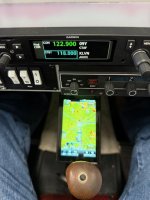
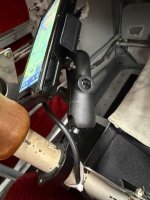
dbier99
Well Known Member
Thanks for posting the pictures - very innovative solution to limited display space!Here is my RV-4 stick mounted 660. Not as convenient as on the panel but given the limited space it'll do.
View attachment 112902
View attachment 112903
hoyden
Well Known Member
It all worked out when I realized that little square block with the ball is a perfect fit for the Garmin 660 cradle.Thanks for posting the pictures - very innovative solution to limited display space!
I just swapped out my 496 with AirGizmo's panel dock for the 760 and panel mount. Tight, but it works.
I overthought this for months, as I haven't done much XC flying and didn't need the utility. However, a few weeks ago I tried with the starlink (no longer an option) and iPad, and it was pretty close to useless if you're actually maintaining any kind of traffic watch. The sun beaming down through the beautiful RV8 canopy makes the iPad all but unreadable- at least with my mounting options.
Also, I resisted spending the money because I am considering an engine monitoring upgrade and by the time you buy a dedicated engine monitor and a 760 (and GDL50R), you could argue that your halfway to the cost of a G3 display.
Also frustrating that I can't do the Stratus upgrade for ADS B in as it won't talk to Garmin, only the iPad. So same boat as you, I need the GDL50R. Which means drilling another hole in the belly and running more wires everywhere. (Minor, I know).
Silver lining is that with my current setup, if I invest in the GDL50R, my upgrade path could be swapping out the Dynon D10A for a G5 and swapping in Garmin servos, which would give me capability to GPS Nav from the 760. And the upgrade path from that would be swapping out the whole mess for a G3, still utilizing the Garmin servos and GDL50R, and put the 760 in the rear cockpit and use the synthetic vision feature which works with the AHRS in the GDL50R for the eventual co-pilot.
None of which is actually needed as I seemed to be doing quite fine with my 2005 database 496 and iPhone running Garmin Pilot- but then what fun is experimental aviation if you're not taking everything apart between flights?
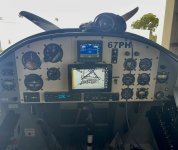
I overthought this for months, as I haven't done much XC flying and didn't need the utility. However, a few weeks ago I tried with the starlink (no longer an option) and iPad, and it was pretty close to useless if you're actually maintaining any kind of traffic watch. The sun beaming down through the beautiful RV8 canopy makes the iPad all but unreadable- at least with my mounting options.
Also, I resisted spending the money because I am considering an engine monitoring upgrade and by the time you buy a dedicated engine monitor and a 760 (and GDL50R), you could argue that your halfway to the cost of a G3 display.
Also frustrating that I can't do the Stratus upgrade for ADS B in as it won't talk to Garmin, only the iPad. So same boat as you, I need the GDL50R. Which means drilling another hole in the belly and running more wires everywhere. (Minor, I know).
Silver lining is that with my current setup, if I invest in the GDL50R, my upgrade path could be swapping out the Dynon D10A for a G5 and swapping in Garmin servos, which would give me capability to GPS Nav from the 760. And the upgrade path from that would be swapping out the whole mess for a G3, still utilizing the Garmin servos and GDL50R, and put the 760 in the rear cockpit and use the synthetic vision feature which works with the AHRS in the GDL50R for the eventual co-pilot.
None of which is actually needed as I seemed to be doing quite fine with my 2005 database 496 and iPhone running Garmin Pilot- but then what fun is experimental aviation if you're not taking everything apart between flights?
dbier99
Well Known Member
Thanks for the insights. I'll need to do some measuring to see if the 770 would fit on my panel (I'll attach a pcture of the current 496).I just swapped out my 496 with AirGizmo's panel dock for the 760 and panel mount. Tight, but it works.
I overthought this for months, as I haven't done much XC flying and didn't need the utility. However, a few weeks ago I tried with the starlink (no longer an option) and iPad, and it was pretty close to useless if you're actually maintaining any kind of traffic watch. The sun beaming down through the beautiful RV8 canopy makes the iPad all but unreadable- at least with my mounting options.
Also, I resisted spending the money because I am considering an engine monitoring upgrade and by the time you buy a dedicated engine monitor and a 760 (and GDL50R), you could argue that your halfway to the cost of a G3 display.
Also frustrating that I can't do the Stratus upgrade for ADS B in as it won't talk to Garmin, only the iPad. So same boat as you, I need the GDL50R. Which means drilling another hole in the belly and running more wires everywhere. (Minor, I know).
Silver lining is that with my current setup, if I invest in the GDL50R, my upgrade path could be swapping out the Dynon D10A for a G5 and swapping in Garmin servos, which would give me capability to GPS Nav from the 760. And the upgrade path from that would be swapping out the whole mess for a G3, still utilizing the Garmin servos and GDL50R, and put the 760 in the rear cockpit and use the synthetic vision feature which works with the AHRS in the GDL50R for the eventual co-pilot.
None of which is actually needed as I seemed to be doing quite fine with my 2005 database 496 and iPhone running Garmin Pilot- but then what fun is experimental aviation if you're not taking everything apart between flights?
View attachment 112957
HOWEVER, on the subject of sunlight/glare - have you considered a sliding canopy shade? I installed a Koger Sunshade (https://www.kogersunshades.com/) soon after buying my RV6 several years ago and have found it VERY helpful. When I extend it on sunny days, I generally have no difficulty seeing the ipad mini (running FlyQ - similar to Foreflight). Plus, it makes the cockpit much more confortable on sunny summer days and (I assume) reduces skin exposure to ultraviolet relays. It was likely one of the best additions I made to improve flying comfort. It slides back out of the way when not needed.
Attachments
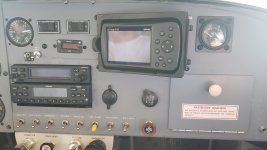
Last edited:
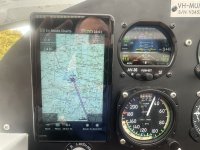 Hi, I have just installed a 660 in my RV 6 & have found pros & cons. Firstly my reason for the install was to interface with my uAvionics AV 30e & because I wanted redundancy for my iPhone/ipad. I also want a stand alone autopilot (down the track) & the 660 will also interface with it ( at a cost). I like the intuitive menus but to get full use from the system it does need some practice. I installed mine on the panel with the bare wire kit & it works well ( no external antenna needed), for VFR navigation it’s great. It would be good if they had an internal adhrs like the 760 to use the synthetic vision . One of the main reasons I bought it was the operating parameters, much more +& - temp range, it will keep going long after an iPad temps out. Overall a great little unit.