Van's Air Force

The definitive Van's Aircraft support community! Buying, building or flying an RV? Join our exclusive family of mentors and enthusiasts!

3D printed throttle handle with switch

dmn056

Well Known Member
Sponsor
I'm installing a DJM two lever throttle quadrant in my RV-8. I wanted to slightly extend and modify the throttle handle shape, and to incorporate a flap switch in it. I drew up the new handle using Freecad, with a cutout to match a three-position switch https://www.digikey.com.au/en/products/detail/e-switch/RRG31C31100/3778127. The switch clips into place and is held by the cutout edge.
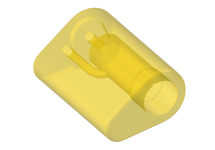
fig01.png fig02.png

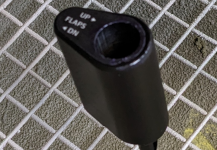
Printed the handle on a Bambu P1S, using Bambu PPA-CF filament. Laser printed a dry rub-on transfer flap switch label and applied it to inboard end of handle. Then sprayed handle and label with epoxy matt clear coat. Came out fairly well, better than my photography capabilities can show.
fig03.png fig04.png
I thought about just having a flying lead from the outboard end of the handle for the flap wiring, but eventually decided to re-make the throttle lever with a conduit down the aft edge, taking the wiring through the quadrant and its mount. The handle's STL file is attached.
 

Attachments

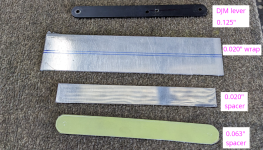
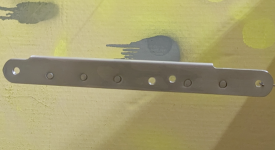
A couple of pictures, not very good ones. Started with DJM lever as a template. It's 0.125" thick, so made up a laminated one the same shape, using a mixture of 0.020" and 0.063". This gives a conduit internal width of about 0.083", which is plenty for the 26AWG wires I used. Cut the two inner spacers to match the DJM shape and finished edges, particularly careful with the aft edges which form the front face of the conduit down which the wires run.

fig01.png

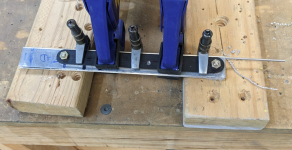
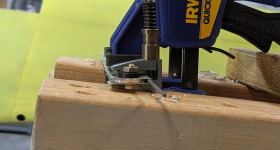
Bent the outer wrap a bit over 90deg on a brake, then completed the bend to 180deg using MS20253 hinge pin to form the conduit shape. Clamped the laminate together and match drilled from DJM lever.

fig02.pngfig03.png

Drilled and reamed #40 five places along lever through laminate, for riveted assembly. Disassembled laminate, cleaned, deburred and edge finished all pieces and holes as necessary. Microstop countersank rivet holes both sides of 0.063" spacer. For other components, only 0.020" thick, dimpled to nest in countersinks. Dimpling the external piece required close quarters dies, and even then was a tight fit. However, after dimpling all parts nested together well. Double flush riveted through laminate five places, using MS20426AD3-4.5 rivets. Not the best double flush riveting I've ever done, but safe enough. Cleaned up edges of assembly, cutting back the conduit down aft edge to clear handle on top and pivot at bottom. Primed and painted matt black.

fig04.png
 
I'm thinking about doing something like this to incorporate a dedicated comm #2 PTT in the end of the handle and to offset the handle 30 degrees for a more comfortable hand position.

Dan, do you have any more pics of the installed throttle, cable routing etc?
 
Looks great, how did you make the white decal again?? BTW I know how hard that is to do, at least for me!
 
Dan, do you have any more pics of the installed throttle, cable routing etc?
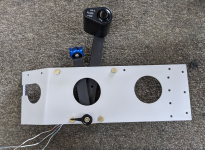
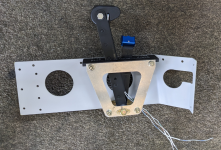
Here are a couple of pictures of the assembled throttle quadrant. Assembly sequence was important, had to attach the handle to the lever before inserting the wires and the switch.

fuselage_2026-01-23_05.png

The wires (3 of 26AWG, taken from a bit of leftover Ray Allen 5-core wire) run out of the handle from hole aft of bolt and lever, then down rear of lever. They come out of lower end of lever well clear of both pivot point and adjacent structure. I'm going to use a very small and light Molex 3-contact connector (part nos 39014036 + 39000041, 39014030 + 39000039) at this point. The wires run outboard to the side skin and forward through a spare hole in the LG aft bulkhead before joining the main cable assembly in the LG box. They are supported against the skin by two adhesive cable tie mounts, since the loads should be very light. No pictures of those wires.

fuselage_2026-01-23_04.png

Looks great, how did you make the white decal again?? BTW I know how hard that is to do, at least for me!

Yes, it was hard for me too. I finally found some white-backed dry rub-on transfer paper which allowed me to laser print the black background, leaving the white lettering unprinted. This is where I got it: https://drdecalmrhyde.com.au/shop/rub-on-decal-paper/, but I'm guessing similar stuff is available near you. It's not as easy to work with as black on clear, but a bit of practice helped. I also used it for a few other items around the cockpit that needed white lettering on black.
 
Exactly, Where,what,when on the "paper/transfer"?
Here's the instruction sheet that came with the paper. It's written in Chinglish, but it more or less works. I tried both inkjet and laser, the laser result was much better. You need the white backing type, not the clear. Be careful cutting out the printed transfer, it's easy to lift the edge from the adhesive layer. After application, I left it a week or so for the adhesive to fully cure, then used an airbrush to apply matt epoxy clearcoat over the entire transfer and overlapping on the adjacent surface, so as to fully seal the edges.

It needs a bit of trial and error, but the result can look quite good. I also used the clear backing version for my panel labels, following the same process. Have to wait and see about long term durability.

fuselage_2025-04-20_02.png

Hope all this helps.
 

Attachments

you are a hell of a craftsman. Is that a standard diameter otto switch? I need something just like this with a starter button.
 
What program do you use to design those panels?
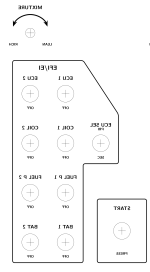
For the labels, I used TikZ (https://tikz.dev), which is a superset of TeX that I used in my day jobs for about the last thirty years. It does a great job, but it takes a long time to learn and I wouldn't recommend it to anyone who just needs to do a one-off. Probably any painting-type program that has good resolution would work OK. For the dry rub-on transfer, everything needs to be reflected. Here's a low-res example:

PanelLeftLabels_reflected.png

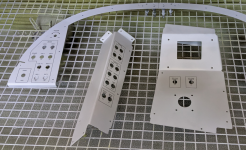
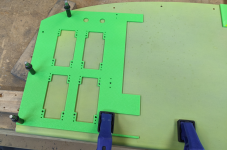
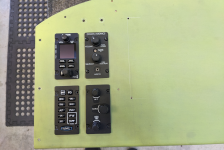
For the panel design and cutouts, I used FreeCAD (https://www.freecad.org/index.php?lang=en), which is easily the best solid modeller I've ever used (and it's free (y)). Van's provide a 3D model of the instrument panel to start with, and the manufacturers of avionics and switches generally also have 3D models of their components available on their websites. I just put them all together in FreeCAD and played around until I was happy with the layout. This also has the advantage that you can check for clearances, interferences and access behind the panels. For cutouts, I used the 3D model to make up 2D templates and then printed them in PLA+ on a Bambu P1S printer. Clecoed them to the panels then drilled and cut as required. Used brass tube bushings on the initial drilling to prevent the soft plastic being damaged and allowing the hole to drift. See examples below:

fuselage_2025-08-29_01.png

fuselage_2025-08-30_01.png

For work like this, FreeCAD is a fairly easy and intuitive sort of program, but it's also capable of much much more.

There's lots of other ways to do these things, including just contracting the whole job to someone else, but this combination suits me OK.
 
Can't seem to find the paper online.... Amzn just lists waterslide.
Any idea where to acquire paper for my laser printer?
 
you are a hell of a craftsman. Is that a standard diameter otto switch? I need something just like this with a starter button.
I use a start button on my stick grip operating a relay. I was concerned about inadvertent operation so I mounted a guarded start enable switch on the panel. It has a momentary position so if the stick switch, wiring, or relay fails, I have another way to activate the starter. After start, I flip the guard down and the stick switch is safed.
Ed
 
Can't seem to find the paper online.... Amzn just lists waterslide.
Any idea where to acquire paper for my laser printer?
I got mine from here https://drdecalmrhyde.com.au but they're in Australia, so maybe not very useful for you.

I did a quick look on Amazon, and I think this one https://www.amazon.com.au/Incal-8-27x11-7in-Premium-Printable-Customized/dp/B09CKLSF7H might be similar. You could try a web search along the lines of "dry rub-on transfer paper for laser printer". There are a few other similar suppliers. The important thing is to get the right background for your application. Select "clear" for black text on light colors, and "white" for white text on black or other dark background.

Hope this helps
 
For those wondering about the decal stuff on printed parts, I did something similar for a flap switch, but just printed the lettering to be cut in to the body of the part (subtract Boolean in Siemens Solid Edge). Then filled the lettering with epoxy and micro balloons (5 minute epoxy since I was impatient and it’s not anything too serious). Sanded smooth out to 1200 grit…. Turned out alright and not going to fall off any time soon.

IMG_7799.jpeg
 
I use a start button on my stick grip operating a relay. I was concerned about inadvertent operation so I mounted a guarded start enable switch on the panel. It has a momentary position so if the stick switch, wiring, or relay fails, I have another way to activate the starter. After start, I flip the guard down and the stick switch is safed.
Ed
Hi Ed,

I was thinking that too (sorry for the thread drift OP). Do you like it there? I have been thinking of putting it on the control yoke, but to me, you have to have at least one hand on the throttle, so unless I grow another hand, my throttle thumb will always be on the ready
 
Howdy Matt,

I have an infinity stick grip and the start button is in the far left position where I have to reach my thumb over the trim hat switch to get to it. I'm unlikely to hit it inadvertently. I do like it on the stick. I am able to hold the stick back through the start which is a good thing with my taildragger. After the start, I close the enable switch cover and there's no way to engage the starter by accident. On the other side of my trim switch is flaps. I like them there too. I can retract them on go around without taking my hands off stick or throttle.
Ed
 
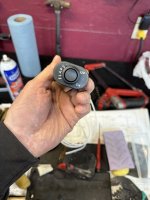
I'm installing a DJM two lever throttle quadrant in my RV-8. I wanted to slightly extend and modify the throttle handle shape, and to incorporate a flap switch in it. I drew up the new handle using Freecad, with a cutout to match a three-position switch https://www.digikey.com.au/en/products/detail/e-switch/RRG31C31100/3778127. The switch clips into place and is held by the cutout edge.
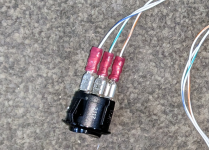
View attachment 99610 View attachment 99611

Printed the handle on a Bambu P1S, using Bambu PPA-CF filament. Laser printed a dry rub-on transfer flap switch label and applied it to inboard end of handle. Then sprayed handle and label with epoxy matt clear coat. Came out fairly well, better than my photography capabilities can show.
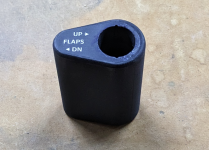
View attachment 99612 View attachment 99613
I thought about just having a flying lead from the outboard end of the handle for the flap wiring, but eventually decided to re-make the throttle lever with a conduit down the aft edge, taking the wiring through the quadrant and its mount. The handle's STL file is attached.
Dmn056,
Well done.
I made one carefully carved from walnut, then covered with thermoplastic that actually contoured to my hand and fingertips. After I installed it, I discovered that I would hit my knuckles on the instrument panel.
I keep it on my bench as an example of what not to do.
Daddyman58
 
Back
Top