Van's Air Force

The definitive Van's Aircraft support community! Buying, building or flying an RV? Join our exclusive family of mentors and enthusiasts!

VPX Issues That No One Can Solve

TroyBranch

Well Known Member
I really did not want to make these troubles public but when I can't get any help to solve it, this was the last choice. I want to be clear that Josh at Stein has been so helpful and has always stepped up to help but he is out of ideas as well.

A bit of back ground. I have been flying the new panel for just short of 2 years. For a full year and over 100hrs of flying I had zero issues. Then I started getting a power supply issue. The first was an audio panel cutting out. At the time we did not think it was power as it wouldn't power off but I would loose Audio. The audio would flash crew I think. VPX ensured it wasn't their unit and Garmin stepped up to the plate and changed the audio. Problem was gone for a few flights and returned. When Nav/com 2 started dropping out, I knew it was a VPX issue. Garmin did some testing and notice that crew would flash when there was an intermittent power loss. I swapped wires on the VPX to a totally different terminal and was able to get it to work without dropping out.

I tried to do and exchange of the VPX. VPX would not do that so I wasn't wasting time and just bought a new one. It worked perfectly for many trips. On my way back from Alaska I had Nav/Com 2 drop out once. It seemed there may still an issue.

On my way to Oshkosh it dropped out again, this time I was on an approach. I had the cross fill turned on so the 750 and the 355 work together. When the 355 dropped out. It corrupted all my approach way points in the 750 to user way points, dropped the altitudes and took out the airport identifier. The approach was gone! I had to reload the airport and approach all while IMC, solo and on the approach. It was so fun.....!

When I got to Oshkosh, VPX still said it is not there unit creating the issue. Garmin said they would change out the 355. At the time I said no as I felt it was not a Garmin issue. I wanted more time to test. At Osh I rewired the Nav 2 to a fuse and dropped it out of the VPX. Com 2 was still in the VPX. I had a long flight home around all the weather as I did not want to file IFR with the issue I had. It was a 11hrs of flying that day and not one issue with the change. I have been flying on and off since Osh weekly but no big trips. Not one issue until today.

Today I was on an approach just practicing and Com 2 went out. Nav2 was on as it was powered direct. Seconds later the 750 com when out, then the unit shut down. That was a first but is so bad that it led me to typing this. I can't be loosing any Nav let alone both. I broke off the approach and heading home. It dropped out 2 more times on the short 5 min flight home from there. Both radios did. That is what it did on Nav 2 before I changed the first VPX. Dropped out multiple times in a row. The radio even switched all frequencies to 121.5 which I was glad I caught before transmitting. I will be wiring the com 2 away from the VPX now just so I have one solid Nav/com.

I understand that some had issues with the VPX because of and plane power alternator. It was creating faults. Not sure I got that right. I have a new B and C so I assume that should be fine. What other test can I do to try to narrow this down if VPX is saying it is not their unit. It is really frustrating that I have went with the best of the best and spared no expense to end up have troubles that I am told no one has seen before. How can I be so lucky! I flew this plane for 15 years with breakers and never had one issue.

Any input would be greatly appreciated as I need to get this solved. Is there something that could be causing the VPX to have issues? I can't imagine trying to wire this with breakers now....

It seems that after so much time the VPX is failing for some reason no one can explain.
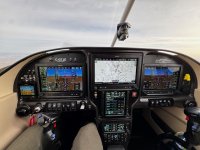
 

Attachments

  • Panel.jpg
    Panel.jpg
    695.2 KB · Views: 126
Have you tested all the equipment connected to VPX, on ground, with a GPU connected (stable 14.4v on battery)?
I can only make it fail while flying. It has been fine when running off the white lightening ground power. But I don’t run it on the ground for hours.
 
If you had problems with two different VPX units perhaps there is merit in looking at other possibilities. Perhaps grounds to start. I find they tend to start the troubles in most electrical issues. Wiring next. It is always possible electrical components inside an instrument can fail. However, the truth is the logical place to start is what feeds the VPX.
 
Im for sure not the one with elect knowledge but I fought a conflict with my VPX and G3X and the flaps for about 6 months. Josh and Nick were great trying to help me out. I never talked to Chad at VPX but I did go to Midwest Panels because the3y are close to me. Still no luck. I was ready to remove the flaps from the VPX wiring and do them direct but tried running a new wire from VPX to Flap motor. Still no dice. I then switched the flap control wires opposite from the drawings and it fixed the issue.

My point is it was not a hardware problem though I was sure it was. Since different components are crapping out, it makes it harder to figure out - maybe. From what you are describing it sounds to me like a power spike or shorting.

Good luck with this. I know the frustration and I do not fly IFR. Im sure you will need to be SURE it is figured out before you do that.
 
When you installed it, did you use the premade vpx harness or did you create your own? Sounds like a intermittent wiring connection issue to me. Check the two grounds on J10 and J12...examine the crimps carefully and ensure they are fully inserted and oriented properly. All of this sounds like common sense, but your symptoms scream "wiring" to me
 
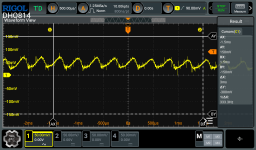
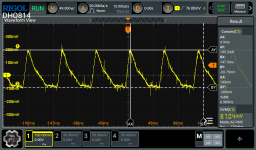
Have you looked at the ripple current from the alternator? Find a handheld oscilloscope, connect to the B+, change the coupling to AC, and adjust the time base and volts per division to see the wave form(s). Expect to see <50mVpp and a few hundred Hz.
 
When you installed it, did you use the premade vpx harness or did you create your own? Sounds like an intermittent wiring connection issue to me. Check the two grounds on J10 and J12...examine the crimps carefully and ensure they are fully inserted and oriented properly. All of this sounds like common sense, but your symptoms scream "wiring" to me
Stein air did all the wiring. I did check the grounds of all the units that were failing. I also looked at all the connectors in the J10 and 12 of the failing units.
 
Have you looked at the ripple current from the alternator? Find a handheld oscilloscope, connect to the B+, change the coupling to AC, and adjust the time base and volts per division to see the wave form(s). Expect to see <50mVpp and a few hundred Hz.
I can look into that.
 
If you had problems with two different VPX units perhaps there is merit in looking at other possibilities. Perhaps grounds to start. I find they tend to start the troubles in most electrical issues. Wiring next. It is always possible electrical components inside an instrument can fail. However, the truth is the logical place to start is what feeds the VPX.
Grounds is the first thing I looked at and the connectors in the VPX. It took forever to break the bundles and trace them and test.

Power to the VPX seems like it could be an issue but the power supply is quite simple. You would think it would affect everything if it was a power to vpx issue. I will share that power wiring diagram.
 
When you say "shut down" are they power cycling, powering off, or tripping the breakers?

Maybe check that your alternator is actually putting out enough current. I had an issue a while back where a few breakers would trip for no apparent reason. Turned out the PP alternator was making full-ish volts but not enough current. This ultimately caused a few of the ecb breakers to trip in the VP-X. It was usually the same two breakers. There was no wiring fault and a reset of the breaker would restore things till it happened again.
 
Grounds at the VPX may NOT be the location. Look at wiring AND grounds all the way back to the components and ground block itself. I agree with Mark, “this screams of wiring”.
 
When you say "shut down" are they power cycling, powering off, or tripping the breakers?

Maybe check that your alternator is actually putting out enough current. I had an issue a while back where a few breakers would trip for no apparent reason. Turned out the PP alternator was making full-ish volts but not enough current. This ultimately caused a few of the ecb breakers to trip in the VP-X. It was usually the same two breakers. There was no wiring fault and a reset of the breaker would restore things till it happened again.
The unit is shutting off and then turning back on. Alternator is putting out enough based on the logs and the voltage is solid.
 
I just got information that the newest VPX has been more sensitive. Someone else was having the exact same issued and they ended up bypassing the avionics master switch and everything work as it should. They ended up having to wire the avionics with breakers for everything to work. My next test it to set the avionics to always on within the VPX and see if the problem goes away. Hopefully the 750 can handle the voltage drop at start up as you can't shut it off. Its nice to know that I am not the only one.
 
I take it that the PP is gone now and that you have a B&C alternator installed? The odds of two completely different alternators causing this problem, and/or the odds of two VPXs failing are very low. Looking at your panel, I imagine the wiring harness and it makes me want to have a stiff drink, but I don't see how it isn't a wiring issue.
 
I take it that the PP is gone now and that you have a B&C alternator installed? The odds of two completely different alternators causing this problem, and/or the odds of two VPXs failing are very low. Looking at your panel, I imagine the wiring harness and it makes me want to have a stiff drink, but I don't see how it isn't a wiring issue.
I want to agree but why would 3 different avionics all on the avionics switch have the same problem. Based on what I just learned I am bypassing the avionics switch and see what happens.
 
I want to agree but why would 3 different avionics all on the avionics switch have the same problem. Based on what I just learned I am bypassing the avionics switch and see what happens.
Another option (for proof of where the problem may be) is to set a couple of items that you are having issues with on the avionics switch, is to change them to ‘always on’ . That way no wiring required, just a menu change.
 
Another option (for proof of where the problem may be) is to set a couple of items that are allocated to the avionics switch is to change them to ‘always on’ . That way no wiring required, just a menu change.
Yes that is the plan.
 
I take it that the PP is gone now and that you have a B&C alternator installed? The odds of two completely different alternators causing this problem, and/or the odds of two VPXs failing are very low. Looking at your panel, I imagine the wiring harness and it makes me want to have a stiff drink, but I don't see how it isn't a wiring issue.
FYI - The PP and B&C have the exact same architecture on the rectification side (the DC output) of the alternator. If there's an issue with the installation (read: grounding) at the alternator, you could see some very nasty DC coming into the VPX and everything else on the bus...

Two time bases used to look at the AC on DC -- signatures should look something like this:

@500.00uSec/div - AC coupled:
RIpple_capture.png
@50.00mSec/div - AC Coupled:
Battery_On_Slow Noise.png

Just a data point...
 
I take it that the PP is gone now and that you have a B&C alternator installed? The odds of two completely different alternators causing this problem, and/or the odds of two VPXs failing are very low. Looking at your panel, I imagine the wiring harness and it makes me want to have a stiff drink, but I don't see how it isn't a wiring issue.
It was always the B and C alternator for this panel. Definitely been the most frustrating challenge this hobby has given me.
 
If you have had two VPX boxes and you still have the problem, have you had those boxes evaluated by Vertical Power? I would suggest having them bench checked. If ok, anchoring onto the concept of this being a VPX problem is keeping you from discovering a wiring problem imho.
 
The unit is shutting off and then turning back on. Alternator is putting out enough based on the logs and the voltage is solid.
Troy, when you say "the unit" do you mean the VP-X or the specific radio/avionics? The VP-X Pro has two independent systems in it, so you'd lose only half your loads if the VP-X failed. If you are losing all your loads, then the power source is the problem.

You could also try swapping pins in the connector (with similar circuit breaker values, and then configure those to 'always on' for testing). If the fault follows the wire, then the it is wiring issue. If the fault moves to the new device on the same (previously problematic pin) then there is a problem with the circuit on that pin.

You say they drop out then come back on, so it doesn't sound like a nuisance trip (that you have to reset manually). It does sound like a wiring issue, and it could be aggravated by the vibration in flight so you don't see it on the ground. Sorry to hear this, sounds very frustrating!

Thinking...
 
If you have had two VPX boxes and you still have the problem, have you had those boxes evaluated by Vertical Power? I would suggest having them bench checked. If ok, anchoring onto the concept of this being a VPX problem is keeping you from discovering a wiring problem imho.
Without knowing the answer to this particular situation, I have seen numerous times in the past where someone locked in to the VP-X being the problem when in fact it was a loose wire, bad switch, or the VP-X was reporting a real short circuit as it is supposed to. So this above is good advice to keep your thinking to a broader range of possibilities. 👍
 
If you have had two VPX boxes and you still have the problem, have you had those boxes evaluated by Vertical Power? I would suggest having them bench checked. If ok, anchoring onto the concept of this being a VPX problem is keeping you from discovering a wiring problem imho.
We had been holding off but I just told Josh to get it tested.
 
Troy, when you say "the unit" do you mean the VP-X or the specific radio/avionics? The VP-X Pro has two independent systems in it, so you'd lose only half your loads if the VP-X failed. If you are losing all your loads, then the power source is the problem.

You could also try swapping pins in the connector (with similar circuit breaker values, and then configure those to 'always on' for testing). If the fault follows the wire, then the it is wiring issue. If the fault moves to the new device on the same (previously problematic pin) then there is a problem with the circuit on that pin.

You say they drop out then come back on, so it doesn't sound like a nuisance trip (that you have to reset manually). It does sound like a wiring issue, and it could be aggravated by the vibration in flight so you don't see it on the ground. Sorry to hear this, sounds very frustrating!

Thinking...
Not the VPX, just the avionics the vpx is powering. I removed power from the VPX on nav 2 that had the issue. I wired it direct to power with a fuse. It has been fine ever since. That told me it is not a wiring issue. Now nav one has the issue. I bet if I wired it direct the problem will be gone too. It’s all link to the avionics switch and vpx. That is the only constant.
 
Not the VPX, just the avionics the vpx is powering. I removed power from the VPX on nav 2 that had the issue. I wired it direct to power with a fuse. It has been fine ever since. That told me it is not a wiring issue. Now nav one has the issue. I bet if I wired it direct the problem will be gone too. It’s all link to the avionics switch and vpx. That is the only constant.
If the avionics switch was bad then all of your associated avionics would power cycle, and it sounds like that is not the problem. So the switch is prob ok.

When you say you 'wire it direct to power with a fuse' - where are you patching in the new power wire? At the Garmin connector or somewhere else?
 
If the avionics switch was bad then all of your associated avionics would power cycle, and it sounds like that is not the problem. So the switch is prob ok.

When you say you 'wire it direct to power with a fuse' - where are you patching in the new power wire? At the Garmin connector or somewhere else?
I wired nav 2 right to the stud on the vpx with a ring connector and fuse.
 
When you say "shut down" are they power cycling, powering off, or tripping the breakers?

Maybe check that your alternator is actually putting out enough current. I had an issue a while back where a few breakers would trip for no apparent reason. Turned out the PP alternator was making full-ish volts but not enough current. This ultimately caused a few of the ecb breakers to trip in the VP-X. It was usually the same two breakers. There was no wiring fault and a reset of the breaker would restore things till it happened again.
So, if the alternator failed fully, breakers would trip? Not a comfortable thought.
 
I wired nav 2 right to the stud on the vpx with a ring connector and fuse.
And where did you wire the other side of the fuse? Did you remove the wire from the VP-X connector and tap into it there or did you run a wire all the way to the Garmin unit and replace the pin on the Garmin?
 
So, if the alternator failed fully, breakers would trip? Not a comfortable thought.
This should not cause breakers to trip. What does happen is if the current draw is close to the circuit breaker value, and the voltage drops due to an alternator failure, then the current will go up and possibly trip a breaker. Usually there is enough headroom that this is not an issue.
 
And where did you wire the other side of the fuse? Did you remove the wire from the VP-X connector and tap into it there or did you run a wire all the way to the Garmin unit and replace the pin on the Garmin?
Yes. Pulled it from the VPX and Josh gave me a connector so I did not have to ruin the vpx pin. If it didn’t work I could just plug it back in. It’s been fine since I did it but not a permanent fix, just a test that told me it’s not a ground issue and targets vpx. It comes on with master so that is a pain. Now I set it up to nav1 and audio panel is always on in vpx so next flight we will see what happens. This deletes the switch and the actions of the switch in the vpx.
 
I really hate the pins/connectors for the power and ground wires to the VP-X. If I had a problem like you describe, that'd be the first place I'd look.
 
Troy, I know we sound like a broken record talking about wiring and grounds but this intermittent power problem really sounds like a pin, connector, wire, terminal somewhere is bouncing back and forth between connected and not connected. So, I would ask, where is the ground wire coming out of the Garmin radios going? Tracing them down is my first attempt to find this kind of issue because experience has shown me that is where I find the majority of intermittent problems. Pull on any and all connectors, pins, plugs on all of the ground and power wires.
 
The unit is shutting off and then turning back on. Alternator is putting out enough based on the logs and the voltage is solid.
That last statement turned on a light bulb.
A while back, I built a Bearhawk Patrol with a Garmin G3X suite. Startup, taxi and flight was good for about 5 minutes. After takeoff , the G3X would go black. After a few minutes, it would power up. In about 5 minutes, it would repeat the process. Grounds checked good, as did voltage at all the power pins. I found that the power pin in the G3X plug had been compromised by cutting several of the conducting strands where it was crimped.
When operating, the electrical load would heat the remaining strands until the resistance got high enough to drop voltage below the operating threshold. After it shut down, the load went away- wire cooled- voltage increased and the G3X powered up. Rinse and repeat. After re-pinning the wire it worked perfectly to this day.

Look closely at all the power and ground terminations. You too may have a compromised wire.


Bill
 
Troy, I know we sound like a broken record talking about wiring and grounds but this intermittent power problem really sounds like a pin, connector, wire, terminal somewhere is bouncing back and forth between connected and not connected. So, I would ask, where is the ground wire coming out of the Garmin radios going? Tracing them down is my first attempt to find this kind of issue because experience has shown me that is where I find the majority of intermittent problems. Pull on any and all connectors, pins, plugs on all of the ground and power wires.
The grounds go to all the same spot. A cluster of spade connectors. I traced the grounds when I had the issue at the start with the audio and the 355. They were fine. When I got the new vpx the audio has been fine. When I wired the nav 2 to direct power it has been fine. Today is new to the 750 and com 2. Same issue I had with the 355 until I wired it direct to power. I will trace the grounds of the 750 if this switch test fails.
 
That last statement turned on a light bulb.
A while back, I built a Bearhawk Patrol with a Garmin G3X suite. Startup, taxi and flight was good for about 5 minutes. After takeoff , the G3X would go black. After a few minutes, it would power up. In about 5 minutes, it would repeat the process. Grounds checked good, as did voltage at all the power pins. I found that the power pin in the G3X plug had been compromised by cutting several of the conducting strands where it was crimped.
When operating, the electrical load would heat the remaining strands until the resistance got high enough to drop voltage below the operating threshold. After it shut down, the load went away- wire cooled- voltage increased and the G3X powered up. Rinse and repeat. After re-pinning the wire it worked perfectly to this day.

Look closely at all the power and ground terminations. You too may have a compromised wire.


Bill
If that were the case for me, wiring direct power like I did would have not fixed the 355 nav power. Also would the vpx not show this as a fault if that happened? I will be wiring the 750 to bypass the vpx as test number two. The vpx is never showing a fault. The check box just goes off like when I shut the breaker off manually on the screen. It is basically shutting power off on its own.
 
The grounds go to all the same spot. A cluster of spade connectors. I traced the grounds when I had the issue at the start with the audio and the 355. They were fine. When I got the new vpx the audio has been fine. When I wired the nav 2 to direct power it has been fine. Today is new to the 750 and com 2. Same issue I had with the 355 until I wired it direct to power. I will trace the grounds of the 750 if this switch test fails.
Spade connectors can have bad crimps. Pins can have bad crimps. VPX connectors can have bad crimps. Wires can have broken strands anywhere along the wire. There are many points along the circuit that could be the potential problem. That is why intermittent failures are the most difficult to track down. I hope you find the culprit. I have given my .02 worth of advice. I don’t know if I have any further thoughts that could help. Good luck, and please keep us informed as to what you find.
 
Yes. Pulled it from the VPX and Josh gave me a connector so I did not have to ruin the vpx pin. If it didn’t work I could just plug it back in. It’s been fine since I did it but not a permanent fix, just a test that told me it’s not a ground issue and targets vpx. It comes on with master so that is a pain. Now I set it up to nav1 and audio panel is always on in vpx so next flight we will see what happens. This deletes the switch and the actions of the switch in the vpx.
Nowhere near an amateur here, but you said they gave you a connector. So you made a new crimp for that connector, or it was premade. Either way, it is not testing the current "old" connector that may have a bad crimp or whatever that could move from flight vibration?
 
Sounds like you have had three devices intermittently fail when connected to the vpx, but in each case wiring them around the vpx resolves the problem. Sure sounds more like a vpx issue than a wiring issue. Struggle to see how you messed up three different wiring runs. Never worked on a vpx, but the only logical scenario here is a fault of some sort in the vpx or you have issues with the vpx input power and ground wiring or you are getting a lot of trash on the main power bus that the vpx can’t deal with. If you trust the vpx is not faulty, then you should follow brians advice to put a scope on the main bus.
 
Nowhere near an amateur here, but you said they gave you a connector. So you made a new crimp for that connector, or it was premade. Either way, it is not testing the current "old" connector that may have a bad crimp or whatever that could move from flight vibration?
It was the male or the female of the vpx connector. We wired that connector to a fuse and I wired that to the main power. I pulled the wire out of the vpx and kept the connector on it. I just slid it in to each other and heat shrank it. It is connected to the connector that was in the vpx. That way it was all kept the same wiring to rule out a wiring issue.
 
One other thing to look at is using a quality DMM, ohm out the ground wires from the VPX connector to the grounding block. If you are going from the block to structure, then check all the way thru the block to the structure nearby. If you are going from the block to the battery via wire, then again, thru the block to the battery terminal. Anything more than about .75 ohms and you have the potential for a bad connection within that path, that could cause a momentary problem.
 
I have a thought for you to consider. Are all of the devices that are failing wired to the same VPX connector by any chance? If so, I'd take a very hard look at the pins and housing in that connector.
 
I have a thought for you to consider. Are all of the devices that are failing wired to the same VPX connector by any chance? If so, I'd take a very hard look at the pins and housing in that connector.
No they are in 3 different connectors. The only constant is they are on switch 3.
 
I am just going to go fly it with the switch set to always on. The trouble is it took from Oshkosh to now for this issue to show up.
I will go through the grounds again, but if it was ground issue should it not show up as a fault?

The other item that I tried was just shutting the unit off in the vpx breaker while it was cycling on and off. If I shut it off in the vpx, it would just turn back on and keep cycling.
I had no control of the power.
 
I am just going to go fly it with the switch set to always on. The trouble is it took from Oshkosh to now for this issue to show up.
I will go through the grounds again, but if it was ground issue should it not show up as a fault?

The other item that I tried was just shutting the unit off in the vpx breaker while it was cycling on and off. If I shut it off in the vpx, it would just turn back on and keep cycling.
I had no control of the power.
Woah... that changes things. The VPX breaker through the G3X display should override any switches. I have no idea how that would be possible unless you were bleeding power from another circuit, or if the VPX itself is just faulty (twice?!).

Let me say this, I'm super sorry you have this issue and I'm sure its frustrating beyond words. Keep at it, sh*t is only a mystery until it isn't.

-G


Edit: rethinking my assertion that the G3X screen would override the circuit. I'm not actually certain that is true. If a physical toggle switch turns a circuit ON, then you flip the soft switch in the G3X for that circuit to OFF, the device will turn off. But If you subsequently cycle the physical toggle switch to OFF and back to ON, will the VPX obey this? I'd have to experiment at the airplane.
 
Last edited:
I'd probably just cut all the power/ground wires to the VPX and re-pin all of them or at least pull each one and inspect with a 5x magnifier.
Faulty stripping/crimping most likely is the cause of intermittent problems.
 
I'd probably just cut all the power/ground wires to the VPX and re-pin all of them or at least pull each one and inspect with a 5x magnifier.
Faulty stripping/crimping most likely is the cause of intermittent problems.
If it was that, why would it work when bypassing the vpx and using the exact same wires/connectors.
 
Troy I'm assuming that all your devices are connected to the same "Avionics Master" switch behavior in the VPX right? So if the toggle switch was faulty it would probably cycle all the devices at once, yes?
 
Back
Top