Van's Air Force

The definitive Van's Aircraft support community! Buying, building or flying an RV? Join our exclusive family of mentors and enthusiasts!

Best Label Maker for Wires and Panel

jackking123

Well Known Member
Patron
I have a cheap Dymo label that has been working well for years but now time to label the wires and eventually panel.
My Dymo has extra small font, which 0.078" tall characters, small enough to go around circumference of 20 awg and likely 22 awg with out overlap.
All I need is two or three sizes of clear heat shrink.


I know you can get heat shrink label maker can print directly onto . The smallest label I found was 5.8mm (flat). This would go around a 0.075" diameter wire, or about 16 awg. I don't have many of those. If I got a label maker I suppose I would want that option for larger wires. You then have to stock different sizes of heat shrink label maker cartridges.

24 awg is going to be challenge with my label maker so one that can do smaller fonts is needed.

For the Panel - I will want WHITE on Clear and best quality and flexibility in font size and style. What kind of label maker and what kind of label material for panel. My plan is paint panel labels, cutout, attach with sticky back, shoot clear over it? Not sure how two part urethane does with label maker tape.
 
I use a K-Sun label maker to print on 1/8" diameter shrink tubing, which is a useful size for almost all the individual wires in an airplane. For coax cable and heavy power wire I go up to a larger size.

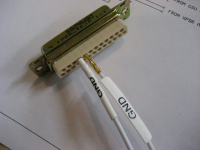
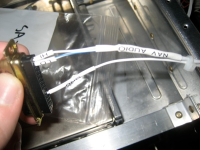
1750027994568.png 1750028153024.png
 
I use a Dymo Rhino 4200 label maker, which will print on 1/4" up to 3/4" heatshrink. It'll also do flag labels so if you don't mind a bit of a tag hanging off this does work well enough (I did flag labels on my pitot tubing since I didn't want to use heat shrink on the plastic tubing).

Generally the smallest size heatshrink will go onto 20 or 22g wires ok, though they may slip along if you really try to move them. Generally I'll make two labels for each wire or wire bundle so I can label each end, and for some long runs (e.g. pitot heat) I'll put extra labels along the length, though I don't activate the heatshrink until I'm certain everything is OK.

I got cartridges from both Dymo and Amazon - they're relatively cheap and do a nice neat job. Small font on the smaller wires works OK, and is much more legible than my handwriting!.
 
I use a Dymo Rhino 4200 label maker, which will print on 1/4" up to 3/4" heatshrink. It'll also do flag labels so if you don't mind a bit of a tag hanging off this does work well enough (I did flag labels on my pitot tubing since I didn't want to use heat shrink on the plastic tubing).

Generally the smallest size heatshrink will go onto 20 or 22g wires ok, though they may slip along if you really try to move them. Generally I'll make two labels for each wire or wire bundle so I can label each end, and for some long runs (e.g. pitot heat) I'll put extra labels along the length, though I don't activate the heatshrink until I'm certain everything is OK.

I got cartridges from both Dymo and Amazon - they're relatively cheap and do a nice neat job. Small font on the smaller wires works OK, and is much more legible than my handwriting!.
Same, but different Rhino.

Amazon has lots of choices for the shrink tube.
 
I went with an Epson LabelWorks LW-PX300 because I could get 1/8” shrink tube for it as needed for 20 and 22awg. Seems to work great, battery or plugin, prints standard labels too.

Tip for saving shrink tube: print out a bunch of labels at the same time, each separated by a space or two. This will use MUCH less shrink tube than the default margin left in the front and back of each print (about 3/8”).
 
I went with an Epson LabelWorks LW-PX300 because I could get 1/8” shrink tube for it as needed for 20 and 22awg. Seems to work great, battery or plugin, prints standard labels too.

Tip for saving shrink tube: print out a bunch of labels at the same time, each separated by a space or two. This will use MUCH less shrink tube than the default margin left in the front and back of each print (about 3/8”).
Same machine, ~ same approach to save HS tubing. NO spaces between labels. Plenty of room to cut

My approach to save some re-thinking. I print power wires in all caps and grounds in all lower case. Anything else is a mixture.
 
I did an avionics installation class with AEA this spring, the instructor (who also owns/operates an avionics shop) actually suggested the use of labels printed on adhesive backed printer paper, cut out and applied to the wire, then use clear heatshrink over the top to seal them on. A tiny bit more labor intensive but effective and cheap.
 
I doubt t that brand makes that much difference (as long as it’s a recognizable brand). We use Brother label makers - have a coupon for them, and they all use the same TZ cartridges, so we can do panel labels or wire labels. I like black or white on clear for panels - if you use an artist’s burnishing tool, you can make the clear part of the label pretty much disappear. Not as perfect as silkscreening the panel, but most people who look in your cockpit will not know the difference - and they are easy to change or add/subtract as your panel matures.
 
If you use a Dymo label maker, the Dymo Rhino Industrial heat-shrink labels produce much better results. A little pricey, but good for the long run.
 
Print off the label you want on your printer and slide the paper under some clear heatshrink. Cost - nothing but the clear hearshrink.
 
Brady M210. Prints on PermaSleeve heat shrink down to 22 AWG. It's a rugged, rechargeable machine with special characters (including electrical). You have to space the labels out if you are doing a bundle or you will end up with a bulge near the connector. If you know what you want to print apriori, you can print a character string and then cut to length with scissors rather than using the machine's cutter on each label... saves a bunch of material.

 
I ended up getting another Dymo but upgrade model Rhino 4200 with battery pack, charger, one cartridge and case..... for $35!!!

Then bought 5 pack of black on yellow 1/4" (shrinks to about 0.05" Dia.) for $27

Also bought 5 pack of white on clear 1/2" for $20.

Got the label maker and like it... It does things that will be handy for the job, printing width wise across the label for example.

I actually learned to appreciate my current cheaper Dymo. The new one does things I will not use like bar codes, but it has many features, which I have not yet to explore. Bottom line I have less than $90 into all the materials, which should be enough for the whole project and then some.
 
Last edited:
I doubt t that brand makes that much difference (as long as it’s a recognizable brand). We use Brother label makers - have a coupon for them, and they all use the same TZ cartridges, so we can do panel labels or wire labels. I like black or white on clear for panels - if you use an artist’s burnishing tool, you can make the clear part of the label pretty much disappear. Not as perfect as silkscreening the panel, but most people who look in your cockpit will not know the difference - and they are easy to change or add/subtract as your panel matures.
And the labels from the TZ cartridges hold up. We used them at work and they held up in high temperatures, low temperatures, and vacuum like would be encountered in space.

I once put a good quality paint stripper on a label that I installed on a painted surface. A few hours later, the paint was gone except for what was under the label and the label was still as good as new.
 
Back
Top