


Van's Air Force

The definitive Van's Aircraft support community! Buying, building or flying an RV? Join our exclusive family of mentors and enthusiasts!

Adding a Skyview level button

cgc

Member
Hello everyone,

I'm in the process of adding a level button (SV-BUTTON-LEVEL) to my RV12. I opened the 37 pin connector for the back of the Skyview classic and found that there's already wiring on pin 26 (dim out). It's indicated as an open position on the RV12 wiring diagram. Without doing more investigating it looks like it lands back in the AV-5000A but I'm not sure what pin unless I pull it apart. Two questions:

1. Does anyone happen to know where this wire leads or ends?
2. If I don't connect the dim wire on the level button I'm assuming I'll either get no backlight or full backlight. Does anyone know if this is a correct assumption?

Thanks for the help! Jonathan
 
Hello everyone,

I'm in the process of adding a level button (SV-BUTTON-LEVEL) to my RV12. I opened the 37 pin connector for the back of the Skyview classic and found that there's already wiring on pin 26 (dim out). It's indicated as an open position on the RV12 wiring diagram. Without doing more investigating it looks like it lands back in the AV-5000A but I'm not sure what pin unless I pull it apart. Two questions:

1. Does anyone happen to know where this wire leads or ends?
2. If I don't connect the dim wire on the level button I'm assuming I'll either get no backlight or full backlight. Does anyone know if this is a correct assumption?

Thanks for the help! Jonathan
Jonathon,

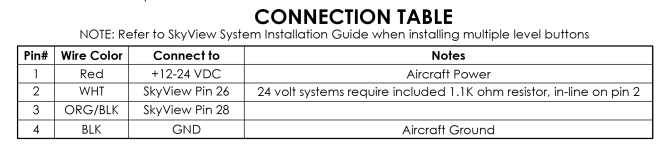
You need to connect it to pin 28, Contact 1 input, not pin 26, in the 37 pin display connector. It is the Orange with Black stripe wire. Reference page 10-14 in the installation manual.

“One terminal of the button should (momentarily) connect the SkyView display 37-pin connector Pin 28 (Contact #1 Input), and the other terminal of the button should connect to Ground.”

Good luck.
 
Jonathon,

You need to connect it to pin 28, Contact 1 input, not pin 26, in the 37 pin display connector. It is the Orange with Black stripe wire. Reference page 10-14 in the installation manual.

“One terminal of the button should (momentarily) connect the SkyView display 37-pin connector Pin 28 (Contact #1 Input), and the other terminal of the button should connect to Ground.”

Good luck.
Good morning,

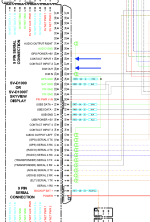
Sorry I should have said that the momentary wire (orange and black) is connected to pin 28 and does work (activates level). It's the white dimmer wire that it says to connect into pin 26 but in my 37 pin connector pin 26 is already taken and feeds back into the AV-50001. In the Vans wiring diagram (screenshot attached) there's nothing connected to pin 26.

Looking at the wider diagram it does look like there's a common dimmer control circuit that routes through a number of different locations in the avionics package.


Screenshot 2025-04-12 at 11.32.29 AM.pngScreenshot 2025-04-13 at 6.36.57 AM.png
 
Good morning,

Sorry I should have said that the momentary wire (orange and black) is connected to pin 28 and does work (activates level). It's the white dimmer wire that it says to connect into pin 26 but in my 37 pin connector pin 26 is already taken and feeds back into the AV-50001. In the Vans wiring diagram (screenshot attached) there's nothing connected to pin 26.

Looking at the wider diagram it does look like there's a common dimmer control circuit that routes through a number of different locations in the avionics package.


View attachment 85103View attachment 85104
OK, pin 26 is the screen Dim Output. In most of Dynon’s wiring diagrams, pin 26, White Wire, will go to the intercom panel pin 5 dim input. This will backlight the intercom panel, using either the photocell in the screen, or manual control light of the screen via input control on pin 25.

Now pin 26 is supposed to go to the dim input to the SkyView intercom panel. If you are hooking it up to Garmin, then leave it disconnected, and backlight the audio panel, or GTR200 with a separate dimmer circuit. I don’t think the Dynon screen output has the current to light up multiple panel backlighting circuits.

Is that what you need, if not connect me at [email protected], and we can do a better answer when I know what you are hooking it up to it.

Brian
 
Back
Top
