
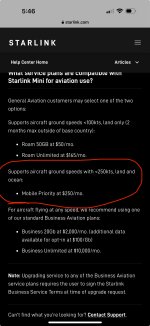
I returned mine when they changed the speed limit on the ROAM plan, so no firsthand experience, but other reports are that it works up to 250 mph on the $250/month Mobile Priority plan; the $50 and $165/mo Roam plans have a 100 mph limit (which is now documented).Any updates on how the new speed limit is working? I sadly only read the first half of this thread and went and bought one- now I'm waiting to see if the speed limit will restrict its use.

Van's Air Force
You are using an out of date browser. It may not display this or other websites correctly.
You should upgrade or use an alternative browser.
You should upgrade or use an alternative browser.
Starlink Mini
- Thread starter YellowJacket RV9
- Start date



I would like to know more about Starlink for my plane. How did you mount yours and do you have any pictures? Does it work reasonably while flying? the internet is crap at my house now so having a backup for the house that I could put in my plane is worth the monthly cost if it works.I switched 2 weeks ago to Mobile Priority - 50GB. $65 per month ($50 base + $15 for 50GB data) and good to 350 kts.
Thanks.

Is this with the mini or the high performance antenna? Can u get the mobile priority plan on the mini?I switched 2 weeks ago to Mobile Priority - 50GB. $65 per month ($50 base + $15 for 50GB data) and good to 350 kts.

The mini worked great the month I had it in the back of my 14. Now airspeed to 350 mph should be ok.Is this with the mini or the high performance antenna? Can u get the mobile priority plan on the mini?

Where did you see that? Their Help Center article still says ground speeds <100Kt is $50/mo and ground speeds <250Kt is $250/moLooks like Starlink changed back their plan and it can now be used on the $50/month plan in our airplanes (unless you're faster than 250kt)

This is the Mini.Is this with the mini or the high performance antenna? Can u get the mobile priority plan on the mini?
I’ve used it on the glareshield, on the back seats and held up against the inside top of the fuselage (fiberglass in the -10) in the baggage compartment with a camera tripod. Works very well while flying. Usually see between 50-150mb/sec download, not much different than my home internet.I would like to know more about Starlink for my plane. How did you mount yours and do you have any pictures? Does it work reasonably while flying? the internet is crap at my house now so having a backup for the house that I could put in my plane is worth the monthly cost if it works.
Thanks.
Where did you see that? Their Help Center article still says ground speeds <100Kt is $50/mo and ground speeds <250Kt is $250/m
Sorry fake newsWhere did you see that? Their Help Center article still says ground speeds <100Kt is $50/mo and ground speeds <250Kt is $250/mo
I think he's talking about the Local Priority Plan for businesses.
Looks like $65 a month, supports in motion use up to 350mph.
Looks like $65 a month, supports in motion use up to 350mph.


Thanks Larry. I think I will give it a try.I’ve used it on the glareshield, on the back seats and held up against the inside top of the fuselage (fiberglass in the -10) in the baggage compartment with a camera tripod. Works very well while flying. Usually see between 50-150mb/sec download, not much different than my home internet.
Be careful about this assumption. Starlink operates in the Ku and Ka frequency bands, not the VHF and perhaps UHF bands that we're mostly used to. The fiberglass/epoxy wingtip is essentially a radome that was not designed for this application. Use your favorite search engines to look up "Ku/Ka band radome design". It might work, or it might attenuate the Starlink signal too much. It might work at some satellite "look angles" but not at others. Before spending a lot of time on a permanent installation, run some tests, and please report back.... and the fiberglass itself won't interfere...

Before I sent mine back I can confirm that it worked on the glareshield, on the passenger seat, on the rear passenger seat and taped to the inside of the roof in the baggage area. I had planned to put it in one of the wingtips (which is a lot thinner).
I put it in the wingtip, and it worked fine there on the three test flights I got in before they changed the speed limit last year. No noticeable difference to pointing out the rear window.Be careful about this assumption. Starlink operates in the Ku and Ka frequency bands, not the VHF and perhaps UHF bands that we're mostly used to. The fiberglass/epoxy wingtip is essentially a radome that was not designed for this application. Use your favorite search engines to look up "Ku/Ka band radome design". It might work, or it might attenuate the Starlink signal too much. It might work at some satellite "look angles" but not at others. Before spending a lot of time on a permanent installation, run some tests, and please report back.
I'm (despite not loving the constantly changing terms) back on the Starlink train with the new $65/month plan, but probably won't bother putting it back in the wingtip this time -- rear window works fine too (and I repurposed the power feed in the wingtip to add a leading edge landing light). Fool me once/fool me twice kind of situation.
My thoughts exactly. Our local T&C are still stuck at 100mph and obviously can’t be relied upon to be stable enough to justify too much work.I put it in the wingtip, and it worked fine there on the three test flights I got in before they changed the speed limit last year. No noticeable difference to pointing out the rear window.
I'm (despite not loving the constantly changing terms) back on the Starlink train with the new $65/month plan, but probably won't bother putting it back in the wingtip this time -- rear window works fine too (and I repurposed the power feed in the wingtip to add a leading edge landing light). Fool me once/fool me twice kind of situation.
I’m reassembling after paint at the moment so will run a 16 or 18 out to the tip while I’m at it and see what happens.
To be fair they refunded the whole cost so I can’t complain too much about the experience - but they aren’t at the top of my list of reliable vendors.

I can confirm Starlink Mini works up to 350mph on Local Priority plan $65. If you are buying the mini new you need to buy Roam-50 plan which doesn’t work above 100mph. Once activated, you can switch to Local Priority in your Starlink account. It doesn’t take effect until end of billing period, but you can submit a support ticket to have them swap it right away
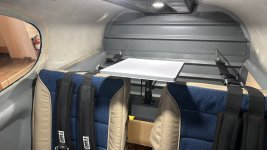
Testing Starlink. $ 5.99 a month Sirius XM works well in flight. (App for phone) Foreflight same, AccuWeather radar and maps same. SMS and phone calls same. Hopefully they do not change the T&C to reduce aircraft speeds but no issues with 220 mph. $ 65.00/month. Should be good for 30 hrs. a month flying. I was concerned with the antenna next to the carbon fiber overhead console but seems ok. Once back from paint will mount the antenna in the tailcone of the 10. (Showplanes fiberglass tailcone)
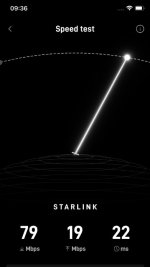
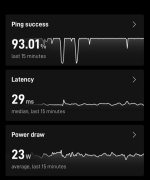


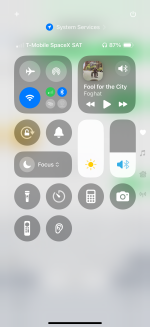 I just get it on my phone through T-Mobile. Lot less bulky

vinzer
Well Known Member
Can you tether the sat data somehow via wifi ?View attachment 87805I just get it on my phone through T-Mobile. Lot less bulky

Would you talk about your Starlink antenna mounting system? I’ve got the Starlink mini and soon, a flyable 14.Starlink mini continues to perform well in my 14 back window.
NORDO Industries LLC
Well Known Member
T-Mobile's Starlink connectivity is very low-bandwidth. For now, it only supports basic text messaging. If you're wanting an experience closer to a regular cell connection, get a Starlink mini terminal.Can you tether the sat data somehow via wifi ?
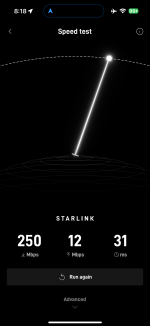

Looks like $300 (50%) off right now at Home Depot.The Starlink Mini is being offered at a reduced price till May 28, 2025, $200 off in the USA.
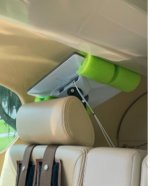
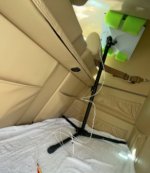
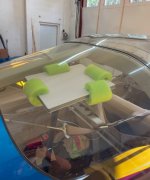
See pic, this is just a temporary set-up (See 10 pics above which is also temporary) as the mini is going to be permanently mounted in the tailcone of my 10 when it gets out of paint. (Using the Showplanes fiberglass tailcone) Uses a tripod set-up with the pole mount mini bracket underneath.Would you talk about your Starlink antenna mounting system? I’ve got the Starlink mini and soon, a flyable 14.
Last edited:
Can you get live weather radar from a provider such as AccuWeather? Foreflight up to date info? Sirius XM, Phone calls, etc.? ThanksView attachment 87805I just get it on my phone through T-Mobile. Lot less bulky
vinzer
Well Known Member
T-Mobile's Starlink connectivity is very low-bandwidth. For now, it only supports basic text messaging. If you're wanting an experience closer to a regular cell connection, get a Starlink mini terminal.
Thank you for clarification on the T-Mobile sat option. I fly with my Starlink Mini and love it.

MyGoFlight has an adapter to mount a Starlink Mini using any of their mounting systems.Would you talk about your Starlink antenna mounting system? I’ve got the Starlink mini and soon, a flyable 14.
I looked at this system and was nervous using suction cups on my rear window of the 14. We have enough problems with cracking plexi.MyGoFlight has an adapter to mount a Starlink Mini using any of their mounting systems.
Is that under a carbon graphite overhead console? I placed mine to the side but maybe did not need to?View attachment 88322
Thank you for clarification on the T-Mobile sat option. I fly with my Starlink Mini and love it.
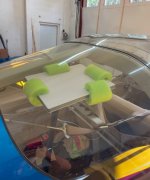
I mounted my mini with mobile priority ($65) in the wingtip of my 9 with a couple of pool noodles and a fabricated bracket to hold it. Ran a thick wire out there with no boost buck and have flown with it for over a month - it works GREAT!!! The thicker wire prevents voltage drop and no brown out. I did put it on a switch so I can turn it on and off.
vinzer
Well Known Member
Yes, and it works just fine there. At first I also tested it on the side, but did not notice any difference in speed between middle and side positions.Is that under a carbon graphite overhead console? I placed mine to the side but maybe did not need to?

Great idea - would love to see photos of this!I mounted my mini with mobile priority ($65) in the wingtip of my 9 with a couple of pool noodles and a fabricated bracket to hold it. Ran a thick wire out there with no boost buck and have flown with it for over a month - it works GREAT!!! The thicker wire prevents voltage drop and no brown out. I did put it on a switch so I can turn it on and off.
I thought about trying it through the carbon fiber overhead console, but I know from at home tree limbs obscure the signal so figured it was a wasted attempt. I'll try when the 10 comes back from paint. Thanks !Yes, and it works just fine there. At first I also tested it on the side, but did not notice any difference in speed between middle and side positions.
Just FYI the Mini draws less than 1/2 amp (40 watts on average) so voltage drop is fairly low. Does need a minimum of 12 volts.I mounted my mini with mobile priority ($65) in the wingtip of my 9 with a couple of pool noodles and a fabricated bracket to hold it. Ran a thick wire out there with no boost buck and have flown with it for over a month - it works GREAT!!! The thicker wire prevents voltage drop and no brown out. I did put it on a switch so I can turn it on and off.
Did you get it to work? Hope did you mount it!I’m contemplating the LH wingtip as well (if it fits) but I’ll need to test whether it interferes with the VOR antenna performance.
I sent it back when they imposed the 100mph in motion limit.Did you get it to work? Hope did you mount it!
Now that local priority works at a higher speed I may re try it.
I’m confident it’ll work in the tip as is worked fine sitting on the back seat. It’ll likely need a switch to power it off so as to not interfere with the VOR antenna.
vinzer
Well Known Member
I switched 2 weeks ago to Mobile Priority - 50GB. $65 per month ($50 base + $15 for 50GB data) and good to 350 kts.
True that! Local Priority plan. $40 per month + minimal $25 for 50Gb so total of $65 per month and I have no issues flying and using my Mini at 140-150 knots. It works great, but when you do a 180 turns sometimes it cuts for 10-15 seconds and then restarts again. I guess something related to internal logic how it handles the satellite almanac data.
NORDO Industries LLC
Well Known Member
Plans got changed up again, this time for our benefit.
Per their support page:
No more needing to use more expensive Priority Data. Paying $50/mo for the Roam 50 GB or $165 for the Roam Unlimited plans is all you need.
They did however change things up – no more Pausing your service. You either have to pay $5/mo for Standby (unlimited 500 kbps) or fully cancel your service, which might mean a surcharge when signing back up if you're doing so in a congested area and your plan choice. You'd also avoid being stuck in a situation where you go out into the backcountry and forgot to re-activate service and can't get the 2-factor code to log into your account.
Per their support page:
You can use Starlink in-motion up to 550 mph (885 kph) with certain service plans
No more needing to use more expensive Priority Data. Paying $50/mo for the Roam 50 GB or $165 for the Roam Unlimited plans is all you need.
They did however change things up – no more Pausing your service. You either have to pay $5/mo for Standby (unlimited 500 kbps) or fully cancel your service, which might mean a surcharge when signing back up if you're doing so in a congested area and your plan choice. You'd also avoid being stuck in a situation where you go out into the backcountry and forgot to re-activate service and can't get the 2-factor code to log into your account.
Thanks for the Home Depot steer, I was gonna buy it direct and deal with delivery delays. OTOH, when I bought it today 8/22/25 HD did not apply my military discount. It specifically said "non-discountable item"For anyone considering the Starlink Mini, Home Depot is an authorized retailer and will honor the 10% military discount.

