Van's Air Force

The definitive Van's Aircraft support community! Buying, building or flying an RV? Join our exclusive family of mentors and enthusiasts!

G3X Touch SW v9.52 Available Now (3/24/2025)

g3xpert

Well Known Member
Advertiser
Greetings VAF!

G3X Touch software version 9.52 was posted to the Software Download Area today. This release includes improvements for Rotax 916iS installations, but includes several background improvements for all installations. Here is a brief description of the changes to configuration mode included with this release:

  • Allow volts/amps inputs for EIS LRU and Vertical Power unit to be used simultaneously
    • Previously, Volts or Amps gauges could only be assigned to a system EIS input, or Vertical power source, never both at the same time. This changes adds flexibility to potential installation configurations.
  • Support for Rotax pressure sensor 664365
    • This sensor preset is a new selection for fuel and oil pressure gauges.

Several system LRU's will be updated with this software load, the software download page includes a detailed LRU software change list. Cross-referencing the System Information page in configuration mode, please ensure each LRU is successfully updated to the appropriate software level upon completion of the software load.

  • Improved NAV radio interface when using both ARINC 429 and RS-232
  • Improved turbine engine airframe time recording
  • Improved weather page display
  • Improved traffic page display
  • Improved display of G-AIRMET's
  • Improved Vertical Power integration when installed with Garmin EIS
  • Improved GEA 24B digital and discrete input operation
  • Improved support for RS Flight Systems integration with Rotax 915/916 iS engines
  • Add support for Rotax pressure sensor 664365
  • General improvements to system operation
  • Includes update to GEA24(B) software version 4.20
  • Includes update to GSA28 software version 5.80
  • Includes update to GTR 205X(R) software version 2.21
  • Includes update to G5 software version 8.60
  • Includes GDL5x software version 2.23
  • Includes GI260 software version 3.00
  • Includes GTR20/200 software version 3.60
  • Includes GMA245 software version 3.20
  • Includes GSU25/B/C/D software version 4.50
  • Includes GSU25/B boot block software version 2.30
  • Includes GSU25C/D boot block software version 2.10
  • Includes GMA245 audio software version 2.20
  • Includes GMA245 Bluetooth software version 2.00
  • Includes GMA245 boot block software version 2.40
  • Includes GEA24B boot block software version 2.00
  • Includes GEA24 boot block software version 2.20
  • Includes GHA 15 boot block software version 2.00
  • Includes GHA 15 software version 2.00
  • Includes G5 boot block software version 2.40
  • Includes GAD 27 -1X software version 2.00
  • Includes GAD 27 -1X boot block software version 2.00
  • Includes GAD27 boot block software version 2.30
  • Includes GAD27 software version 2.80
  • Includes GAD29 software version 3.40
  • Includes GAD29 boot block software version 3.10
  • Includes GAD29C boot block software version 2.00
  • Includes GAD29C software version 2.10
  • Includes GSU73 software version 3.80
  • Includes GSU73 IGRF database version 1.04 (Base Year 2020)
  • Includes GAD13 software version 2.10
  • Includes GAD13 boot block software version 2.00
  • Includes GDL39 software version 4.91
  • Includes GI260 boot block software version 2.20
  • Includes GMC507 software version 5.00
  • Includes GMC507 boot block software version 2.30
  • Includes GMU11 software version 2.20
  • Includes GMU11 boot block software version 2.10
  • Includes GPS20A software version 2.40
  • Includes GPS20A boot block software version 2.10
  • Includes GSA28 boot block software version 2.20 or 2.10 (-2X Model)
  • Includes GTR20/200 boot block software version 2.40
  • Includes update to Timezone database version 38.00
Please let us know what questions you may have!

Thanks,

Justin
 
Does this update improve the Bluetooth connectivity between the G3X touch and the GDL-39R? My pfd (gdu 460) has to be connected to the gdl39r each power cycle. It also seems to drop the connection sometimes and not display traffic or weather. The mfd (gdu 450) is hardwired and always displays traffic and weather. Thanks for the update!
 
  • Allow volts/amps inputs for EIS LRU and Vertical Power unit to be used simultaneously
    • Previously, Volts or Amps gauges could only be assigned to a system EIS input, or Vertical power source, never both at the same time. This changes adds flexibility to potential installation configurations.
Hi @g3xpert ,

Does that mean we will be able to have 3 Voltage readings at the same time? Volts 1 and Volts 2 from VPX serial + Volts 3 being measured directly from GEA analog voltage input, for example?

Is there an update to the installation manual explaining in more depth new capabilities with VPX?

Thanks!
 
My pfd (gdu 460) has to be connected to the gdl39r each power cycle.
You can make this an "auto reconnect" (something like that) in your bluetooth settings. I have my GDL52R set to reconnect automatically and my iPad, as well.
 
Does that mean we will be able to have 3 Voltage readings at the same time? Volts 1 and Volts 2 from VPX serial + Volts 3 being measured directly from GEA analog voltage input, for example?
This should be possible using either a dedicated VOLTS input, or by using the "Custom Volts" configuration with a GP input.
 
You can make this an "auto reconnect" (something like that) in your bluetooth settings. I have my GDL52R set to reconnect automatically and my iPad, as well.
I will double check that. I believe it is set to auto reconnect but it doesn’t seem to want to do it.
 
This should be possible using either a dedicated VOLTS input, or by using the "Custom Volts" configuration with a GP input.
I know. But all inputs are taken in my case and the only one available now is "VOLTS1" which I could not use before because I was getting "VOLTS1" reading from serial comm from VPX.

If I am able to use VOLTs1 now, means I get an "extra" input :) . But it is not clear to me if the SW side of things will allow me to actually display VOLTs1 as a 3rd voltage reading gauge on EFIS.
 
Does this update successfully address the double-500 callout that many of us were experiencing with 9.50 and 9.51? See the 9.50 thread for examples, starting from post #56:

 
As I understand it, one call out is from the GDU and one from the GTN650.
I just turned the GTN call out off.
Update works ok.

Good luck
 
As I understand it, one call out is from the GDU and one from the GTN650.
I just turned the GTN call out off.
Update works ok.

Good luck
In the other thread, people without a GTN reported doubled callouts, one person reported a triple callout, and one person confirmed with Garmin it was a problem.

The audio is identical, in perfect succession, and appears like it might sometimes be suppressed (like my post where it was doubled on the first trip around the pattern but not on the third). If the GTN were generating one of the alerts, I would expect that the timing would vary (sometimes overlapping and sometimes being spaced out more) and that the audio would not be identical (since GTN and G3X are from different teams at Garmin). I would also expect that it would be more consistent, always doing the double alert. And I would expect that the pilot who gets triple alerts would have a third LRU capable of generating these alerts that for some reason is also doing them in sequence rather than asynchronously.

I count 11 people reporting this problem after a 9.50 or 9.51 update without any changes to the GTN software or settings. Maybe a few of us had a saboteur sneak into our hangars and change GTN audio settings between the time we updated the G3X software and the next time we flew, but not all 11.

Hopefully Garmin will weigh in on the issue here.
 
Does this update successfully address the double-500 callout that many of us were experiencing with 9.50 and 9.51?
This is the sort of minor change they often file under "General improvements to system operation". Easy enough to try it and see.
 
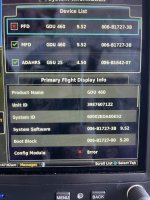
Just loaded this morning and now have a message “PFD config module missing” on the PFD. Went to Tools and this is what I see:

IMG_9429.jpeg
 
Loaded it this morning’s and went for a flight. I did notice one anomaly in the EGT/CHT graph and Leaning function.

I normally run ROP. While leaning, the graph bars usually go from Green to Yellow then to Red. When one or two cylinders go Red, I’ll richer the mixture until I get 4 Blue bars.

Today, on the first leaning cycle I never saw yellow or red bars and I was way below my normal fuel flow. When I started to richen the mixture, the bars turned blue without ever turning yellow. Tried another full leaning cycle starting from full rich. This time I did get some yellow bars then blue bars. I ended up using the old fashion way just looking at EGT and fuel flow.

I also noticed heavy white horizontal bars across each EGT bar. I don’t recall seeing them before. They were in the position of the “Normalized” bar if you select Normal rather than Lean on the EFT/CHT display.
 
I normally run ROP. While leaning, the graph bars usually go from Green to Yellow then to Red.
Without knowing the details of your configuration it's not really possible to interpret what you're describing. I'd reach out to [email protected] with as much detail as possible, including a copy of your configuration data, specific step-by-step details, and photos and video if possible.

I also noticed heavy white horizontal bars across each EGT bar. I don’t recall seeing them before.
It sounds like you are describing the CHT indicators, which would be normal to see.
 
You can make this an "auto reconnect" (something like that) in your bluetooth settings. I have my GDL52R set to reconnect automatically and my iPad, as well.

It looks like my problem was “operator error” 🤠. I checked and the auto reconnect option for Bluetooth was not enabled.

I also installed the update and everything is working great for me.
 
It looks like my problem was “operator error” 🤠. I checked and the auto reconnect option for Bluetooth was not enabled.

I also installed the update and everything is working great for me.
I wish my install had no issues. I have a “PFD config module missing” problem now that I haven't found a remedy.
 
As I understand it, one call out is from the GDU and one from the GTN650.
I just turned the GTN call out off.
Update works ok.

Good luck
Nope, not the GTN, it's the software. My RV-8 with no GTN or GHA15 does the double 500...... sometimes. Still haven't figured out why or when.

My RV-10 with GTN & GHA15 also does it....sometimes??????

Hoping the new software addresses this.
 
Nope, not the GTN, it's the software. My RV-8 with no GTN or GHA15 does the double 500...... sometimes. Still haven't figured out why or when.

My RV-10 with GTN & GHA15 also does it....sometimes??????

Hoping the new software addresses this.
I heard 500 double call outs and found out that it was coming from Foreflight via the bluetooth connection. (Foreflight tablet and G3X)
after turning foreflight call out off I never heard double calls again.
 
I appreciate it if someone would tell me what I am doing wrong.

Downloaded the update. Garmin says to power up the unit and inset the SD card. Nothing happens. I tried inserting the card and powering up and still nothing happens. I have tried moving the individual files to the root folder and vice versa and still nothing happens.

Thanks in advance.
Rob.
 
I appreciate it if someone would tell me what I am doing wrong.

Downloaded the update. Garmin says to power up the unit and inset the SD card. Nothing happens. I tried inserting the card and powering up and still nothing happens. I have tried moving the individual files to the root folder and vice versa and still nothing happens.

Thanks in advance.
Rob.
Make sure you have the SD card format to FAT32. If that doesn't fix it or has been done then re-download the files.
 
So do I need to power up first or insert the card before powering up?
Either will work, if the card is properly formatted, and the files are located where the software expects them, and the card is not write-protected.

What OS are you using to create the update card? Can you post screenshots of the card contents?
 
Thank you guys for your response.

I found operator error. Garmin cleary says to copy "2. Copy the "Garmin" folder to the top level (root directory) of the SD card." I was copying "GDU4xxCockpitDisplay_OtherOperatingSystem__952" to the root director.

All went well.
 
Does this update successfully address the double-500 callout that many of us were experiencing with 9.50 and 9.51? See the 9.50 thread for examples, starting from post #56:

Hello,

Yes this problem was resolved with this update.

Thanks,

Justin
 
Had an issue today, not sure if it is related to the update, but I am not locking on GPS Satellites from my G3X touch all of a sudden. It is seeing the satellites, but not getting a lock. Anyone else seen this, or have any suggestions on possible causes?
 
  • Improved GEA 24B digital and discrete input operation
  • Includes update to GEA24(B) software version 4.20
Any chance this includes a fix for the issue where configuring the RPM 2 input on the GEA as a discrete breaks the Fuel Flow 1 input?

I'd give it a try to see, but if the issue remains and FF stops working, the only option is to wipe the entire config and rebuild it.

Thanks!
 
Had an issue today, not sure if it is related to the update, but I am not locking on GPS Satellites from my G3X touch all of a sudden. It is seeing the satellites, but not getting a lock. Anyone else seen this, or have any suggestions on possible causes?
Did you happen to check the GPS notams? Sometimes there will be military or GPS testing relating jamming.
 
Any chance this includes a fix for the issue where configuring the RPM 2 input on the GEA as a discrete breaks the Fuel Flow 1 input?
It might. Update fixed discrete used for smart glide that effected fuel flow.
 
It might. Update fixed discrete used for smart glide that effected fuel flow.
Can you please share what that bug was, first I am hear of it but I don't use smart glide feature every day :)
On other notes, I updated mine and all seem to work without any issues. I noticed one new thing which not sure if it is new or not. When in a published hold, the highway in the sky color changes to magenta and white color alternatively.
 
Can you please share what that bug was, first I am hear of it but I don't use smart glide feature every day :)
On other notes, I updated mine and all seem to work without any issues. I noticed one new thing which not sure if it is new or not. When in a published hold, the highway in the sky color changes to magenta and white color alternatively.
The magenta pathway boxes represent the active leg, the white boxes represent the next leg. There was no change to this behavior, although it may be a bit more noticeable while an IFR navigator is drawing the legs of a holding pattern.
Any chance this includes a fix for the issue where configuring the RPM 2 input on the GEA as a discrete breaks the Fuel Flow 1 input?

I'd give it a try to see, but if the issue remains and FF stops working, the only option is to wipe the entire config and rebuild it.

Thanks!
Updating to this software version will resolve this problem. You do not need to wipe your entire configuration however.

Thanks,

Justin
 
The magenta pathway boxes represent the active leg, the white boxes represent the next leg. There was no change to this behavior, although it may be a bit more noticeable while an IFR navigator is drawing the legs of a holding pattern.


Thanks,

Justin
Justin,
When I was in a hold, every other box was white (alternating magenta and white) and it did not represent the next leg. In fact, I am not sure how highway in the sky can represent the next leg as my understanding has been, it represent only the current path. This is in contrast to when established on a path to a way point, every box drawn is magenta.
 
Justin,
When I was in a hold, every other box was white (alternating magenta and white) and it did not represent the next leg. In fact, I am not sure how highway in the sky can represent the next leg as my understanding has been, it represent only the current path. This is in contrast to when established on a path to a way point, every box drawn is magenta.
Could it be the next hold overlapping the active hold?
 
Could it be the next hold overlapping the active hold?
I am not sure what that means. But in the hold I was (published miss at KMHR) there is only one hold. Also, I have never seen the highway in the sky depict the next leg as it would not make sense. Highway in the sky box depicts the the lateral and vertical path to the next point. I think alternating white and magenta is a good and logical way to let the pilot know they are in a hold and no particular waypoint.
 
Actually it's always done this.
I wonder if we are talking about the same thing, highway in the sky i.e. the rectangular boxes on the PDF. If so, what is the distance that the synthetic vision creates forward and what would it look like if the next leg is 150nm away?
I will be flying tomorrow and will take pictures of my screens.
 
I wonder if we are talking about the same thing, highway in the sky i.e. the rectangular boxes on the PDF. If so, what is the distance that the synthetic vision creates forward and what would it look like if the next leg is 150nm away?
The synthetic vision Pathways feature obviously won't show a flight plan leg that is 150 miles away, but it definitely shows upcoming flight plan legs that are near enough to see - such as happens during a hold or procedure turn.
 
The synthetic vision Pathways feature obviously won't show a flight plan leg that is 150 miles away, but it definitely shows upcoming flight plan legs that are near enough to see - such as happens during a hold or procedure turn.
So please help me understand how that works when every other box is White, if the white box represent the next leg.
 
You're seeing two flight plan legs overlapping.
Matt, I hope you are not taking this as a way of pointless argument, my intention is to understand. With that said, when in a hold what are the two flight plan legs and why when I look at the map page, I see my current leg in magenta and the next leg in white. If white box is the representation of the opposite side of the hold/leg, then why am I dead center on that box just with the magenta box.
 
Flight plans with IFR procedures often have multiple legs that occupy the same location in space, these will often be distinguishable in the SVT view but not on the map, not much more to it than that.
 
Back
Top