Van's Air Force

The definitive Van's Aircraft support community! Buying, building or flying an RV? Join our exclusive family of mentors and enthusiasts!

Trim Control Wire Intermittent Short to Ground under Vibration?

JacobDarling

I'm New Here
Hi All,

I read a lot on here, but am posting for the first time hoping for some help with my new-ish to me RV-12iS, with the Dynon Avionics system.

Long Story hopefully short: While the engine is off, the trim control behaves normally, to include detecting a "stuck switch" condition in the Dynon system if I hold down a control button for 4 or more seconds. However, when the engine is running, the trim will occasionally have a runaway in the "up" direction until it hits the limit, and even has gotten stuck in that condition without being able to apply trim down. Then, it will mysteriously go away and behave normally again. When it does this, no "stuck switch" indication is present on the Dynon display, which, I suspect is due to the input being intermittently shorted as the plane vibrates, and not actually constantly shorted. I can't seem to find the source of the short, though.

Obviously, in these planes, the pilot can always physically overcome the trim, but it isn't the best thing to have happen while flying, obviously...

What I have done to debug so far:
  1. Verified the circuits visually, and I don't see any chaffed/problematic wires anywhere in the circuits attached to pins 3-6 (the Pilot and Co-Pilot trim control inputs that get grounded to move the trim) on the D-Sub connected to the Dynon AP module.
  2. Sent the AP module back to Dynon, where they bench tested and refurbished it out of caution (for free, even out of warranty...I can't say enough good things about Dynon!). Re-installed, no effect.
  3. Re-verified the circuits visually, as well as with a voltmeter, to ensure pins 3-6 were being grounded correctly (and open to ground correctly), based on the control buttons.
  4. Used the test controls on the SkyView to move the trim motor, verifying it is functioning properly.
  5. Contacted Dynon, again, as I didn't know what else could be the problem... They sent me a new AP module, on loan, to replace for a test. Problem is still present. Again, Dynon's customer service is quite literally second-to-none.
  6. At this point, I started to suspect the Arduino in the power module had gone "nuts", causing intermittent grounding on the trim control wires. In order to isolate the power module, I removed the 50 pin D-Sub from the back of the power module, and at this point, I think I got a bit "lucky" in that I still had the ohmmeter on continuity mode between the trim up control wire and ground, and as I was physically pulling the plug off the power module, I heard a few distinct, short, sporadic "beeps" indicating the wire was being grounded! I could then gently move/shake the 50 pin connector and occasionally get the beeps to occur, indicating the short was present. For clarity, the AP module and power module were disconnected as I was doing this, so I believe that absolves the modules themselves from causing the issue.
  7. I removed the backshell from the 50 pin connector, verified pins 30, 31, 42, and 43 were well seated well in the connector, and that there were no frayed wires, etc., present. I did think I felt one of the pins seat a bit tighter when I pushed on it, but I am not 100% confident that is true, and not just in my head.
  8. I more carefully inspected the wires behind the 50 pin connector for any issues...they all seemed fine.
  9. I re-installed the backshell on the 50 pin connector, and I could no longer get the short to occur (no ohmmeter beeps as I moved and shook the connector!), so I thought I had the issue fixed...
  10. ...until the next flight. It still has the issue. We found it on climb out after takeoff, where it actuated in the up direction a bit on its own. We got the trim re-centered, and pulled the fuse to continue the flight.
At this point, I suspect there is an issue with an intermittent short to ground, caused by motion or vibration in the plane. I am at my wits end trying to find where, and was hoping some of the super-smart folks on here could point me in the right direction as to the best course of action. As I see it, I have the following options:

  1. Replace the 50 pin connector. This seems like a big PITA, but doable. Has anyone had a faulty D-Sub where the connector itself has a pin/socket that shorts to ground?
  2. Remove wires C6327, C6326, C6324, and C6325 from the harness entirely, as they are only present because they are needed if the plane does not have the AP module. This would also allow the AP module to appropriately discern whether the pilot or co-pilot is commanding the trim, and allow the pilot to override the co-pilot if needed (which it won't be, but would separate the circuits).
I am not sure I love option 2, as it seems like it might mask another potential problem...

Something else? I appreciate everyone's time and help!

Link to the appropriate schematic, for convenience: https://www.vansaircraft.com/wp-content/uploads/2022/10/WH-00133-1.pdf
 
Sounds like you likely have a Dynon (or Advanced Flight) AP Control Panel... which is where the trim China Hat switches connect... and then drive the trim motor.
The unit arbitrates between Left & right stick buttons as well as stuck trim button and also does trim motor speed scheduling based on airspeed from EFIS.
There IS a recall on the units and runaway trim is one of the know failure modes - this MAY not be your root cause however you should be aware & send it in for the free fix.
Ok, Sorry - I jumped the gun without completely reading your post:confused:.
Sounds like a wire in or around either control stick, possibly wires inside stick or around where sticks pivot. The trim control is pretty simple, the AP control is just a relay deck with some other logic. Not likely a power issue. Meanwhile I'll digest your already provided schematic.
Tell us more about entire configuration for best troubleshooting assistance... connectors at sticks for wiring etc.
 

Attachments

Last edited:
Sounds like you likely have a Dynon (or Advanced Flight) AP Control Panel... which is where the trim China Hat switches connect... and then drive the trim motor.
The unit arbitrates between Left & right stick buttons as well as stuck trim button and also does trim motor speed scheduling based on airspeed from EFIS.
There IS a recall on the units and runaway trim is one of the know failure modes - this MAY not be your root cause however you should be aware & send it in for the free fix.
Tell us more about entire configuration for best troubleshooting assistance...
Good feedback!

I forgot to mention the AP module is one after the affected units, and not subject to the recall.

The setup is the full Dynon System in a 2019 RV-12is. It’s an E-LSA, but is still exactly in its factory-identical configuration, with the exception of adding the second SkyView screen…it hasn’t been modified from that.

Since a picture is worth a thousand words: https://www.aircraft.com/aircraft/236060463/n59am-2019-vans-rv-12is
 
I had a very similar issue with the intermittent uncommanded uptrim movement a couple years ago in my RV-12iS. After taking the interior apart three times looking for a grounded wire, replacing the AV-60000 power module, replacing the Ray Allen stick grip, and multiple conversations with Dynon, Vans, and Steinair I finally found the issue. Even though I don't have the AP module, there was a green wire that was part of the AP harness located above the shelf near radio that was rubbing on the structure and became grounded intermittently due to vibration. I know it's a pain but keep looking for that grounded wire somewhere.
 
Check the trim "hat".

***IF*** there has been too much "downward" (vertical as opposed to fore and aft) pressure, the hat can get to a position where you only get the "UP" and cannot get the "DOWN". On the ground, you and the plane are more relaxed.

Try feeling it on the ground and see if you can sense it moving as much as it "should".

If it doesn't, use a small knife or screwdriver to VERY GENTLY pry the hat up a millimeter or so.

Just did that with a friend's RV14A with Tosten grips and it seems to work.

We went through much of the same stuff you went through (minus returning the DynonAP head).

I got the tip from the good people at Tosten.
 
The control sticks in my 2010 RV-12 have sharp corners inside of it. Those sharp corners could easily cut wire insulation. I suggest that you pull the wires out of the control sticks and either carefully inspect or replace the wires.
 
Agree. I believe in chasing the easy first.
I would disconnect the stick trim switch and connect a VOM and go fly.
 
Hi All,

I read a lot on here, but am posting for the first time hoping for some help with my new-ish to me RV-12iS, with the Dynon Avionics system.

Long Story hopefully short: While the engine is off, the trim control behaves normally, to include detecting a "stuck switch" condition in the Dynon system if I hold down a control button for 4 or more seconds. However, when the engine is running, the trim will occasionally have a runaway in the "up" direction until it hits the limit, and even has gotten stuck in that condition without being able to apply trim down. Then, it will mysteriously go away and behave normally again. When it does this, no "stuck switch" indication is present on the Dynon display, which, I suspect is due to the input being intermittently shorted as the plane vibrates, and not actually constantly shorted. I can't seem to find the source of the short, though.

Obviously, in these planes, the pilot can always physically overcome the trim, but it isn't the best thing to have happen while flying, obviously...

What I have done to debug so far:
  1. Verified the circuits visually, and I don't see any chaffed/problematic wires anywhere in the circuits attached to pins 3-6 (the Pilot and Co-Pilot trim control inputs that get grounded to move the trim) on the D-Sub connected to the Dynon AP module.
  2. Sent the AP module back to Dynon, where they bench tested and refurbished it out of caution (for free, even out of warranty...I can't say enough good things about Dynon!). Re-installed, no effect.
  3. Re-verified the circuits visually, as well as with a voltmeter, to ensure pins 3-6 were being grounded correctly (and open to ground correctly), based on the control buttons.
  4. Used the test controls on the SkyView to move the trim motor, verifying it is functioning properly.
  5. Contacted Dynon, again, as I didn't know what else could be the problem... They sent me a new AP module, on loan, to replace for a test. Problem is still present. Again, Dynon's customer service is quite literally second-to-none.
  6. At this point, I started to suspect the Arduino in the power module had gone "nuts", causing intermittent grounding on the trim control wires. In order to isolate the power module, I removed the 50 pin D-Sub from the back of the power module, and at this point, I think I got a bit "lucky" in that I still had the ohmmeter on continuity mode between the trim up control wire and ground, and as I was physically pulling the plug off the power module, I heard a few distinct, short, sporadic "beeps" indicating the wire was being grounded! I could then gently move/shake the 50 pin connector and occasionally get the beeps to occur, indicating the short was present. For clarity, the AP module and power module were disconnected as I was doing this, so I believe that absolves the modules themselves from causing the issue.
  7. I removed the backshell from the 50 pin connector, verified pins 30, 31, 42, and 43 were well seated well in the connector, and that there were no frayed wires, etc., present. I did think I felt one of the pins seat a bit tighter when I pushed on it, but I am not 100% confident that is true, and not just in my head.
  8. I more carefully inspected the wires behind the 50 pin connector for any issues...they all seemed fine.
  9. I re-installed the backshell on the 50 pin connector, and I could no longer get the short to occur (no ohmmeter beeps as I moved and shook the connector!), so I thought I had the issue fixed...
  10. ...until the next flight. It still has the issue. We found it on climb out after takeoff, where it actuated in the up direction a bit on its own. We got the trim re-centered, and pulled the fuse to continue the flight.
At this point, I suspect there is an issue with an intermittent short to ground, caused by motion or vibration in the plane. I am at my wits end trying to find where, and was hoping some of the super-smart folks on here could point me in the right direction as to the best course of action. As I see it, I have the following options:

  1. Replace the 50 pin connector. This seems like a big PITA, but doable. Has anyone had a faulty D-Sub where the connector itself has a pin/socket that shorts to ground?
  2. Remove wires C6327, C6326, C6324, and C6325 from the harness entirely, as they are only present because they are needed if the plane does not have the AP module. This would also allow the AP module to appropriately discern whether the pilot or co-pilot is commanding the trim, and allow the pilot to override the co-pilot if needed (which it won't be, but would separate the circuits).
I am not sure I love option 2, as it seems like it might mask another potential problem...

Something else? I appreciate everyone's time and help!

Link to the appropriate schematic, for convenience: https://www.vansaircraft.com/wp-content/uploads/2022/10/WH-00133-1.pdf

Keep it Simple. Remove the DB9 connector and hard wire them together and solder and seal them together...
 
Just wanted to update everyone that I found the problem, and got it fixed! Wanted to close the thread with what the problem was in case it helps the next person.

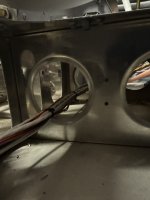
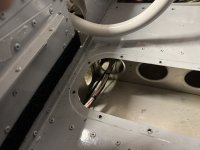
Long story short, the wire loom under the copilot seat was ran through an aluminum tunnel without any edge protection on the aluminum. I put the proper protection on the tunnel, and everything works as expected!

I didn't find it earlier as the velcro strip holding the carpet in had that access panel "locked" shut, and I thought I could feel things out well enough without removing that panel, but turns out that wasn't the case.

Appreciate the help!

50B8A211-6FCF-480E-9D2E-D112299AD23D_1_105_c.jpegC71D41FE-47E0-481D-8F2C-25D2AEC426E7_1_105_c.jpeg
 
Excellent & good job on letting the collective know the root cause...
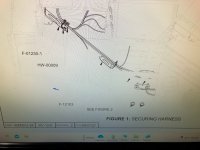
I would mention that industry standard routing of the wire bundles shown would make use of Adel clamps to constrain the bundles from vibration as well as chaffing even if the lightning hole edges are protected (shown in attachment for your review).
Glad you found it!
 

Attachments

Last edited:
Excellent & good job on letting the collective know the root cause...
I would mention that industry standard routing of the wire bundles shown would make use of Adel clamps to constrain the bundles from vibration as well as chaffing even if the lightning hole edges are protected (shown in attachment for your review).
Glad you found it!
I won't argue with the use of fixed point anchoring but it appears that the wire routing and bundling is done per the KAI's for the RV-12. (42MiS/U pg 16 figure 1) Being an E-LSA there is no room for plans deviation like there is in EAB. What was missing was the plastic edge protector on the edge of the lightening hole. It may have been installed correctly at build time but "popped" off with vibration. I'd look around for it with a borescope or mirror. It's a potential FOD in the critical control stick area. When installing those edge guards a dab of RTV at the joint will help it stick to the edge and reduce the risk of it coming loose. This is illustrated on 42PiS pg 8 Fig 1.
 
Looks like the wire routing brackets and associated snap bushings are missing. They are shown on page 42MiS/U-28 and their installation is described in step 2.

Good job finding the source of the grounded wire.
 

Attachments

  • IMG_4151.jpg
    IMG_4151.jpg
    3.5 MB · Views: 37
Back
Top