Van's Air Force

The definitive Van's Aircraft support community! Buying, building or flying an RV? Join our exclusive family of mentors and enthusiasts!

GTN 650/G3xT not talking correctly...SLSA...help

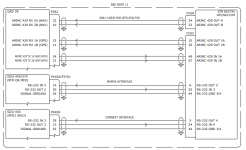
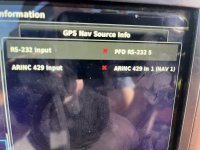
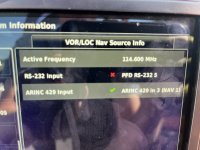
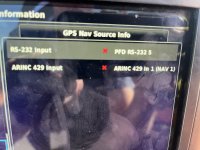
I am at my wits end with chasing a problem. Background...we have two newish (2021 and 2023) RV12is SLSA. Recently we lost COM and NAV display on G3XTs. We also lost GPS position on the G3XTs. Diagnostics show. Red x on RS-232 Position 1 and 5, Plus an ARINC input issue. First we ruled out the low hanging fruit by swapping boxes (GTN, GDU, GAD 29) problem did not go away. Out comes the wiring diagram. PITA to get to the P1001 connector on the back side of the GTN. We check continuity between pins for position 1 and 5. Continuity is good. Signal ground continuity is good. After getting Aric involved at Van's they have run out of suggestions and suggest talking to Garmin....IF I don't find a chafed wire back in the twisted mess of harnessed going to the GTN, Autopilot, GMA. It is very tight back there. QUESTION: IF I HAVE CONTINUITY BETWEEN THE PINS WOULDN'T THAT MEAN I DO NOT HAVE A CHAFED WIRE?

The wasn't an intermitant error came back from a flight as a hard failure.
GTN still has GPS signal, COM and NAV and works as should.

Short of pulling the radio racks to get a good look at the radio stack end of the wires/connectors...anything else to check?

Thank you for any suggestions.

Eric
 

Attachments

  • IMG_2297.jpeg
    IMG_2297.jpeg
    2.8 MB · Views: 77
  • IMG_2298.jpeg
    IMG_2298.jpeg
    2.7 MB · Views: 72
  • IMG_2297.jpeg
    IMG_2297.jpeg
    2.8 MB · Views: 77
  • IMG_2333.jpeg
    IMG_2333.jpeg
    1.9 MB · Views: 81
If I understand it correctly, you have 2 RV‘s that are both having issues. Did I read this correctly? If so, did you do a recent software update on both?
 
We also lost GPS position on the G3XTs.

Everything else sounds like some kind of wiring issue, but this point stands out to me. Your GTN 650 should not be the only source of position data for your G3X system, so you must have some other GPS antenna installed, and any problems with that should be unrelated to the wiring of your GTN. Is it possible you are just experiencing poor GPS reception due to being in a hangar, or does this persist when outside?
 
I am at my wits end with chasing a problem. Background...we have two newish (2021 and 2023) RV12is SLSA. Recently we lost COM and NAV display on G3XTs. We also lost GPS position on the G3XTs. Diagnostics show. Red x on RS-232 Position 1 and 5, Plus an ARINC input issue. First we ruled out the low hanging fruit by swapping boxes (GTN, GDU, GAD 29) problem did not go away. Out comes the wiring diagram. PITA to get to the P1001 connector on the back side of the GTN. We check continuity between pins for position 1 and 5. Continuity is good. Signal ground continuity is good. After getting Aric involved at Van's they have run out of suggestions and suggest talking to Garmin....IF I don't find a chafed wire back in the twisted mess of harnessed going to the GTN, Autopilot, GMA. It is very tight back there. QUESTION: IF I HAVE CONTINUITY BETWEEN THE PINS WOULDN'T THAT MEAN I DO NOT HAVE A CHAFED WIRE?

The wasn't an intermitant error came back from a flight as a hard failure.
GTN still has GPS signal, COM and NAV and works as should.

Short of pulling the radio racks to get a good look at the radio stack end of the wires/connectors...anything else to check?

Thank you for any suggestions.

Eric
If you suspect a shafed wire, also check if
there is a short between pin 1/5 and GND.

Good luck
 
Hi Eric, you've got some good suggestions here.... to answer your question, does continuity indicate you don't have chaffed wires... no. As Avanza says, a chaffed wire would show as 'continuity' from pin 1 to 5, pin 1 to ground, and/or pin 5 to ground. You need to check for cross continuity, not direct continuity. Also, your last photo is another interesting clue... the GTN650 isn't receiving data from the GSU 25 ADHRS unit. I believe this integrates via the GAD29, so good advice from piot2512 to check that. Best though is the idea to talk with Garmin, especially as this is an SLSA. All maintenance must be done in accordance with the maintenance manuals or directions provided directly by the manufacturers.
 
If I understand it correctly, you have 2 RV‘s that are both having issues. Did I read this correctly? If so, did you do a recent software update on both?
No, we have one with the issue. I have done all the "swaptronics" using the other one to rule out issues with the boxes.
 
Hi Eric, you've got some good suggestions here.... to answer your question, does continuity indicate you don't have chaffed wires... no. As Avanza says, a chaffed wire would show as 'continuity' from pin 1 to 5, pin 1 to ground, and/or pin 5 to ground. You need to check for cross continuity, not direct continuity. Also, your last photo is another interesting clue... the GTN650 isn't receiving data from the GSU 25 ADHRS unit. I believe this integrates via the GAD29, so good advice from piot2512 to check that. Best though is the idea to talk with Garmin, especially as this is an SLSA. All maintenance must be done in accordance with the maintenance manuals or directions provided directly by the manufacturers.
The ADHRS unit does not have any things to do with the GTN populating the com and nav frequencies from the 650 though. Correct?
 
Hi Eric, you've got some good suggestions here.... to answer your question, does continuity indicate you don't have chaffed wires... no. As Avanza says, a chaffed wire would show as 'continuity' from pin 1 to 5, pin 1 to ground, and/or pin 5 to ground. You need to check for cross continuity, not direct continuity. Also, your last photo is another interesting clue... the GTN650 isn't receiving data from the GSU 25 ADHRS unit. I believe this integrates via the GAD29, so good advice from piot2512 to check that. Best though is the idea to talk with Garmin, especially as this is an SLSA. All maintenance must be done in accordance with the maintenance manuals or directions provided directly by the manufacturers.
I have been working with Aric at the Factory. They seem to be suggesting I need to focus on the wiring behind the GTN/GMA/ GFC racks. It was a PITA just to get to the P10001 connector. Meanwhile the airplane is not out flying and we are loosing revenue. All functions of GTN are working just simply not populating COM/NAV/GPS signal to PFD.
 
On the G3X system information page are any of the boxes red xs, other than the GTN ones?

If you put the GTN into configuration mode (hold the home button when it starts up) and go to the system status page, are there any of the boards that aren't powering up (shown as just dashed lines)?

The way this is presenting, assuming the canbus is still solid, I am wondering if you lost power to pins 19 / 20 or ground at pins 77 / 78 on GTN connector P1001.

You can check this pretty quickly from the front with a voltmeter. We make make a quick probe tool in the shop by crimping a pin on a wire and taping it to some safety wire then connecting the wire to the voltmeter probe.
 
Last edited:
The ADHRS unit does not have any things to do with the GTN populating the com and nav frequencies from the 650 though. Correct?
That is correct. But you showed a photo that the GTN650 isn’t receiving altitude info from the ADHRS. That has everything to do with the GSU 25 and GAD 29 connectivity. Seems the issues aren’t just between the G3X and GTN 650
 
I am at my wits end with chasing a problem. Background...we have two newish (2021 and 2023) RV12is SLSA. Recently we lost COM and NAV display on G3XTs. We also lost GPS position on the G3XTs. Diagnostics show. Red x on RS-232 Position 1 and 5, Plus an ARINC input issue. First we ruled out the low hanging fruit by swapping boxes (GTN, GDU, GAD 29) problem did not go away. Out comes the wiring diagram. PITA to get to the P1001 connector on the back side of the GTN. We check continuity between pins for position 1 and 5. Continuity is good. Signal ground continuity is good. After getting Aric involved at Van's they have run out of suggestions and suggest talking to Garmin....IF I don't find a chafed wire back in the twisted mess of harnessed going to the GTN, Autopilot, GMA. It is very tight back there. QUESTION: IF I HAVE CONTINUITY BETWEEN THE PINS WOULDN'T THAT MEAN I DO NOT HAVE A CHAFED WIRE?

The wasn't an intermitant error came back from a flight as a hard failure.
GTN still has GPS signal, COM and NAV and works as should.

Short of pulling the radio racks to get a good look at the radio stack end of the wires/connectors...anything else to check?

Thank you for any suggestions.

Eric
The GAD 29, GEA 24, GPS 20A, GSA 28, GSU 25 units have an LED on their outer cases that indicates the LRUs current status.
G3X Installation manual, Table 31-1 Status LED Indications. PDF pg 739.

Good luck
 
That is correct. But you showed a photo that the GTN650 isn’t receiving altitude info from the ADHRS. That has everything to do with the GSU 25 and GAD 29 connectivity. Seems the issues aren’t just between the G3X and GTN 650
The GTN gets airdata via the GAD29 ARINC which gets it either from the GDU via serial or ARINC or via canbus. I can’t remember and doesn’t really matter either way because if there was a GSU25 connectivity problem there would be red Xs all over the PFD.
I don’t think the GSU25 has anything to do with it.

I’d remove the unit and double check that the P1001 connector hasnt come loose from the back of the GTN rack.
 
ts airdata via the GAD29 ARINC which gets it either from the GDU via serial or ARINC or via canbus. I can’t remember and doesn’t really matter either way because if
That is correct. The GTN gets its airdata through the EFIS/Airdata ARINC port, which is on P1001. All of the failed data connections are common to GTN P1001, so that is where we should focus our attention.
 
The GTN gets airdata via the GAD29 ARINC which gets it either from the GDU via serial or ARINC or via canbus. I can’t remember and doesn’t really matter either way because if there was a GSU25 connectivity problem there would be red Xs all over the PFD.
I don’t think the GSU25 has anything to do with it.

I’d remove the unit and double check that the P1001 connector hasnt come loose from the back of the GTN rack.
GSU connections are good and green light is flashing as it should.
 
I am at my wits end with chasing a problem. Background...we have two newish (2021 and 2023) RV12is SLSA. Recently we lost COM and NAV display on G3XTs. We also lost GPS position on the G3XTs. Diagnostics show. Red x on RS-232 Position 1 and 5, Plus an ARINC input issue. First we ruled out the low hanging fruit by swapping boxes (GTN, GDU, GAD 29) problem did not go away. Out comes the wiring diagram. PITA to get to the P1001 connector on the back side of the GTN. We check continuity between pins for position 1 and 5. Continuity is good. Signal ground continuity is good. After getting Aric involved at Van's they have run out of suggestions and suggest talking to Garmin....IF I don't find a chafed wire back in the twisted mess of harnessed going to the GTN, Autopilot, GMA. It is very tight back there. QUESTION: IF I HAVE CONTINUITY BETWEEN THE PINS WOULDN'T THAT MEAN I DO NOT HAVE A CHAFED WIRE?

The wasn't an intermitant error came back from a flight as a hard failure.
GTN still has GPS signal, COM and NAV and works as should.

Short of pulling the radio racks to get a good look at the radio stack end of the wires/connectors...anything else to check?

Thank you for any suggestions.

Eric
Hello Eric,

Just to be sure, you mention 2 RV12's. I presume you are seeing this problem on only one of them, or is there a problem with both aircraft?

Is this a problem that recently developed on a previously working system, or has this always been an issue since you took delivery of the aircraft/finished the installation?

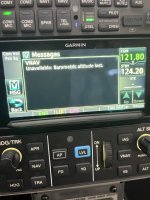
Is the VNAV message present on the GTN at all times? It is possible to see that message if the GTN were powered without the GSU 25 being powered.

Without knowing more about your configuration and wiring, you appear to have a problem with both the serial connection from the GTN to the GDU, as well as 2/3 ARINC 429 connections from the GTN to the GAD 29. In the absence of more information, it hard to say exactly what could be the cause of this. If you send us a configuration file, your wiring diagram and some pictures of your system information menu (configuration mode), we can probably help you get to the bottom of this pretty quickly. We can be reached directly at [email protected].

Thanks,

Justin

1724168225433.png
 
Curious if this was resolved? And if it was care to share the details? How many hours did the airplane have on it (particularly interested if it did end up being a chafing/grounding issue).
 
Curious if this was resolved? And if it was care to share the details? How many hours did the airplane have on it (particularly interested if it did end up being a chafing/grounding issue).
Not resolved yet. Had to put it back into service until we get a stretch of bad weather. The timing of this was pretty horrible as we are a busy flight school. I emailed @g3xpert but haven't heard anything yet. My plan is to pull the racks of the Transponder, GTN, GMA, and GFC and really get a good look at the wire harness. I would suspect this is going to be an area of concern for many RV12is SLSA owners as they put time on the aircraft. I will include pictures and an update as soon as I get to the bottom of this. Right now it is flying 6 hours a day, M-F.
 
Not resolved yet. Had to put it back into service until we get a stretch of bad weather. The timing of this was pretty horrible as we are a busy flight school. I emailed @g3xpert but haven't heard anything yet. My plan is to pull the racks of the Transponder, GTN, GMA, and GFC and really get a good look at the wire harness. I would suspect this is going to be an area of concern for many RV12is SLSA owners as they put time on the aircraft. I will include pictures and an update as soon as I get to the bottom of this. Right now it is flying 6 hours a day, M-F.

Pulling the GTN out of its rack and checking whether the P1001 is loose in the back of the rack is a 30second task. Don’t do anything else until you’ve done that.
It’s got nothing to do with the GMA, GFC or transponder.
I doubt there’s any “area for concern” for RV12is SLSA owners related to this.
 
  • Like
Reactions: 9GT
Pulling the GTN out of its rack and checking whether the P1001 is loose in the back of the rack is a 30second task. Don’t do anything else until you’ve done that.
It’s got nothing to do with the GMA, GFC or transponder.
I doubt there’s any “area for concern” for RV12is SLSA owners related to this.
 
Try physically swapping RS-232 to unused ports….., abandon current path, leave old signal wire in place. run a new signal wire and re configure the ports to MAPMX.

I have seen ports go bad. The wiring checks out, but they just don’t work.
 
It sounds like you need to hire an A&P experienced in avionics troubleshooting to check this out. It it’s not the wiring and parts are bad then you’ll have to send them in to Garmin for repair. Your expressed concerns about this somehow being an airframe issue are of little relevance in troubleshooting the problem, until or unless you find evidence of a problem that was caused by such. It is unfair to try and deflect blame off to the as-yet unknown cause of the problem you are experiencing.

There’s been some very good advice offered here, but it sounds like you are unwilling or unable to carry out the necessary steps to figure out what is going on. I’d love to hear the results of what’s found and how it gets fixed. It’s education and entertaining to learn about these systems but if you don’t have the time, interest, or ability to do the work, it’s time to bring in hired help to get it right.

And starting separate threads to insinuate that the airframe product is suspect due to a different engine note from other airframes is internet troll behavior.
 
The timing of this was pretty horrible as we are a busy flight school
Busy flight schools have busy A&Ps. Par for the course. And did I imagine it, or did you see the plane is flying 6 hours a day? GMAB

Edit to add: "Not resolved yet. Had to put it back into service until we get a stretch of bad weather." Do your students know there's an issue you're defering until the weather is bad enough to address?
 
Last edited:
Pulling the GTN out of its rack and checking whether the P1001 is loose in the back of the rack is a 30second task. Don’t do anything else until you’ve done that.
It’s got nothing to do with the GMA, GFC or transponder.
I doubt there’s any “area for concern” for RV12is SLSA owners related to this.
Thank you Richard. Please read ALL above posts in the thread. No loose connector. Have you seen the way the stack is installed in the Rv12Is with the premium Garmin Package? I am fully aware my issue does not involve the other avionics however in order to have ANY room to inspect the GTN harness you need to remove ALL racks above. Geez….
 
I’m talking about the 2 4-40 0.25 screws that hold the connector into the rear of the rack.
Accessed by sitting in the pilot seat.
Pull the radio out of the rack. Get a long Philips and verify they are tight.
 
Any updates with this? Assuming you've checked continuity of the wires involved...

3 serial pins from PFD (41,24,34) to GTN P1001 connector (27,8,46);
4 ARINC pins from GAD29 J292 connector (23, 11, 24, 12) to GTN P1001 connector (10,29,48,67)

Once those check out, then the last thing to check is to see that nobody was monkeying around in the GTN650 settings in SETUP mode. Ensure:

RS 232 CONFIGURATIONINPUTOUTPUT
RS-232 1MAPMX FORMAT 2MAPMX FORMAT 2
RS-232 2OFFADSB+ FORMAT 1
RS-232 3OFFOFF
RS-232 4CONNEXT FORMAT 2CONNECT FORMAT 2
ARINC 429 CONFIGURATIONSPEEDFORMAT
ARINC 429 IN 1LOWEFIS FORMAT 2 (GDU FORMAT 2 if G3x > v8.9)
ARINC 429 IN 2LOWOFF
ARINC 429 OUT 1LOWGARMIN 429
ARINC 429 OUT 2LOWOFF
SDILNAV 1
 
Last edited:
I would also check for an unseated pin(s) that is not locked/clicked into the d-sub pin housing which is EZ to check from the front with the units out of the trays.
 
Back
Top