Van's Air Force

The definitive Van's Aircraft support community! Buying, building or flying an RV? Join our exclusive family of mentors and enthusiasts!

Xcruze 100 Autopilot (formerly TruTrak) for my RV9A

pwprice

I'm New Here
Autopilot, servos, and installation kit purchased from Gulf Coast Avionics.

Wiring harness, pitot, and static connection purchased from Aircraft Spruce.

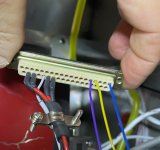
I just completed the installation of the Xcruze 100 in my VANS RV9A and am very pleased with the results. I connected the AP to my Garmin GNC250XL (circa 2003) from it’s secondary serial output and the ARINC A and B output. That connection only required three new pins in the J101 female 37 pin connector. The AP also requires connection the pitot and static systems. After working out a few bugs, the first flight was a delight. I put several waypoints in the Garmin nav/com route function. The AP acquired the GPS signal immediately and started monitoring my heading while taxing. Shortly after climb-out I changed the mode to GPS steering and the plane gently turned toward and intercepted the route. The AP anticipated each succeeding way point and gently turned the plane rounding each corner and fixing on the next waypoint heading. Climbs, descents, and heading adjustments are also easily make in the tracking mode.

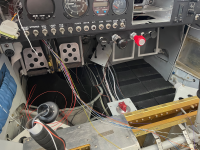
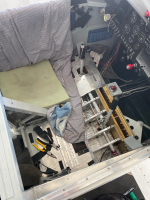
The installation was labor intensive removing all seats, interior panels, seat pans and several floor pans. After that routing the wiring was quite easy thanks to the excellent wiring harness from Aircraft Spruce. VANS provided excellent support about wire routing and allowable additional pass-through holes where required.

A few things, unnecessarily, made the install more difficult than needed.

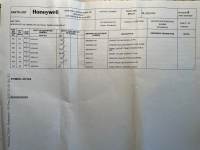
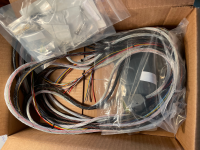
First, The Aircraft Spruce website has no description and no reviews for the $350 wiring harness. A customer support person at Aircraft Spruce willingly sent me a picture of the packing slip for the product. It said the harness was “30 inch” and included the 9 pin back shells for the servo connections but said nothing about the 25 pin connector needed for the autopilot control head. I ordered the wiring harness anyway and was more than pleasantly surprise. The wiring harness was 30 feet long and nicely separated into snake-skins for each servo. The remaining several wires, for mostly under the panel connections, were 5 feet long. The wires were all terminated perfectly into the 25 pin connector. Two other small annoyances were 1) the harness included exactly 16 female socket pins for making up the servo connections and none for the connection to the nav/com so if you don’t have a few of your own you cannot complete the wiring and 2) one of the servo connection back-shells is a 90 degree connection that proved worthless because it’s virtually impossible to connect it to the mounting screw holes in the servo. I used a straight connector that came with the autopilot itself and it worked fine. Overall, the product is excellent and I am glad I made the purchase.

Second, the installation kit specific to the RV9A cost $515 and included two small custom sheet metal mounting brackets and bunch of wire terminals that also came with the wiring harness and a bunch of installation diagrams but no instructions. The mounting brackets are essential and worked perfectly but if you’re handy with sheet metal you could make the same things for a few dollars.

Third, the wiring diagrams were incorrect for the RV9A. The pitch servo diagram has an option A and option B which makes the servo rotate either clockwise or counter-clockwise when commanded from the control unit. The Honeywell/BendixKing support people assured me the RV9A uses option A but they were wrong and the pitch responded opposite to my inputs during the ground test. The roll servo diagram does not include any model specific options but it also responded opposite during the ground test. Fortunately, the AP set up procedure lets you reverse the servos electronically so the corrections were easily made.

Fourth, the Garmin GNC250XL had the secondary serial output turned off so the first ground test showed “No GPS”. The Garmin operating manual showed how to turn it on so that correction was also a quick fix. The second ground test was flawless and first flight test was also just perfect.

The Xcruze 100 overall is an excellent choice for me and my RV9A. I didn’t know all that I was missing without an autopilot and I really enjoy the reduced work load.
 

Attachments

  • 3 pins to navcom purple yellow blue.png
    3 pins to navcom purple yellow blue.png
    3.2 MB · Views: 226
  • Packing Slip.png
    Packing Slip.png
    12.9 MB · Views: 276
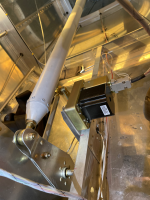
  • Pitch servo in empenage.png
    Pitch servo in empenage.png
    14.8 MB · Views: 281
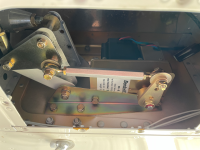
  • Roll servo in right wing.png
    Roll servo in right wing.png
    13.1 MB · Views: 267
  • Wires in progress.png
    Wires in progress.png
    15.8 MB · Views: 238
  • Disassembly.png
    Disassembly.png
    10 MB · Views: 195
  • Wiring Harness.png
    Wiring Harness.png
    11 MB · Views: 244
Good choice on the AP, interesting to note that the servo design has changed where the linkage is connected to the servo gear, used to be a screw that could come loose so there was a retaining plate added but now they have a locknut with locktite, wonder if you can buy that part. Also on the roll servo diagram it is probably the photo but it looks like the bolt that attaches the servo rod to the aileron bellcrank is slightly too short. You are also probably aware that the AV-30 can also drive the xCruze, just run the RS232 from the GNC250XL to the AV-30 and back to the xCruze 100. Software version 3.0 adds additional functionality.
Figs
 
Also note that the attachment to the servo arm is incorrect. Th large washer should be on the outside nearest the nut to protect against hime joint failure.
 
Also note that the attachment to the servo arm is incorrect. Th large washer should be on the outside nearest the nut to protect against hime joint failure.
Good catch, I just checked the old Trutrak roll installation drawings and they did not show the order of washers etc. was a big discussion point years ago, this link should help the OP
Roll Servo Install
 
Do you run your Xcruze through the AV 30 ? I’m looking at the same scenario but don’t really see the point of going through the AV 30 ?
 
The AV-30 has a heading and altitude select/hold mode that can drive the XCruze somewhat similar to the G5 and Skyview interface. It works but if you do not have the AV-30 magnetometer installed the DG drift makes heading mode impractical. I tried it to get a heading mode capability but ended up disabling the interface and just using track mode on the XCruze (Vision 385 in my case).
Figs
 
The AV-30 has a heading and altitude select/hold mode that can drive the XCruze somewhat similar to the G5 and Skyview interface. It works but if you do not have the AV-30 magnetometer installed the DG drift makes heading mode impractical. I tried it to get a heading mode capability but ended up disabling the interface and just using track mode on the XCruze (Vision 385 in my case).
Figs
Hi , I do have a magnetometer , do you see an advantage of going through the AV 30, or is the performance essentially the same ?
 
Hi , I do have a magnetometer , do you see an advantage of going through the AV 30, or is the performance essentially the same ?
It will give you a heading mode function which the XCruze does not inherently have, I thought it might be useful when getting vectors for an approach but without the magnetometer the DG drift was an issue (for the certified version I believe uAvionix requires the magnetometer for this reason). I find that using the Direct To function of my Aera 760 or GNX375 is easier and using track mode on the XCuze is pretty easy to tweak to fly a ATC designated heading.
Probably a small nit also is the GUI is a little funky with pushing and twisting the center knob and I have the AV-30 on the left of my EFIS and am right handed which makes it a bit awkward, I moved the Trutrak 385 control head from the left to the right side for that very reason and it is much more comfortable to operate. Small stuff I know but helps when you get busy, also learning just one set of operational procedures for A/P operation works for me.
Net result for my configuration I use the AV-30 as a HSI and a backup ADI and do not use the A/P functionality.
YMMV.
Figs
 
Thanks for posing this. I'm about ready to purchase a Garmin GNX 375 and G5 for my RV-9A. I have a TrukTrak Gemini autopilot installed which receives lateral navigation data from a Garmin GPS 496. My plan is to send ARINC 429 from the GNX 375 to a GAD 29 then to the TrukTrak and G5. I asked for a quote from Aircraftspruce for the GNX 375 and G5 and ask them for a a cable from the GNX 375 to the GAD 29 and to the G5. Hopefully they will figure out what I need. Currently I have a Dynon D-180, GTX 327, GL 82 installed. I considered installing a GPS 175 and upgrading to a Dynon Skyview HDX, ARLINC 429, transponder and ADSB in and out. What I learned is that the Skyview system will require major rework of the panel and the aircraft will be down for quite a while. The GTX 375 will replace the GTX 327. I'll move TrukTrak to the right and install the G5 where the TrukTrak is now. Comments welcome.

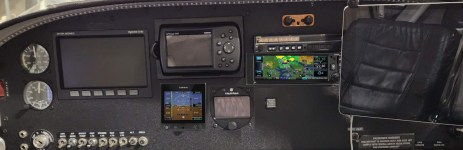
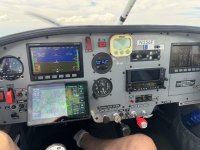
The new panel will look something like this:

1736187974003.png
 
Thanks for posing this. I'm about ready to purchase a Garmin GNX 375 and G5 for my RV-9A. I have a TrukTrak Gemini autopilot installed which receives lateral navigation data from a Garmin GPS 496. My plan is to send ARINC 429 from the GNX 375 to a GAD 29 then to the TrukTrak and G5. I asked for a quote from Aircraftspruce for the GNX 375 and G5 and ask them for a a cable from the GNX 375 to the GAD 29 and to the G5. Hopefully they will figure out what I need. Currently I have a Dynon D-180, GTX 327, GL 82 installed. I considered installing a GPS 175 and upgrading to a Dynon Skyview HDX, ARLINC 429, transponder and ADSB in and out. What I learned is that the Skyview system will require major rework of the panel and the aircraft will be down for quite a while. The GTX 375 will replace the GTX 327. I'll move TrukTrak to the right and install the G5 where the TrukTrak is now. Comments welcome.

The new panel will look something like this:

View attachment 77880
Here is my very similar setup, D-100, GNX 375, Aera760, AV-30. The AV-30 is similar to your G-5 setup but was cheaper than the G-5/GAD29 combo with very similar functionality. You can sell the 327 and the GDL 82 to recover some of your costs. The setup works well, if you get a HS34 the GNX375 will also drive the D180 HSI function as well.
Figs
IMG_4947.JPG
 
Here is my very similar setup, D-100, GNX 375, Aera760, AV-30. The AV-30 is similar to your G-5 setup but was cheaper than the G-5/GAD29 combo with very similar functionality. You can sell the 327 and the GDL 82 to recover some of your costs. The setup works well, if you get a HS34 the GNX375 will also drive the D180 HSI function as well.
Figs
View attachment 77886
Very similar setup. Thanks for posting. I am considering the AV-30 as well but will probably go with the G5 even though it is a little more expensive. I noticed you have alternate air. This is something I don't have. Can I ask how you installed an alternate air system?
 
Very similar setup. Thanks for posting. I am considering the AV-30 as well but will probably go with the G5 even though it is a little more expensive. I noticed you have alternate air. This is something I don't have. Can I ask how you installed an alternate air system?
I have the push fittings pitot static setup from Stein in my RV and use this switch for the alternate air Stein alternate air switch
 
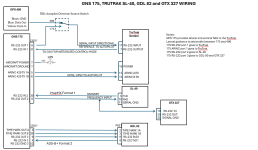
I'm planning to connect the GPS 175 to a GDL-82, TrukTrak Gemini, SL 40 and GTX 327. That is four RS-232 connections which exceeds the number of RS-232 connections available. Has anyone successfully connected a GPS 175 to the SL 40 so that SL 40 can receive standby communication frequencies from the GPS 175?

1736877384246.png
 
I'm planning to connect the GPS 175 to a GDL-82, TrukTrak Gemini, SL 40 and GTX 327. That is four RS-232 connections which exceeds the number of RS-232 connections available. Has anyone successfully connected a GPS 175 to the SL 40 so that SL 40 can receive standby communication frequencies from the GPS 175?

View attachment 78497
I would have to look up the 175 connections to check but you can daisy chain RS232 connections to multiple devices. In my setup the SL30 comm frequencies are sent by my AERA 760 which would be the 496 in your setup. Also one of the nuances of the Trutrack autopilot is that while it needs the RS232 GPS signal as the primary input at all times, if it detect Arinc 429 labels it prioritizes the guidance to the 429 signal. In your schematic you could delete the input select switch between the 496 and the 175 and just run the 496 data out (blue wire) to pin 17 of the TT and daisy chain the same signal to the SL-40 pin 10 which would let you upload the comm frequencies into the SL-40 standby slot from the 496.
With respect to the NAV as long as you do not have a nav route (Direct To, Flight plan, or Approach) active on the 175 you can drive the TT via the 496 in GPSNav lateral nav mode. As soon as you activate a 175 guidance mode the TT will switch to GPSS mode.
I use this all the time to fly Direct To and altitude change modes from the 760 and then setup my 375 for the approach scenario and switch modes as the 760 is easier to use en route.
The 496 will not fly the nice waypoint turns that the 175 will but the setup works pretty well.
Figs
 
I would have to look up the 175 connections to check but you can daisy chain RS232 connections to multiple devices. In my setup the SL30 comm frequencies are sent by my AERA 760 which would be the 496 in your setup. Also one of the nuances of the Trutrack autopilot is that while it needs the RS232 GPS signal as the primary input at all times, if it detect Arinc 429 labels it prioritizes the guidance to the 429 signal. In your schematic you could delete the input select switch between the 496 and the 175 and just run the 496 data out (blue wire) to pin 17 of the TT and daisy chain the same signal to the SL-40 pin 10 which would let you upload the comm frequencies into the SL-40 standby slot from the 496.
With respect to the NAV as long as you do not have a nav route (Direct To, Flight plan, or Approach) active on the 175 you can drive the TT via the 496 in GPSNav lateral nav mode. As soon as you activate a 175 guidance mode the TT will switch to GPSS mode.
I use this all the time to fly Direct To and altitude change modes from the 760 and then setup my 375 for the approach scenario and switch modes as the 760 is easier to use en route.
The 496 will not fly the nice waypoint turns that the 175 will but the setup works pretty well.
Figs
Thanks. I was thinking I wanted to have the 175 send the frequencies to the SL 40. Currently, the 496 sends frequencies to the SL 40 and that works well. From what I can gather from the manuals, the SL 40 needs the $PMRRCO1mka<chksum><cr> command to set the standby frequency. I assuming the 175 will output the set standby frequency command when the configuration is set to MapMX Format 1 for the connected RS-232 port and the GTX 327 is looking for GPS commands.
 
I dont have the G3X so do not know how the integrated function to the TT actually works but if it is not connected to the 175, with the 496 connected to pin 17 of the TT you do not actually need the RS232 Out 1 on pin 6 of the 175 connected to the TT. I think the only purpose of the GPS input to the 327 is for ground speed, so maybe you could use that pin 6 output for the 327 GPS input.
 
For anyone stumbling on this thread, here is a better understanding of RS-232 and ARINC 429 input to the TruTrak Gemini autopilot. From the pilot operation guide "The GPSS mode allows the autopilot to follow a direct-to or multi-leg flight plan from an IFR GPS or an external steering source such as an EFIS. This mode uses ARINC 429 data. This mode will anticipate upcoming turns, rounding the corners instead of overshooting the next course. It will also fly procedure turns and approaches. This mode is accessed from the track selector mode by toggling the joystick to the left. When in GPSS Mode, the autopilot display will show GPSS on the display. If ARINC 429 steering inputs are present, GPS Nav mode will be skipped." What this tells me is that it is not necessary to connect RS-232 from the GPS 175 to the TruTrak.
 
For anyone stumbling on this thread, here is a better understanding of RS-232 and ARINC 429 input to the TruTrak Gemini autopilot. From the pilot operation guide "The GPSS mode allows the autopilot to follow a direct-to or multi-leg flight plan from an IFR GPS or an external steering source such as an EFIS. This mode uses ARINC 429 data. This mode will anticipate upcoming turns, rounding the corners instead of overshooting the next course. It will also fly procedure turns and approaches. This mode is accessed from the track selector mode by toggling the joystick to the left. When in GPSS Mode, the autopilot display will show GPSS on the display. If ARINC 429 steering inputs are present, GPS Nav mode will be skipped." What this tells me is that it is not necessary to connect RS-232 from the GPS 175 to the TruTrak.
Slight correction, the TT requires a base GPS input for internal operation on pin 17, but it does not care where it comes from, in your configuration it can come from the 496 and so the 175 GPS connection is not required. This is how mine is setup with the base GPS coming from the Area 760 versus the 375. If you only had the 175 then you would have to connect a GPS input to the TT.
 
Slight correction, the TT requires a base GPS input for internal operation on pin 17, but it does not care where it comes from, in your configuration it can come from the 496 and so the 175 GPS connection is not required. This is how mine is setup with the base GPS coming from the Area 760 versus the 375. If you only had the 175 then you would have to connect a GPS input to the TT.
Great clarification. Thanks!
 
Interesting the roll servo went into the wing. Someone told me recently the roll goes under copilot seat in the -6A. Wonder why the diff?
 
(This is the closest thread I could find.)
Any tips on performing the Xcruze 100 Ground Checkout WITHOUT the pitot/static test box-machine ???
Thanks.
 
(This is the closest thread I could find.)
Any tips on performing the Xcruze 100 Ground Checkout WITHOUT the pitot/static test box-machine ???
Thanks.
Probably not the best method, but I just did mine in flight. Would go fly, then land and tweak settings accordingly.
 
Thanks Kiwi.
I was hoping to at least confirm direction of travel on the ground. :)

Roll servo can be confirmed by turning the knob and watching reaction.
Wondering how to check pitch servo on the ground without a box/machine.
 
(This is the closest thread I could find.)
Any tips on performing the Xcruze 100 Ground Checkout WITHOUT the pitot/static test box-machine ???
Thanks.
You can verify the the autopilot responds to pitch and roll commands but you will have to fly to test the pitot.
 
Thanks Kiwi.
I was hoping to at least confirm direction of travel on the ground. :)

Roll servo can be confirmed by turning the knob and watching reaction.
Wondering how to check pitch servo on the ground without a box/machine.
Been a while but I think you can check correct pitch direction by using the vertical speed or altitude select functions
 
With a Garmin GPS 175 connected, the Xcruse 100 will fly an LPV approach. The Xcruze will not capture the vertical guidance if flown down to the glideslope however. The Xcruze will show VFLAG indicating the vertical guidance is not active. This might sound silly but the aircraft must be trimmed for the airspeed or the Xcruze will porpoise while descending after the final approach fix. My technique is to establish the aircraft on the initial phase approach altitude, turn off the autopilot off, the slow the to 120 KIAS 5 miles before FAF, set the trim and turn the autopilot on by pressing the joystick to the left. This is engage GPSS and GPSV modes.
 
With a Garmin GPS 175 connected, the Xcruse 100 will fly an LPV approach. The Xcruze will not capture the vertical guidance if flown down to the glideslope however. The Xcruze will show VFLAG indicating the vertical guidance is not active. This might sound silly but the aircraft must be trimmed for the airspeed or the Xcruze will porpoise while descending after the final approach fix. My technique is to establish the aircraft on the initial phase approach altitude, turn off the autopilot off, the slow the to 120 KIAS 5 miles before FAF, set the trim and turn the autopilot on by pressing the joystick to the left. This is engage GPSS and GPSV modes.
The pilots guide does discuss this, the autopilot must be in altitude HOLD or zero vertical speed at the IAF or FAF to capture and change to coupled mode. Easiest way to do this is to use the altitude select function to select the appropriate altitude and then an appropriate VS to get to the selected altitude prior to the fix. On the 760 that I use for the navigator display you can select the VNAV function to be a specific altitude MSL at a point prior to the selected waypoint and then the VSR label will tell you what VS (rate of decent) you need to hit that spot. Works pretty well and the VSR label is an option on the navigator but I am not sure the same VNAV waypoint selection functionality exists.
Figs
 
Back
Top