
I would like to use an iPad with Foreflight while in flight in my RV-12iS. I haven't been able to settle on a good method ... knee board strapped to leg? ... or iPad Mini mounted somewhere using RAM mounts (and if so, where? and how attached?). Is there anyone who has already solved this problem, given that the space is limited?

Van's Air Force
You are using an out of date browser. It may not display this or other websites correctly.
You should upgrade or use an alternative browser.
You should upgrade or use an alternative browser.
Using iPad in flight
- Thread starter jveatch
- Start date


In my 8 I mounted one of these. The thing is rock solid, I can do loops and the iPad does not move.
I'm not a fan of the kneeboard as I don't like looking down at it, but that's just a personal preference.

 mygoflight.com
I'm not a fan of the kneeboard as I don't like looking down at it, but that's just a personal preference.
Flex Bolted Quick Release
Product Description The Flex Bolted Quick Release has been designed to secure anywhere with four screws of an AMPs pattern. Once the base is secured in the desired location you can slide in the mount and lock it in place. Device can also be secured with 3M Adhesive Petal Base, sold separately...
mygoflight.com
On our 14, we did this kind of mount with an iPad mini. Not sure if thats practical on the 12.
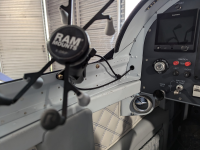

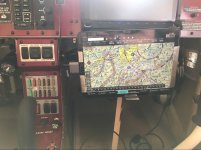
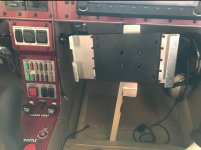
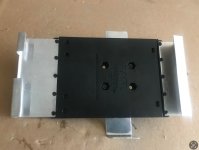
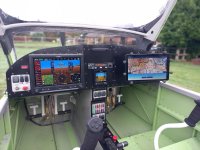
I think, that depends a lot on the instruments you got in your dashboard. I’ve even seen a setup where the owner fitted a 12 inch iPad right in the center for the price of not having to 10 inch displays. It was mounted with some 3D printed parts and a fan in its back (photos are without the iPad, but I think one can get the grasp).I would like to use an iPad with Foreflight while in flight in my RV-12iS. I haven't been able to settle on a good method ... knee board strapped to leg? ... or iPad Mini mounted somewhere using RAM mounts (and if so, where? and how attached?). Is there anyone who has already solved this problem, given that the space is limited?


George,On our 14, we did this kind of mount with an iPad mini. Not sure if thats practical on the 12.
View attachment 82158
Nice panel.
Daddyman58

I have a solution that makes the iPad Mini 6 or iPad Mini 7 work well. I do not have a 3D printer so I also don’t have the means to share a file with those who do.
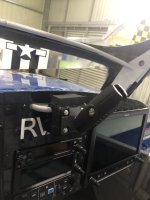
It is high enough to not block view of radio frequencies and can be positioned low enough to not interfere with canopy.
I connect the iPad to a Stratus 2 (Wi-Fi) to be an independent backup system to the Garmin. I also connect the iPad (Bluetooth) to the G3X for ease of sending flight plans back and forth. Works great.
The piece "hangs" on the egress assist handle and the lower part rests against the panel. A piece of 1/2" rubber on top utilizes the canopy frame to hold the mount firm on the handle. Can't bounce out in turbulence and can't even move or shake around in flight with canopy closed. Getting in or out is easy as the piece simply lifts off the handle when needed.
It is high enough to not block view of radio frequencies and can be positioned low enough to not interfere with canopy.
I connect the iPad to a Stratus 2 (Wi-Fi) to be an independent backup system to the Garmin. I also connect the iPad (Bluetooth) to the G3X for ease of sending flight plans back and forth. Works great.
The piece "hangs" on the egress assist handle and the lower part rests against the panel. A piece of 1/2" rubber on top utilizes the canopy frame to hold the mount firm on the handle. Can't bounce out in turbulence and can't even move or shake around in flight with canopy closed. Getting in or out is easy as the piece simply lifts off the handle when needed.
I've been using my iPhone+ since transitioning to a G3X. Works great!

My .02 (tip to Stein). iPad Mini 6 using FF in RV-6. Having said that, for the last year I've been using my iPhone 14 in that spot on a RAM mount (running FF).

 dougreeves.smugmug.com
Pivot Case - Doug Reeves
Pictorial review by Doug Reeves of vansairforce.net. I'm using an iPad Mini Gen 6. This case is available at https://pivotcase.com/. From Pivot, “We created a discount code (Code: "VAF") that you can offer to your audience. It will give anyone you give it to a 15% discount on www.flyboys.com “
dougreeves.smugmug.com
Last edited:
Very clever. Is "the piece" made of wood?I have a solution that makes the iPad Mini 6 or iPad Mini 7 work well. I do not have a 3D printer so I also don’t have the means to share a file with those who do.
View attachment 82160
It is high enough to not block view of radio frequencies and can be positioned low enough to not interfere with canopy.
I connect the iPad to a Stratus 2 (Wi-Fi) to be an independent backup system to the Garmin. I also connect the iPad (Bluetooth) to the G3X for ease of sending flight plans back and forth. Works great.
The piece "hangs" on the egress assist handle and the lower part rests against the panel. A piece of 1/2" rubber on top utilizes the canopy frame to hold the mount firm on the handle. Can't bounce out in turbulence and can't even move or shake around in flight with canopy closed. Getting in or out is easy as the piece simply lifts off the handle when needed.

It is. Two blocks one of which is a rectangle block and the upper that was jigsawed and sanded to form the "hook" to go over the handle then black material glued on to protect that panel paint. The rubber on top slightly mashes between the canopy frame tube and the block to hold it in place tightly.Very clever. Is "the piece" made of wood?
I used Quad Lock to mount but Ram or any mount brand that has a flat base available can be screwed onto the piece.
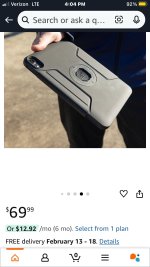
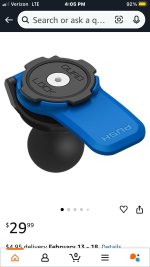

I fly with an iPad Air. Installed a Ram mount on the passenger side of the center section. Can’t use it with a passenger though. Modified the iPad Ram mount to better power it during flight. Due to the weight of the iPad, the support stick is required.
Attachments
Yep, made in China but works gud!I use a MyClip brand knee pad mount. No perfect, but it has worked in every plane I've flown.
I fly in a -10, and, like the quoted poster, I carry (usually on the top of the center ‘tunnel’) my iPad mini, but rarely use it when VFR. Except, if someone else is sitting left seat and flying, and I am right seat, it’s easier for me to see traffic data on my iPad (running WingX, wi fi to SkyRadar ADSB-in box) than it is to look way over to the pilot’s EFIS. When practicing instrument approaches, either seat, I’ll pick up the iPad/WingX to review the approach. But for actual IMC I usually bring along a paper plate. I’ve never gotten over the fear that the iPad will die at the worst time. I know, I’m old and set in my ways….iPad mini on a knee board. Honestly, though I carried it on every flight, I almost never used it. The EFIS is so darn good.

Piper J3
Well Known Member
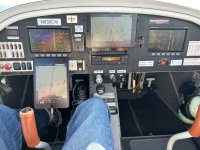
I have two mini iPads running ForeFlight. The one in front of the pilot is zoomed out to show route / weather and the one above the radio stack is zoomed in to show nearby traffic. Pilot iPad is powered by aircraft buss and iPad above radio stack runs on internal battery that gets charged when plane is in hanger, but can also be charged in-flight. Both iPads are mounted with plastic tray using 3M body side molding tape. Plastic tray is salvaged from mini iPad case on Amazon.
Attachments
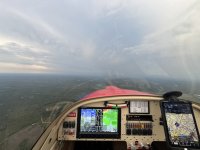
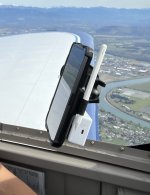
I mount my iPad mini with the pivot case and pivot ball mount. I attach it to the canopy careful not to interfere and get in the way of the control stick. Also it’s in spot where it doesn’t block the lights for Lane A and B. Also, unrelated, I attach my sentry to the back of the pivot case with Velcro.

 flyboys.com
PIVOT Shorty Single Suction Cup Mount
Overview Compact version of the popular 809PPK Single Suction Cup Mount, ideal for applications where space is limited. Attaches to any non-porous surface with unshakable grip due to the Locking Suction Cup. Adjustable viewing angles. Order now! In a hurry? Expedite processing of your order with...
flyboys.com
Attachments

I went to FLyboys and the discount code appears invalid. Anyone know why?My .02 (tip to Stein). iPad Mini 6 using FF in RV-6. Having said that, for the last year I've been using my iPhone 14 in that spot on a RAM mount (running FF).
Pivot Case - Doug Reeves
Pictorial review by Doug Reeves of vansairforce.net. I'm using an iPad Mini Gen 6. This case is available at https://pivotcase.com/. From Pivot, “We created a discount code (Code: "VAF") that you can offer to your audience. It will give anyone you give it to a 15% discount on www.flyboys.com “
The full size iPad is PERFECT for the rear seat of the RV-8 though.I use the Ram mount for my mini iPad. The full size iPad is too large for the RV cockpit.
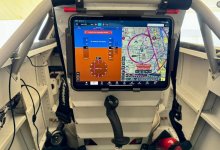

I beg to differ. Been flying over 14 years with a full size Ipad mounted on a ram mount on the side of the roll bar on my slider 9A.I use the Ram mount for my mini iPad. The full size iPad is too large for the RV cockpit.
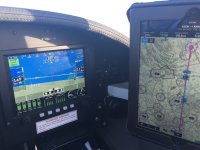

I have a 9 but the panel is not much different in size. I use a 11" ipad mounted on a ball mount on the far right side of the panel. It is hard to see in the picture but you can get the idea. It does cover my A/P and radio, but I always use the G3X to set them. I run foreflight on the ipad and it works great. My ipad is about 2.5 years old and when I replace it I will get the mini so I can mount it on the left side just in front of the strut mount.
Edit - second pic added with the ipad mounted
Edit - second pic added with the ipad mounted
Attachments
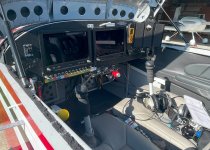
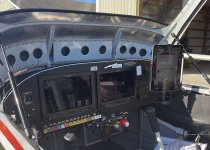

Me too. 11 inch iPad Pro on a suction cup ball mount (RAM) works great on the open area of the right panel. I use it strictly for ForeFlight with Sentry. I also have an iPad Mini 6 that I use for the IFD100 app for my Avidyne navigator as well. I used to wear it on an knee board but found it too inconvenient and now just keep it in the center or toss it on the passenger seat (if there's no passenger). That allows me a full-screen interface for the Avidyne navigator and flight management system (image is old image before aviionics upgrade).I have a 9 but the panel is not much different in size. I use a 11" ipad mounted on a ball mount on the far right side of the panel. It is hard to see in the picture but you can get the idea. It does cover my A/P and radio, but I always use the G3X to set them. I run foreflight on the ipad and it works great. My ipad is about 2.5 years old and when I replace it I will get the mini so I can mount it on the left side just in front of the strut mount.
Edit - second pic added with the ipad mounted
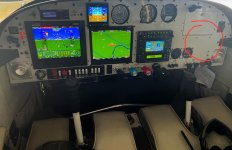
What EFIS? I agree modern glass with database is pretty darn good and all you need? But.... what EFB app do you have.iPad mini on a knee board. Honestly, though I carried it on every flight, I almost never used it. The EFIS is so darn good.
1 - I have GARMIN GPS and have to update the IFR data if I want to file.... I have no option to be legal, current data. I update as needed, ala carte. It is IFR GPS with tiny color map. It could display WX and Traffic from ADS-B but I don't have proprietary accessories to do that. I have other means...
2 - my EFIS (GRT) has free data, airports, terrain updates..... Overlay of sectional and low alt IFR charts is from 2nd party (Seattle Avionics). I get ADS-B NEXTRAD and traffic via hard wire USB from non-proprietary Stratux on EFIS if I want....
3 - iPad EFB (not Foreflight) is free and has all the charts: sectional, low alt IFR, and approach plates, no charge. It can display ADS-B WX and Traffic via WiFi which my Stratux output has... It is handy.
If God forbid I am IMC and lose the main EFIS which has everything, I have a G5 back up for pure flight and attitude instrument. As far as Nav I would still have the Garmin GPS map display and course and LPV deviation indication to get down. However having the IPAD as a backup is nice to have.

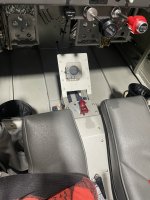
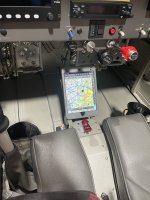
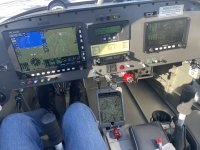
I've thought about doing something similar with one of these telescoping arms that charge the iPad through the keyboard port. Mount it underneath the dash and have the ability to pull it up for use, or keep it down low like you have it for keeping the cockpit open. I worry it might not handle vibration/turbulence very wellI made a mount for my mini using a Pivot mount. This location on my RV6 is out of the sun most of the time.

KUXIU X36 Pro MAX iPad Magnetic Charging Stand
The world's first magnetic charging iPad stand After over 600 days of research and extensive testing, KUXIU is proud to introduce the world's first magnetic charging stand for iPad. This undoubtedly brings great convenience to users who regularly use their iPads for work and entertainment. 18W...
 kuxiu.co
Jayson, I think I finally realized that the RAM mount I would use is an extra one I have that attaches to the back of any iPad RAM Mount. I could use that with your block but with longer screws. What material did you find worked good for the block? I should first verify I either do or don't have the resources to make your design and not put it in your lap. I messed around with one of my spare suction cups yesterday and while that works, it doesn't allow the iPad Mini to be tucked in close to the top of the panel. Thanks so much for your communication and offer ... I got side-tracked and forgot to answer. John Veatch, Bremerton WA, N18HHI have a solution that makes the iPad Mini 6 or iPad Mini 7 work well. I do not have a 3D printer so I also don’t have the means to share a file with those who do.
View attachment 82160
It is high enough to not block view of radio frequencies and can be positioned low enough to not interfere with canopy.
I connect the iPad to a Stratus 2 (Wi-Fi) to be an independent backup system to the Garmin. I also connect the iPad (Bluetooth) to the G3X for ease of sending flight plans back and forth. Works great.
The piece "hangs" on the egress assist handle and the lower part rests against the panel. A piece of 1/2" rubber on top utilizes the canopy frame to hold the mount firm on the handle. Can't bounce out in turbulence and can't even move or shake around in flight with canopy closed. Getting in or out is easy as the piece simply lifts off the handle when needed.
Poplar; but because it is something I had some scrap of lying around. If pine had been here I would've used pine. Anything would work in this application, I believe. There is no hardness/softness consideration and given the small size weight really isn't a factor.
Did you fabricate a mount?I could use that with your block but with longer screws.
Pivot leg strap by FlyboysI would like to use an iPad with Foreflight while in flight in my RV-12iS. I haven't been able to settle on a good method ... knee board strapped to leg? ... or iPad Mini mounted somewhere using RAM mounts (and if so, where? and how attached?). Is there anyone who has already solved this problem, given that the space is limited?


Phyrcooler
Well Known Member
I’ve tried different leg straps with iPad mounts, but find that what I really wish someone would make is one with a wedge or support under it - tilting it up about 45°. Angled towards you, It would be easier to read, and pointed at your body, frequently have less reflection and glare.

Piper J3
Well Known Member
I’m not familiar with RV-12iS instrument panel…. I have early SN RV-12 with Dual Dynon D180/D100. I run two mini iPads – one above radio stack that I keep zoomed-in for close traffic and one mounted at 45 degree angle just ahead of pilot’s stick that shows route. The pilot side iPad covers switches for Nav Lights and AP – both of which I don’t have, so I marked switches inop...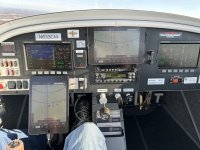
If you haven’t considered going ultra-compact, here’s an alternative I’m currently using - whittled down from 5 years of using iPad minis, full size iPads, paper, kneeboards, folded towel on leg, 3D printed mounts and a dozen other things in the sim/Phenom/RV/KingAir:
iPhone 14/15/16/17 Pro Max and….(my 14 Pro Max fits in the 17 Pro Max case)
Rock. Solid. And out of the way. You can tap ‘Scratchpad’ and start writing w/your finger faster than you can pick up a pencil. In the sim I put it on the window up above my eyes so I can glance up over my glasses and see the plate/checklist (I can focus at a distance of about a foot w/o glasses). IP’s think I weird.


 pivotcase.com
Phone in the cockpit. iPad in the FBO/Home. Flights you create on one auto-syncs to the other device.
Just food for thought if you haven’t considered it.
v/r,dr
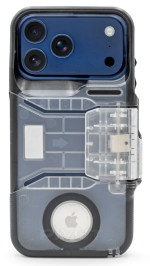
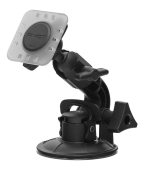
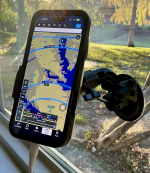
Since it's half the distance to your head as the panel, relatively it looks just as big, if not bigger than the G3X screens, and because of it's compact size you don't lose much canopy viz.
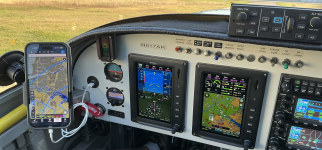
iPhone 14/15/16/17 Pro Max and….(my 14 Pro Max fits in the 17 Pro Max case)
Rock. Solid. And out of the way. You can tap ‘Scratchpad’ and start writing w/your finger faster than you can pick up a pencil. In the sim I put it on the window up above my eyes so I can glance up over my glasses and see the plate/checklist (I can focus at a distance of about a foot w/o glasses). IP’s think I weird.
with
Single Suction Cup Mount
Click here to learn how the PPK-XP enhances strength, reliability, and long-term performance.
pivotcase.com
Phone in the cockpit. iPad in the FBO/Home. Flights you create on one auto-syncs to the other device.
Just food for thought if you haven’t considered it.
v/r,dr
Since it's half the distance to your head as the panel, relatively it looks just as big, if not bigger than the G3X screens, and because of it's compact size you don't lose much canopy viz.
Last edited:

Went with a iPad mini and a shorty pivot mount. 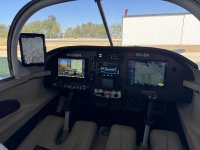

If you haven’t considered going ultra-compact, here’s an alternative I’m currently using - whittled down from 5 years of using iPad minis, full size iPads, paper, kneeboards, folded towel on leg, 3D printed mounts and a dozen other things in the sim/Phenom/RV/KingAir:
iPhone 14/15/16/17 Pro Max and….(my 14 Pro Max fits in the 17 Pro Max case)
As a wise Mandalorian once said, this is the way.
My employer provides us with iPads and ForeFlight business subscriptions. Foreflight, in turn, allows us to load worldwide Jepp charts onto one iPad *and* one iPhone. So I could choose either device.
Over the years I've found the iPhone Pro Max is the best option for me, because a) it's always with me, b) it has dual SIM cellular and therefore always seems to have a solid internet connection, and c) it's the right size for an RV cockpit. I also utilize as my device of choice it when flying the G650 -- although I have to carry the iPad there because all the required paperwork is in Gulfstream's proprietary iPad-only application.
But I love the iPhone. And having fewer devices to maintain, update, charge, and carry around? Yes please.
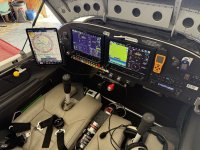
In the RV-6 I utilize a FlightFlix suction mount and iPhone holder.
--Ron

sansoneservices
Well Known Member
I don't like the kneepads only because looking far down feels awkward. Higher mounting feels better for me.
