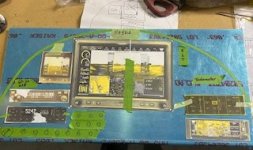
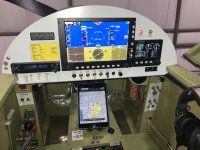
Before actual, after plan. After sleeping on it, radio and transponder will move under G3X so as to better lay out switches and CB's. Please advise, with yes, no or have you thought about this. Day VFR panel with room for next owner to add IFR Nav.


Hi, there several radio's which can communicate with the G3X. Of course several Garmins but also the Trig remote radio. Unfortunately the same can't be said of the transponders. Also be aware that the G3X 10" screen needs to be lower in the panel as what you show in your mock up. The forward canopy frame square profile will either hit it or blank it. The G3X is well proud of the panel. I have a G3X and G5, switches and breakers in the panel. There's enough space for remote transponder and radio behind the panel.Before actual, after plan. After sleeping on it, radio and transponder will move under G3X so as to better lay out switches and CB's. Please advise, with yes, no or have you thought about this. Day VFR panel with room for next owner to add IFR Nav.


Rick…IMO. You have too much going on. Just my 2 cents.Before actual, after plan. After sleeping on it, radio and transponder will move under G3X so as to better lay out switches and CB's. Please advise, with yes, no or have you thought about this. Day VFR panel with room for next owner to add IFR Nav.


After talking with Dynon customer service,I am leaning heavily toward 10" HDX. That will allow me to use my current Garmin radio and transponder. The G5 will be a backup for the HDX and Dynon makes ALL the necessary cables and harnesses to hook it all together. I wanted to stay all Garmin but too much expense and extra work.Hi, there several radio's which can communicate with the G3X. Of course several Garmins but also the Trig remote radio. Unfortunately the same can't be said of the transponders. Also be aware that the G3X 10" screen needs to be lower in the panel as what you show in your mock up. The forward canopy frame square profile will either hit it or blank it. The G3X is well proud of the panel. I have a G3X and G5, switches and breakers in the panel. There's enough space for remote transponder and radio behind the panel.

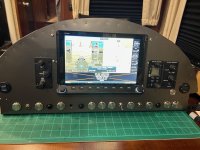
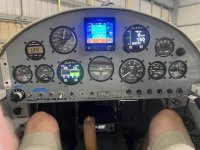
Anyone know where in the plans that cross brace is? My 4 doesn't seem to have it and I can't find it in the plans.Keep in mind the cross brace a few inches behind the lower panel. Switches barely fit in that space, and breakers are a no go. I had to make a removable face for the switches to get the panel in and out. This pic (of my 10" HDX) was before I figured that out lol. For roughly 1.25" above or below the centerline of those switches, backspace is limited. You certainly can't fit a transponder or radio there. My transponder (GTX-327) is going to have to go in a center console behind the stick.
I think it is the F-402 bulkhead, the crossmember is F-402C and it appears that it was added in a revision in '82.Anyone know where in the plans that cross brace is? My 4 doesn't seem to have it and I can't find it in the plans.
Ah there it is. Mine was finished in 04, but not sure what version of plans they used. I'll have to see if I can make a new one and fit it in there. I already took that space up with a radio and other things.I think it is the F-402 bulkhead, the crossmember is F-402C and it appears that it was added in a revision in '82.


Put the Xponder on a tip out hinge, on the right sidewall (behind your knee, in front of your hip.). Works great for me and is off the panel, out of the way, but easy to reach if I need to change a code.My transponder (GTX-327) is going to have to go in a center console behind the stick
I thought about mounting it face up in an armrest there. I will try to visualize a hinge setup, anything to make the little cockpit feel bigger.Put the Xponder on a tip out hinge, on the right sidewall (behind your knee, in front of your hip.). Works great for me and is off the panel, out of the way, but easy to reach if I need to change a code.
Not a great pic but this is what mine looks like.Ah there it is. Mine was finished in 04, but not sure what version of plans they used. I'll have to see if I can make a new one and fit it in there. I already took that space up with a radio and other things.
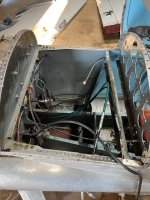
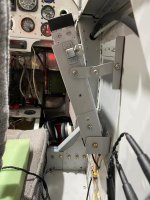
Thanks for the picture. It looks like on mine they mounted the panel right where the support goes. I've already installed a bunch of things down low there so I'll fab up a support that will fit sometime soon.Not a great pic but this is what mine looks like.
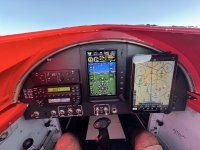
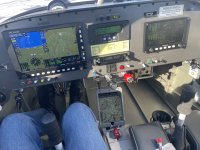
I have a few clarifications.This is what I had in my last RV4 (below). 2 GRT screens, both with their own WAAS gps, which will work for enroute IFR GPS navigation. All that’s needed to make it an IFR bird (by your next owner, as you’ve said) is an IFR approach certified navigator. This could be as simple as a remote VHF navigation receiver, like remote VOR receiver. You can do any VHF approach (ILS, LOC, LOC/BC, VOR) and use your GPS as an overlay for SA with this minimal equipment. Enroute IFR GPS direct to navigation is approved using non-approved GPS navigation equipment any time you’re in a radar environment. I’ve done this several times. You’ll need an approved IFR navigation source for the approach or if the enroute navigation source you are using (GPS) goes TU while enroute (highly unlikely). A VOR receiver works for this.
My GRT equipment is compatible with almost all other IFR/VFR navigation equipment. I have a VFR bird with this same level of equipment in my RV6. I have tons of experience flying IFR, but choose to not do so because of my age. If I wanted to make it IFR compatible, I could do the mods to do that in about 2 or 3 days at minimal cost. I don’t believe in building/equipping my airplane for someone else - - unless it’s part of the sale.
First pic - my second RV4. Second pic - my current (last) RV6.

Put the Xponder on a tip out hinge, on the right sidewall (behind your knee, in front of your hip.). Works great for me and is off the panel, out of the way, but easy to reach if I need to change a code.
Have you thought about a remote mounted transponder that you control through your G3X/Dynon? Generally, you only need to set the code once a flight, so even though you have to get to the transponder number pad, I find that it's not a big deal. It would free up a little panel space, which seems to be at a premium in the -4.I thought about mounting it face up in an armrest there. I will try to visualize a hinge setup, anything to make the little cockpit feel bigger.
I’ll try to remember to take a picture and send youI thought about mounting it face up in an armrest there. I will try to visualize a hinge setup, anything to make the little cockpit feel bigger.
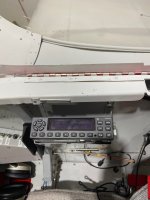
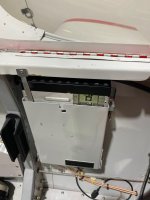
I have, but all the remote ones I'm aware of have ADSB out. I don't want that.Have you thought about a remote mounted transponder that you control through your G3X/Dynon? Generally, you only need to set the code once a flight, so even though you have to get to the transponder number pad, I find that it's not a big deal. It would free up a little panel space, which seems to be at a premium in the -4.
I have a Sandia STX 165R (remote) transponder mounted behind my panel, controlled through my GRT EFIS. Very easy to change codes and it’s a mode C - the ADSB out is via the uAvionix Echo. I don’t think the echo is available anymore, so not sure what they are recommending for that.I have, but all the remote ones I'm aware of have ADSB out. I don't want that.
I will look for one of those. Are there other remote mount, non-adsb, that would work with my dynon hdx?I have a Sandia STX 165R (remote) transponder mounted behind my panel, controlled through my GRT EFIS. Very easy to change codes and it’s a mode C - the ADSB out is via the uAvionix Echo. I don’t think the echo is available anymore, so not sure what they are recommending for that.
The default Dynon xponder is a re-branded Trig TT-22. If you don’t plug in the gps data to it, it will default to mode S, no ADSB-out. But I don’t think that’s what you want, either.I will look for one of those. Are there other remote mount, non-adsb, that would work with my

To expand on Bob's comments, the Dynon and the Trig transponders also have different software. They are NOT interchangeable.The default Dynon xponder is a re-branded Trig TT-22. If you don’t plug in the gps data to it, it will default to mode S, no ADSB-out. But I don’t think that’s what you want, either.
The default Dynon xponder is a re-branded Trig TT-22. If you don’t plug in the gps data to it, it will default to mode S, no ADSB-out. But I don’t think that’s what you want, either.
So if I'm understanding correctly, I could buy the Dynon transponder but not connect the gps. That would satisfy the transponder requirement for an airplane with electricity but not provide ADSB out, that would then be required to be turned on even in the rural world I live in?To expand on Bob's comments, the Dynon and the Trig transponders also have different software. They are NOT interchangeable.
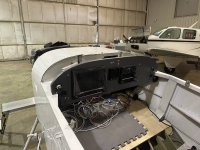
That is correct. Without ADSB-out you will be restricted to below 10,000'MSL (with some exceptions), no Class B or C areas, not within 30 nm of Class B airport, etc. But the reason for my cryptic comment ('I don't think that's what you want') is that the TT-22 is still a mode S transponder and, even without ADSB-out, it replies to "pings" with your N number (or hexadecimal equivalent), so it is not truly anonymous, if that is your goal. You could call (or ask here) for someone really knowledgeable about the Dynon transponder, ask "What if I leave the transponder set up table blank where it asks for the N number?" e.g., Does it still work, but as a mode C (no ID data is sent out), or does it not function at all with the table blank? I don't know the answer.So if I'm understanding correctly, I could buy the Dynon transponder but not connect the gps. That would satisfy the transponder requirement for an airplane with electricity but not provide ADSB out, that would then be required to be turned on even in the rural world I live in?
I have decided to go with the 7", thanks for the heads up!Keep in mind the cross brace a few inches behind the lower panel. Switches barely fit in that space, and breakers are a no go. I had to make a removable face for the switches to get the panel in and out. This pic (of my 10" HDX) was before I figured that out lol. For roughly 1.25" above or below the centerline of those switches, backspace is limited. You certainly can't fit a transponder or radio there. My transponder (GTX-327) is going to have to go in a center console behind the stick.
View attachment 108575