Van's Air Force

The definitive Van's Aircraft support community! Buying, building or flying an RV? Join our exclusive family of mentors and enthusiasts!

Terrain, Terrain, Pull Up, Pull Up!

Amadeus

Well Known Member
Sponsor
My RV-12iS has the dual G3X VFR package that has had the GPS20A removed and replaced with the GPS175 in March 2023. Last fall, shortly after a take off in VFR conditions, the G3X map screen and PFD background displayed in the color red and the audio alert of "terrain, terrain, pull up, pull up" began repeating itself. Having flown from that airport multiple times and also being able to see clearly on a CAVU day I knew there was nothing in my path at my altitude and continued my flight. Once at cruising altitude my pilot/passenger and I began to assess why this may have occurred and came up with a WAG (wild assumption guess). We were attending a fly-in event that had many aircraft departing once festivities were over. I had just started up and the GPS175 was still in TERR TEST mode when the marshaller began directing me to pull into the line of traffic moving toward the runway. My temperatures were in the green so I began movement. We both figured that moving the airplane while the TERR TEST was still being conducted confused the navigator as to actual location so I made mental note to always wait for the test to complete before beginning to taxi.

Waiting for TERR TEST to complete before movement seemed to do the trick for quite a few months. Then in March of this year I was departing another familiar airport on a VFR day when the same "terrain, terrain, pull up, pull up" event again occurred despite waiting. I wrote it off as a one time thing before it once again occurred leaving an unfamiliar airport (but in a very flat farmland area on the Illinois/Indiana state line) in the path of totality for the April 8 eclipse. Because this was once again taking off from an event when everyone else was I wondered if the close proximity to other navigators could have an input to the problem; after all, two of the three data points are leaving crowded events. However it happened again just last weekend at a small uncrowded airport.

Fortunately all these occurrences were in VFR conditions. Until I figure it out I will not be taking off into IFR conditions. Has anyone else experienced this navigator behavior? I'm stumped on where to begin my research.
 
Your alert audio will be coming from one of your GDU displays, not your IFR navigator.

You can adjust the sensitivity of terrain alerts using the menu options on the Terrain page; they default to the most sensitive settings.
 
Your alert audio will be coming from one of your GDU displays, not your IFR navigator.

You can adjust the sensitivity of terrain alerts using the menu options on the Terrain page; they default to the most sensitive settings.
Thank you, I will look at those setting options.

The GDU displays are receiving GPS data externally (the GPS175). Would this have any bearing on perhaps stemming from the navigator unit?
 
They will use their own GPS data for terrain alerting, unless something is amiss with your GPS installation.
Perhaps something is amiss. I do get the "message" on the GDU that "GPS is from an external source" once everything is powered up and operating.
 
Perhaps something is amiss. I do get the "message" on the GDU that "GPS is from an external source" once everything is powered up and operating.
Yes, this is indicative of a problem with the GPS receiver, antenna, or reception to your GDU displays. I would address this before further flight as it is not a normal condition.
 
Huh? The G3X requires a GPS antenna and the GPS175 requires its own antenna, neither has a built in antenna.
Perhaps a review of the associated manuals would help you.
It isn't built in to the GDU. THIS is the antenna.
 
Last edited:
I see that I can choose between "external" and "internal" antenna in the G3X settings. Once the GPS175 is booted up and running I get the message on the G3X GDU that the GPS source is from the "external" antenna (meaning the GPS175). If I just click MENU and select INTERNAL as the GPS source would this solve the issue or would it mean that the G3X is now ignoring the GPS175 for everything including the flight plan, approach, etc.?
 
I see that I can choose between "external" and "internal" antenna in the G3X settings. Once the GPS175 is booted up and running I get the message on the G3X GDU that the GPS source is from the "external" antenna (meaning the GPS175). If I just click MENU and select INTERNAL as the GPS source would this solve the issue or would it mean that the G3X is now ignoring the GPS175 for everything including the flight plan, approach, etc.?
Don't confuse GPS navigation with GPS reception. The setting you are looking at affects the flight plan only, not the GDU's GPS receiver. Ignore this and focus on the issues with your GDU's GPS reception. Make sure the GPS antenna configuration is correct, and make sure your GDU can achieve a valid GPS fix. If you don't know how to do this, Garmin product support can help you.
 
I get the alert when I'm going into a local, private, grass strip. It is very annoying and I can't understand why my GTN 650xi doesn't understand it is an airport.
 
I get the alert when I'm going into a local, private, grass strip. It is very annoying and I can't understand why my GTN 650xi doesn't understand it is an airport.
Terain alerts are generated by the G3X (I believe) and have nothing to do with the GTN or it’s databases…..
 
I don't have a G3X. I have a Dynon Skyview. The alert shows up on the GTN and the stop button is on the GTN.
 
The G3X antenna is not certified. It cannot see as much of the sky. The G3X internal GPS is not WAAS either. Depending on where the antenna is mounted, it can be blocked by the fuselage or something and it is not getting any help from ground stations for error correction and altitude/position lock. The internal GPS in the G3X is likely taking priority over the external. External certified systems are designed to be used standalone so you can pre-load flight plans and approaches without them changing the nav on the G3X display until one is ready. If the G3X does not have a view of the sky or it is getting conflicting info from the certified unit, it will take the most risky situation as priority to call out. I think that is what you were experiencing.

My theory is that when you had the GPS20A the G3X was taking it as a priority. The 20A is a position only system and WAAS certified. The G3X was designed to work with the 20A and was likely ignoring the internal source if there was a conflict. There is a ranking and checksum system in the software. The software developers decide what GPS position takes precedence. Only way to override them is to remove a source that is causing problems.

I believe you can disable the internal G3X GPS completely in the config or unplug the antenna. When the internal system is out the G3X will only be able to rely on the certified GPS position coming in on the 429 serial bus. I recall settings having a setting to set the priority source as well. Try flying off of the certified GPS only to see if it you have any issues. If all works on the certified then you may want to change your G3X antenna to a fuselage mount to give it a better view of the sky or just rely on the external GPS source.
 
Terain alerts are generated by the G3X (I believe) and have nothing to do with the GTN or it’s databases…..
As an owner/operator/installer of GTN650xi - I can tell you that the GTNxi DOES do Terrain Awareness, DOES use it's own single external antenna & internal database.
Warnings ARE displayed on GTNxi screens & are output as Voice warning to EFIS GDU and/or audio panel.
Please review Pilots guide subsection section on Terrain Awareness in section 5 Hazard Awareness (see front page attached).
You CAN select minimum runway conditions (type & length) that are acceptable and many many more things
It's hard to follow this thread - looks like several drifts & avionics suits being discussed....
Just adding known factual info.... sorry if someone considers this yet another drift.
I just checked GPS175 Pilots Guide:
It has the SAME functions as the GTNxi
Hope this helps.
 

Attachments

Last edited:
As an owner/operator/installer of GTN650xi - I can tell you that the GTNxi DOES do Terrain Awareness, DOES use it's own single external antenna & internal database.
Warnings ARE displayed on GTNxi screens & are output as Voice warning to EFIS GDU and/or audio panel.
Please review Pilots guide subsection section on Terrain Awareness in section 5 Hazard Awareness (see front page attached).
You CAN select minimum runway conditions (type & length) that are acceptable and many many more things
It's hard to follow this thread - looks like several drifts & avionics suits being discussed....
Just adding known factual info.... sorry if someone considers this yet another drift.
I just checked GPS175 Pilots Guide:
It has the SAME functions as the GTNxi
Hope this helps.
Everything that you say about the GTN is true….but the OP was talking about getting terrain alerts from his G3X, and those are generated from within that unit, not from the GTN. You are correct that this thread has many tangential comments that don;t apply to the origins of the post…..
 
Everything that you say about the GTN is true….but the OP was talking about getting terrain alerts from his G3X, and those are generated from within that unit, not from the GTN. You are correct that this thread has many tangential comments that don;t apply to the origins of the post…..
I am in violent agreement with you Paul. It's IMPORTANT that the OP understands that originally the Terrain warnings came from his VFR GDU & internal GPS & database, when the GPS175 was added in lieu of the GPS-20A he added a 2nd source of Terrain warning (the GPS175). He needs to enable One & ONLY one of the Terrain warning sources... and be sure to put all of his warning & mode choices in the selected Terrain warning source.
 
He needs to enable One & ONLY one of the Terrain warning sources... and be sure to put all of his warning & mode choices in the selected Terrain warning source.
I cannot find this setting location. Is it found in the G3X menus or do I need to put the G3X into config mode to do this?
 
In the Pilots Manual: G3X Pilots Guide Rev Y 190-01754-00 there is a section on Terrain & Terrain Setting that is on page 232 of the manual - as well as:
Enabling/disabling terrain alerts:
1) From the Terrain Page, press the MENU Key.
2) Touch Alerts to toggle between Enabled and Inhibited.
on page 234....
I recommend reading this entire manual especially for Traffic & Alerts, it's a free PDF download from Garmin.
I am not a G3X user or owner - just a retired Avionics engineer, I do own & fly a GTN650xi and it as well as your GPS175 have the capabilities of generating similar Traffic alerts which COULD be routed directly to an audio panel or through the G3X depending on how they are wired - which I have no knowledge of.
Hope that helps you out.
 
Enabling/disabling terrain alerts:
1) From the Terrain Page, press the MENU Key.
2) Touch Alerts to toggle between Enabled and Inhibited.
I have inhibited before in my home area where I know the hazards but am not comfortable in unfamiliar territory doing this.

What I cannot locate is how to make the GPS175 the one and only terrain warning source (as mentioned in post #19).
 
What I cannot locate is how to make the GPS175 the one and only terrain warning source (as mentioned in post #19).
For this you would need to permanently disable terrain alerting on your G3X system, which you could do by changing all the terrain alert sensitivity settings to "Disabled" on the terrain setup page.
 
For this you would need to permanently disable terrain alerting on your G3X system, which you could do by changing all the terrain alert sensitivity settings to "Disabled" on the terrain setup page.
I don't want to disable terrain alerting. I just want the GPS source to be the better antenna of the GPS175 instead of the lesser G3X antenna that the -12iS has mounted under aluminum.
 
I don't want to disable terrain alerting. I just want the GPS source to be the better antenna of the GPS175 instead of the lesser G3X antenna that the -12iS has mounted under aluminum.
I'm not sure what you're trying to do here. Your G3X system can use GPS data from your IFR GPS if it has a better fix than one of the various other available GPS sources, but for various reasons this is considered an abnormal condition.

After rereading the previous posts in this thread, it sounds like you might have a GPS antenna installation issue, although I'm not totally clear on this. Perhaps you can provide more information about your installation, with photos.
 
It is the standard -12iS dual Garmin G3X VFR package. This includes a Garmin puck antenna (coupled to the PFD) that is mounted under the aluminum sheet that covers the avionics bay plus the GA36 antenna coupled to the GPS20A that is mounted firewall forward under the cowling.

After airworthiness the GPS20A was removed and a GPS175 installed using the existing GA36 antenna. A little over a year ago I began getting terrain alerts even when 2,000' above the highest terrain. I also showed up as traffic to myself with a yellow "00" on top of my own icon on the G3X traffic page. I ended up going to an avionics A&P who reran a ground line between the GPS175 and the GMU11. That didn't make sense to me but I did get almost a year of flying without the erroneous terrain alerts occurring. Now the erroneous terrain alerts have returned so I am revisiting this thread. Same thing as before with the yellow "00" atop my icon on the G3X traffic page plus the "terrain, terrain, pull up, pull up" audio and terrain depicted in red on G3X screens. Yesterday it continued the entire 5,500' of climb plus a few minutes of level flight.

My guess is this is the result of the puck antenna attached to the G3X being mounted under the aluminum. If there isn't a method for having the GA36 antenna be the antenna in use for terrain then next month during my Condition Inspection I plan to move the puck antenna from the avionics bay out to be under the cowling.
 
Garmin puck antenna (coupled to the PFD) that is mounted under the aluminum sheet that covers the avionics bay

The GPS antenna is inside the metal fuselage? This doesn't sound like it comes close to meeting the GPS antenna mounting requirements from the G3X installation manual, which state in part:

The GPS antenna is a key element in the overall system performance and integrity for a GPS navigation system. The mounting location, geometry, and surroundings of the antenna can affect the system performance and/or availability.
Mount the antenna on top of the aircraft in a location with an unobstructed view of the sky.
The GPS antenna should be mounted in a location to minimize the effects of airframe shadowing during typical maneuvers.

I know some have had success with antennas mounted in the hot engine compartment, but I don't like it, and the installation guidelines don't either:

Due to the excessive temperature environment and large areas of signal blockage caused by the fuselage, mounting the antenna under the engine cowling (forward of the firewall) is not recommended and likely will not provide adequate GPS reception.
 
I don't want to disable terrain alerting. I just want the GPS source to be the better antenna of the GPS175 instead of the lesser G3X antenna that the -12iS has mounted under aluminum.
Please listen very carefully to this:
If given a choice of G3X or GPS175 - Garmin recommends using the G3X Terrain Alerting only & turning OFF all the terrain alerting in the GPS175.
If you wish to use the GPS175 as the primary source of flight plan & GPS location - that's fine & good - set it as your G3X's EXTERNAL GPS SOURCE - that will use the GPS175's antenna & GPS receiver to provide location data to the G3X, and if the GPS175 ever goes off line the G3X will revert to it's own GPS internal receiver & internal antenna.
Enable the Terrain Alerting in the G3X ONLY to whatever levels you want, keep the Terrain database in the G3X up to date.
This is how it's done in the certified world also.
Feel free to contact Garmin Tech support 913-440-5252 for confirmation or more assistance.
Best of luck.
 
If you wish to use the GPS175 as the primary source of flight plan & GPS location - that's fine & good - set it as your G3X's EXTERNAL GPS SOURCE - that will use the GPS175's antenna & GPS receiver to provide location data to the G3X, and if the GPS175 ever goes off line the G3X will revert to it's own GPS internal receiver & internal antenna.

Well actually, that's only half correct.

Yes, there is a setting to determine where the G3X system uses flight plan and navigation data from an external navigator ("External") versus its own flight plan and navigation data ("Internal") but this has no effect on the GPS position data that the G3X system will use.

There is no setting that will explicitly cause the G3X system to use GPS position data from an IFR GPS. It's possible for this to happen automatically, if there is a problem with the G3X system's preferred sources of GPS data - which certainly seems to be the case with this installation. But it's considered an abnormal condition, and is annunciated with a caution message to alert you to the problem.
 
It is the standard -12iS dual Garmin G3X VFR package. This includes a Garmin puck antenna (coupled to the PFD) that is mounted under the aluminum sheet that covers the avionics bay plus the GA36 antenna coupled to the GPS20A that is mounted firewall forward under the cowling.

After airworthiness the GPS20A was removed and a GPS175 installed using the existing GA36 antenna. A little over a year ago I began getting terrain alerts even when 2,000' above the highest terrain. I also showed up as traffic to myself with a yellow "00" on top of my own icon on the G3X traffic page. I ended up going to an avionics A&P who reran a ground line between the GPS175 and the GMU11. That didn't make sense to me but I did get almost a year of flying without the erroneous terrain alerts occurring. Now the erroneous terrain alerts have returned so I am revisiting this thread. Same thing as before with the yellow "00" atop my icon on the G3X traffic page plus the "terrain, terrain, pull up, pull up" audio and terrain depicted in red on G3X screens. Yesterday it continued the entire 5,500' of climb plus a few minutes of level flight.

My guess is this is the result of the puck antenna attached to the G3X being mounted under the aluminum. If there isn't a method for having the GA36 antenna be the antenna in use for terrain then next month during my Condition Inspection I plan to move the puck antenna from the avionics bay out to be under the cowling.
Regarding what Matt said:
GPS antenna inside aluminum fuselage, not having an unobstructed view of the sky through only fiberglass or plexiglass - Bad, Very Bad
GPS antenna in a hot engine compartment, assuming heat source is engine, - VERY LIFE LIMITING on GA36 antennas historically.
 
As I understand it.
The G3X (GDU) has a built in non TSO, VFR WAAS GPS that is used for VFR navigation, ADAHRS functionality and terrain alert only.
If an IFR navigator is installed and activated as EXTERNAL NAVIGATOR, it provides NAV-data for the flight plan only.
An IFR navigator can be used as an approved position source for ADSB.
As other have said, the GDU GPS antenna is important.

Good luck
 
Terrain & Terrain Setting that is on page 232 of the manual - as well as:

Methinks here is a clue to what may be the issue. Any manual that is 232+ pages most likely is going to put a lot of home builders to sleep.

Thanks goodness we have folks like Matt (and lots of others) here to help.
 
Well actually, that's only half correct.

Yes, there is a setting to determine where the G3X system uses flight plan and navigation data from an external navigator ("External") versus its own flight plan and navigation data ("Internal") but this has no effect on the GPS position data that the G3X system will use.

There is no setting that will explicitly cause the G3X system to use GPS position data from an IFR GPS. It's possible for this to happen automatically, if there is a problem with the G3X system's preferred sources of GPS data - which certainly seems to be the case with this installation. But it's considered an abnormal condition, and is annunciated with a caution message to alert you to the problem.

The attached excerpt (middle figure) shows how to cause an external navigator to become the sole source of GPS location data, by disabling both GDU antenna's, however at least to my mind - this eliminates redundancy to the G3X GPS internal receiver(s) in case of an external GPS failure.
 

Attachments

It is the standard -12iS dual Garmin G3X VFR package. This includes a Garmin puck antenna (coupled to the PFD) that is mounted under the aluminum sheet that covers the avionics bay plus the GA36 antenna coupled to the GPS20A that is mounted firewall forward under the cowling.
My KAI's indicate the the GA36 is located FWF under the fiberglass and the supplemental for the Nav/Com should be a GA26 affixed to the same bracket F00196-1, See 42Pis-22. There shouldn't be any GPS puck in the avionics bay.
 
The GPS antenna is inside the metal fuselage? This doesn't sound like it comes close to meeting the GPS antenna mounting requirements from the G3X installation manual, which state in part:
I agree wholeheartedly which is why my plan is to move it forward of the firewall to be side by side with the GA36. Why Van's has it mounted in the avionics compartment above the center stack is surprising.
 
The attached excerpt (middle figure) shows how to cause an external navigator to become the sole source of GPS location data, by disabling both GDU antenna's, however at least to my mind - this eliminates redundancy to the G3X GPS internal receiver(s) in case of an external GPS failure.
You're right, but definitely don't do this, as it will lead to other complications and adverse behaviors, I've seen it many times. Garmin will be happy to tell you the details, but suffice to say this would definitely be against their guidance (just as mounting a GPS antenna inside a box would be!)
 
I agree wholeheartedly which is why my plan is to move it forward of the firewall to be side by side with the GA36. Why Van's has it mounted in the avionics compartment above the center stack is surprising.

I think that the GPS in the avionics bay was a decision made by the avionics shop that did your 175 install, not Van's.

What I'm a little confused by, or learning about in this thread, is the single/double antenna setup. I'm working through the install of a 175 in my RV-12is and am pretty familiar with the Van's configurations. Their IFR package uses a single antenna and I was planning to do the same. I guess I need to re-think this part.
 
I think that the GPS in the avionics bay was a decision made by the avionics shop that did your 175 install, not Van's.

What I'm a little confused by, or learning about in this thread, is the single/double antenna setup. I'm working through the install of a 175 in my RV-12is and am pretty familiar with the Van's configurations. Their IFR package uses a single antenna and I was planning to do the same. I guess I need to re-think this part.
Nope. No antenna changes. The GPS175 adopted the existing GA36 when the GPS20A was removed.
 
What I'm a little confused by, or learning about in this thread, is the single/double antenna setup. I'm working through the install of a 175 in my RV-12is and am pretty familiar with the Van's configurations. Their IFR package uses a single antenna and I was planning to do the same. I guess I need to re-think this part.

It can be a little complicated, to be sure. Section 2.1.1.8 in the current installation manual (revision AV) spells out the requirements:

GPS data is used for ADAHRS performance monitoring, so at least one source of GPS data is required. This requirement can be met by installing a GPS 20A, or by connecting a GPS antenna to at least one GDU GPS receiver. A GTX Series Transponder with built-in GPS, or a GNX 375 connected to the system will also satisfy this requirement. In a system with multiple GDU displays, additional GPS antennas may be connected to the other displays for redundancy, if desired.

The G3X system is capable of displaying basic position data from an external IFR GPS navigator, but this data is not used for ADAHRS monitoring and thus does not satisfy the above requirement.

So if your installation has a GPS 175, that box will need its own GPS antenna, since every IFR GPS navigator requires its own GPS antenna. Then for your G3X system you'll need at least one of the above GPS sources to have a correct installation, since the GPS 175 doesn't count towards this requirement.

In the OP's case, the original installation started with a GPS 20A, which was all that was needed. Then the GPS 20A was swapped out for an IFR GPS navigator, which doesn't satisfy the G3X system requirements for GPS data. A second GPS antenna connected to a GDU was added, which is one of the correct ways to remedy this issue. But, it sounds like it was installed inside a Faraday cage, which no antenna is going to be happy about!
 
A second GPS antenna connected to a GDU was added, which is one of the correct ways to remedy this issue. But, it sounds like it was installed inside a Faraday cage, which no antenna is going to be happy about!
Nothing added. This was part of the original package. Being beyond the airworthiness certificate I will be making the change next month to move it out of the avionics bay.
 
Please listen very carefully to this:
If given a choice of G3X or GPS175 - Garmin recommends using the G3X Terrain Alerting only & turning OFF all the terrain alerting in the GPS175.
If you wish to use the GPS175 as the primary source of flight plan & GPS location - that's fine & good - set it as your G3X's EXTERNAL GPS SOURCE - that will use the GPS175's antenna & GPS receiver to provide location data to the G3X, and if the GPS175 ever goes off line the G3X will revert to it's own GPS internal receiver & internal antenna.
Enable the Terrain Alerting in the G3X ONLY to whatever levels you want, keep the Terrain database in the G3X up to date.
This is how it's done in the certified world also.
Feel free to contact Garmin Tech support 913-440-5252 for confirmation or more assistance.
Best of luck.
You always need an antenna on a G3X Touch display in the system, or a GPS 20A, or a transponder with built in GPS. This is a requirement to aid the GSU 25 ADAHRS, which a GPS 175 cannot do. See page 2-6 of the AW revision of the G3X Touch Installation Manual.

Regarding what Matt said:
GPS antenna inside aluminum fuselage, not having an unobstructed view of the sky through only fiberglass or plexiglass - Bad, Very Bad
GPS antenna in a hot engine compartment, assuming heat source is engine, - VERY LIFE LIMITING on GA36 antennas historically.
This location shades the antenna to the horizon aft of the aircraft. This is made worse when at lower altitudes, like an approach, when you are relying on that antenna to provide vertical guidance to the runway.
As I understand it.
The G3X (GDU) has a built in non TSO, VFR WAAS GPS that is used for VFR navigation, ADAHRS functionality and terrain alert only.
If an IFR navigator is installed and activated as EXTERNAL NAVIGATOR, it provides NAV-data for the flight plan only.
An IFR navigator can be used as an approved position source for ADSB.
As other have said, the GDU GPS antenna is important.

Good luck
This sums things up nicely.
The attached excerpt (middle figure) shows how to cause an external navigator to become the sole source of GPS location data, by disabling both GDU antenna's, however at least to my mind - this eliminates redundancy to the G3X GPS internal receiver(s) in case of an external GPS failure.
This also eliminates your source of GPS for attitude aiding. Please cross reference this section with 2.1.1.8 - GPS.
Nope. No antenna changes. The GPS175 adopted the existing GA36 when the GPS20A was removed.
You lost your GPS source for attitude aiding when you removed the GPS 20A. You can easily resolve this by adding a glareshield mount antenna to any G3X Touch display in the system. See section 2.1.1.8 of the G3X Touch Installation Manual for more detail.

Thanks,

Justin
 
Nothing added. This was part of the original package. Being beyond the airworthiness certificate I will be making the change next month to move it out of the avionics bay.

Is there some unique back story on your particular aircraft that makes you so sure of this? What you're saying does not conform to the KAI at all. There is an antenna bracket forward of the firewall, where the original antenna would have been mounted. It sounds like the avionics shop used that location for the new antenna with the 175 install, then improvised on a location for an antenna to connect to the G3X.

Either the original builder or the avionics shop chose that location in the avionics bay for the antenna. The original antenna location is on the bracket forward of the firewall. It makes more sense that it would be the avionics shop since they were left to improvise on somewhere to put a second antenna. Hard to imagine why a builder would have done that, especially on an ELSA build.
 
Nothing added. This was part of the original package. Being beyond the airworthiness certificate I will be making the change next month to move it out of the avionics bay.
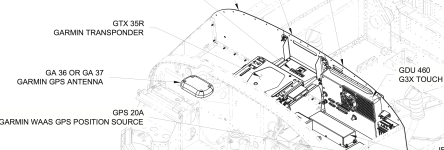
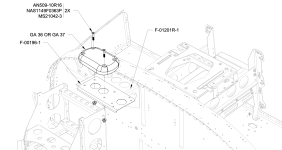
Here is what should have been the "original package"...
Screenshot 2025-03-20 at 10.19.36 AM.png

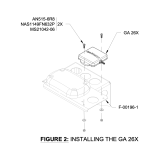
This is how Van's does the second antenna.

Screenshot 2025-03-20 at 10.10.30 AM.png


Screenshot 2025-03-20 at 10.10.34 AM.png
 
You always need an antenna on a G3X Touch display in the system, or a GPS 20A, or a transponder with built in GPS. This is a requirement to aid the GSU 25 ADAHRS, which a GPS 175 cannot do. See page 2-6 of the AW revision of the G3X Touch Installation Manual.


This location shades the antenna to the horizon aft of the aircraft. This is made worse when at lower altitudes, like an approach, when you are relying on that antenna to provide vertical guidance to the runway.

This sums things up nicely.

This also eliminates your source of GPS for attitude aiding. Please cross reference this section with 2.1.1.8 - GPS.

You lost your GPS source for attitude aiding when you removed the GPS 20A. You can easily resolve this by adding a glareshield mount antenna to any G3X Touch display in the system. See section 2.1.1.8 of the G3X Touch Installation Manual for more detail.

Thanks,

Justin
Justin - Thank you for jumping in !!!
 
Back
Top