Van's Air Force

The definitive Van's Aircraft support community! Buying, building or flying an RV? Join our exclusive family of mentors and enthusiasts!

Switch and Connector

KLRDMD

Active Member
Patron
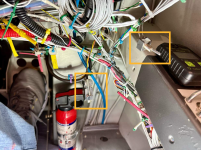
I just took delivery of an 8A and noticed these two items hanging down under the panel on the right side. The seller doesn't know what they are for. I put an orange square around them. One looks like a DB9 connector, and the other is a two-position toggle switch. Could the connector be to update the Dynon D180?
 

Attachments

  • Screenshot 2025-04-12 at 19.39.20.png
    Screenshot 2025-04-12 at 19.39.20.png
    3.8 MB · Views: 222
Honestly, I wouldn’t even hesitate a guess - these are home built airplanes, every one unique - and unless the builder gave you a drawing, you’re going to have to crawl underneath and trace wires. Any answer you get other than “trace it” will just be an idea - not an absolute.
 
Get a flashlight and trace em to wherever they go. You’re in luck that the wires seem to be uniquely colored, so start with that. It looks like the builder went to the trouble of labeling some of the wires at least. Maybe there’s a paper diagram somewhere?

DB9 with three wires is often RS-232 for “serial” data transfer.

Builders, please keep accurate circuit diagrams!
 
The D180 has two serial ports to download EFIS and EMS data as shown in the Dynon manual. The connector is most likely to one of those ports. I hve used se both on my D180. Don't know about the switch.
 
Honestly, I wouldn’t even hesitate a guess - these are home built airplanes, every one unique - and unless the builder gave you a drawing, you’re going to have to crawl underneath and trace wires. Any answer you get other than “trace it” will just be an idea - not an absolute.
I do have many drawings, I guess that's where I need to start. I was hoping there was something typical that I could start with but it could be anything. Thank you -
 
The toggle is easy, flip it on and see what happens, make sure the shute is good and no one is in range of the guns
I did. Nothing that I can see happens. I thought it might be wig-wag for the lights but no. I do not see anything change at all when the switch is flipped. I have lots of drawings so can look later. The 8A goes in for paint next week so it will be gone a while.
 
I did. Nothing that I can see happens. I thought it might be wig-wag for the lights but no. I do not see anything change at all when the switch is flipped. I have lots of drawings so can look later. The 8A goes in for paint next week so it will be gone a while.
Perhaps a hidden “start permissive” switch?
Carl
 
Since the DB9 has 3 wires connected, I agree with others that it is likely used to download data from the Dynon D-180. Since newer laptop computers are unlikely to have a serial port, you will need a "USB Serial Adapter with FTDI Chipset", available online for $13. You will also need DYNON SOFTWARE. I download the DD-180 data after every flight.
 
Since the DB9 has 3 wires connected, I agree with others that it is likely used to download data from the Dynon D-180. Since newer laptop computers are unlikely to have a serial port, you will need a "USB Serial Adapter with FTDI Chipset", available online for $13. You will also need DYNON SOFTWARE. I download the DD-180 data after every flight.
I don't suppose the software is available for Mac? I haven't used a Windows computer in 30 years.
 
Before doing anything, why not look through the drawings you do have, and confirming the connections by, yeah, crawling up under the dash with a flashlight and tracing the wires?

While you're at it, maybe clean up the wire harness a bit, instead of leaving things like Dsubs and switches hanging freely in mid-air?

Yes, the Dsub is probably to the Dynon (I have one on my D10), but the switch could be anything...trim reversal, audio switch, who knows? The only way to really verify is to look...and THEN test the functionality that you think it's connected to.

FWIW, the D10/100/180 stuff hasn't had a software update since 2016... :)
 
Before doing anything, why not look through the drawings you do have, and confirming the connections by, yeah, crawling up under the dash with a flashlight and tracing the wires?

While you're at it, maybe clean up the wire harness a bit, instead of leaving things like Dsubs and switches hanging freely in mid-air?

Yes, the Dsub is probably to the Dynon (I have one on my D10), but the switch could be anything...trim reversal, audio switch, who knows? The only way to really verify is to look...and THEN test the functionality that you think it's connected to.

FWIW, the D10/100/180 stuff hasn't had a software update since 2016... :)

I have confirmed that the D180 in the airplane has the latest (2016) software. It will be a few weeks before I have time to look through everything since the airplane will be gone for paint so I can't trace the wires for a bit yet.
 
Could be the switch selects RS232 receive input to the D180. Either a GPS signal or the signal from the DB9 connector (for updates and data log download)?
Just a wild guess.
 
I don't suppose the software is available for Mac? I haven't used a Windows computer in 30 years.
Buy an old used laptop with Windows XP or 7, definitely not one with Windows 8 or 10 or 11. I only use my old XP laptop for retrieving D-180 data and keep it in the hangar. Save the D-180 data to a USB drive. Take the USB drive home to look at the data on a spreadsheet program.
 
I looked over some of the electrical schematics that came with the airplane and didn't see anything resembling wiring for that toggle switch. I thought maybe it was a Wig-Wag switch for the landing light, but that's not it. I have a GDL82 ADS-B Out unit that in the description says "For inflight privacy, an Anonymous mode can be set to mask your aircraft ID from displaying on other aircraft’s ADS-B “In” traffic display". I had such a switch in a 310 I previously owned. I'll flip the switch for a few minutes when I fly tomorrow and see if I disappear from ADS-B for a while.
 
When updating the D-180 software you need to disconnect the D-180 from your Nav source (SL30, GPS, etc). This is often accomplished with a SPST switch as depicted in your setup. I had a D-100 and wired up something similar. See FlighDeck-D180 Installation Manual section for details.
 
When updating the D-180 software you need to disconnect the D-180 from your Nav source (SL30, GPS, etc). This is often accomplished with a SPST switch as depicted in your setup. I had a D-100 and wired up something similar. See FlighDeck-D180 Installation Manual section for details.
That could be it too, thank you.
 
Buy an old used laptop with Windows XP or 7, definitely not one with Windows 8 or 10 or 11. I only use my old XP laptop for retrieving D-180 data and keep it in the hangar. Save the D-180 data to a USB drive. Take the USB drive home to look at the data on a spreadsheet program.
I have an old Windows NT (Not Today) laptop I need to use to talk to the DEECS on a 2002 Falcon!
I also have a Win 7 laptop that I never connect to the WWW.
 
I’m going through a complete panel update now, and have found M-F DSUB BreakOuts in both DB9 and DB25 configurations are useful along with a tone prob, and ohm meter. Also these are useful at both ends of harness to confirm correct pin assignments. The tone prob will bleed over to other wires, but sometimes can get you close to where a signal wire is ran to, then you can confirm with an ohm meter.

When using a tone try to avoid using B+ or Grounds as these will bleed tone to many circuits, and main busses.


Example DSUB Breakout here

Example Tone Probe Kit here
 
Last edited:
Could be the switch selects RS232 receive input to the D180. Either a GPS signal or the signal from the DB9 connector (for updates and data log download)?
Just a wild guess.
Easy to test. If the D180 is showing that a nav source is connected, flip the switch and see if it disappears.
 
I looked over some of the electrical schematics that came with the airplane and didn't see anything resembling wiring for that toggle switch. I thought maybe it was a Wig-Wag switch for the landing light, but that's not it. I have a GDL82 ADS-B Out unit that in the description says "For inflight privacy, an Anonymous mode can be set to mask your aircraft ID from displaying on other aircraft’s ADS-B “In” traffic display". I had such a switch in a 310 I previously owned. I'll flip the switch for a few minutes when I fly tomorrow and see if I disappear from ADS-B for a while.
I flew this morning and flipped the switch five minutes into the flight, and flipped it back after 10 minutes. ADS-B continued, so it isn't a switch for anonymous mode.
 
Easy to test. If the D180 is showing that a nav source is connected, flip the switch and see if it disappears.
I have an Aera 660, but the seller said it was not connected to the D180. I haven't played around with it yet as I just completed my transition training. Flipping the switch off and on again did not seem to change anything on the display today.
 
Back
Top