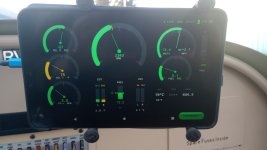
that is cool! Is it an ipad running at the same time? I am in the process of deciding what upgrade to do in my RV7A Tipper. I bought an MVP50 but I have cold feet about installing it instead of an EFIS. I do like a large and dedicated EIS though. Maybe a solution like this is a winner. I am considering installing my MVP50, and an EFIS, and then I'd have both too, but not integrated. Two completely different ecosystems. Tell me more about how this works please!
Hi Tom,
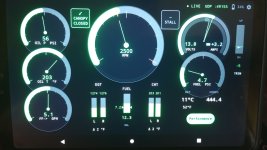
It's an Android app running on a cheap AlldoCube 8.4in tablet (I think I paid $75 or $80 for it on Amazon a year ago). It relies on the Dynon Skyview's wifi data stream to gather the data it presents. The main reason for it, as I mentioned, is that my RV-12 only has one (too many IMO!) Skyview display. This leaves me with the little strip of engine info when I have all three screens active in the Dynon (PFD+EMS+MAP). While it works, I'd always wanted something larger.
I'm not planning on offering it up, at least at this point (I may consider doing a beta through Google Play in the future), but wanted to show it since we're an experimental community and others might want (and already have) played on this. There is at least one other person I'm aware of that is working on something similar but I have no idea of the status of the project. I believe the performance section is somewhat unique, but regardless, something I wanted to play with.
A few things I did to satisfy my own wants:
1. Each gauge is fully configurable for range and both high and low warning and redline thresholds by simply touching and holding the gauge for a few seconds then entering the desired behavior into the entry box.
2. I combined the Volts and amps into an outer (volts) and inner (amps) combo gauge to save space.
3. The reference point on the trim is set and stored through the setup menu where you press and hold to calibrate the reference point. You need to make sure the trim is where you want before you do it.
4. For my Rotax, I added a 5 minute timer if the RPM goes over 5500 RPM (Rotax guys will know why) and of course, RPM threshold colors dependent on oil temp during warmup.
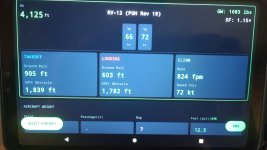
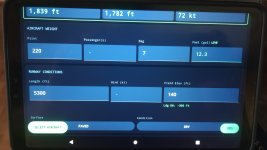
5. The performance page uses the density altitude from Skyview and fuel quantity along with the user entered pilot weight, pax weight and baggage weights to calculate actual aircraft weight real time. The user must make a few simple entries to the aircraft profile to provide MGTOW and empty weight along with book value for Vx and Vy.
6. The Vx and Vy live values are shown calculated against density altitude since they change as does the climb rate which is interpolated from the performance tables. Nice if you are departing or enroute and need to climb, you can get a feel for performance vs terrain. (I live in the mountainous Pacific Northwest)
7. I have the RV-12 takeoff and landing tables baked in. The system uses density altitude and weight to interpolate the takeoff ground roll/50ft Obstacle and same for landing in real time. The landing numbers are dependent on the user entering the field elevation and of course there are plenty of assumptions, just like when using the performance tables manually!
8. The user has the option to enter runway length, type (paved/grass/gravel), wind and wet/dry conditions and a safety factor from 1.00 to 1.5 times. I'm still arriving at the rules of thumb and aerodynamic models that are most agreed upon in order to safely calculate sane numbers, but I'm getting there. Testing has been positive.
9. If the system loses the data stream, the performance numbers are turned from green to yellow and locked with the last known data and a user warning to review and make manual entries if necessary. If this happens, all the simple entry boxes are provided to enter destination altimeter setting, field elevation, and OAT to aid in the density altitude calculation for the landing field (or departing). If the local ATIS/AWOS report density altitude you can also enter that directly in absence of the Dynon data stream.
10. The aircraft performance database is fully editable.
Hopefully that gives you a good overview. Cheers!