

Van's Air Force
You are using an out of date browser. It may not display this or other websites correctly.
You should upgrade or use an alternative browser.
You should upgrade or use an alternative browser.
Seattle Avionics
- Thread starter Larco
- Start date



All,It's not just you, I've also had trouble with Data Manager. Seems the left and right sides aren't filling in with selection options. I can't seem to get past that point. I'll be calling them soon. (I've tried reloading the DM, but that hasn't worked either.)
Same same.
Daddyman58

To get the Seattle Avionics databases updated easily I’ve found that I need to leave the SD Card out of the computer and update the data base first. For some reason if I insert the card first and then start the update it invariably won’t load the sectionals and I get a “no VFR sectionals selected”.
olyolson,To get the Seattle Avionics databases updated easily I’ve found that I need to leave the SD Card out of the computer and update the data base first. For some reason if I insert the card first and then start the update it invariably won’t load the sectionals and I get a “no VFR sectionals selected”.
Tried.No-go.
It looks like it is continually stuck in a download/redownload mode.
Both screens still blank.
I'll have to call them this pm as they are West Coast based.
Daddyman58
The new chart cycle was not loading to my computer.
I just went under options and erased all data downloaded onto the computer, started over, mostly got things to work.
Now I am getting things to load but have some disk error message. I attributed this to using new USB drives so I can stop bringing things home to update, just exchange. But I brought home my original drives and got the same error.
I'll try to install in a few and see if it all works.
[email protected]
I just went under options and erased all data downloaded onto the computer, started over, mostly got things to work.
Now I am getting things to load but have some disk error message. I attributed this to using new USB drives so I can stop bringing things home to update, just exchange. But I brought home my original drives and got the same error.
I'll try to install in a few and see if it all works.
[email protected]
Philippe Michel
I'm New Here
I found that for the last year or so it does not update CURRENT approach plates. Plates update but not current. For what its worth I've had the life time subscription for years.

SA to Skyview lifetime subscription here. I gave up trying to download approach plates from SA a long time ago. When it did work, it took forever. But mostly it just timed out and the DM app froze. I just use it for aviation data and charts now. I have an iPad mini running Foreflight for approach plates.
I wonder if there's any representation from SA here on VAF... It'd be nice if they read this stuff.
I wonder if there's any representation from SA here on VAF... It'd be nice if they read this stuff.

I've renewed my annual subscription with the same SA reps for several years at OSH.
I hope they're going to be there this year because the price hadn't gone up (even after they had been bought by a "technology investor").
I really am comfortable with
their product (charts) but there doesn't seem to be any $$ being thrown at updating their download app.
Probably because of aforementioned investor.
I hope they're going to be there this year because the price hadn't gone up (even after they had been bought by a "technology investor").
I really am comfortable with
their product (charts) but there doesn't seem to be any $$ being thrown at updating their download app.
Probably because of aforementioned investor.

So today the Download Manager worked very well and was faster than before. I always tried to do the download a few days early, we used to be able to use the Fri. before, but now I will try waiting until the day the new charts go into effect. Don't know but today the system worked very well. I did change over to new drives recently and that was a definite improvement too. The newer drives do not get nearly as warm as the older ones. Hopefully for their sake and ours things will continue to improve. I do remember the old days! IMO was way worse than now?

jselvatici
Well Known Member
Performed the download last night and did notice it was faster than usual (normally takes more than an overnight, not good).
If they have done improvements to how the tool handles the download and copying the files to the USB drive, thumbs up this time.
Let's see next month...
If they have done improvements to how the tool handles the download and copying the files to the USB drive, thumbs up this time.
Let's see next month...

jeffreyuh60
Well Known Member
I had the same issue, however, it worked well late last night
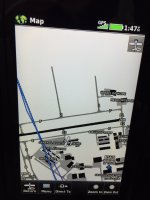
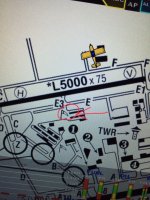
I am downloading all the data Ok but I have a strange error using Seattle Avionics. I have an AFS 5500 EFIS and have 2 choices for the airport map to display. One is called the “SA Airport Diagram” which I like better because it is North Up and easy to use and all the labeling is right side up. Unfortunately the map position for my home airport is way off. I have several backup GPS devices and they are always spot on. I have e-mailed Seattle Avionics 2-3 times with details and pictures of the error and all I ever get is a response like “we have forwarded this to tech support and will address the issue” or words to that effect. No one has ever followed up and the problem still exists.
Anyone have a better way to contact them besides e-mail? They don’t have a phone number listed. First picture below shows my correct position on the Aera 660 GPS. The second shows the incorrect position on my EFIS using the SA map page.
Anyone have a better way to contact them besides e-mail? They don’t have a phone number listed. First picture below shows my correct position on the Aera 660 GPS. The second shows the incorrect position on my EFIS using the SA map page.
Attachments

Olyolson,olyolson,
Tried.No-go.
It looks like it is continually stuck in a download/redownload mode.
Both screens still blank.
I'll have to call them this pm as they are West Coast based.
Daddyman58
Seattle Avionics help was SUPER helpful and quick.
Got it all working.
Faster than ever.
Daddyman58
Finally got a real reply from Matt at Seattle Avionics reference my airport diagrams issue:
“Our Data team is behind on updating the SA diagrams, we are not sure when it will occur. In the meantime, please use the FAA airport diagram for KSUS. We are sorry for the inconvenience.”
At least I finally know it’s not any of my systems.
“Our Data team is behind on updating the SA diagrams, we are not sure when it will occur. In the meantime, please use the FAA airport diagram for KSUS. We are sorry for the inconvenience.”
At least I finally know it’s not any of my systems.
