Van's Air Force

The definitive Van's Aircraft support community! Buying, building or flying an RV? Join our exclusive family of mentors and enthusiasts!

RV7A IAS/Static Port Issue - Any Other Thoughts?

RVSmith7A

I'm New Here
I haven’t posted much if at all over the course of my build, but I’m looking for some input from the VAF brain trust. I have a newly flying RV 7A with about 12 hours on it now and I’ve been trying to solve an IAS issue. I’ve spent time researching VAF and the internet trying to resolve the issue. Here’s a rundown of the troubleshooting and actions taken to date:
  • Static system was tested and calibration checked before first flight (and the G3X and backup G5 give the same IAS).
  • During first flights IAS was determined to be 20+ mph off
  • Rechecked static (and pitot) system for leaks
  • Verified static ports installed in correct location
  • Checked static system and ports for plugs (and have actually replumbed the static system)
  • Installed alternate static switch on the panel. With the alternate static air active IAS is reasonably close and you can actually see the airspeed change by 20+ mph when then the alternate static air is activated/deactivated.
  • I do have the Show Planes ports that mimic the rivets installed.
  • I’ve experimented with some dams in front of the ports, but didn’t see any improvement.
  • I did see a post that someone had added washers under their ports to correct their IA. I have tried this with insignificant change.
  • Putting the plane into a skid, left or right, does not impact the IAS.
  • Before a recent flight the tubing at the ports was disconnected to verify the ports were the issue and the IAS was essentially the same as when the alternate static air is active.
Based on the troubleshooting to this point the issue seems to be with the ports. As mentioned above I do already have the Show Planes ports. I do have a hangar neighbor whose RV 7A ports are in a similar location to the RV 6 and 14 locations. I have another set of ports and am considering installing them in the location similar to the RV 6/14 to see if that makes any difference. Has anyone else done this on an RV 7A or have their ports in a location similar to the RV 6/14? I did check with Van’s. They didn’t have any experience with this themselves.

Any other thoughts or considerations before I drill some holes?

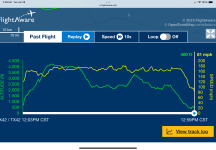
Screenshot from my Van’s first flight post attached.

 

Attachments

  • E2526EBD-BEF0-4992-8B59-A54E4C9F3ADC.jpeg
    E2526EBD-BEF0-4992-8B59-A54E4C9F3ADC.jpeg
    402.9 KB · Views: 37
Sounds like you may have plumbed the alt static switch backwards - or you have mounted it or the faceplate upside down.
 
I haven’t posted much if at all over the course of my build, but I’m looking for some input from the VAF brain trust. I have a newly flying RV 7A with about 12 hours on it now and I’ve been trying to solve an IAS issue. I’ve spent time researching VAF and the internet trying to resolve the issue. Here’s a rundown of the troubleshooting and actions taken to date:
  • Static system was tested and calibration checked before first flight (and the G3X and backup G5 give the same IAS).
  • During first flights IAS was determined to be 20+ mph off
  • Rechecked static (and pitot) system for leaks
  • Verified static ports installed in correct location
  • Checked static system and ports for plugs (and have actually replumbed the static system)
  • Installed alternate static switch on the panel. With the alternate static air active IAS is reasonably close and you can actually see the airspeed change by 20+ mph when then the alternate static air is activated/deactivated.
  • I do have the Show Planes ports that mimic the rivets installed.
  • I’ve experimented with some dams in front of the ports, but didn’t see any improvement.
  • I did see a post that someone had added washers under their ports to correct their IA. I have tried this with insignificant change.
  • Putting the plane into a skid, left or right, does not impact the IAS.
  • Before a recent flight the tubing at the ports was disconnected to verify the ports were the issue and the IAS was essentially the same as when the alternate static air is active.
Based on the troubleshooting to this point the issue seems to be with the ports. As mentioned above I do already have the Show Planes ports. I do have a hangar neighbor whose RV 7A ports are in a similar location to the RV 6 and 14 locations. I have another set of ports and am considering installing them in the location similar to the RV 6/14 to see if that makes any difference. Has anyone else done this on an RV 7A or have their ports in a location similar to the RV 6/14? I did check with Van’s. They didn’t have any experience with this themselves.

Any other thoughts or considerations before I drill some holes?

Screenshot from my Van’s first flight post attached.
Actual pictures of your static ports installation required for analysis... outside so we can see exactly how they are positioned, inside so we can see plumbing. Pic of Alt air switch plumbing also helpful.
Is displayed Altitude off at all ? Ever fly with a chase to closely compare altitudes? or even compare to high accuracy GPS altitude.
All this would be very useful,
Steve
 
How are you calibrating/verifying your IAS? Flying along someone else and comparing it to their IAS?

I have found the type of static ports that was first sold by Cleveland tools and now offered by Flyboys are the most accurate. The suggestion for your alt static ports to make sure it is working as expected especially in regards to the ON/OFF should be the first step in making any changes.
Also, does your speed inaccuracy vary by the speed of the plane or is it constant? A not so well static port will produce different speed inaccuracy depending on how fast you are going, the faster the higher is the error.
 
How are you calibrating/verifying your IAS? Flying along someone else and comparing it to their IAS?

I have found the type of static ports that was first sold by Cleveland tools and now offered by Flyboys are the most accurate. The suggestion for your alt static ports to make sure it is working as expected especially in regards to the ON/OFF should be the first step in making any changes.
Also, does your speed inaccuracy vary by the speed of the plane or is it constant? A not so well static port will produce different speed inaccuracy depending on how fast you are going, the faster the higher is the error.
Agree. I went through the whole static port issue on my 7 probably 15y ago.
The Cleveland/FB ones are definitely the closest to reality that I’ve tested. I went straight for them in my 10 and my PEC is negligible.
I don’t know what the SP ones are like, but Vans now sells them also so you’d hope they’ve determined they are good enough.
I doubt theyre the problem as plenty of people likely have them and we’d know about it by now.
 
I would be a lot more concerned that my altitude is inaccurate if my static system was not working properly. Have you verified the altimeter is accurate at different altitudes? I looked at Flightaware and you are all over the place for altitude on your last 4 flights.

Just an opinion but before fiddling with anything, go up high enough to get above the haze layer where the air is smooth and do a 4 way test while holding a constant altitude if you haven’t done this. Use the autopilot if you have one. Knock the dust off the E6B and calculate (don’t use what the G3X shows) your TAS and compare it against your GS. If your IAS is off, your TAS will also be off. Also look at Flightaware to check your altitude. Talk to ATC to see what they are reporting for altitude.

What IAS are you landing? What IAS are you on final? I can’t image you are landing at 40 or 80 knots.

Remember that IAS is derived from the difference in the static and pitot pressures. If your altitude is right (static) focus on the pitot side of things if your IAS is wrong.

Here is a good article on static ports and altitude. https://www.kitplanes.com/static-port-location-and-altitude-calibration/

With only 12 hours in phase 1, a single verification flight will check a lot of boxes. And you have another excuse to go fly that nice new bird of yours!
 

Attachments

  • IMG_2082.png
    IMG_2082.png
    567.7 KB · Views: 11
Last edited:
Actual pictures of your static ports installation required for analysis... outside so we can see exactly how they are positioned, inside so we can see plumbing. Pic of Alt air switch plumbing also helpful.
Is displayed Altitude off at all ? Ever fly with a chase to closely compare altitudes? or even compare to high accuracy GPS altitude.
All this would be very useful,
Steve
I have a Garmin G3X with gnx 375 so I do have gps groundspeed and altitude for comparison. Altitude is consistent and as expected with alternate static and static ports disconnected. G3X data on charts and graphs may be incoming when I’m back at my computer.
 
How are you calibrating/verifying your IAS? Flying along someone else and comparing it to their IAS?

I have found the type of static ports that was first sold by Cleveland tools and now offered by Flyboys are the most accurate. The suggestion for your alt static ports to make sure it is working as expected especially in regards to the ON/OFF should be the first step in making any changes.
Also, does your speed inaccuracy vary by the speed of the plane or is it constant? A not so well static port will produce different speed inaccuracy depending on how fast you are going, the faster the higher is the error.
The IAS error does diverge with speed and altitude.
 
I would be a lot more concerned that my altitude is inaccurate if my static system was not working properly. Have you verified the altimeter is accurate at different altitudes? I looked at Flightaware and you are all over the place for altitude on your last 4 flights.

Just an opinion but before fiddling with anything, go up high enough to get above the haze layer where the air is smooth and do a 4 way test while holding a constant altitude if you haven’t done this. Use the autopilot if you have one. Knock the dust off the E6B and calculate (don’t use what the G3X shows) your TAS and compare it against your GS. If your IAS is off, your TAS will also be off. Also look at Flightaware to check your altitude. Talk to ATC to see what they are reporting for altitude.

What IAS are you landing? What IAS are you on final? I can’t image you are landing at 40 or 80 knots.

Remember that IAS is derived from the difference in the static and pitot pressures. If your altitude is right (static) focus on the pitot side of things if your IAS is wrong.

Here is a good article on static ports and altitude. https://www.kitplanes.com/static-port-location-and-altitude-calibration/

With only 12 hours in phase 1, a single verification flight will check a lot of boxes. And you have another excuse to go fly that nice new bird of yours!
I agree it’s a good excuse to go fly, just waiting for the weather to clear up. Yes, I have been up and down and all over the place, partly by design as I am still hand flying everything since I solo’d in my plane after flying with a qualified pilot for the first 8 hours. And the last one you posted was a little bumpy (and going higher wasn’t better), and I confirmed that I can hit my head on the canopy. I’ll tighten the belts a little tighter next time.

The G3X provides a wealth of data for comparison. As a retired engineer, I’ve generated a few charts and graphs analyzing the data. When I fly my 1962 Cessna 172, I just go fly. Is the IAS correct, who knows?
 
Have you verified the integrity of the AOA connection between the tube and the AHRS? The pitot and AOA are differential and possibly create issues. My 6A was off by about 12 MPH high and had to use fences to get it in line, so I am proof that the stock location does not provide 100% succes. That said, it seems to work for most.
 
If the speed changes with cabin as static, that implies the IAS is reading 20 low with actual ext static source, is that correct? If so, my fist guess is that you are using the AOA port to feed the pitot pressure instead of the pitot. i.e. pitot and AOA tubes swapped at AHRS. That would account for a low IAS. It also explains why the inaccuracy reduces with airspeed (AOA increases), though that is also the same behavior with static issues. Guessing you haven't played with the AOA yet. You would find that to not be working well.
 
Quick thoughts on quantizing your error to see if changes are making improvements.

in flight

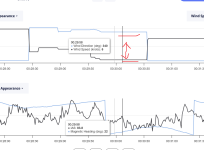
Watch your wind vector on the display and fly upwind and downwind from the known forecast. You will either be running around with a constant addition of a headwind or tailwind based on the error type(static port seeing a high or low error or even a partially blocked pitot).

post flight

If you use Savy for engine data, here is an easy way to calculate your total install error.

Few assumptions:
your pressure sensors are repeatable.
wind speed is halfway constant (hugely important)
A/C is in a fairly steady state. Flow over the static port is constant.
Have gps,OAT

Find a power setting for a level constant speed constant bank turn and fly a 720(smooth air option). or you can do a box (rough air option) try to start so 2 legs are parallel to the forecast wind and 2 perpendicular. The box makes it easier as the error will be a square wave vs a sine wave for the turn but.. A box coupled with highest g 90 deg turn that can maintain a/s is ideal . Minimizes the opportunity for wind to change and add errors.
Change a/s do it again.

Download the data to Savy for the flight and plot windspeed and direction on one chart and plot heading and a/s an another to find your maneuver easy

Ideally the wind speed will be constant with zero errors. The plot will probably be in the shape of a sine wave or squarewave with errors due to low update and sampling rates). Look at the difference from peak to trough and divide by 2. This is your average error and is captured with either a pure head and tail wind. The efis box uses IAS, OAT and GS as truths and calculates everything else. So the wind is the variable that changes

Now if you look at the 2 different speeds, the difference between the magnitude of the error is a rough guess as to the errors sensitivity to AOA as that is different for the 2 test cases.

Update and recording rates are going to make the plots look jumpy. Not the best plot but shows about a 5kt error.

Good Luck
Mike
 

Attachments

  • Screenshot 2025-01-29 104434.png
    Screenshot 2025-01-29 104434.png
    115 KB · Views: 11
Pitot static system calibration and troubleshooting requires both a systematic approach and a clear understanding of how it works to deliver altitude and IAS. As already mentioned, altitude indication is entirely dependent on static port pressure and behavior only (subject to the systems' fundamental integrity, i.e. no leaks, altimeter setting, properly functioning indicator, ADAHRS, etc.), while IAS is dependent on both static and pitot pressure. So, any calibration or analysis should start with pitot system calibration, because both altitude and IAS depend on it and especially for IFR altitude better be within limits. Note that for calibration purposes, GPS altitude is useless unless corrected for a variety of atmospheric conditions.

So, a nice way to summarily determine your altitude and IAS accuracy is by using Kevin Horton's excellent spreadsheet:


It starts with the gathering of flight test data, including indicated altitude, OAT, etc., and then populating the analysis tab, and then yielding the computed altitude and IAS errors to the right side of the analysis sheet. It looks a bit complicated at first, but is a wonderfully compact tool to determine your altitude and IAS accuracy.

So now if it turns out your altitude is off, then you are in the trial and error mode to figure out the fix, be it different static ports, ramps, locations. As previously referenced, I wrote an article on static port location and calibration: https://www.kitplanes.com/static-port-location-and-altitude-calibration/

Finally, once altitude is calibrated correctly, IAS is usually close or also correct, since pitot pressure and accuracy are much less likely to be off because it is delivered by typically a well known pitot such as Garmin or Dynon, and not subject to the vagaries of a static port design or location.

Reinhard
 
...As already mentioned, altitude indication is entirely dependent on static port pressure and behavior only ...while IAS is dependent on both static and pitot pressure. So, any calibration or analysis should start with pitot system calibration, because both altitude and IAS depend on it ...
Hang on a second...

ALTITUDE depends only on *static* port pressure, as you said at first. Then, you contradicted that statement (see the words highlighted in red).
 
Hang on a second...

ALTITUDE depends only on *static* port pressure, as you said at first. Then, you contradicted that statement (see the words highlighted in red).
Yup, uncontrolled typing:(

Sorry, should be "start with static system calibration"
 
Back
Top