


Van's Air Force

The definitive Van's Aircraft support community! Buying, building or flying an RV? Join our exclusive family of mentors and enthusiasts!

Power and data in same connectors - how do you organize?

skirting_virga

Well Known Member
Patron
I've spent the last couple weeks trying to learn about avionics wiring, mostly in the context of my GTN 625 navigator and GTR 200 radio, but I'm also looking at the G5 while I make a decision about backup attitude.

One thing that stands out: every last box/module seems to use power pins that are just in a sea of data connections on the same damn connector. If these boxes were PC components like a SATA drive or video card, they would separate out the power connectors from the data.

Obviously this isn't going to change no matter how much I hate it, but I want to understand how a panel builder keeps things organized. I get that grounds would generally go to a Forest of Tabs and power comes from the circuit breaker. As far as I can tell, this results in a bunch of neat, tight data cables with a couple stray wires for power and ground. Worse still, many boxes have a second power supply that can come from a backup battery or e-bus. I suppose that's a second circuit breaker for the few essential items. It all seems like a rats nest....
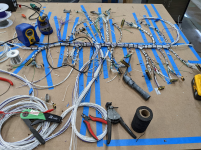
 
Doing a full panel you'll end up with a harness that has many of those stray power/ground wires, which themselves ultimately form a neat bundle. You also won't really end up with distinct cables that go from A to B; in a modern full glass panel there are so many interconnects between different boxes that each connector is likely going to 2, 3, 4, or more other connectors. I had one major trunk and then one branch per device.

This is a picture of my harness when it was nearly complete and before installation -- the mostly purple bundle next to the soldering iron is all of the power wires; the mostly gray bundle to its right is grounds going to a forest of tabs.
1747920123573.png

If you have any desire to do a full panel yourself, I strongly recommend the AEA avionics course. If you use that knowledge to build your own panel, you'll end up saving vs paying a panel builder to do the harness for you, and it's a load of fun. I did my panel after the course and had zero issues; I'll be doing two more panels for friends builds this year/next too now.
 
I've spent the last couple weeks trying to learn about avionics wiring, mostly in the context of my GTN 625 navigator and GTR 200 radio, but I'm also looking at the G5 while I make a decision about backup attitude.

One thing that stands out: every last box/module seems to use power pins that are just in a sea of data connections on the same damn connector. If these boxes were PC components like a SATA drive or video card, they would separate out the power connectors from the data.

Obviously this isn't going to change no matter how much I hate it, but I want to understand how a panel builder keeps things organized. I get that grounds would generally go to a Forest of Tabs and power comes from the circuit breaker. As far as I can tell, this results in a bunch of neat, tight data cables with a couple stray wires for power and ground. Worse still, many boxes have a second power supply that can come from a backup battery or e-bus. I suppose that's a second circuit breaker for the few essential items. It all seems like a rats nest....

Yes, but sata drives and video cards operate at very high speeds and are for more sensitive to interference than an rs-232 data stream.
 
Yes, but sata drives and video cards operate at very high speeds and are for more sensitive to interference than an rs-232 data stream.
I think that is a key point. Normally for PC like components you have signals that are low current, possibly high speed. Those signals can go over a small connector contact. Then you have power that requires a larger contact to handle the higher current. That is why two separate connectors are used. For our application it is more about being a reliable connection and being easy to work on or modify at some later date. Being a fine pitch connector wouldn't be very convenient at all for us.
 
Doing a full panel you'll end up with a harness that has many of those stray power/ground wires, which themselves ultimately form a neat bundle. You also won't really end up with distinct cables that go from A to B; in a modern full glass panel there are so many interconnects between different boxes that each connector is likely going to 2, 3, 4, or more other connectors. I had one major trunk and then one branch per device.

This is a picture of my harness when it was nearly complete and before installation -- the mostly purple bundle next to the soldering iron is all of the power wires; the mostly gray bundle to its right is grounds going to a forest of tabs.
View attachment 88280

If you have any desire to do a full panel yourself, I strongly recommend the AEA avionics course. If you use that knowledge to build your own panel, you'll end up saving vs paying a panel builder to do the harness for you, and it's a load of fun. I did my panel after the course and had zero issues; I'll be doing two more panels for friends builds this year/next too now.
Which AEA course did you attend? There's a 2-day one that caters to G3X touch and experimental in Aug and a more comprehensive 3-day one targeted at avionics technicians in certified aircraft soon. I'm guessing they are both excellent for learning about wiring and connectivity but I'm wondering which one you did.
 
Last edited:
Which AEA course did you attend? There's a 2-day one that caters to G3X touch and experimental in Aug and a more comprehensive 3-day one targeted at avionics technicians in certified aircraft soon. I'm guessing they are both excellent for learning about wiring and connectivity but I'm wondering which one you did.

I did the "Avionics Installation for Experimental Aircraft" course in May 2022 in Lee's Summit. At the time it was scheduled as 3 days, we finished around lunch on day 3.
 
Back
Top