Van's Air Force

The definitive Van's Aircraft support community! Buying, building or flying an RV? Join our exclusive family of mentors and enthusiasts!

Mounting a panel mount Garmin GPS below the panel?

donmtt

Active Member
Patron
Haven't been able to find anything with search...Has anyone mounted a GPS-175 (or similar) below the panel?

Panel mounting one in my (new to me) RV-7 is going to take some serious reconfiguring of the current panel.

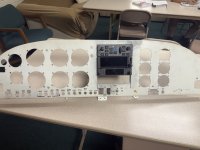
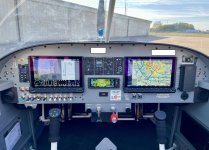
I've attached a couple of mock ups for reference. Was thinking just to the right of the throttle quadrant.

Feedback appreciated.

PS - Given the time of year, I really need to get an approach-certified GPS in ASAP. I may revisit the setup in Spring/Summer....
 

Attachments

I would definitely not put it on the passenger side if you were to sling it under the panel. I have a GNX375 and I feel that the display would be really difficult to navigate with it all the way over there. What you’re suggesting isn’t totally uncommon in tandem RVs, but I can’t say I’ve ever seen it on a side by side. I think it would be worth the hassle to put it in a central location in the panel purely from an ergonomic perspective. Maybe put all the dynon control heads in a row across the bottom with the navigator on top?
 
Agree with above, mounting that low is a bad idea, moves your vision too far from the AI/efis. In fact, in a normally certified installation, the TSO requires mounting within certain distances from the AI, unless your EFIS can replicate all the required gps annunciations (so you don’t have to look at the gps).
 
Fully agree with the previous posts. I also have a 375 in my panel, and use it quite a lot for traffic, transponder coding, nav, etc, and could not fathom having to operate if mounted below the panel, no way. I'd probably move those flood lights control to another place either in or below the panel, integrate the trim indicator into the Dynon EFIS, and then place the 175 as in your layout #1.
Probably late for that option, but a better way would have been horizontal panels for the radios/AP, placing them AP on the top, 175 below, and the radios below those 2, all on the left side of the central panel.
 
Haven't been able to find anything with search...Has anyone mounted a GPS-175 (or similar) below the panel?

Panel mounting one in my (new to me) RV-7 is going to take some serious reconfiguring of the current panel.

I've attached a couple of mock ups for reference. Was thinking just to the right of the throttle quadrant.

Feedback appreciated.

PS - Given the time of year, I really need to get an approach-certified GPS in ASAP. I may revisit the setup in Spring/Summer....
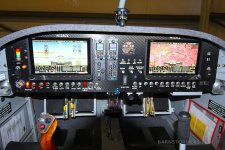
My advice. You have taken up a large amount of prime real estate at the center of your panel where your eye works the best with non visually necessary items. For starters I would say, as others have mentioned, don’t put something you have to look at for more than a millisecond down low. You need the gps screen high in your view so that looking at the screen does not require mental, or even physical, gymnastics.

Having said all that, my suggestion involves some reworking of your panel. It may seem that sounds like a headache but in reality your panel does not seem that difficult to move just a few items around to make things work. So, first, I am assuming in the center of your panel sits three knobs for dimmers (if that is incorrect please correct me), along with panel light switches. That is prime real estate for a gps. Without knowing how much space is available for those switches and dimmers, you could move those all down toward the bottom of the panel above your throttle quadrant. Also, look at the possibility of reorienting your vertical Dynon radio, knob, etc., panels to a horizontal mount instead of vertical mounts. That could free up space in the center of the panel. (I was able to see your first mock up but not your second one.). My suggestion is pretty close to your first mock up with added idea of moving your light switches down to the bottom of your panel.

Of course, all of these suggestions depends on support ribs and their location behind this equipment. I understand you are hoping to not have to cut a new panel to include an additional instrument. However, I think it is possible you could still keep your existing panel and repurpose one or two holes and add one or two holes for moving switches.

All of this is my suggestions just looking at your picture but I do think it would not be as much work as you think. Feel free to ask me to clarify my thoughts if what I mentioned needs it.

 
My advice. You have taken up a large amount of prime real estate at the center of your panel where your eye works the best with non visually necessary items. For starters I would say, as others have mentioned, don’t put something you have to look at for more than a millisecond down low. You need the gps screen high in your view so that looking at the screen does not require mental, or even physical, gymnastics.

Having said all that, my suggestion involves some reworking of your panel. It may seem that sounds like a headache but in reality your panel does not seem that difficult to move just a few items around to make things work. So, first, I am assuming in the center of your panel sits three knobs for dimmers (if that is incorrect please correct me), along with panel light switches. That is prime real estate for a gps. Without knowing how much space is available for those switches and dimmers, you could move those all down toward the bottom of the panel above your throttle quadrant. Also, look at the possibility of reorienting your vertical Dynon radio, knob, etc., panels to a horizontal mount instead of vertical mounts. That could free up space in the center of the panel. (I was able to see your first mock up but not your second one.). My suggestion is pretty close to your first mock up with added idea of moving your light switches down to the bottom of your panel.

Of course, all of these suggestions depends on support ribs and their location behind this equipment. I understand you are hoping to not have to cut a new panel to include an additional instrument. However, I think it is possible you could still keep your existing panel and repurpose one or two holes and add one or two holes for moving switches.

All of this is my suggestions just looking at your picture but I do think it would not be as much work as you think. Feel free to ask me to clarify my thoughts if what I mentioned needs it.

Thanks! You are spot on and those switches don't even work anymore...I agree with all the comments here.

My primary goal is to get IFR legal (in the short term) without weeks of downtime waiting on the "ultimate setup" (for now).

Maybe my best bet is to get a blank panel and copy what I have - with the necessary changes for mounthing the GPS right where you say?

I'm hesitant to go hacking into what I have now - since it's been many years since I built race cars and had that skill and tools. I'm sure it would come back, but I'm not sure I want to risk breaking what works now???

Could a panel shop use my current panel and cut me one with the GPS in the right place? So it would basically be plug and play for all my current wiring....
 
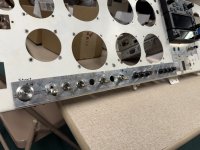
For a short term solution, I think the easiest thing would be to remove your panel (it appears that would be relatively easy as it’s screwed into place). Then simply cut out the center portion that needs re-arranged, then make a new center portion with everything re-located and screw it into place with nut plates in your existing panel. You would want to leave a “frame” around the top and bottom, so the existing panel is still a continuous piece. You would also only need to cut out the areas in the existing panel where the components will poke through,, rather than cut out one big hole. I did something similar with my switches/breakers on my panel because I added a lot of stuff and wouldn’t have had room without optimizing the spacing.
 

Attachments

  • IMG_0939.jpeg
    IMG_0939.jpeg
    2 MB · Views: 43
  • IMG_0971.jpeg
    IMG_0971.jpeg
    3.4 MB · Views: 38
  • IMG_0975.jpeg
    IMG_0975.jpeg
    2 MB · Views: 40
  • IMG_0978.jpeg
    IMG_0978.jpeg
    4.4 MB · Views: 40
My airplane panel is very similar to yours (HDX + 4 control panels ) since the 175 is short it can fit on the center without cutting into the sub panel (if it has not been cut already) and you can run the four control panels on top and the 175 under them. You may need to move stuff if there are any boxes (like the SV-ARINC) that could get in the way of the tray and connector, but you get the idea.

Aitor
IMG_8167_sm.jpg
 
Thanks! You are spot on and those switches don't even work anymore...I agree with all the comments here.

My primary goal is to get IFR legal (in the short term) without weeks of downtime waiting on the "ultimate setup" (for now).

Maybe my best bet is to get a blank panel and copy what I have - with the necessary changes for mounthing the GPS right where you say?

I'm hesitant to go hacking into what I have now - since it's been many years since I built race cars and had that skill and tools. I'm sure it would come back, but I'm not sure I want to risk breaking what works now???

Could a panel shop use my current panel and cut me one with the GPS in the right place? So it would basically be plug and play for all my current wiring....
If you wish to talk with me about your panel changes in detail I have sent you PM with my phone number. I build panels for RVs. I have built many panels like yours that require cutting new holes and repurposing old holes. Feel free to to call me if you would like to discuss your panel options at the phone number I sent in the PM.
 
that setup would never fly in a certified airplane because in a crash, the passenger would be virtually guaranteed to get at a broken leg and/or have a kneecap relocated to the baggage compartment.
 
I have an uncut -7 panel you can have if you pay shipping.

I was going to use it, but we decided to go with .071 straight sheet and place All The switches and circuit breakers on its own sub panel with the throttle and mixture and stuff below and slightly recessed from the upper panel.

You will find when you go to remove the old panel how much fun it is to disconnect all them wires!

As a side note. When I redid my VFR panel with IFR, I mounted the remote equipment to removable plates that attach on both sides of each of the fore aft braces between the sub panel and the firewall. With everything controlled by the G3X.
 
I've got a Garmin 696 mounted on a gimbal under a RV3b panel. Not the best place to have it, but not many options in such a small cockpit. When it comes time for some button pushing on the 696 I trim as best I can and eyes in the cockpit very briefly. Lingering too long with under panel button pushing can lead to a spiral dive, or other unplanned aerobatics. The 696 communicates with the AV30 on the panel which is useful, but still requires eyes under the panel periodically. If you can, I would try to avoid mounting under the panel.
 
Don,

The right answer is to buy a new piece of aluminum and cut a new panel. It will be less work than a temporary patch and then doing the new panel. It’s just time cutting holes, mounting nutplates and paint.

Move the GPS-175 as high as possible. The SkyView modules can be mounted below the 175. If you want to go first class I can outline how to make the panel removable. I did this for an RV-6A and it came out well.

Carl
 
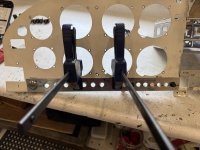
I did mount a Garmin GNC200 NAV/COM under the panel on right side. It's on a lightweight slider hanging from a tray that spans the distance from the bottom edge of the panel to the subpanel. You can slide it out if you need access, but usually it's slid back out of the way and is controlled via the G3X interface. I was in the middle of IFR training and learned ... even tho I and my DAR thought a GPS would be enough ... the wisdom/guidance at that time indicated that another nav source would be required for the checkride. Not wanting to tear apart the panel mid training, I tucked the radio underneath. Works really well, and used piano hinges on the front and back to secure the tray, so it can easily drop out if needed in the future. It will be incorporated into the panel the next time need to pull it. If people are curious about the view from the bottom, LMK and I'll take some photos from that direction.

Now you see it...
1766195898741.jpeg

Now you don't...
1766196510443.jpeg
 
I agree with the others that the higher up the panel the better it is for such a critical piece of gear like a 175. I just completed my IR ticket in August of this year and in more than a couple occasions disliked the low location of mine. Even though I can see what I need to fly the plane on the PFD, it was when ATC changed an approach on me that my focus for more than a few seconds shifted low on the panel to the 175.

There may be a panel “recut” in the next couple years for ‘ol N761GS

IMG_0871.jpeg
 
I agree with the others that the higher up the panel the better it is for such a critical piece of gear like a 175. I just completed my IR ticket in August of this year and in more than a couple occasions disliked the low location of mine. Even though I can see what I need to fly the plane on the PFD, it was when ATC changed an approach on me that my focus for more than a few seconds shifted low on the panel to the 175.

There may be a panel “recut” in the next couple years for ‘ol N761GS

View attachment 105110
So I understand the focus issue (I fly a Citation part 135 for a living, so I understand importance of having things where you need them). That said - and this is not a rhetorical question - why can't ForeFlight on my iPad by my primary interface with the Garmin GPS?
 
So I understand the focus issue (I fly a Citation part 135 for a living, so I understand importance of having things where you need them). That said - and this is not a rhetorical question - why can't ForeFlight on my iPad by my primary interface with the Garmin GPS?
As for the iPad used as a primary display for IFR, the iPad hardware is no where near robust enough to reliably rely on for IFR flight. Just so you know, the 175 navigation is sent to the Dynon display. You can effectively obtain the same result by viewing the navigational moving map on that large Dynon display. I am not an IFR pilot but I do install Dynon panels. That data from the 175 is wired to the Dynon displays and will show the same moving map data, on the Map page of the Dynon, as is displayed on the 175.
 
As for the iPad used as a primary display for IFR, the iPad hardware is no where near robust enough to reliably rely on for IFR flight. Just so you know, the 175 navigation is sent to the Dynon display. You can effectively obtain the same result by viewing the navigational moving map on that large Dynon display. I am not an IFR pilot but I do install Dynon panels. That data from the 175 is wired to the Dynon displays and will show the same moving map data, on the Map page of the Dynon, as is displayed on the 175.
Thanks. I think I understand that. My question is really about controlling the GPS (using the iPad "Sent to Panel" capability). So let's say ATC clears me to a point on the approach. I can set Direct To on the iPad, send to panel (the 175) and voila! Flight plan and Dynon PFD updated!
 
For a short term solution, I think the easiest thing would be to remove your panel (it appears that would be relatively easy as it’s screwed into place). Then simply cut out the center portion that needs re-arranged, then make a new center portion with everything re-located and screw it into place with nut plates in your existing panel. You would want to leave a “frame” around the top and bottom, so the existing panel is still a continuous piece. You would also only need to cut out the areas in the existing panel where the components will poke through,, rather than cut out one big hole. I did something similar with my switches/breakers on my panel because I added a lot of stuff and wouldn’t have had room without optimizing the spacing.
I'm thinking more and more that this is the exact interim solution I'm looking for. Thank you.
 
Verify this with the user manuals for the Dynon and the 175, and/or, maybe someone with experience with doing so can chime in here and correct me if I am wrong, but, you should be able to plot on the Dynon and send it to the 175. It must be wired to do so, but if wired correctly, I am pretty confident what you are wishing to do can be done on the Dynon.
 
As for the iPad used as a primary display for IFR, the iPad hardware is no where near robust enough to reliably rely on for IFR flight. Just so you know, the 175 navigation is sent to the Dynon display. You can effectively obtain the same result by viewing the navigational moving map on that large Dynon display. I am not an IFR pilot but I do install Dynon panels. That data from the 175 is wired to the Dynon displays and will show the same moving map data, on the Map page of the Dynon, as is displayed on the 175.
While you can push/pull flight plans between ForeFlight and the 175 there seems to be added taps in FF vs 175 to accomplish certain actions. Example, a simple 2 taps on the 175 to change an approach to “vectors to final”, versus multiple taps and a push to load that simple function from FF to the 175.

Granted I’m a complete newbie in the IFR world with less than 4 months on my rating but I can honestly say that while I love FF and it’s easy push/pull from the 175 (Bluetooth is solid, hint, hint Dynon), I think the extra steps on FF to do a similar function on the 175 with less “touches” would divert to much of my attention. What is very absent and MUST be addressed by Dynon is their deficient link and interface with a Navigation receiver such as the 175. If I built another plane, Dynon would not go in it due to deficiencies I now see as an IR pilot.
 
Last edited:
Verify this with the user manuals for the Dynon and the 175, and/or, maybe someone with experience with doing so can chime in here and correct me if I am wrong, but, you should be able to plot on the Dynon and send it to the 175. It must be wired to do so, but if wired correctly, I am pretty confident what you are wishing to do can be done on the Dynon.
Negative. Can’t edit on Dynon and push to 175.

Edit: Will retract my “negative” if someone can show me how to add push/pull on flight plans from HDX to 175. I have both a Dynon 429 and Garmin 429 wired per Dynon’s recommendation.
 
Haven't been able to find anything with search...Has anyone mounted a GPS-175 (or similar) below the panel?

Panel mounting one in my (new to me) RV-7 is going to take some serious reconfiguring of the current panel.

I've attached a couple of mock ups for reference. Was thinking just to the right of the throttle quadrant.

Feedback appreciated.

PS - Given the time of year, I really need to get an approach-certified GPS in ASAP. I may revisit the setup in Spring/Summer....
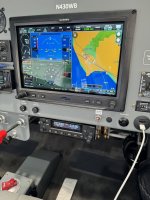
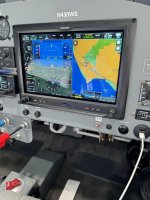
Got a lot of great feedback from the collective. Here is where I have settled as an intermediate step in my panel journey. (Before and after).

The audio panel turned out to be a real bugger to fit in. Not in an ideal spot, but works great for me. Test flew today with no issues.
 

Attachments

  • Panel 2.jpeg
    Panel 2.jpeg
    443.5 KB · Views: 28
  • Panel with GPS175.jpeg
    Panel with GPS175.jpeg
    2.7 MB · Views: 28
Back
Top