Van's Air Force

The definitive Van's Aircraft support community! Buying, building or flying an RV? Join our exclusive family of mentors and enthusiasts!

(Mostly) Finished F1 Interior

Ironflight

VAF Moderator / Line Boy
Mentor
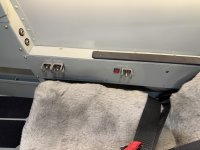
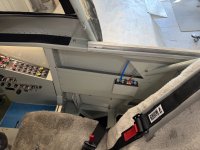
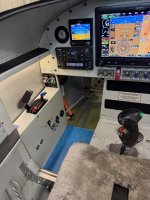
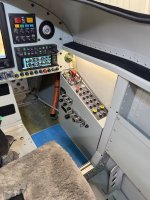
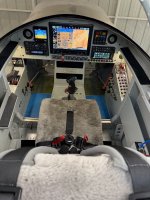
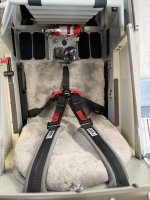
With John Stahr coming next week to put paint on the outside of the Rocket project, I have been busy making sure that everything truly fits together. While waiting for bits and spots of filler and primer to cure I decided it was time to finally assemble the interior completely all at the same time, so here it is! It will, of course, mostly come out for the AWC inspection, but at least now I know that all the nutplates work, fasteners line up, the paint survived the building process…. And the permanent floor panels are riveted down (sharp eyes will see a few clecos for things that will get removed to expose critical flight control junctions for inspection). And yes, some nuts have been left off because the control surfaces and flaps all come off for paint.

I get the most enjoyment personally when I build an airplane in making the cockpit my own - it may not fit anyone else, but things here are just where I want them - a nice office for myself, and a comfy place for a passenger. (AHRS, Magnetometer, G3X, G5 calibration are not yet complete - hence the weird mismatch in pitch between displays…)

Note that I still have blue lo-tack vinyl on the storage compartments under my thighs - those serve as steps for entry and egress, and I figure I’ll leave them protected even through Phase 1 - then find something to cover them with for the future - perhaps clear skateboard tape. The entire painted interior was covered with that vinyl for the past two years and it did a great job of protecting the paint - and peeled right off when asked!

Haven’t decided what goes under my heels yet - but I have some ideas!
IMG_9124.jpeg
 

Attachments

  • IMG_9123.jpeg
    IMG_9123.jpeg
    4.1 MB · Views: 659
  • IMG_9121.jpeg
    IMG_9121.jpeg
    4.5 MB · Views: 537
  • IMG_9120.jpeg
    IMG_9120.jpeg
    4 MB · Views: 499
  • IMG_9118.jpeg
    IMG_9118.jpeg
    2.8 MB · Views: 505
  • IMG_9117.jpeg
    IMG_9117.jpeg
    3.1 MB · Views: 512
  • IMG_9116.jpeg
    IMG_9116.jpeg
    3 MB · Views: 525
  • IMG_9115.jpeg
    IMG_9115.jpeg
    3.1 MB · Views: 598
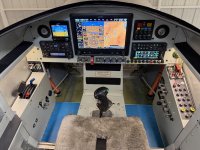
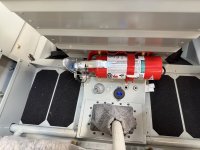
With John Stahr coming next week to put paint on the outside of the Rocket project, I have been busy making sure that everything truly fits together. While waiting for bits and spots of filler and primer to cure I decided it was time to finally assemble the interior completely all at the same time, so here it is! It will, of course, mostly come out for the AWC inspection, but at least now I know that all the nutplates work, fasteners line up, the paint survived the building process…. And the permanent floor panels are riveted down (sharp eyes will see a few clecos for things that will get removed to expose critical flight control junctions for inspection). And yes, some nuts have been left off because the control surfaces and flaps all come off for paint.

I get the most enjoyment personally when I build an airplane in making the cockpit my own - it may not fit anyone else, but things here are just where I want them - a nice office for myself, and a comfy place for a passenger. (AHRS, Magnetometer, G3X, G5 calibration are not yet complete - hence the weird mismatch in pitch between displays…)

Note that I still have blue lo-tack vinyl on the storage compartments under my thighs - those serve as steps for entry and egress, and I figure I’ll leave them protected even through Phase 1 - then find something to cover them with for the future - perhaps clear skateboard tape. The entire painted interior was covered with that vinyl for the past two years and it did a great job of protecting the paint - and peeled right off when asked!

Haven’t decided what goes under my heels yet - but I have some ideas!
View attachment 116817
NICE, well more than NICE :cool:
 
Passenger warning placard in the front seat?
From 8130.2L, Table D-1 (Operating Limitations):

Except for single-place aircraft, the following placard must be displayed in the aircraft in full view of all occupants:
“PASSENGER WARNING―THIS AIRCRAFT DOES NOT COMPLY WITH FEDERAL SAFETY REGULATIONS FOR
STANDARD AIRCRAFT.” (38)

Notice the “All Occupants” (not just passengers)!
 
That looks awesome, Paul!

What’s the thought process behind two sets of headset jacks for each seat?
I’m sure there’s a reason- it’s just not obvious to me.
 
That looks awesome, Paul!

What’s the thought process behind two sets of headset jacks for each seat?
I’m sure there’s a reason- it’s just not obvious to me.
Good question. Sometimes I want to use a helmet/O2 mask, and that has a preferred routing, other times, a headset with a different preferred routing. Some passengers like the cords one place, others someplace else. Two sets of jacks in parallel are easy to route, so it just gives options.
 
Good question. Sometimes I want to use a helmet/O2 mask, and that has a preferred routing, other times, a headset with a different preferred routing. Some passengers like the cords one place, others someplace else. Two sets of jacks in parallel are easy to route, so it just gives options.
When you get this plane in the air Paul be very careful with it. It has the very strong capability of producing a smile on your face that you may have difficult time removing. At least that is one of my observations when I built one.
 
I’m intrigued by the arrangement of switches and breakers. I have an RV14A (and building a second) with the luxury of a wide side-by-side panel, and realize the tandem seating panel has less real estate and therefore more critical prioritization decisions. However, there are a lot of very unique choices made here and with your experience, a lot of “knowledge” to share. For example, you have distributed the breakers in 3 different “banks”, and arranged switches all over the cockpit. Lots of personal choices, but I believe also nuggets of wisdom scattered throughout. Please share some of this design knowledge and wisdom.
 
Very nice Paul. Creative and thoughtful use of the limited space afforded in an 8 for actuators and such.
 
Like you I like the symmetry and balance of the cockpit layout. It seems to help keep things organized and have a natural flow. Really nice.
 
Love the setup for the rear rudder pedals! Is that a standard rocket thing? I don't think I have seen that kind of setup on any RV-4s. :unsure:
 
Love the setup for the rear rudder pedals! Is that a standard rocket thing? I don't think I have seen that kind of setup on any RV-4s. :unsure:
Those are standard with the F1 kit when it came out. Vince sells a version that is probably a bit better overall, but for the F1 you’d have to remake the two-piece rudder cables that come with the kit, and I am very much a “stock” builder of airframes (I use my creativity in avionics and interiors….), so I went with what was supplied. Remember that the F1 is a clean-sheet design, not a modified RV-4 like the Harmon.
 
I’m intrigued by the arrangement of switches and breakers. I have an RV14A (and building a second) with the luxury of a wide side-by-side panel, and realize the tandem seating panel has less real estate and therefore more critical prioritization decisions. However, there are a lot of very unique choices made here and with your experience, a lot of “knowledge” to share. For example, you have distributed the breakers in 3 different “banks”, and arranged switches all over the cockpit. Lots of personal choices, but I believe also nuggets of wisdom scattered throughout. Please share some of this design knowledge and wisdom.
I can - and most likely will - write an entire article on how this particular cockpit ended up where it is, and could (and probably never will get around to …) write a book on cockpit design. The thing to remember is that while there are definitely a few “bad” ideas, there are a whole family of “good” ideas, so the concept of right and wrong doesn’t really apply. I have worked closely with the graduates of most of the world’s test pilot schools, and know that if you throw out the question “which side of the panel should the radios be on?” You better get out of the room quickly before the food fight begins in earnest…

In this case, I have grabbed ideas from previous airplanes I have built, and lessons I learned from flying them. I am a big believer in cockpit “flow” - putting switches in the order that you are likely to use them. I also like to put little-used switches in places that are less important. I like “systems management” stuff out of the way of the main panel. And as an engineer, I look at panel and wiring integration. All of those things get put in a design pot, stirred around, tried out, and the one with the least set of compromises floats to the top. (No design, by the way, has zero compromises…..)

So a quick summary for this case. Electrical system is all contained in the panel to the right, as are the controls (Master, B/U Master, External power enable, etc. Big breakers - stuff that you really won’t reset in fight because if they trip, it would be bad - are there as well. All large wiring in the cockpit is in that box, and it is compact. The panel is another “self contained” box, built on the bench, with as few wires as possible crossing the interface to the aircraft - the panel is removable without a lot of cursing, although with the removable panel in front of the windshield, it really doesn’t need to be. This design created the desire for avionics breakers on the panel — because all the power wires that had to cross the interface was the main and Aux bus conductors. The breakers that are part of the annunciator panel are primary power for critical avionics. The row on the bottom are for redundant power and the one with a red “boot” is for A/P servos. Those are all pretty fairly low power breakers on the panel.

Switches are arranged for flow (in general). Power stuff for engine start is from left to right - levers, fuel pump (which you can operate with a finger while playing with Throttle and Mixture), timing - then ignitions and starter. The blue switches are for external lights - which it can be argued don’t need switches at all in the day of LED’s (just leave everything on all the time) - and in the order they get used in flight. Switches on the right sub-panel are systems - Oxygen, internal lighting, taxi cam, seat heat, rear stick grip enable - stuff that you can manage when you need it, not because it is critical. In the rear, the passenger has a few switches to keep them occupied and involved - seat heat, lighting…and the baggage area light switch.

Finally, yes - I do like symmetry - I created the annunciator panel mostly to visually balance the G5 for instance.

Others…will have different solutions, and as long as they have rationale that satisfies THEM, who am I to argue? So long as the switches are labelled, unambiguous, and follow general conventions (up is on down is off kind of stuff….), I’m happy for them.

Paul
 
The whole layout is full of lessons on good design. The lights over the side panels are a particularly nice touch -- the extra mile.
 
Paul, please write that article and maybe even that book on cockpit design. From what I've seen, it's rather badly needed.

One area that's not often considered, I think, is future system modification, things like revising a panel or adding equipment. Times change, requirements change, people change, and often there's no allowance for integrating updates into a cockpit. Of course sometimes, particularly with smaller cockpits, there's no room for any changes.

Dave
 
Paul, please write that article and maybe even that book on cockpit design. From what I've seen, it's rather badly needed.

One area that's not often considered, I think, is future system modification, things like revising a panel or adding equipment. Times change, requirements change, people change, and often there's no allowance for integrating updates into a cockpit. Of course sometimes, particularly with smaller cockpits, there's no room for any changes.

Dave
Plannign for upgrades is a very good idea - especially for “old guys” building a VFR airplane that their heirs may one day have to sell to someone that wants more (IFR?) capability. In this case, I was really only going to build it VFR (for my needs these days), and the sapce occupied by the current 375 was just going to be a transponder with ADS-B In/Out capabilty. It turns out that if you buy that capability from Garmin, it costs about $5K….for an additional $2K, you get the 375 with all that PLUS an IFR GPS - sort of a no-brainer while already spending $25k(ish)…. But I left side panel space for new systems, new breakers, and more capability.

One advantage with modern avionics that use a data bus is that it is easy to hang things on the end of the bus when you want to upgrade. And leaving spare circuit breakers for future use is far easier during the initial layout and build than later. I have never built a plane where I didn’t modify the panel(s) in some way after initial layout because of “better ideas”, so I always use shop labeling instead of panel engraving - not a right/wrong thing, just a different perspective. Leave space, scar your power and data wiring, and don’t paint yourself into a corner - these are ways to “future-proof” your cockpit design.
 
Paul

Side panel lights, what are the lights you used for this

Cheers
Rob
12 volt LED strip lights cut to length - no noise, very cheap! I thought of getting color-changing, but these are just subtle floods for switch lighting.
 
Perihelion Designs. Or your favorite Boeing/Rockwell/North American Space Shuttle dealer (but be prepared to bring MegaDollars….🤣)
I'll second Perihelion. I put a few of these in my cockpit redo recently and they're awesome. You can even cut them for side by side switches for less bulk and the drawings tell you exactly where to cut.
 
I'll second Perihelion. I put a few of these in my cockpit redo recently and they're awesome. You can even cut them for side by side switches for less bulk and the drawings tell you exactly where to cut.
Okay- I gotta ask… where are you finding those Perihelion parts?
When Paul mentioned them months ago, I went looking. I found their website, but under “Shop”, it just brings up a page that says
“New products are coming soon!”
I’m about to redo my panel, and would love to have access to those switch guards.
Can someone please point me in the right direction?

Gyro
 
Okay- I gotta ask… where are you finding those Perihelion parts?
When Paul mentioned them months ago, I went looking. I found their website, but under “Shop”, it just brings up a page that says
“New products are coming soon!”
I’m about to redo my panel, and would love to have access to those switch guards.
Can someone please point me in the right direction?

Gyro
Here is a pointer - with phone number:


I think he may have decided to just sell on Ebay - he has a store there. Google “Perihelion designs space shuttle switch guards” for a start….

 
Back
Top