Van's Air Force

The definitive Van's Aircraft support community! Buying, building or flying an RV? Join our exclusive family of mentors and enthusiasts!

Instrument Panel rub on transfer files?

johnpaul44

Well Known Member
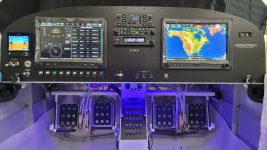
Starting to redo my rv6 panel, would anybody be willing to share their file that was sent to print out rub on transfers? seems like it could save me a lot of time using someone else's file and simplify modifying it to suit my panel vs starting everything from scratch? (font size, lettering, etc)
 
Starting to redo my rv6 panel, would anybody be willing to share their file that was sent to print out rub on transfers? seems like it could save me a lot of time using someone else's file and simplify modifying it to suit my panel vs starting everything from scratch? (font size, lettering, etc)

They accept pdf format and very easy to work with. Have ordered from them many times.
 
I have found that not all RV6 panels are same shape in their top curvature. Be sure to use your old panel as template to fit the new one to the fuselage.
Later prepunched models have much more consistency in shape.
 
How do they take a clear coat?
Clear coat great, gloss or matte finish. I like to use 2 coats and found if you apply 2 coats of matte gives it too much of an orange peel effect so better to use first coat of gloss then second coat of matte or 2 coats of gloss.
 
Plus one for Custom Rub On Transfers, aka Platon Graphics. Rigo was amazing to deal with and very patient with all my revisions. I used SEM Trim Black 39143 and Duplicolour Wheel Matte Clearcoat. 3 coats of colour and 2 coats of clearcoat. I found it best to cutout the backing sheet only behind the word I was transferring. I used my stylus from my iPad to rub on the letters. Worked great. Order as many extras as will fit on the sheet, for practice and mistakes. Any words or letters that were nfg I used a piece of vinyl tape over the rub on transfer to remove it.
20240718_143901.jpeg
 
Back
Top