Van's Air Force

The definitive Van's Aircraft support community! Buying, building or flying an RV? Join our exclusive family of mentors and enthusiasts!

Garmin Announces the All-New Garmin Pilot Web

g3xpert

Well Known Member
Advertiser
Greetings VAF!

Garmin Pilot Web, an all-new flight planning companion tool to Garmin Pilot mobile, is now available for pilots to plan, file, and sync flight plans from computers to mobile devices. With easy to navigate maps, flights, and aircraft tabs, Garmin Pilot Web gives you many of the beloved features in the Garmin Pilot app on a larger viewing platform.

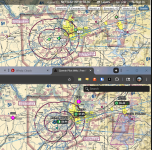
1745938753220.png

Garmin Pilot Web (pilotweb.garmin.com) is available across a few different tiers of service, closely tied to each users Garmin Pilot subscription. The free version gives pilots access to the maps tab with selectable base maps, data layers like weather/NOTAMs/fuel prices, FAA charts, airport information, and more. The free version also includes simple, at-a-glance flight planning tools on the maps page to run what-if scenarios on upcoming flights based on forecasted winds aloft at the time of departure.

Pilots with a Standard Garmin Pilot subscription ($109.99/yr in US) now have access to advanced functionality on the Maps, Flights, and Aircraft Tabs. With the ability to plan, save, and file flight plans, request briefings, and add/edit aircraft profiles, users can finish the flight planning process all in one place. Garmin Pilot Premium users ($209.98/yr in US) get access to all standard subscription features plus icing forecasts and Garmin SafeTaxi® diagrams.

We are excited to make this new tool available for Garmin Avionics users, please let us know if any questions come up!

Thanks,

Justin
 
This would be great news if I regularly used my laptop. I only fire it up these days to update the SD cards for my G3X and GTN databases. Otherwise, I'm on my iPad exclusively.
 
This would be great news if I regularly used my laptop. I only fire it up these days to update the SD cards for my G3X and GTN databases. Otherwise, I'm on my iPad exclusively.
Not tried it, but heard it also works on an ipad (but then why not use the real app)
 
This looks really promising!

What I really miss is the pilots' comments on the airports, the crowd sourced data. There is a treasure trove of info in another EFB. Is there a possibility of cross importing that into Garmin Pilot (some coopetition)?
 
For my locale the Garmin piiot app is poor and expensive compared to the competition. This desktop/laptop solution also way behind. I'll even take the pain of entering my flight plan directly into my navigator. Needs to try harder. Pete
 
I am certain I'm missing something simple, but I don't see any controls for zooming the map in and out?
 
Add me to the list of people who are glad to see this. I spend a ton of time on a desktop, and the lack of this feature is the main reason I have always subbed to the 'other guy' instead. This will get me to give a GP sub a try for the next year.
 
Greetings VAF!

Garmin Pilot Web, an all-new flight planning companion tool to Garmin Pilot mobile, is now available for pilots to plan, file, and sync flight plans from computers to mobile devices. With easy to navigate maps, flights, and aircraft tabs, Garmin Pilot Web gives you many of the beloved features in the Garmin Pilot app on a larger viewing platform.

Looks promising, but data outside CONUS seems ... poor. No airspace, very few airports. At least there are IFR airways/waypoints.

Interesting direction to take. Other EFBs have "universal binaries" so the iPad app can also run on a Mac desktop (not much help for Windows users, but great in the Apple ecosystem)

The feature I really want to see from Garmin Pilot is to be able to use it to live-sync weather/NOTAMs from the app to the G3X Touch system. There's no UAT978/TIS-B outside the USA, and also no Sirius XM coverage outside the North American continent, so non-American G3X Touch systems have no connectivity they can use to display "live" data to aid pilot decision making.

Bluetooth connectivity to an app on a 5G device that can sync weather radar, winds aloft, lightning, freezing levels, TAFs, NOTAMs, etc would be tremendously helpful.

I know all that stuff is on the iPad, but all the screenshots for G3X Touch marketing on Garmin's website say the panel I spent quite a bit of money on should be able to do it too :)

I'd definitely become a Garmin Pilot subscriber if it yielded that functionality.

- mark
 
Looks promising, but data outside CONUS seems ... poor. No airspace, very few airports. At least there are IFR airways/waypoints.

Interesting direction to take. Other EFBs have "universal binaries" so the iPad app can also run on a Mac desktop (not much help for Windows users, but great in the Apple ecosystem)

The feature I really want to see from Garmin Pilot is to be able to use it to live-sync weather/NOTAMs from the app to the G3X Touch system. There's no UAT978/TIS-B outside the USA, and also no Sirius XM coverage outside the North American continent, so non-American G3X Touch systems have no connectivity they can use to display "live" data to aid pilot decision making.

Bluetooth connectivity to an app on a 5G device that can sync weather radar, winds aloft, lightning, freezing levels, TAFs, NOTAMs, etc would be tremendously helpful.

I know all that stuff is on the iPad, but all the screenshots for G3X Touch marketing on Garmin's website say the panel I spent quite a bit of money on should be able to do it too :)

I'd definitely become a Garmin Pilot subscriber if it yielded that functionality.

- mark
Last time I looked at it maybe 2y ago you couldn’t even file a domestic IFR flight plan here with it. Maybe that’s been addressed now but for me it’s got a lot of wood to chop before it’s a competitor to the other 3 (2 effectively)
 
This would be great news if I regularly used my laptop. I only fire it up these days to update the SD cards for my G3X and GTN databases. Otherwise, I'm on my iPad exclusively.
I use ForeFlight rather than Garmin Pilot, but my experience is the same. The usability of ForeFlight on an iPad beats their web PC application hands down.
 
I use ForeFlight rather than Garmin Pilot, but my experience is the same. The usability of ForeFlight on an iPad beats their web PC application hands down.
Actually, where this would shine for me is at work where in a spare moment it would be great to be able to access GarminPilot functionally on my desktop, but unfortunately to login I have to have access to either my cell phone (which I can't have at work) or to my personal gmail account which is blocked on our LAN. Bottom line is I'm SOL.
 
Question. Is this good news to you foreflight users since it was recently sold from Boeing to a private equity firm (typically by history for other sell offs not a great thing to happen), or are you foreflight users locked in no matter what? I'll need to decide which to use
 
Question. Is this good news to you foreflight users since it was recently sold from Boeing to a private equity firm (typically by history for other sell offs not a great thing to happen), or are you foreflight users locked in no matter what? I'll need to decide which to use
I think all FF (and Jepp) users share your concern, we will have to see what happens in 2026, but for now they continue to innovate and lead.
 
This is great news. I don't use my phone or iPad for that much and prefer my desktop computer to do anything complicated. That, and Garmin has already started alerting me in Garmin Pilot that my phone and iPad are "too old" for them, and I was worried that they'd eventually drop support for my devices. So it's nice that they are offering this through the browser also!
 
Not a commercial pilot but I've used Garmin Pilot exclusively and it gets it done, easy to use, intuitive, and integrates seamlessly with the airplane avionics. Love it.

i switched from top tier FF subscription to GP and don’t miss anything with one exception: community notes for airports. that may keep me from canceling.

i used GP for long XC planning and navigation (mix of VFR and IFR legs) and it’s been great. No issues with IFR filing and receiving proposed amended routing. integrates well with my GPS175 and GDL50. TargetTrend traffic is a real game changer to me.
 
Tried it out a bit and the first thing I noticed was that it is absolutely crushing my CPU, continuously using 20-50% CPU when it's in a foreground tab but doing nothing but displaying a map. My computer's fans are running hog wild and my office is getting hot! Probably just one of many bugs that tend to arise in brand new software. g3xpert/Justin, I'm happy to help debug over E-mail by providing system information and so on if you'd like.
 
Tried it out a bit and the first thing I noticed was that it is absolutely crushing my CPU, continuously using 20-50% CPU when it's in a foreground tab but doing nothing but displaying a map. My computer's fans are running hog wild and my office is getting hot! Probably just one of many bugs that tend to arise in brand new software. g3xpert/Justin, I'm happy to help debug over E-mail by providing system information and so on if you'd like.
Tried it out on Chrome on my Mac Pro, not pegging of CPU - total usage was less than 5% for the entire system.
 
Tried it out a bit and the first thing I noticed was that it is absolutely crushing my CPU, continuously using 20-50% CPU when it's in a foreground tab but doing nothing but displaying a map. My computer's fans are running hog wild and my office is getting hot! Probably just one of many bugs that tend to arise in brand new software. g3xpert/Justin, I'm happy to help debug over E-mail by providing system information and so on if you'd like.
Time to upgrade!
My PC isn't even slightly fazed by this. Fans still running minimum speed and I'm zooming and panning like crazy.
 
Time to upgrade!
My PC isn't even slightly fazed by this. Fans still running minimum speed and I'm zooming and panning like crazy.

Ha ha! I've got a quad core i5 with 64GB of RAM that I've never seen under load like this, including when doing software development and video editing. Pretty sure it's not the computer. Its not the browser either, tried both Safari and Firefox.
 
I think it would be great if they included Garmin Pilot for free as part of the Garmin aviation database subscription.
Ditto!

Not sure who Garmin Pilot Web's target user is. Skyvector on a laptop/desktop is much more capable and allows saving and downloading flight plans, which Garmin charges extra for.
 
I think it would be great if they included Garmin Pilot for free as part of the Garmin aviation database subscription.
At least a discount for the pair. I think they would see more people start using Garmin Pilot if that was the case.
 
Tried it out a bit and the first thing I noticed was that it is absolutely crushing my CPU, continuously using 20-50% CPU when it's in a foreground tab but doing nothing but displaying a map. My computer's fans are running hog wild and my office is getting hot! Probably just one of many bugs that tend to arise in brand new software. g3xpert/Justin, I'm happy to help debug over E-mail by providing system information and so on if you'd like.
Time to upgrade!
My PC isn't even slightly fazed by this. Fans still running minimum speed and I'm zooming and panning like crazy.
Ha ha! I've got a quad core i5 with 64GB of RAM that I've never seen under load like this, including when doing software development and video editing. Pretty sure it's not the computer. Its not the browser either, tried both Safari and Firefox.

Also running an i5 with 16gb ram on a micro ThinkCenter. It is hardly even causing a blip on the CPU utilization. Sorry but it appears you got something else going on.
 
As a long time GP user, I hope this web version is just a teaser and the real fully functioning product will be released shortly.
 
Also running an i5 with 16gb ram on a micro ThinkCenter. It is hardly even causing a blip on the CPU utilization. Sorry but it appears you got something else going on.
Have to agree, I've tried on my Mac and my Windows Laptop, with Chrome, Firefox, and Safari. Most CPU usage was 8%. My first suspect would be an antivirus issue.
 
Last time I looked at it maybe 2y ago you couldn’t even file a domestic IFR flight plan here with it. Maybe that’s been addressed now but for me it’s got a lot of wood to chop before it’s a competitor to the other 3.
You may have hit a bug/glitch with it; I've been using GP since it was new-ish in 2012, have been filing IFR plans for years.

But, speaking of bugs/glitches, I've had my share with it! I've been running it on 3 Android tablets over the years and the 'droids have seemingly been treated as the red headed stepchild with features lagging behind the IPad versions... like color pictorial layout on SIDs/STARs; FF has had that for years and we still get bupkis on the GP Android version. Plus the program gets buggy after a few months... seems like every 8-9 months or so I have to delete and reload the app just to get it working right. But, I still like it.
 
I just gave it a try and like it.
I was a FF customer since about the beginning but since I have a full Garmin panel I have tried GP a couple of times. Hard to get used to a different software once you get used to another. I have been on GP since last year and finally am close to getting comfortable. This desktop version really helps. I usually spend time on my desktop planning a trip then have to enter it on the iPad then file from the iPad then load it on the GTN650 while in the plane.
Now I can plan a flight and the web version, it saves the trip to my account and I can easily file on my phone right before takeoff.
 
You may have hit a bug/glitch with it; I've been using GP since it was new-ish in 2012, have been filing IFR plans for years.

But, speaking of bugs/glitches, I've had my share with it! I've been running it on 3 Android tablets over the years and the 'droids have seemingly been treated as the red headed stepchild with features lagging behind the IPad versions... like color pictorial layout on SIDs/STARs; FF has had that for years and we still get bupkis on the GP Android version. Plus the program gets buggy after a few months... seems like every 8-9 months or so I have to delete and reload the app just to get it working right. But, I still like it.
I’m in Australia. Def not a bug. Just didnt interface with our ANSP.
 
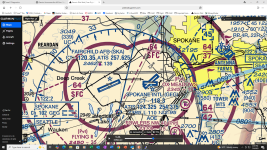
I like the tool, but the VFR maps are unfortunately quite blurry. The image below compares the same area at the same zoom level in SkyVector and PilotWeb. As you can see, the PilotWeb map is nearly unreadable. Are there any plans to improve the map quality?

pilotweb.png
 
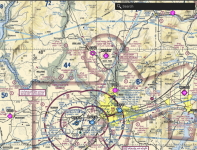
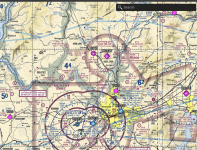
The clarity appears to depend upon your zoom level. SkyVector jumps between preset zoom levels. This allows them to optimize the image for each of their preset zoom levels. Garmin Pilot web appears to have infinitely adjustable zoom. Like SkyVector they only have a preset number of VFR map resolutions, but on Garmin Pilot they allow you to go in between these preset zoom levels and they just upscale the lower resolution image. (More levels of zoom at the cost of some blurriness when not at the optimal levels)

For example, here are two images from Garmin Pilot web. They are both nearly identical zoom levels. But, one is just barely zoomed in enough to switch to the higher resolution graphics.

Screenshot 2025-07-09 at 2.45.38 PM copy.pngScreenshot 2025-07-09 at 2.45.53 PM copy.png
 
The clarity appears to depend upon your zoom level. SkyVector jumps between preset zoom levels. This allows them to optimize the image for each of their preset zoom levels. Garmin Pilot web appears to have infinitely adjustable zoom. Like SkyVector they only have a preset number of VFR map resolutions, but on Garmin Pilot they allow you to go in between these preset zoom levels and they just upscale the lower resolution image. (More levels of zoom at the cost of some blurriness when not at the optimal levels)

This is almost surely what's happening, or something like it.

When dealing with raster maps (such as digital sectionals), typically there is a big computationally-expensive preprocessing step that happens before publishing, where the original charts from the FAA are chopped up into square tiles for efficient serving, and resampled for all the various levels of detail (sometimes known as zoom levels) that they will be displayed at. The quality of results at those specific levels of detail tend to be quite good.

Then, on the display side, some mapping software will lock you into those pre-determined, known, high-quality zoom levels, where they can display the tile data as-processed, looking nice and sharp. Other mapping software will let you flexibly choose any zoom level and that can cause poor interpolation or resampling on-the-fly, often resulting in not-so-great image quality.

I actually have code on my home server that downloads VFR and IFR charts, processes them so I can serve my own local version of SkyVector/vfrmap.com, and I've seen these visual effects in abundance during the development of that software!

EDIT: If you look extra closely, a very observant mapping nerd will notice that the PilotWeb charts have also been re-projected into a cylindrical map projection (probably WebMercator or something similar), whereas the SkyVector charts may not have been. This re-projection, if done incorrectly, can also result in visual defects in the final product. Probably not what's happening in this case, since there do exist views where the displayed data looks good. Re-projection related quality defects tend to not depend on zoom level.
 
Last edited:
I actually have code on my home server that downloads VFR and IFR charts, processes them so I can serve my own local version of SkyVector/vfrmap.com, and I've seen these visual effects in abundance during the development of that software!
I hacked up a similar tool when I wanted a detailed 36"x36" map printed to use as the base for my vfr led light map project.
 
Ha ha! I've got a quad core i5 with 64GB of RAM that I've never seen under load like this, including when doing software development and video editing. Pretty sure it's not the computer. Its not the browser either, tried both Safari and Firefox.

I really love the Garmin Pilot ecosystem, and I want to do more flight planning using the web version, but the excessive CPU usage really bothered me. So I sat down to do a little debugging and performance profiling to figure out what's happening with this software. With a little help from Claude Code, I've got the issue narrowed down to the point that perhaps Garmin might be able to fix it. Who knows if Garmin's developers read VAF, but if you do, consider this free QA help--it's probably worth what I was paid for it.

Easy workaround for the user: I you see high CPU usage, turn off the RADAR weather layer (which is on by default).


Technical discussion below, happy to send via E-mail


To fix the code: Don't call requestAnimationFrame unless actually animating the RADAR weather layer

Garmin Pilot Web consumes ~40% CPU continuously on my machine while idle with the RADAR weather radar layer enabled. The cause of the high CPU usage is two independent requestAnimationFrame loops in the RADAR overlay code that run unconditionally at display refresh rate (each calling rAF in a tight chain), each triggering a full map repaint, which in turn triggers Angular Zone.js change detection on every frame. Disabling the RADAR layer drops CPU usage from 40% to 5%. I did some profile captures in Firefox to diagnose this. requestAnimationFrame is called approximately 120 times per second when the radar layer is on, and approximately 2 times per second when the radar layer is off. requestAnimationFrame is computationally expensive because each call triggers Zone.js task overhead and Angular change detection.

Issue 1: Two Runaway requestAnimationFrame Loops

There are two classes with independent rAF loops that call this.map.triggerRepaint() on every frame, unconditionally:

(a) RADAR Animation Controller (class YP)

Code:
// Class YP constructor — the renderControl callback:
this.renderControl = () => {
    if (this.startAnimationTime != null) {
        if (!this.isTimeOutOfRange) {
            // ... find closest frame time ...
        }
        // BUG: unconditionally triggers repaint + schedules next frame
        this.map.triggerRepaint();
        this.animationFrameId = requestAnimationFrame(this.renderControl);
    }
};

This loop runs as long as this.startAnimationTime != null. Even when the RADAR image is static (no animation playing, user not interacting), the loop continues calling triggerRepaint() and scheduling the next frame. stopAnimation() doesn't get called until the RADAR layer is turned off.

(b) Wind Particle Renderer (class CD)

Code:
// Class CD — wind particle animation
frame() {
    this.map.triggerRepaint();
    this.animationId = requestAnimationFrame(this.frame.bind(this));
}

startAnimation() {
    this.disableAllAttributes();
    this.state = "ANIMATING";
    this.setBounds(this.map.getBounds());
    this.frame(); // starts the infinite loop
}

frame() always schedules the next frame regardless of state. The rAF loop itself never stops unless stopAnimation() is called.

Issue 2: Map render loop triggers full Angular change detection cycle

Code:
triggerRepaint() {
    this.style && !this._frameRequest && (
        this._frameRequest = new AbortController,
        m.frame(this._frameRequest, N => {  // <-- calls requestAnimationFrame
            s.cF.frame(N);
            this._frameRequest = null;
            this._render(N);
        }, () => {})
    );
}

Where m.frame() wraps requestAnimationFrame:

Code:
let m = {
    frame(N, d, p) {
        let T = requestAnimationFrame(P => {
            M();
            d(P);
        });
        // ... abort signal handling ...
    }
};

Each call to triggerRepaint() schedules a requestAnimationFrame callback. Because the map component is instantiated inside Angular's NgZone, every rAF callback triggers a full Angular change detection cycle, even though no application state has changed.
 
Back
Top