


Van's Air Force

The definitive Van's Aircraft support community! Buying, building or flying an RV? Join our exclusive family of mentors and enthusiasts!

GAD 27 How can you tell if a dimmer isn't working?

eavila1

Well Known Member
Friend
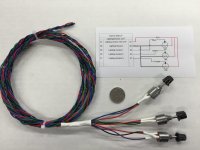
Ok I have these three dimmers wired to my GAD27:

1 Wired to dim all panel Garmin screens
1 wired to cabin baggage white LED Strip
1 wired to under glareshield LED blue strip

Panel and baggage LED's are working nicely. Both dimming as they should. Finally connected my glareshield LED strip and it turns on bright but no dimming happening like the other two.

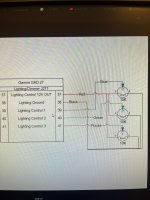
Should I Run continuity checks off the connecter pins 39,40, and 41 (Blue, Green, Purple wires) to the pins on the dimmer?? It could be that there is not a good connection of the wires at that dimmer as well. maybe I redo that one dimmer wiring. Before I do is there a better way to verity a bad dimmer?? Suggestions?
 

Attachments

  • IMG_1949.jpg
    IMG_1949.jpg
    79.9 KB · Views: 25
  • IMG_2733.jpg
    IMG_2733.jpg
    3.9 MB · Views: 28
I would start by checking the Cockpit Lighting Configuration page. Verify the configuration matches your wiring, and then watch the graph: if the Input Level value doesn't move, then you have a problem with your potentiometer and/or wiring.
 
I would start by checking the Cockpit Lighting Configuration page. Verify the configuration matches your wiring, and then watch the graph: if the Input Level value doesn't move, then you have a problem with your potentiometer and/or wiring.
ok that's a good point Matt. It could be a configuration setup issue. I will check that. Thank you
 
I assume you have connected the LED strip ground to the PWM dimming on the GAD27? I assume the LEDs are compatible with PWM dimming?
 
I assume you have connected the LED strip ground to the PWM dimming on the GAD27? I assume the LEDs are compatible with PWM dimming?
Yes all power and ground are connected to the GAD 27. Another good point, I did compare the two LED strips and they look a little different at the terminals (not as robust wire guage) So maybe this is the issue. Although I thought I bought the glareshield strip at Steins. Couldve been through Aircraft spruce. Some don't allow dimming then I'm assuming?
 
Ok I have these three dimmers wired to my GAD27:

1 Wired to dim all panel Garmin screens
1 wired to cabin baggage white LED Strip
1 wired to under glareshield LED blue strip

Panel and baggage LED's are working nicely. Both dimming as they should. Finally connected my glareshield LED strip and it turns on bright but no dimming happening like the other two.

Should I Run continuity checks off the connecter pins 39,40, and 41 (Blue, Green, Purple wires) to the pins on the dimmer?? It could be that there is not a good connection of the wires at that dimmer as well. maybe I redo that one dimmer wiring. Before I do is there a better way to verity a bad dimmer?? Suggestions?
You can verify that the potentiometers (pots) are working correctly on the Cabin Lights page. Navigate to the page corresponding to the pin assigned to the glareshield light. Move the rheostat and watch the chart—there should be a line that moves in response.

If the line doesn't move, double-check that you've selected the correct rheostat from the dropdown menu.

If the indicator does move, confirm that the LED strip is wired to the intended pin and that the PWM output from the GAD27 is connected to the negative side of the LED strip.
 
You can verify that the potentiometers (pots) are working correctly on the Cabin Lights page. Navigate to the page corresponding to the pin assigned to the glareshield light. Move the rheostat and watch the chart—there should be a line that moves in response.

If the line doesn't move, double-check that you've selected the correct rheostat from the dropdown menu.

If the indicator does move, confirm that the LED strip is wired to the intended pin and that the PWM output from the GAD27 is connected to the negative side of the LED strip.
Ok excellent. I'll check this Joshua. I bet it is me (user error somewhere)
 
Yes all power and ground are connected to the GAD 27. Another good point, I did compare the two LED strips and they look a little different at the terminals (not as robust wire guage) So maybe this is the issue. Although I thought I bought the glareshield strip at Steins. Couldve been through Aircraft spruce. Some don't allow dimming then I'm assuming?

That's correct -- some LED lights are not dimmable. There are also different ways to dim LED lights. The GAD27 uses PWM (pulse width modulation) which is generally LED-friendly, but some LEDs explicitly do or don't support PWM. Generally, though, I'd expect them to flicker or make noise if they don't support PWM, not just do nothing at all. I suspect the others are correct that it is a configuration error.
 
@g3xpert @mburch

This might be a debate to be had over beer, but shouldn't the PWM pins on the GAD 27 (J271, 45,46,47) be listed as "IN"? They do sink current to ground - albeit pulsed.
 
@g3xpert @mburch

This might be a debate to be had over beer, but shouldn't the PWM pins on the GAD 27 (J271, 45,46,47) be listed as "IN"? They do sink current to ground - albeit pulsed.

It's something that bothers me... So I try not to think about it too much :)

But if you want to be super pedantic, the electrons do actually go from ground to positive, so you could argue it is actually outputting electrons.
 
It's something that bothers me... So I try not to think about it too much :)

But if you want to be super pedantic, the electrons do actually go from ground to positive, so you could argue it is actually outputting electrons.
You just need to make an even number of sign errors, and it will work!
 
Wanted to give an update. Sure enough it was a simple cockpit lighting configuration PWM choice in the G3X configuration page. A simple fix and i need to remind myself to go to the G3X manual and configuration page if something seems off or not responding how I think it should. The three separate wired Dimmers to GAD 27 that I purchased from stein is working great. Both LED strips to the cockpit/baggage and to the glareshield now dimming like they should as well as to my PFD, GTN625, and GTR200B synched together.
 
Back
Top
