

Van's Air Force
You are using an out of date browser. It may not display this or other websites correctly.
You should upgrade or use an alternative browser.
You should upgrade or use an alternative browser.
G3X flight director
- Thread starter Jonnyb
- Start date



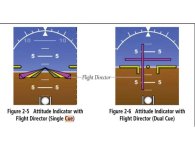

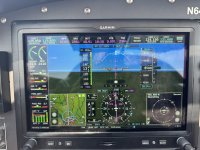

How do you change to dual cue on the Garmin G3X please ?
Use the Flight Director Setup page in the main menu.

Thanks guys!
I just wanted to check it was what I thought it was.
After 25 years in the airlines that’s what I’m used to.
The biggest chalange for me was changing from skypointer to roll pointer.
Attachments
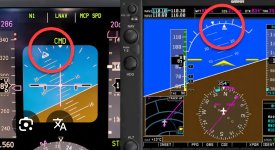

You can configure the G3X attitude indicator’s roll indicator to either ground or sky pointer. Config mode tho not so not in the pilots guide I don’t believe.The biggest chalange for me was changing from skypointer to roll pointer.
Yes, I know. I don’t fly airliners anymore and fly several other GA aircraft’s, all configured with ground pointers, so I decided to get used to de GP. Sometimes still find myself turning the wrong way.You can configure the G3X attitude indicator’s roll indicator to either ground or sky pointer. Config mode tho not so not in the pilots guide I don’t believe.

RV8Squaz
Well Known Member
Switch to the v-bars. It's much more intuitive. It'll take you about 5 minutes to get used to it. The v-bar gets you to make pitch and roll inputs in one fluid movement. I often see people making two separate inputs with the dual cue. My airline also uses the dual cue and when I get into my airplanes I'm grateful for the v-bar. I've had to switch back and forth over my 40 year AF and airline career and much prefer the more modern v-bar.Thanks guys!
I just wanted to check it was what I thought it was.
After 25 years in the airlines that’s what I’m used to.

If you have an AFS EFIS you can also change the flight director between single cue (V bars) or dual cue as well in the EFIS menu.Switch to the v-bars. It's much more intuitive. It'll take you about 5 minutes to get used to it. The v-bar gets you to make pitch and roll inputs in one fluid movement. I often see people making two separate inputs with the dual cue. My airline also uses the dual cue and when I get into my airplanes I'm grateful for the v-bar. I've had to switch back and forth over my 40 year AF and airline career and much prefer the more modern v-bar.

I’m the same way. I just got my type rating in a Cirrus Jet this past Sunday. I commented to my instructor that there ought to be a “whiny Airbus guy” mode on that fancy Garmin system that makes everything look like an Airbus!Thanks guys!
I just wanted to check it was what I thought it was.
After 25 years in the airlines that’s what I’m used to.
