Van's Air Force

The definitive Van's Aircraft support community! Buying, building or flying an RV? Join our exclusive family of mentors and enthusiasts!

Experiment to decode ADS-B for ground testing

PaulvS

Well Known Member
Patron
Soon I will be installing ADS-B out equipment (Dynon transponder and GPS source) in my RV-6A and need to run a ground test after installation. The nearest avionics shop with a ramp test unit is 250 miles away so I've been looking for a way to run the functional test locally at my farm hangar.

I'm planning to use a Software Defined Radio receiver (SDR) similar to those used to feed flightradar24, flightaware etc to receive and decode the ADS-B signals from the transponder.

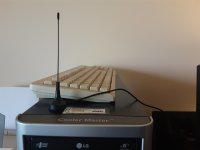
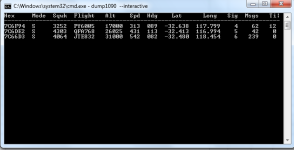
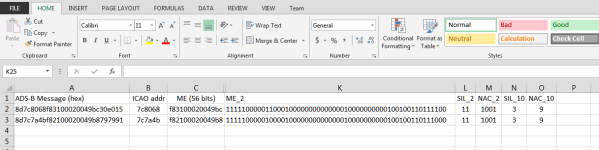
So far I've purchased and installed the USB receiver and antenna (cost under $30 USD) and can receive and display local air traffic ADS-B data using the open source ADS-B decoder "dump1090". This decoder can display most of the required data for the test but there is also additional system performance info required e.g. SIL, NAC. I'm using Excel to decode that info from the raw data.

Screen shots attached. If there is interest then I'll post an update once the transponder is installed and ground tests have been run to prove that this process will work.
 

Attachments

  • 20230703_143413_resized.jpg
    20230703_143413_resized.jpg
    480.6 KB · Views: 110
  • 20230703_143352_resized.jpg
    20230703_143352_resized.jpg
    350.3 KB · Views: 116
  • SSdump1090.png
    SSdump1090.png
    43.4 KB · Views: 146
  • SSExcel.png
    SSExcel.png
    41.1 KB · Views: 128
Android's Avare ADSB Pro does this recording nicely. If you don't like Dump1090. Just need the On The Go, "OTG" function enabled on the device so the USB SDR integrates. Saves comma delineated text files.
 
Not sure if you know this but take the plane up for a short flight to at least 2000 ft if you are near major airports or 3000 - 4000 ft or more if you are 100’s of miles away. Go to
https://adsbperformance.faa.gov/PAPRRequest.aspx

Fill it out and within a few minutes you’ll get a report back. It’s pretty simple. If you have no red in the report you passed.
 
Not sure if you know this but take the plane up for a short flight to at least 2000 ft if you are near major airports or 3000 - 4000 ft or more if you are 100’s of miles away. Go to
https://adsbperformance.faa.gov/PAPRRequest.aspx

Fill it out and within a few minutes you’ll get a report back. It’s pretty simple. If you have no red in the report you passed.

Thanks... plane is still under construction and is not flying yet - working on panel.
Also I'm in Aus and the FAA tool doesn't work here! :confused:
 
So far I've purchased and installed the USB receiver and antenna (cost under $30 USD) and can receive and display local air traffic ADS-B data using the open source ADS-B decoder "dump1090". This decoder can display most of the required data for the test but there is also additional system performance info required e.g. SIL, NAC. I'm using Excel to decode that info from the raw data.
Hi Paul,

This is a great idea and I'd definitely like to know more when you have some info to share. Are you using dump1090 as-is to get the data you're decoding in Excel, or did you modify it?

Many thanks -

Dave
 
Dump1090

Hi Paul,

This is a great idea and I'd definitely like to know more when you have some info to share. Are you using dump1090 as-is to get the data you're decoding in Excel, or did you modify it?

Many thanks -

Dave

Hi Dave,

I'm using Dump1090 "as-is" (the Malcolm Robb fork or version from Github) with Windows 7.

The --debug switch outputs data that can be directed to a text file.
From there it's a manual process to find a type 31 (operational status) extended squitter message and copy the encoded message string to Excel for further decoding.

It would be more elegant to enhance Dump1090 to decode the relevant message types but I'm doing this as a one off "quick and dirty" to check my transponder!

PDF of the debug log file attached for interest.

Regards,
Paul.
 

Attachments

Have a look at these documents
MOD 7
MOD 14
They are from the LAA in the UK, I can't remember one describes a process for testing ABSB without a test set

Thanks Pete, that is "most" helpful. There was a link within to a TransponderReport tool that is compatible with the SDR dongle that I have plugged in. The Royal Flying Doctor service just happened to by passing overhead and their transponder seems to be working OK! See att. for the transponder report.

Problem solved (or at least made easier) thanks to VAF and the global community!!! :D
 

Attachments

The --debug switch outputs data that can be directed to a text file.
From there it's a manual process to find a type 31 (operational status) extended squitter message and copy the encoded message string to Excel for further decoding.

It would be more elegant to enhance Dump1090 to decode the relevant message types but I'm doing this as a one off "quick and dirty" to check my transponder!

PDF of the debug log file attached for interest.
This is awesome, thanks Paul!

I've played a little with dump1090 on a Raspberry Pi, but not on Windows. I have a cheapo Win machine at the hangar for database and software updates, should be perfect for this application.

Cheers,

Dave
 
Last edited:
Test completed

This is just to provide an update on the outcome of the experiment; it was successful and I was able to validate that the ADS-B transponder is functioning correctly on the ground. (The aim was to conduct a ground test of a new ADS-B out Trig transponder installation to verify that it is sending out the correct data.)

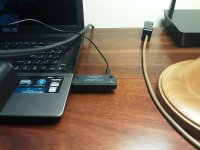
The test receiver is a Software Defined Radio "SDR" USB device. There are many options on eBay but the nooelec brand has a good reputation and solid support. I bought the NESDR Mini on Amazon AU for about $45 (USD $27) including antenna and shipping.

https://www.nooelec.com/store/sdr/sdr-receivers/nesdr-mini.html

This device plugs into the USB port on a Windows PC, or a tablet, or Raspberry Pi computer.

On Windows I used DUMP1090 open source software initially to decode the ADS-B signal and display the traffic. This version worked well:

https://github.com/MalcolmRobb/dump1090

The SDR receiver and small antenna can pick up commercial traffic several hundred miles away, these signals were received through my study window.

A more complete decoder and reporter is available free from a developer in the UK:

https://getyourwings.co.uk/uncertif...st-checking-the-output-from-your-transponder/

The report that it generates includes lat, long, aircraft ID, ICAO code and the internal system indicators to validate the ADS-B out installation e.g. SIL, SDA values etc.

As a bonus, the SDR receiver when plugged into the USB port on the tablet that has Avare ADSB installed (free version on Google Play Store) and enabled for GDL90 will display direct-received traffic on Ozrunways EFB, along with other traffic that comes in via the mobile network. This provides a low cost way to display ADS-B in traffic.

There was a bit of setup work to get the receiver working initially but it was fairly straightforward and problem-free and very good "bang for the buck" and was quite interesting for the learning.

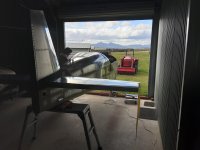
The GPS receiver was unable to receive a strong signal in the shop and I shifted the airframe to get a clear view of the sky out of the door. I also tested for interference on the radio while the transponder was functioning and there was initially some crackle due to the use of RG58 cable. I replaced this with RG400 and that resolved the interference.
 

Attachments

  • 20230728_135324.jpg
    20230728_135324.jpg
    283.7 KB · Views: 34
Last edited:
FWIW, Canada has a similar test system you can access over the internet. Since Canada's ADS-B coverage is satellite based, and since the Aireon network is global, you may be able to use our system to test your Australian setup? No guarantees...

https://www.navcanada.ca/en/air-traffic/space-based-ads-b/public-ads-b-performance-report.aspx

The NavCanada tool only provides information for flights taking place in Canadian airspace. Sometimes it doesn't even do that (I've had troubles with it finding my flights which are wholly within Canada).
 
I had the same idea as @PaulvS before I read this thread. I wanted to test my transponder ADSB to make sure everything is working correctly while the aircraft is under construction. I ended up buying a complete kit from ADSBExchange. Figured I'd also become a node and feed the networks while I was at it. I have the ADSB receiving equipment next to the plane with the antennas inside the hangar (about 4 feet from the plane). I have a GPS repeater inside the hangar above the plane that transmits GPS location in the building. I get a solid 3D location lock on all GPS receivers.

I am not seeing any indication on the ADSBExchange UI that it sees the plane. I have tried in ground mode, in ON mode and have hit ID. The plane is not bing hit by radar, but I assume it should be transmitting by itself and seen by the software. It is possible the software is filtering the plane before broadcasting or the airplane isn't transmitting anything. Not sure? Dump1090 is installed on the Raspberry Pi. Possible it is pulling the data into a raw file and the UI is filtering it. I don't know much about how it works. The tail number of the plane is not registered yet. I don't have engines! I have the tail number reserved under my name. This is one of the reasons why I don't want to be testing with real radar or outside of the building.

I am using a Garmin G3X system with a GTX45R/GPS transponder. I do not have any errors on the network. The Transponder has a solid GPS lock on its internal GPS and I have a solid GPS lock on a GPS20A and the GTX GDU internal GPS. 3 GPS's in total are connected and all have solid 3D location. The transponder is configured with all of the aircraft info like the tail number, length, etc. The Transponder antenna is connected as well.

From the G3X side everything looks to be fine, but I am not seeing any ADSB Data on my ADSBExchange system. Thinking it could be ADSBExchange, I also installed the feeders for FlightRadar24 and FlightAware. All 3 networks are showing my ADSB receiver online and I am picking up aircraft even with the antenna inside of the hangar. My ADSB equipment has two receivers in it -- 1090 and 970. They should be able to see the Garmin transmitting on either frequency.

Anyone have any suggestions I can try? Is there a way to look at the raw 1090Dump data? I am building inside of a Class B airspace. I am going to have to get the transponder tested before I can fly it. I don't want to pay an expensive avionics shop to do the final certification tests until I can confirm everything is working correctly.

Thank you in advance for your help!
 
My bad - the transponder won't reply (transmit) until it hears an interrogation, or it's in ground test mode (@Walt)

The Ident button sets an additional bit in the Mode3A/C reply packet Learn something new every day.
 
Great replies to this post. Thank you all so very much for your help. Another thing that someone mentioned is I have not calibrated my magnetometer. That may also be the problem. If it is, I may be stuck for awhile. I can't get the plane outside. It is winter here and the plane is pretty much stuck where it is for awhile. I am going to try the ground test mode that @Walt mentioned. That is a good idea. Maybe it will override the magnetometer calibration. I am hoping to just see that it is transmitting something!
 
My bad - the transponder won't reply (transmit) until it hears an interrogation, or it's in ground test mode (@Walt)

The Ident button sets an additional bit in the Mode3A/C reply packet Learn something new every day.
Actually a mode S xpdr is always transmitting squitter unlike a mode a/c unit.
 
You can get the raspberry pi software image to receive ADS-B at adsbexchange.com, and you can then be a feeder for them and get free premium access. It displays all the ads-b parameters when you click on a displayed aircraft. To just see traffic, globe.adsbexchange.com works better than flightaware for pure ADS-B display. It doesn't mix in flight plans aircraft.
 
I had the same idea as @PaulvS before I read this thread. I wanted to test my transponder ADSB to make sure everything is working correctly while the aircraft is under construction. I ended up buying a complete kit from ADSBExchange. Figured I'd also become a node and feed the networks while I was at it. I have the ADSB receiving equipment next to the plane with the antennas inside the hangar (about 4 feet from the plane). I have a GPS repeater inside the hangar above the plane that transmits GPS location in the building. I get a solid 3D location lock on all GPS receivers.

I am not seeing any indication on the ADSBExchange UI that it sees the plane. I have tried in ground mode, in ON mode and have hit ID. The plane is not bing hit by radar, but I assume it should be transmitting by itself and seen by the software. It is possible the software is filtering the plane before broadcasting or the airplane isn't transmitting anything. Not sure? Dump1090 is installed on the Raspberry Pi. Possible it is pulling the data into a raw file and the UI is filtering it. I don't know much about how it works. The tail number of the plane is not registered yet. I don't have engines! I have the tail number reserved under my name. This is one of the reasons why I don't want to be testing with real radar or outside of the building.

I am using a Garmin G3X system with a GTX45R/GPS transponder. I do not have any errors on the network. The Transponder has a solid GPS lock on its internal GPS and I have a solid GPS lock on a GPS20A and the GTX GDU internal GPS. 3 GPS's in total are connected and all have solid 3D location. The transponder is configured with all of the aircraft info like the tail number, length, etc. The Transponder antenna is connected as well.

From the G3X side everything looks to be fine, but I am not seeing any ADSB Data on my ADSBExchange system. Thinking it could be ADSBExchange, I also installed the feeders for FlightRadar24 and FlightAware. All 3 networks are showing my ADSB receiver online and I am picking up aircraft even with the antenna inside of the hangar. My ADSB equipment has two receivers in it -- 1090 and 970. They should be able to see the Garmin transmitting on either frequency.

Anyone have any suggestions I can try? Is there a way to look at the raw 1090Dump data? I am building inside of a Class B airspace. I am going to have to get the transponder tested before I can fly it. I don't want to pay an expensive avionics shop to do the final certification tests until I can confirm everything is working correctly.

Thank you in advance for your help!
Try running the Dump1090 program on a Windows laptop or desktop computer in the hangar with the SDR dongle plugged into a USB port. Dump1090 displays all of the ADS-B message types that it receives, whereas the ADSBExhange software is possibly processing only the message types that are transmitted when the aircraft is airborne or moving on the ground. If the aircraft is stationary the transponder will still transmit operational status type messages and these will be viewable in raw format in Dump1090.
The ADS-B transponder does not require interrogation because it designed to regularly transmit independently when it is turned on.

This is the ADS-B SDR receiver dongle that I used, NOOELEC SDR Mini, $34.95 including antenna:
 
Last edited:
Anyone have any suggestions I can try? Is there a way to look at the raw 1090Dump data?
If you have an ADSB IN source compatible with the Garmin Pilot (borrow a GDL 50?), the GP under the devices section has an ADSB test page. It decodes everything found in the received packets of an ID you select and presents it in a user friendly way. I'd post a screenshot but I left the GDL in the hangar..
 
I tried @Walt's suggestion of putting the G3x Transponder into ground test mode. That is a great option to know about. Forces the transponder into ALT mode. I can see the change on the display. The transponder acts like it is working, but my ADSB receiver does not see the airplane. It doesn't see any messages at all from it. The only thing that I don't specifically have calibrated is the magnetometer. The display is complaining about calibrating it. Does the magnetometer need to be calibrated to get the system to transmit ADSB? If not, it is possible that the receiver I am trying to use is not picking up the plane for some reason. I am going to try Garmin Pilot with my GDL52 to see if it sees it. I will try the Nooelec to see if that can see it.
 
Last edited:
If you have an ADSB IN source compatible with the Garmin Pilot (borrow a GDL 50?), the GP under the devices section has an ADSB test page. It decodes everything found in the received packets of an ID you select and presents it in a user friendly way. I'd post a screenshot but I left the GDL in the hangar..
I have a GDL52 installed on the plane. It is now showing the airplane on the GDX display, but it would know its own tail number. I have not tried connecting Garmin Pilot to it to see if the unit see anything. I will give that a try. Thanks for the suggestion.
 
I finally got out to the airplane to try some of the suggestions in this post. I have 2 ADSB receivers (Foreflight and ADSBExchange commercial devices) that are running Dump1090 or a version of it. I tried to get Dump1090 running on a laptop and failed. Most articles I found on how to install it are circa 2014 talking about Windows 7. Possible the old software is the reason why I couldn't get it working on my Windows 10 and Windows 11 laptops. The ADSB receivers will not show any activity from the airplane with the receiving antennas feet away from it. My ADSB receivers have both 1090 and 978 radios.

I had previously installed an ADSB antenna on the outside of the hangar. I have used it to pick up ADSB ground weather and traffic around the airport for testing. The airport I am building at has radar on field. The antenna can get interrogated by radar. I have never connected the outside antenna to the Transponder. I have only tested with the GDL52 that is receive only. I figured I would hook up the outside antenna to the transponder and let it get hit a couple of times by radar to see what happened. I have a GPS repeater inside the hangar that provides full 3D coverage to all radios.

As soon as radar hit the plane, the ADSB message was picked up by the Dump1090 software on both of the ADSB receivers. It showed I was on ground. When I flipped to test mode that @Walt recommended that forces the transponder into ALT mode and the ADSB sites thought I started taxing. The GPS location was not changing. I'm assuming the receivers are looking for a particular tag coming out of the plane that gets triggered when it is hit by radar. The good news is I can confirm that ADSB is indeed working...

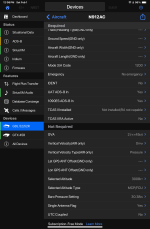
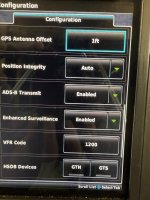
Next test, I moved to @ve0kog's brilliant and insightful suggestion. I installed Garmin Pilot and skipped the subscription stuff. I was assuming the software wouldn't be useful without a subscription, which his why I haven't tried it out yet. I was wrong. Garmin Pilot has a lot of awesome data about the avionics. I didn't have to pair it to the plane or do anything. It saw all avionics in the plane as soon as I opened the software. I went into the GDL52 section and found the ADSB Test that @ve0kog mentioned. Wow! It is awesome. The plane immediately identifies my airplane and what ADSB messages are being sent from it. Every time the plane transmits it will index a counter up so one can confirm that ADSB is indeed transmitting. There are a ton of useful features. I have enhanced surveillance turned on enabling additional broadcast features. For example, when I change preselect altitude on the G3X I can confirm that ADSB is transmitting the altitude preselect data.

Another cool thing that I discovered that is getting picked up from CANBUS is ADSB IN weather and traffic. I only have one outside ADSB antenna that I connected to the transponder. The ADSB antenna on the GDL52 is mounted on the plane inside the hangar. It cannot see the weather broadcast antenna or traffic that isn't right over the hangar. I have a GTX45R transponder that can pick up ADSB IN data. The GDL52 sees that data coming from the Transponder and indexes it even though it is not directly picking it up. This is great for redundancy. I can see information being populated in the ADSB Weather and Traffic section of the GDL52 in Garmin Pilot even though it cannot get the data directly.

The data one can read with a GDL5x and Garmin Pilot is astonishing. I can see more than what a $20K ground test unit can see. Makes me feel more comfortable that when I get to the actual transponder check that it will pass. Thank you so much @ve0kog for the Garmin Pilot recommendation.
 
have enhanced surveillance turned on enabling additional broadcast features. For example, when I change preselect altitude on the G3X I can confirm that ADSB is transmitting the altitude preselect data.
Wow this is something out of the big airliners book. Had no idea G3X had it . wonder if my Dynon stack can do the same.
 
Wow this is something out of the big airliners book. Had no idea G3X had it . wonder if my Dynon stack can do the same.
I'm attaching a screenshot of Garmin Pilot and the G3X transponder config screen. The Not Required section gets activated when Enhanced Surveillance Features are enabled. One of the things I wanted to test was seeing exactly what this feature did. The Garmin Pilot software is excellent! Cool actually seeing what is being transmitted from the aircraft.
 

Attachments

  • IMG_0076.png
    IMG_0076.png
    309 KB · Views: 18
  • IMG_3069.jpeg
    IMG_3069.jpeg
    1.9 MB · Views: 18
Back
Top