Van's Air Force

The definitive Van's Aircraft support community! Buying, building or flying an RV? Join our exclusive family of mentors and enthusiasts!

Dynon Flightdek D-180 Removal Question

Pilotjim77

Well Known Member
Friend
Just purchased 2011 RV-12 ELSA. I need to remove/replace the internal battery on the Dynon D-180. I loosened the 7/64 allen screw in the front of the unit, but it appears the optional rear screw is also installed as the right side of the unit will not come loose. I see that the avionics panel is in three sections. Can I access the screw by removing the center or left panel section screws, or will I need to remove the top avionics panel skin to get back there? I'm not sure how far rearward I will be able to pull the panel sections due to wire and/or tube connections.

 
Are you sure someone really did that? Kind of insane to do so. Sometimes the box is tight inside the rack and wiggling it may get it loose. Can you put a borescope or mirror or cell phone to get a picture of the back? I’m sure you know this but they may not have put a service loop in the pitot static or connectors. There are a few in the back that need to be undone. I’ve installed and removed the 180 many times I’ve even got a spare.
 
Jim

When you say that you’ve loosened the Allen key screw, it does take about 10+ turns to start moving the unit. I’d suggest to try again.

KR Peter
 
Jim

When you say that you’ve loosened the Allen key screw, it does take about 10+ turns to start moving the unit. I’d suggest to try again.

KR Peter
KR,

I'm afraid of breaking something. I probably backed the allen screw out 6 or 7 turns, but only the left side of the unit moved, probably 1/4 inch. The right side stayed firmly in place no matter how I prodded, wiggled, or finessed it. P. 4-13 of the D-180 install manual has the following language:

"Use the included 7/64” Allen wrench to secure the mounting screw (at the bottom left of the front bezel) into mounting rack. At your discretion, you can also screw a #6-32 screw into the back of the mounting rack on the opposite side. This screw should penetrate into the instrument no further than ¼”

So, I'm not sure if the original builder included this additional screw, but it kinda feels like it. I'm thinking that I'd like to remove the center section of the avionics panel since there are no pitot or static lines connected there and I should be able to see and access that corner of the tray. I can't see anything from underneath as there is an underside panel closing everything off from view. This is different from my RV-6 which was completely open under the panel.

Jim
 
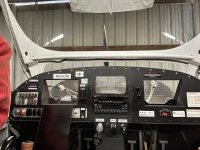
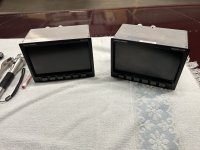
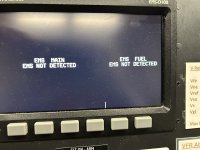
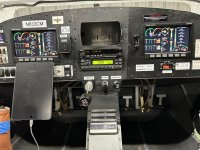
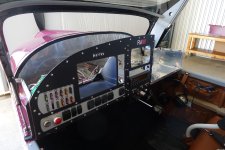
Dynon D-180 / D-100 slide out easily. I remove instrument bay cover to gain access to back side of units for electrical and pitot/static connections. D-100 needed repair... it lost EMS network connection with D-180.
 

Attachments

  • IMG_3772.jpeg
    IMG_3772.jpeg
    2.1 MB · Views: 32
  • IMG_3764.jpeg
    IMG_3764.jpeg
    3.4 MB · Views: 38
  • IMG_2738.jpeg
    IMG_2738.jpeg
    1.6 MB · Views: 24
  • IMG_3993.jpeg
    IMG_3993.jpeg
    2.6 MB · Views: 28
Last edited:
PilotJim77
Removing the avionics bay cover is the best way to get access. Lots of screws but straightforward unlike trying to remove the center panel which has a lot of stuff attached to it.
I have had to access the avionics bay for various updates and service bulletins. Not a problem.

P1060880.jpeg
 
Back
Top