Van's Air Force

The definitive Van's Aircraft support community! Buying, building or flying an RV? Join our exclusive family of mentors and enthusiasts!

Drawing an arbitrary radius circle around arbitrary point on ForeFlight or SkyVector?

Ironflight

VAF Moderator / Line Boy
Mentor
Off the wall question, but maybe some computer-savvy young whippersnapper can answer…this is to help us old, doddering DAR’s….

Does anyone know how to draw an arbitrary (say 75 nm or 100 nm) radius circle around an arbitrary point (say an airport) on any of the popular charting programs? I know how to have a range circle around my airplane on ForeFlight, but it stays glued to my current position.
 
Off the wall question, but maybe some computer-savvy young whippersnapper can answer…this is to help us old, doddering DAR’s….

Does anyone know how to draw an arbitrary (say 75 nm or 100 nm) radius circle around an arbitrary point (say an airport) on any of the popular charting programs? I know how to have a range circle around my airplane on ForeFlight, but it stays glued to my current position.
Yes, or I did about a year ago and vaguely remember the procedure. I used Google Earth to draw the shape I wanted in the location I wanted and then exported that shape to a .kml file. The .kml file can then be imported into ForeFlight and turned on/off via the bottom right of the layers menu. In my case I wanted the east side of the Red Boundary I drew to be 4 nm off of an airway.

Screenshot.jpeg
 
Off the wall question, but maybe some computer-savvy young whippersnapper can answer…this is to help us old, doddering DAR’s….

Does anyone know how to draw an arbitrary (say 75 nm or 100 nm) radius circle around an arbitrary point (say an airport) on any of the popular charting programs? I know how to have a range circle around my airplane on ForeFlight, but it stays glued to my current position.
I couldn’t find a way on Garmin Pilot, my solution was to use Google Earth (pretty easy to figure out) and then printed the map. I had 50 nm from my home strip and also a neighboring airport where I have a hangar, so I did it for each one and folded the pages back to join. Kind of a kludge but I know where I can go.
 
Off the wall question, but maybe some computer-savvy young whippersnapper can answer…this is to help us old, doddering DAR’s….

Does anyone know how to draw an arbitrary (say 75 nm or 100 nm) radius circle around an arbitrary point (say an airport) on any of the popular charting programs? I know how to have a range circle around my airplane on ForeFlight, but it stays glued to my current position.

Distance Rings Generator for SkyVector - https://eliasvitali.github.io/pilottools/distanceRings.html
 
Not very efficient but you can also create a flight plan in ForeFlight point/bearing/distance from a fix
 

Attachments

  • IMG_1900.png
    IMG_1900.png
    5.7 MB · Views: 39
Another easy option that you can do other things with is chat gpt. I asked it to create a KML file and after a little thinking it created a .KML download which I then downloaded on my phone and shared to Foreflight.

Here is the prompt I used,
Could you create a KML file that I can import as a custom overlay in foreflight that shows a ring 10 miles around KCCR?


And here is the chatGPT session if you want to see it in action.
 
Best answer! Looks like you can build the rings with the generator then export it right to foreflight. Or a Dynon/Garmin system. Thanks for showing us this useful tool.
How do you export it to Foreflight? Can’t figure it out. 🤪 I can bring it in as a pdf in documents, but not as a ring on the map.
 
Last edited:
Oops, I forgot the link. Thanks.

MED, this tool doesn't meet Paul's requirement of opening in a charting app.
Yup - the one in Post #4 works in Skyvector relatively easily, and puts the distance ring on the aero chart. You can guess that I want to us it to figure out which airports are within a Phase 1 test area - not that bug f a deal in the east where airports are a dime dozen, but here we can draw a 100 nm circle and only have three or four airports in some cases!
 
Setting in FF have a tab for ownership distance rings (similar wording but tired of fighting autocorrect). scrolling in and out appears to change the distance rings, my guess is one could get close to 100.
 
Another easy option that you can do other things with is chat gpt. I asked it to create a KML file and after a little thinking it created a .KML download which I then downloaded on my phone and shared to Foreflight.

Here is the prompt I used,


And here is the chatGPT session if you want to see it in action.
This worked amazingly well! Terrific idea.
 
Setting in FF have a tab for ownership distance rings (similar wording but tired of fighting autocorrect). scrolling in and out appears to change the distance rings, my guess is one could get close to 100.
Yes - but that only works if you can randomly put “own ship” wherever you want it, and I don’t know if they is a way to do that. I have that feature turned on all the time BTW… just doesn’t help in this application.
 
Yes - but that only works if you can randomly put “own ship” wherever you want it, and I don’t know if they is a way to do that. I have that feature turned on all the time BTW… just doesn’t help in this application.
If it were me, I would do it with the plane at the central airport, make note of the allowed airports. It sounds to me like you want this circle to stay? Perhaps just get a screenshot photo? On my iPhone I do that simultaneously pressing the power button and the top volume button, similar on an iPad.
 
If it were me, I would do it with the plane at the central airport, make note of the allowed airports. It sounds to me like you want this circle to stay? Perhaps just get a screenshot photo? On my iPhone I do that simultaneously pressing the power button and the top volume button, similar on an iPad.
Tell me how you “put your plane” at the central airport without actually being there, and I’m with you …
 
Hi Paul,
ForeFlight's 945-page user manual discusses this and other types of drawings that can be imported. The manual is a free download.
Hope this helps,
Paul
 
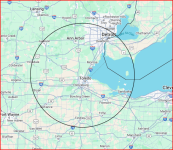
As part of an operating limitations update, the FSDO is requesting a sectional with 50-75 nm ring for proposed new phase one test area. I used the technique in post #4 but the saved pdf with skyvector sectional for submission has unreadable resolution. Is there a way to improve on this? Here's my result.
 

Attachments

Makes me long for the days of paper charts and a pencil compass. And I used to be pretty decent with a computer.

I've got a drawer full of old paper sectionals I'm saving for when someone drops an emp bomb on us, or... Well maybe someday my grandkids can sell them on eBay as a nostalgia item.

Dang I'm getting old...

Sorry back to your regular programming.

Joe
 
Back
Top