Van's Air Force

The definitive Van's Aircraft support community! Buying, building or flying an RV? Join our exclusive family of mentors and enthusiasts!

Designing a 3D Phone Cradle to Use Instead of Kneeboard

DeltaRomeo

doug reeves: unfluencer
Staff member
For the last few months I've been using only my iPhone in the cockpit, leaving the iPad home. Less stuff to keep track of on contract gigs and in the sim. Also, the phone is always with me and can talk to the Internet without tethering (my iPad is Wi-Fi only). Faster to file and amend flight plans.

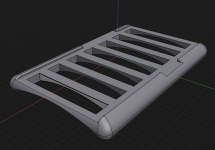
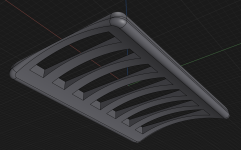
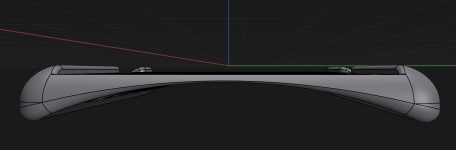
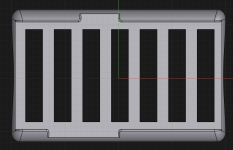
Playing around with Shapr3D (free version with 10min of videos after the install included that show you the basics) - fiddling around with a design that I want for my specific need. Can't find it online. A cradle to rest my iPhone on for flights with side bumpers measured to the O.D. of my 14 Pro Max with its $14 case. Curvature with a radius that exactly matches my right thigh, not a national average. Tight enough tolerance so I have to slightly press on the phone to set it in place. No straps. Gravity and friction. Less stuff.

Using ForeFlight to write down ATC instructions with my finger in the scratchpad and on charts, as well as the usual stuff.

Worked this design up on the MacBook Pro with trackpad only in about 30 minutes having never used software like this before. Pretty easy to use, actually. And slightly fun. Download it and play around if interested - anybody can do this. FreeCAD is easy too. And free. Might upload this file to a site that can print it, or send it to a friend with a printer. Or buy a small printer <grin>. Never know. Something to fiddle with on trips…

Easy to resize for any phone. Bringing my dial micrometer home from the airport tomorrow so I can get accurate measurements of my phone case.

Some working images for giggles…..
Developing...subject to change a million times. Or not. :ROFLMAO:.

Screenshot 2024-12-13 at 7.13.38 PM.png
Screenshot 2024-12-13 at 7.13.56 PM.png
Screenshot 2024-12-13 at 7.20.30 PM.png
Screenshot 2024-12-13 at 7.24.53 PM.png

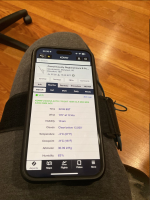
The current rig - kneeboard clamp (yellow arrow) holds phone on upper edge of case. Works fine, but I'd like smaller stuff while dumping the velcro, which messes with dress pants.
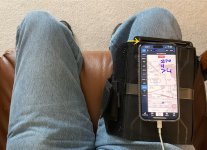
IMG_5862.JPG
 
Last edited:
Playing around with software (Shapr3D free version) - fiddling around with a design that I want for my specific need. A cradle to rest my iPhone on for flights. No straps. Can leave the phone in its case. Gravity does the work.

For using ForeFlight during part time contract flights (I write down ATC instructions with my finger in the scratchpad and on charts).

Worked this up in about 30 minutes having never used software like this before. Pretty easy, actually. And fun.

Some working images for giggles…..

Developing...

View attachment 76260
View attachment 76261
View attachment 76262
View attachment 76263

The current rig - kneeboard clamp holds phone on upper edge of case.
View attachment 76264
Pretty cool! Amazing what computers can come up with! I still use my drafting board. ;)

Suggestion: I have a clip that holds both sides of the phone with elastic going under my thigh. My main complaint with that system (it does hold the phone really TIGHT!) is that it sits flat on my leg. I find myself wanting the phone to be angled up towards me to better put the screen in my visual field. Maybe making the 'ribs' further away taller to get the angle. As the phone is essentially sitting on my leg, I need to come up with something to tuck under the far end of the phone and not stuck to it to raise it up just...........that much.......... Would also make it easier to 'write' on.

Also: apparently you have never flown in Wyoming.:LOL: EVERYTHING, including me, needs to be secured! It's nice to fly a -4 where the shoulder harnesses actually do help hold me in the seat! So: I might want something that grabbed onto the phone even just a little. Nothing like having your phone hit the canopy.........😲😬 Or on your contract flights, ending up somewhere under the seat.....or just SOMEwhere......??
 
For the last few months I've been using only my iPhone in the cockpit. Leave the iPad at home now. Less stuff to keep track of on contract gigs and in the sim.

I made the same leap a few years ago. I still have to carry the iPad for certain work requirements like PlaneBook -- and it serves as the secondary screen in the panel of my RV6 -- but aside from that, I have all my charts, documents, checklists, etc. on the iPhone. It's not only smaller and more convenient, but it's also with me all the time, so no matter where I am, I've got easy access to aviation weather, charts, and data worldwide.

I've got an iPhone 14 Pro and the screen size doesn't bug me at all. The only thing I miss on the iPhone is the ability to take notes (ATIS, clearances, etc) with a stylus. There are some advertised on Amazon that, in theory, work with the iPhone, but my experience has been that they fail to live up to the advertising hype.

--Ron
 
Looked for a similar solution and ended up with the 15 Pro Max in a quad lock mag case and a magnetic kneeboard strap that I found (Dream Pilot), holds the phone securely in place, also modified the old ASA kneeboard to attach to the same knee mount. As Ron noted it would be great if a stylus worked with the phones.
Figs
 
In Pursuit of Economy of Motion.....and why I'm interested in creating this 3D custom cradle for my phone.

I have the short-term memory of a goldfish, and pencils take time to grab.

FF on my phone scratching ATC instructions with a finger helps with both. I can write with my finger as fast as they talk. No pencil or stylus to drop. In this 3D cradle, my phone will be positioned where MY hand naturally falls on the precise heading needed - nothing on the market currently does this that I can find.

Clearance Delivery
  1. Generate NavLog for the next leg (Flight/NavLog, Save to FF Documents) then
  2. Bring it up - zoom in a little.
  3. Call Clearance (I don’t use the dedicated CRAFT scratchpad because you can’t paste in the text of the filed route (feature request!))
My method:
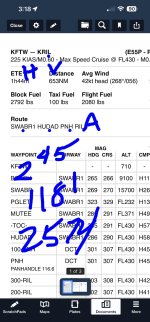
See the dot over by KRIL? Means “Cleared to Rifle.”
H and V are ‘runway Heading’ and ‘radar Vectors’
Dots under the route. A is ‘as filed’
‘2’ with ’45’ in superscript is ‘2000 expect FL450 in 10’.
Departure freq and squawk.
I can take the clearance down as fast as they they can read it using my finger and phone, and I don’t have to grab or carry a piece of paper and pencil.
Screenshot 2024-12-14 at 10.56.16 AM.png

Taxi Instructions
Again dots. If you’ve sent the flight to PLATES, most of your prep is done. Things are laid out in the order you need them, and you can draw on them all.
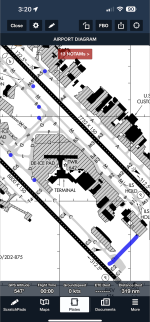
So taxi instructions…airport diagram up and dots as fast as they can read it. No pen needed.
Alpha 5, cross 31R, Mike 5, Bravo, Foxtrot, Charlie, hold short Charlie 2.” Pretty typical instruction at Love Field.

Dot dot dot dot dot line.

Screenshot 2024-12-14 at 10.56.28 AM.png

Pulling up to the runway
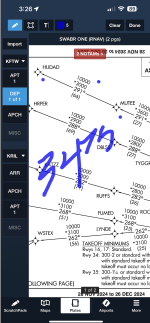
Departure plate. Dots on route. Finger scratches for freq changes until we get to cruise. Can reset and wipe clean w/two taps when screen gets cluttered.
Screenshot 2024-12-14 at 10.56.55 AM.png

Cruise
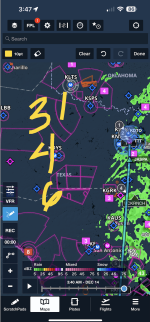
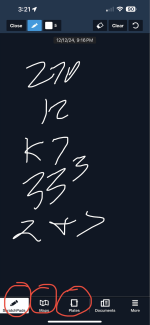
Draw on map if you’re looking at it when you get an ATC instruction. You can be writing with finger faster than it takes to reach for a pencil. Alternate, tap 'Scratchpad' with your thumb and you have a clean slate to scratch on.
Screenshot 2024-12-14 at 10.57.03 AM.png

Around here I'll tap 'Airports' and get the FBO freq for our destination. Call 'em on radio two.

Arrival and/or Approach
Same as above w/ what's filed. I write all over these (and clear/reset) while getting vectored to the inbound course.
Screenshot 2024-12-14 at 10.56.46 AM.png

FF automatically goes to airport diagram at touchdown. Ready for taxi again. Dots.

Misc
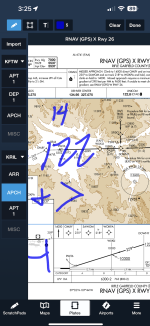
My thumb is nearly perfectly placed to go to the scratchpad in under a second. Note the order the icons are in bottom left - how I set them. I get around in the app faster with these and my finger than I can with an iPad/Stylus setup.
Screenshot 2024-12-14 at 10.56.37 AM.png

Taking more detailed notes is difficult, and I’ve got a small notepad in the backpack for that and I’ve looked into iPhone stylus solutions. If can make one work using Notability or similar app I’ll chime in here.

I guess the bottom line for me is FF running on my iPhone gives me an economy of motion that is noticeable - I’ve tried many, many methods over the years.

I may rotate the orientation of the printed cradle a few degrees in yaw so it matches MY hand exactly while my legs are resting. Maybe another cradle down the road with a built in space for an external battery.

I’m probably going to end up buying a small 3D printer to play around with. The laptop on the road fiddling with designs beats watching more YouTube TV.

If it happens, I’ll attach files created to these threads so you can have a copy of anything I design for free if interested.

v/r,dr
 
Last edited:
In Pursuit of Economy of Motion.....and why I'm interested in creating this cradle for my phone.

I have the short-term memory of a goldfish. FF on my phone scratching ATC instructions with a finger helps very much. I can write with my finger as fast as they talk. No pencil or stylus to drop. In this 3D cradle, my phone will be positioned where MY hand naturally falls on the precise heading needed - nothing on the market currently does this.

Clearance Delivery (dots and Flights/NavLog)
Generate NavLog (Flight/NavLog, Save to FF Documents) then bring it up - zoom in a little. Call Clearance. I don’t use the dedicated CRAFT scratchpad because you can’t paste in the text of the filed route (feature request!)
See the dot over by KRIL? Means “Cleared to Rifle.”
H and V are ‘runway Heading’ and ‘radar Vectors’
Dots under the route. A is ‘as filed’
‘2’ with ’45’ in superscript is ‘2000 expect FL450 in 10’.
Departure freq and squawk.
I can take the clearance down as fast as they they can read it using my finger and phone, and I don’t have to grab or carry a piece of paper and pencil.
View attachment 76297

Taxi
Again dots. If you’ve sent the flight to PLATES, most of your prep is done. Things are laid out in the order you need them, and you can draw on everything.
So taxi instructions…as fast as they can read it I can touch the screen. No pen. Just finger.
Alpha 5, cross 31R, Mike 5, Bravo, Foxtrot, Charlie, hold short Charlie 2.” Pretty typical instruction at Love Field.
Dot dot dot dot dot line.
View attachment 76298

Climbing out
Departure plate. Dots on route. Finger scratches for freq changes until we get to cruise. Can reset and wipe clean w/two taps when screen gets cluttered.
View attachment 76299

Draw on map if you’re looking at it when you get an ATC instruction. You can be writing with finger faster than it takes to reach for a pencil.
View attachment 76300

Approach
Same as above. I write all over this plate (and clear/reset) while getting vectored to the inbound course.
View attachment 76301

Misc
My thumb is nearly perfectly placed to go to the scratchpad. Note the order the icons are in bottom left - how I set them. I get around in the app faster with these and my finger than I can with an iPad/Stylus setup.
View attachment 76302

Taking more detailed notes is difficult, and I’ve got a small notepad in the backpack for that and I’ve looked into iPhone stylus solutions. If can make one work using Notability or similar app I’ll chime in here.

I guess the bottom line for me is FF running on my iPhone gives me an economy of motion that is noticeable - I’ve tried many, many methods over the years.

I may rotate the orientation of the printed cradle a few degrees in yaw so it matches MY hand exactly while my legs are resting. Maybe another cradle down the road with a built in space for an external battery.

I’m probably going to end up buying a small 3D printer to play around with. The laptop on the road fiddling with designs beats watching more YouTube TV.

If it happens, I’ll attach files created to these threads so you can have a copy for free if interested.

v/r,dr
If you are looking for a nice but small printer to get started, I have the Bambu A1 Mini found here. The print bed is small though, about the size of an Iphone Max (in each direction, 180mm by 180mm by 180mm). I think you can get it for about $180.

Or, if your project fits, I'd be happy to print it for you.
 
Doug, thanks for the demo of annotating on FF - learn something new every day. I'm currently wrestling with whether to purchase an iPad Mini or not. I have an iPad Air that was dedicated to the RV before a panel upgrade (it was on the dash as the nav screen) but it's a bit big for the RV8 cockpit. Now I just like FF for the big picture overview and for planning. Maybe I'll upgrade to a bigger iPhone instead.
 
Doug, thanks for the demo of annotating on FF - learn something new every day. I'm currently wrestling with whether to purchase an iPad Mini or not. I have an iPad Air that was dedicated to the RV before a panel upgrade (it was on the dash as the nav screen) but it's a bit big for the RV8 cockpit. Now I just like FF for the big picture overview and for planning. Maybe I'll upgrade to a bigger iPhone instead.
I have a 14 Pro Max. The screen is plenty big enough for me in a plane.

I sort of transitioned over the years from VFR give me the biggest map I can cram in there to IFR just give me the waypoints and freqs in the order I need 'em so I can go eat lunch quicker. :sneaky:

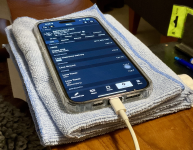
My .02 for now....Find a big puffy rag and fold it into thirds and set that on your leg. Put your phone on that folded rag. You’d be surprised how useful that rig is to start with. Unless there’s a lot of turbulence, of course.😆Screenshot 2024-12-14 at 6.29.32 PM.png
 
Last edited:
In Pursuit of Economy of Motion.....and why I'm interested in creating this 3D custom cradle for my phone.

I have the short-term memory of a goldfish, and pencils take time to grab.

Taking more detailed notes is difficult, and I’ve got a small notepad in the backpack for that and I’ve looked into iPhone stylus solutions. If can make one work using Notability or similar app I’ll chime in here.


v/r,dr
Doug, I have found that the built in apple notes has improved significantly under IOS 18.2, would probably do everything you need. If you find a good stylus let us know. I have been through the iPad mini >> iPad Pro 11 >> iPhone 15 pro Max and the iPad Pro 11 2024 is by far the best but bulky in the cockpit, the iPad mini is not bright enough so the best compromise is the iPhone Pro Max as you have found which fits on a kneeboard, is very readable (and out of direct sunlight for readability and heat management). Slowly migrating to the iPhone tied into the GNX375/Aera 760 combo. Carry the iPad Pro in the side pocket for backup.
I will study your ATC annotation methodology approach as I am still in the pencil/paper stage for that.
Figs
 
The dots thing is interesting. I don't think I've ever seen that technique before. Did it emerge from the sim work, RV flying, or doing the 91 gigs single-pilot? Or all the above?

I had a Max until a few years ago. Went down to the non-Max Pro model and like it much better for everything else, especially how it fits in my pocket.

Oddly enough, I never used a kneeboard in my life until I started flying at the West Coast Formation Clinic; there it seemed almost a requirement to have one. Everything they provided was formatted for one. So on a whim I started using it when flying IFR in the RV6, and I just put the top of the iPhone case under the edge of the clip to hold it in place. It works very well, and gives me the ability to use the iPhone *and* take notes using Old School techniques.
 
The dots thing is interesting. I don't think I've ever seen that technique before. Did it emerge from the sim work, RV flying, or doing the 91 gigs single-pilot? Or all the above?
I’d guess my use of 'dots' came from 91 work if I had to pick one (the sim gets kinda clobbrered also - five approaches back to back makes for busy fingers). I don't claim to have made it up, but I never thought to look <g>. I just started doing it one day and it just seemed like the easiest way to get the information down. I set the cursor width to at least 5pt so I get a good ‘dot’. VERY helpful for taxi instructions (especially at Love during a rush). <g>. Outside of FF, I use https://notability.com/ on my phone for just taking random life notes with a finger. It’s very smooth. (I did my little initials up in my avatar using that app.)

PS: I ordered a 3D printer. Going to print a phone case that snaps into my custom kneeboard (haven’t seen that anywhere). Like from this glasses case a friend printed. Hey look at me talking about 3-D stuff :-). Seriously it’s shockingly easy to do, and if I can do this, you certainly can.
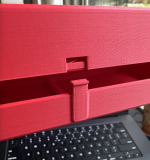
Screenshot 2024-12-16 at 4.05.37 PM.png
 
Last edited:
Progress.
Sent low res file to a friend with printer. Have yet to pick up, but soon. Will make changes after using it for a bit to see what I want to change/adjust.

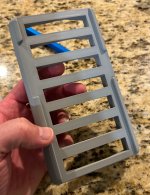
Being printed:

In hand (well, not my hand):
IMG_6258.jpg
 
Last edited:
Thanks for the tips on note taking, especially on the taxi instructions. It's scary for me at a big airport when I got it wrong.
 
[ed. What model did you order?]

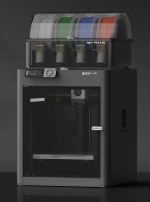
Bambu Lab P1S.
Planning on raising the 3D print game here on VAF in '25, and make it all free for download (and I'll probably print a LOT of things for friends for free. A LOT.).
Happy to help.
v/r,dr.
  • Enclosed-body for high-temperature filament printing
  • Up to 16-color printing with AMS
  • Up to 20000 mm/s² acceleration, prints a benchy in 18min
  • Built-in camera for remote monitoring and timelapse
Screenshot 2024-12-19 at 4.47.05 PM.png
 
Last edited:
Once you have a printer, your perspective on how to tackle projects totally changes. There are tons of already designed objects on sites like Thingiverse (you can spend hours just flipping through designs), but the real power comes when you dig in and learn to harness the power of whatever CAD program you use. I'm still a complete novice at Fusion360 (I use the free version), but for every project, I learn how to do something new. I love the satisfaction of designing something from scratch and watching it come to life on a 3D printer! It still blows my mind that we have that power at home now. You're going to find yourself printing all sorts of stupid stuff, just because you can!
 
12/23/2024 Update

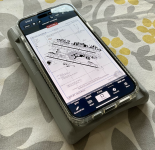
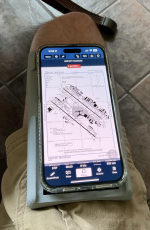
Item I'm prototyping picked up from friend. Little bit of slop laterally for the phone, can tighten up that a bit for my phone case. 1/4” longer than it needs to be. Radius of cutout on thigh just about right - more data later w/dress pants on a side gig trip. Cutouts for phone buttons pretty spot on.

Will use on next trip and note changes needing to be made.

My printer should arrive sometime after the new year.

Fun to fiddle with!

v/r,dr
Screenshot 2024-12-23 at 3.38.39 PM.png
Screenshot 2024-12-23 at 3.38.48 PM.png
 
Last edited:
this looks great! I would add a slope to point the screen more towards the pilot's face, a ring magnet (mag safe shape?) and cutouts on the sides for an elastic band for less than smooth air situations. but you probably already thought of all that :)

EDIT:

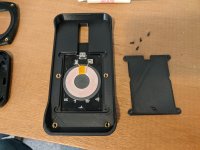
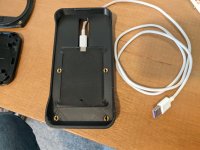
I just created a proof a concept, sans 3d printing

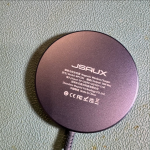
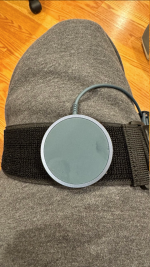
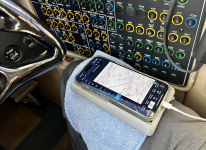
glued a piece of velcro to the back of a charging puck. stuck it to a velcro band wrapped over the thigh. the magnet seems to hold in a simulated *light* turbulence but not in moderate to severe. The charging cable is coiled under the flap - easy to unwrap if the phone needs some juice. feels comfortable. the puck can get warm during high speed charging of a near empty battery. it's probably better to use a low current USB port if available.

1735011985828.png1735012005062.png1735012127392.png


Last edited:
Data finally collected in flight:

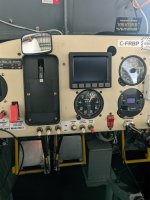
Extra paper route as SIC today in the King Air 350. CA took a pic of the 3D printed prototype kneeboard phone table I’m playing around with (designed by me - printed by my buddy David until my printer arrives). Light chop about 1/2 the flight - all stayed put. Approach to minimums. Easy peezy.

Things I like….things I want to tweak. My thumb rests just about perfect on the Scratchpad icon. Juggling data getting easier.

80% happy with it so far. I like very much just wrapping the rag around the whole thing and setting on the dash when we shut down (I open the door and need to crawl out of the seat first). 'Building my nest' involves less objects now. Good.

More when I have it. Needle moving….
Screenshot 2025-01-02 at 3.33.15 PM.png
 
Last edited:
I've been eyeballing one of those Bambu Labs units..... Mainly to print CF-PLA. Be great to hear what you think of it.

I have an Ender 3 now and just figured out how to turn it on. :)
 
Last edited:
Data finally collected in flight:
Suggestion: Might depend on where your charger plugs in, but when I was using my Samsung Tab S2 on my thigh I turned it 180 degrees so the charging port was at the "top" of the screen, then the cable went forward to the USB charger in the cigarette lighter plug. I found that more convenient than having the cable come out down near the seatbelt and then have to wrap around to get to the charger.

Also: You can get magnetic connectors that plug into the charge port, and a matching cable, and then there's no worry about getting out and forgetting to unplug. They're quite handy, I had them on all of my Micro-USB powered devices.
 
I've been eyeballing one of those Bambu Labs units..... Mainly to print CF-PLA. Be great to hear what you think of it.

I have an Ender 3 now and just figured out how to turn it on. :)
Buy the Bambu. You will not be sorry.
(PLA is not very good at heat. My first glovebox warped after being parked in the sun and SnF. But, they have plenty of other CF loaded filaments)
Be advised, the Bambu is so fast you will swear it is going to self-destruct! (and it makes you feel guilty for not working as hard....)
 
The Bambu is a great printer, and the P1S a solid home printer. I would give some fair consideration to the Prusa CORE One, recently released. They have a very long history of building reliable, easy to use machines, and supporting the 3D printer community with fantastic open source software (without which, the Bambu wouldn’t even exist).

In my home shop I run a 350 mm3 Voron (same speeds and print quality as an X1C just bigger) plus heavily modded Ender 3, both capable of printing fairly high temp materials. I’ve long ago switched away from PLA based materials. PETG and/or PETG-CF are much more stable and better structurally. On the Voron I run exclusively ASA, as it is the most U.V stable polymer, plus the latest blends put the strength at or above PETG, and the printer is heavily tuned for it. For what it’s worth, in 99.9% of applications where a 3D printed part works, the carbon loaded filaments (not Markforged actual carbon+nylon) are just costing more money. The exception is applications where one is mating the part to a composite; PETG-CF is wonderful for that.

This kneeboard looks very nice; if a bigger version or really any Vans support part is needed that won’t fit on your local printer, feel free to reach out-I’m always happy to run a part if the printer has down time.
 
have you looked at resin printers? the quality and detail is staggering. my local public library makes resin prints at nominal cost.
 
I have, and I’ve used older industrial variants. If your part needs supports, it’s a poor choice. It’s also somewhat toxic, though much less so than even priming an airplane. Otherwise it’s a nice piece of tech and for small parts makes sense. I tend to print larger items (think support cradles) where FDM has an advantage. For everything else, there is SLS 😀
 
Back
Top