
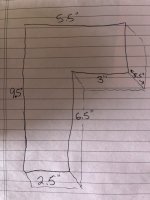
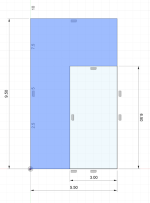
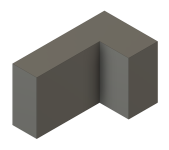
I am in need of a battery box spacer to fill the space in an enclosed battery box with a new smaller battery. Anyone out there who would be willing to draw up a cad design to my dimensions for me and email me a file that I could print on my 3D printer? I am about smart enough to take thingiverse files and resize them. Beyond that I’m hopeless. Every free cad program I have tried won’t translate to a usable file.

Van's Air Force
You are using an out of date browser. It may not display this or other websites correctly.
You should upgrade or use an alternative browser.
You should upgrade or use an alternative browser.
Design help needed
- Thread starter meloosifah
- Start date


I could draw something up for you. Post some dimensions.I am in need of a battery box spacer to fill the space in an enclosed battery box with a new smaller battery. Anyone out there who would be willing to draw up a cad design to my dimensions for me and email me a file that I could print on my 3D printer? I am about smart enough to take thingiverse files and resize them. Beyond that I’m hopeless. Every free cad program I have tried won’t translate to a usable file.
If all you're wanting is a cube, many slicers can do this without needing a separate CAD program. For example, here's how to do this in Bambu Studio:
Right click, then select "Add Primitive" / Cube.
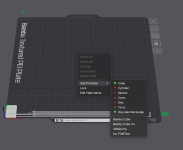
Click on "Scale". Uncheck "uniform scale" (if checked). Then enter your dimensions in mm.
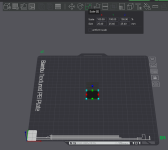
If desired, you can keep adding cubes and other basic shapes this way. However, if you're combining more than a couple of shapes, a real CAD program is the better option.
Right click, then select "Add Primitive" / Cube.
Click on "Scale". Uncheck "uniform scale" (if checked). Then enter your dimensions in mm.
If desired, you can keep adding cubes and other basic shapes this way. However, if you're combining more than a couple of shapes, a real CAD program is the better option.
To draw the same cube in Tinkercad:Tinkercad is as simple as it gets (designed for kids) and will export .stl files that your slicer can use.
First create an account and open a new design.
Click on Box, then enter your desired dimensions
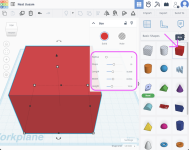
From here you can keep on adding other shapes as required.
Then, once you're done, click export and select STL. From here the process is the same as any other STL you download.
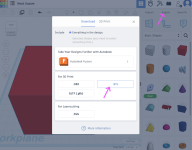
I could draw something up for you. Post some dimensions.
Attachments
I tried this and the export file was always like a single kb in size and would not populate in Creality Slicer. I will go back and try again and see if I am missing a step.To draw the same cube in Tinkercad:
First create an account and open a new design.
Click on Box, then enter your desired dimensions
View attachment 87174
From here you can keep on adding other shapes as required.
Then, once you're done, click export and select STL. From here the process is the same as any other STL you download.
View attachment 87175
All this Cad and 3d printing is cool and all, but isnt this kind of the nuclear option for something as simple as a smaller battery/bigger battery box situation?
If it's an EarthX it comes with different thicknesses of closed cell foam to stick in there and take up the extra space...
If it's an EarthX it comes with different thicknesses of closed cell foam to stick in there and take up the extra space...
