


Van's Air Force

The definitive Van's Aircraft support community! Buying, building or flying an RV? Join our exclusive family of mentors and enthusiasts!

CAD Help - STEP File for Waterjetting

I've done this once before, now i cannot repeat the process. I

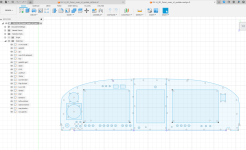
I have drawn up my instruments on the Vans provided drawing for my 14, now I need to create a STEP. Note I am working with the maker version of Fusion 360 so my export options are limited.

If I export the STEP file now, upload to SendCutSend, I essentially dont have dimensions. I've attempted to extrude the panel, so I have cut features, but that wont work.

Basically forgot how to do this.

What is the next step? Willing to Zoom with someone too if its easier.
 

Attachments

  • Screenshot 2024-12-27 201544.png
    Screenshot 2024-12-27 201544.png
    198.1 KB · Views: 34
Step is a standard that supports 3D data, you apparently don’t have 3D data and ar attempting to exprt 2D data via Step.
Use a DXF format for 2D data.
 
SendCutSend wants a (2d) dxf. That said, make sure your file only contains lines that you actually want cut. You seem to have lots of extra stuff in that file. And one dxf per panel, as it looks like you want to do 3 panels.
 
Thanks, I think I have it figured out. I extruded the initial panel, then cut extrude my drawings in the areas that need relief only. That seems to be working.
 
My usual strategy when kicking DXF’s out of Fusion is to fully model everything (extruded to proper thickness, cut outs finished etc) to make it easier to visualize that everything is correct.

Then I’ll create a new sketch, and “ctrl+p” to “project”.

Select “body” for object type, and then select the body (in this case the panel) you want to project.

I’ll then rename the sketch to something like “left panel production DXF”. Then right click that sketch, and export as DXF.

I’ve found this method most preferable because it eliminates the worry of redundant geometry or construction lines making it into the final DXF. Also, any updates, cutouts, hole enlargements etc you made along the way will be accounted for in the production DXF.
 
I've done this once before, now i cannot repeat the process. I

I have drawn up my instruments on the Vans provided drawing for my 14, now I need to create a STEP. Note I am working with the maker version of Fusion 360 so my export options are limited.

If I export the STEP file now, upload to SendCutSend, I essentially dont have dimensions. I've attempted to extrude the panel, so I have cut features, but that wont work.

Basically forgot how to do this.

What is the next step? Willing to Zoom with someone too if its easier.
If you email me the file, I'll convert it to DXF and check it for double lines/geometry. I have the full version of Fusion 360 I use fusion for laser cutting. DM me for my email or contact info.
 
Back
Top
