Van's Air Force

The definitive Van's Aircraft support community! Buying, building or flying an RV? Join our exclusive family of mentors and enthusiasts!

Anyone use Satellite Texting with iOS 18?

avrojockey

Well Known Member
Patron
Most know the Starlink drama...I ended up returning my Mini because Tmobile is launching satellite service.

T-Mobile service hasn't officially begun but iOS 18 supports iMessage over satellite now. I haven't been flying in a couple days but just updated my phone to iOS 18. I've tested satlitte reception from my driveway using the built in demo, but unless your phone can't receive service, there's no way to text.

Anyone try it yet?
 
I am interested in this as well. I expect to pick up my iphone 16 on Tuesday and the satellite message is the reason Im getting the phone. Im planning a trip out west from Michigan and want to be able to message. Maybe I am better getting a garmin inreach or something like that. I dont know if the iphone will do what I want - the guy at the verizon store didnt either. Ugg. Maybe I need a Tmobil phone?
 
From what I understand...the Apple service works on any iPhone 14 or above (that has SOS) and is free for the first 2 years. The T-Mobile service rolling out soon for any LTE or greater phone with Tmobile, as it's using normal mobile phone frequencies.

Reading on beechtalk forum about the new iOS feature....

Satellite texting works well. Current limitations that I found:

1) Can only send to (or receive from) people who have upgraded to iOS 18
2) Doesn't support group texts
3) Can only send plain text; no GIFs, emojis, pictures, etc.
4) Requires from in-flight orienting of the phone to get a satellite connection.
 
From what I understand...the Apple service works on any iPhone 14 or above (that has SOS) and is free for the first 2 years. The T-Mobile service rolling out soon for any LTE or greater phone with Tmobile, as it's using normal mobile phone frequencies.

Reading on beechtalk forum....
But to clarify, the Apple service is ONLY for emergency messages, it cannot be used for regular text messaging. It will just connect you to emergency services.
 
But to clarify, the Apple service is ONLY for emergency messages, it cannot be used for regular text messaging. It will just connect you to emergency services.
No, this is a recent change for US based users, see here- normal texting via satellite.

 
Mine works extremely reliably and I’ve never had any issues with it. I use it almost weekly.

Same for me ...

The Apple service works fine, but as is alluded to above, it doesn't work in airplane mode. That is, you need to be out of airplane mode, with cellular selected on, but no service. Even one bar of unusable service at altitude is enough for the message to not be able to be sent via satellite.
 
I was flying yesterday in Wisconsin, specifically in the Oshkosh area. I attempted to send a text and was surprised to see the "send by satellite" dialog. It send the message flawlessly despite it reporting a poor connection to the satellite. That being said, I do not think it would be a valid replacement for an inreach.
 
My sister in law was in a remote area with no cell service a couple days ago and texted me from her iPhone via satellite. She thought it was using the upcoming T-Mobile/Starlink system. I let her know it was the new iOS 18 feature that Apple rolled out. The Starlink direct-to-cell service won't be available for consumers for several more months.

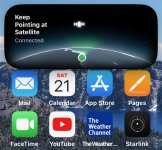
She sent this screen shot later:

IMG_3021.jpeg
 
My sister in law was in a remote area with no cell service a couple days ago and texted me from her iPhone via satellite. She thought it was using the upcoming T-Mobile/Starlink system. I let her know it was the new iOS 18 feature that Apple rolled out. The Starlink direct-to-cell service won't be available for consumers for several more months.

She sent this screen shot later:

View attachment 71131
Im updating to iOS 18 tonight to see how it works on my phone. Thanks for the heads up.
 
Tried this on my phone last weekend while over a rural part of Texas with no ground-based signal. Worked great for checking in with folks and providing an updated ETA.
 
I’ve tried it as well, it does seem to work. Some observations from my experience this last weekend -

In one instance the phone took a long time, like several minutes, to connect to the satellite. That’s not a big deal as long as you can turn on an autopilot and devote some brain cells to keeping the phone pointed in the right direction, but it’s a distraction if you’re hand-flying in a busy environment.

There was also an instance when the satellite was behind me and it was difficult to keep the phone pointed at it. I think as time goes on and Globalstar launches more satellites, this should be less of a problem.

But my only real complaint is that the phone will only let you go into satellite mode when it thinks it has no other connectivity. At 6,500’ MSL over New Hampshire I may still have a bar of cell service but that often won’t be enough to send an SMS message, so I have to wait until cell reception completely goes away *and* the phone decides to offer a satellite connection before I can send a message. Perhaps Apple and Globalstar will smooth this out over time.

But these are all first-world problems - it's still extremely cool to send text message via space from my phone!

HTH

Dave
 
Last edited:
I’ve tried it as well, it does seem to work. Some observations from my experience this last weekend -

In one instance the phone took a long time, like several minutes, to connect to the satellite. That’s not a big deal as long as you can turn on an autopilot and devote some brain cells to keeping the phone pointed in the right direction, but it’s a distraction if you’re hand-flying in a busy environment.

There was also an instance when the satellite was behind me and it was difficult to keep the phone pointed at it. I think as time goes on and Globalstar launches more satellites, this should be less of a problem.

But my only real complaint is that the phone will only let you go into satellite mode when it thinks it has no other connectivity. At 6,500’ MSL over New Hampshire I may still have a bar of cell service but that often won’t be enough to send an SMS message, so I have to wait until cell reception completely goes away *and* the phone decides to offer a satellite connection before I can send a message. Perhaps Apple and Globalstar will smooth this out over time.

But these are all first-world problems - it's still extremely cool to send text message via space from my phone!

HTH

Dave
This mirrors my own (limited) experience. Very cool, very promising. A question....would you pay Apple extra to subscribe to that service so that it could be used regardless of cellular connectivity? I'm sure people at Apple are asking the same question...
 
I did this but you literally have to point your phone at the one single satellite available and as you message because you are flying you may be moving away from said satellite, and the satellite doesn’t seem to be in geostationary orbit either because it kept asking me to adjust my pointing of my phone throughout the 5 minutes I tried it. Not practical for flying. Inreach is far superior for that purpose.
 
Perhaps some sort of RAIM technology capability will be added to the iOS and "pointing" or "positioning" will become unnecessary.
 
I have used it several times flying and it’s awesome. You do have to point the phone to a certain direction but it does change from time to time
 
I have used it several times flying and it’s awesome. You do have to point the phone to a certain direction but it does change from time to time
To me it’s not worth it since I’m trying to fly and it takes attention away from the task at hand of clearing your flight path from traffic….
 
I did this but you literally have to point your phone at the one single satellite available and as you message because you are flying you may be moving away from said satellite, and the satellite doesn’t seem to be in geostationary orbit either because it kept asking me to adjust my pointing of my phone throughout the 5 minutes I tried it. Not practical for flying. Inreach is far superior for that purpose.
Those satellites are low, not geosynced, so yup - moving across the sky relatively fast.
 
tried satellite texting yesterday. (no sign of a cell signal at 8500). may be i got lucky but I did not really have to point the phone at anything, it just worked.

a gateway number to text with the ATC NAS in case of a 7600 situation would be a great safety addition . How can we float the idea with the FAA?
 
Most know the Starlink drama...I ended up returning my Mini because Tmobile is launching satellite service.

T-Mobile service hasn't officially begun but iOS 18 supports iMessage over satellite now. I haven't been flying in a couple days but just updated my phone to iOS 18. I've tested satlitte reception from my driveway using the built in demo, but unless your phone can't receive service, there's no way to text.

Anyone try it yet?
Now this is cool so instead of doing what I'm supposed to be doing right now, I'm updating my T-Mobile iPhone 15 to IOS 18 (y)
 
Apparently I can not use this with my iPhone 3. It has to be iPhone 14 or later. Guess I have to spend another $250 to buy a new iPhone. I hope the prices for a new iPhone havent increased a lot.
 
Apparently I can not use this with my iPhone 3. It has to be iPhone 14 or later. Guess I have to spend another $250 to buy a new iPhone. I hope the prices for a new iPhone havent increased a lot.
Actually, I'm pretty sure an iPhone 11 and some previous nonnumeric I-Phones will support iOS 18 such as Xr, Xs, and SE (2nd and 3rd gen)
 
Apparently I can not use this with my iPhone 3. It has to be iPhone 14 or later. Guess I have to spend another $250 to buy a new iPhone. I hope the prices for a new iPhone havent increased a lot.
I'm pretty sure you can't run any current apps on an iPhone 3 due to RAM space and software programming.
 
Actually, I'm pretty sure an iPhone 11 and some previous nonnumeric I-Phones will support iOS 18 such as Xr, Xs, and SE (2nd and 3rd gen)
It's not just a software function. The Qualcomm X65 modem is necessary and the iPhone 14 was the first model to use that.

The iPhone 14 running iOs 17.6 had the same modem but could only send messages to emergency providers. The newer version 18.01 can send and receive regular texts on the 14, 15, 16.
 
Last edited:
My garmin inreach works flawlessly whenever I'm on trail.
I just got the iphone 16+ last week & running iOS 18. I'll have to put it to the test this week.
Thanks for the info. I was unaware of the new feature.
 
Apparently I can not use this with my iPhone 3. It has to be iPhone 14 or later. Guess I have to spend another $250 to buy a new iPhone. I hope the prices for a new iPhone havent increased a lot.
I just traded 2 iphone 11s for the 16+. They credited me $930 for each phone against the $1030. Costs me $2.78 for 36 months/iphone. It was a no-brainer to do the upgrade.
 
I flew from KTVI to KHMP at 4500 feet yesterday. On my iPhone 14 I received a text and it offered to send a text if I'd point my phone to the right
 
will millions of passengers on the commercial airline flights catch on to this quickly, overwhelm the satellites, and force Apple to convert this into a paid feature faster than we think?
 
will millions of passengers on the commercial airline flights catch on to this quickly, overwhelm the satellites, and force Apple to convert this into a paid feature faster than we think?
Apple's SOS feature is free for two years after purchasing a new iPhone, but then you have to pay (supposedly). My iPhone 14 is just over 2 years old and I haven't heard a word from them yet. No doubt they will be charging for it as added service at some point in the near future as most people will never use it...so not a big sales draw. As to the airlines, I don't know about the rest of the them as I only fly Delta, but they have free texting on all their domestic flights with wifi and have stated that they aim for all wifi to be free globally.
 
I must be getting old. I remember when the internet experts warned of doom and gloom if you used your phone in flight and the FCC would track us down and arrest us.;)

Joe
 
I tried using the satellite messaging on a trip from Michigan and Louisiana and back. It was not as easy as I hoped it would be. I’m still not sure if it worked or not. It says if the phone you are sending it to does not have the correct software it will not work. I did get a text once but it could have been cell. It may get to where it works ok but I will get an inreach before my next trip.
 
I just traded 2 iphone 11s for the 16+. They credited me $930 for each phone against the $1030. Costs me $2.78 for 36 months/iphone. It was a no-brainer to do the upgrade.
Depends on the carrier, of course. Just today I traded my iPhone 14 for a 16 Pro Max and got $1000 off at AT&T...so ...$5.56/mo x 36. My wife traded her iPhone 13 for a 16 Pro and got $700 off. All the carriers have some kind of trade-in gimmick.
 
Depends on the carrier, of course. Just today I traded my iPhone 14 for a 16 Pro Max and got $1000 off at AT&T...so ...$5.56/mo x 36. My wife traded her iPhone 13 for a 16 Pro and got $700 off. All the carriers have some kind of trade-in gimmick.
Also, very dependent on the plan you are on. If you are on a high end plan the trade-in is free. If you are on a less expensive plan that gives you 95% of the high-end plan benefits it costs you. Even then if you accept their "free" phone you are locked into the high-end plan for 24 to 36 months which is exactly what they want.
 
I've been beta testing the ios 18 satellite messaging since mid-summer.. Its been fairly reliable and seems to work as advertised -- and now that ios 18 is out in the wild, I can message pretty much anyone else with an updated IOS device now.

Occasionally it will not go into satellite mode even though I have no apparent cell or wifi signal though. I've found it useful to communicate briefly "hey, updated ETA will be 3:55pm". Drawbacks is that you can't send regular TXT messages to non-IOS devices, sending the messages takes fairly long (about 5-7 seconds), and you have to keep your phone aimed at a certain point (which slowly moves or sometimes changes to a completely different direction as another satellite takes over). Advantage is that you already have the device, its free, and its transparent (aside from a message appearing buddy's iMessage app).. but there's no "weird" phone number or shortcode that your messages will be sent from.

SOS feature is still there, as is the "Update my position via satellite" in the Find My app. Its a good feature to add to your toolbag in case of a wilderness crash/unplanned landing. With an old 121.5Mhz ELT, you'll be lucky if anyone hears it even in populated areas; with a 406Mhz ELT you'll be located within about 5km; and with a GPS-connected 406Mhz ELT, its within a tenth of a minute ( 43⁰ 34.1') [about a 1/10th of a mile].. but you have no idea for sure if anyone received your distress call until hours later. At least with the iPhone, you can have two-way communication and can know for sure that help is on the way, along with more specific coordinates.

 
I've been beta testing the ios 18 satellite messaging since mid-summer.. Its been fairly reliable and seems to work as advertised -- and now that ios 18 is out in the wild, I can message pretty much anyone else with an updated IOS device now.

Occasionally it will not go into satellite mode even though I have no apparent cell or wifi signal though. I've found it useful to communicate briefly "hey, updated ETA will be 3:55pm". Drawbacks is that you can't send regular TXT messages to non-IOS devices, sending the messages takes fairly long (about 5-7 seconds), and you have to keep your phone aimed at a certain point (which slowly moves or sometimes changes to a completely different direction as another satellite takes over). Advantage is that you already have the device, its free, and its transparent (aside from a message appearing buddy's iMessage app).. but there's no "weird" phone number or shortcode that your messages will be sent from.

SOS feature is still there, as is the "Update my position via satellite" in the Find My app. Its a good feature to add to your toolbag in case of a wilderness crash/unplanned landing. With an old 121.5Mhz ELT, you'll be lucky if anyone hears it even in populated areas; with a 406Mhz ELT you'll be located within about 5km; and with a GPS-connected 406Mhz ELT, its within a tenth of a minute ( 43⁰ 34.1') [about a 1/10th of a mile].. but you have no idea for sure if anyone received your distress call until hours later. At least with the iPhone, you can have two-way communication and can know for sure that help is on the way, along with more specific coordinates.

True but with a Garmin inreach you will get an exact coordinate sent out and you will be able to communicate with Garmin knowing help is on the way just like the iPhone. Yes it’s not free but it is a one emergency button press while still on your way to the crash site, it also works rain or shine. Trying to use a wet iPhone is harder than you’d think.

I would also add that if you plan on being out in the wild for awhile before rescue arrives, battery conservation for an iPhone will be far harder than this unit which pretty much runs for 5 days straight if you keep it on and not send any messages. If you shut it down as you would an iPhone it would last a long time.

By no means am I knocking on it, just pointing out the differences, pros and cons.
 
True but with a Garmin inreach you will get an exact coordinate sent out and you will be able to communicate with Garmin knowing help is on the way just like the iPhone. Yes it’s not free but it is a one emergency button press while still on your way to the crash site, it also works rain or shine.
The iPhone will contact your emergency contacts without even touching a button if you crash. It's has sensors like an ELT.

 
Last edited:
I just used the satellite text yesterday. It was sent almost as fast a cell handled text.
I have a garmin inreach which I will modify my subscription, as this should handle the comms as needed. The only advantage with the inreach now is the tracking/logging.
 
The iPhone will contact your emergency contacts without even touching a button if you crash. It's has sensors like an ELT.
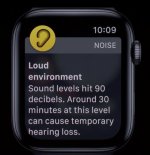
I've tripped that feature a few times on my iPhone, Apple Watch, or both, in falls while mountain biking. My watch is also very protective of my hearing. I get warned several times while flying.

IMG_1555.jpeg
 
I flew relief flights with supplies from Hopkinsville, KY to Greenville, TN the last two Saturdays and on both flights at 7500' and 8500' I used this feature, and it worked flawlessly. I do not think I would pay extra, to be able to use it though. iPhone 15 pro - iso 18.1
 
PiRep
Location: Near Paris, TX @ 7500MSL
Time: 10:43AM CDT 10/18/2024
Device: iPhone 14, iOS 18.0.1

User interface was easy to understand and use when prompted to move the phone left/right in order to get a bead on the OV. Sent text message without a problem.

Neat feature.
 
This is one of those times I wish I didn't have coverage do I could test this feature.

I just drove from East Texas to Wadesboro NC for a fly-in this week and returned yesterday without losing my T-Mobile signal not even once. Is it ok to be frustrated and complain that I have great service? :D
 
Just to close up this topic.. Here's Apple's "HOW TO" with screenshots... I'd highly recommend reading it because there are some nuances (special features) for those who are listed as your Emergency Contact or are in your Family Sharing group. Also, I hadn't thought of it at the time, but this feature would have been of great benefit to disaster areas like western North Carolina that knocked out absolutely everything for many days.

https://support.apple.com/en-us/120930
 
Has anyone been successful using satellite texting in flight?

I have T-Mobile service but still using an iPhone 12 Pro Max and the great info Rob shared with us in Post #47 states an iPhone 14 (or newer) is required.

Does anyone know if satellite texting will work on the Messages app on a new iPad Mini 7 with WiFi + Cellular? Thinking of an iPad upgrade before a new iPhone.
 
Has anyone been successful using satellite texting in flight?

I have T-Mobile service but still using an iPhone 12 Pro Max and the great info Rob shared with us in Post #47 states an iPhone 14 (or newer) is required.

Does anyone know if satellite texting will work on the Messages app on a new iPad Mini 7 with WiFi + Cellular? Thinking of an iPad upgrade before a new iPhone.
From Apple,

About Messages via satellite on your iPhone​

With iPhone 14 or later (all models), you can send iMessages or SMS messages via satellite when you’re off the grid with no cellular and Wi-Fi coverage.
 
Back
Top