


Van's Air Force

The definitive Van's Aircraft support community! Buying, building or flying an RV? Join our exclusive family of mentors and enthusiasts!

Adding a circuit to existing VPX

dmattmul

Well Known Member
Benefactor
Sponsor
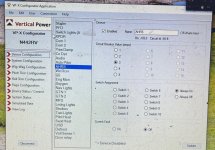
I need to add an additional circuit for a second AHRS that is wired to J8-6. There has to be a way to do this rather than going through the On Line Load Planning Tool and recreate the entire configuration. I've saved the existing configuration just can't figure out how to feed it back into the load planning tool.
Screenshot 2024-12-15 185408.jpg
 
Yea, it's super easy. Find the appropriate available circuit in the configurator (10A, 5A, etc) Just modify the associated connector (you need the tool and some pins) and then jump in the configurator assign it, done.

You should have the tool and some leftover pins in the box if you still have it. If not, call SteinAir and they can very likely send you some.
 
Last edited:
Yea, it's super easy. Find the appropriate available circuit in the configurator (10A, 5A, etc) Just modify the associated connector (you need the tool and some pins) and then jump in the configurator assign it, done.

You should have the tool and some leftover pins in the box if you still have it. If not, call SteinAir and they can very likely send you some.
It has been wired in already. Just need to add a new circuit to the configurator.
 
Last edited:
It has been wired in already. Just need to add a new circuit to the configurator.

Did you get it setup? If not, where are you stuck? It sounds like you may be overthinking it, the VPX has N circuits, just pick the one you plugged the wire into and adjust the settings accordingly.
 
I found the circuit. It was mislabeled and had an incorrect switch assigned to it. Still not sure how to add an additional unused circuit if you don't specify it in the online planning tool but for now resolved.

Thanks
 
Still not sure how to add an additional unused circuit if you don't specify it in the online planning tool
Hmm this topic interests me and I decided to do some digging... Indeed Page 55 of the current GEN unit manual says to use the PC software as you mentioned...

However I have the previous GEN Legacy VP-X and to my knowledge can only be programmed via the EFIS (ie no ethernet port so no PC connection) Someone please correct me if I'm wrong on this point.

Notably on the current GEN manual also on page 55 the GRT EFIS access procedure described ( "Display Unit Maintenance" / "VP-X Configuration") is the exact procedure I use to reveal the programming menu on my GRT Sport EX anyway. However right below, it says the app should be used to configure so maybe the available programming methods might be different depending which generation of VP-X we are using?
 
I found the circuit. It was mislabeled and had an incorrect switch assigned to it. Still not sure how to add an additional unused circuit if you don't specify it in the online planning tool but for now resolved.

Thanks
OK, I think the issue why I could not add a circuit was because all my circuits are being used. (See pic above) If there was another circuit open it would show up in the left-hand side of the screen as for example 10A-5. From there I could name it, assign the circuit breaker amp value and switch assignment or always on or off, etc.

The issue was the AHRS2 pin that was used was labeled CO (see above) and that was on a switch and not "always on" like AHRS1. CO was actually on the Volt Since 1 circuit. After starring at screens all day updating from Garmin software from 3 years ago to present, testing and naming discretes my brain was fried. (Plus, I'm getting old). I incorrectly assumed the panel builder had just left the circuit off the list and was trying to add it back in. I apologize for the confusion, bkervaski was correct should have been easy. Thanks
 
Last edited:
I see you have only one circuit for landing lights. You will not be able to wig wag unless you add an external board. The vpx requires two circuits to wig wag.
 
Back
Top
