Van's Air Force

The definitive Van's Aircraft support community! Buying, building or flying an RV? Join our exclusive family of mentors and enthusiasts!

Garmin AXIS, Next Generation Integrated Flight Display

Hi G3xpert,

I’m not sure if you saw it, but several of us are planning the upgrade and have questions about the power inputs. As not to derail this thread, I’ve put it into another thread. We would love your input when you get a minute:

 
Ok it's clear to me that I'm going to connect some items to some screens via HSDB. But for anything with only one HSDB connection to one screen, that screen becomes a single point of failure.

Does it make sense to also wire CAN bus to my transponder and radio as a backup to the HSDB connections? Will the CAN bus allow communication to the remaining display if the display with the HSDB connection is down?
This really depends on the specific combination of equipment you are installing.

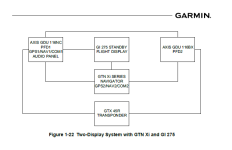
For any system with a single IFR navigator, you have a single point of failure for IFR GPS/NAV. Many will opt for the addition of a secondary source of navigation in the form of another AXIS display or external navigator.

Transponders do not connect to the system via CAN. You are able to connect them via RS-232 to the GSU 25, which has always been a single connection for that data. If you have a second GDU 25 in an AXIS system, you can actually create a second connection for this path.

The failure of an HSDB/CAN connection to a panel mount GTR 205 only has the effect of eliminating the remote control of the radio from the AXIS display. For Remote Mount GTR's, the radio is placed into a failsafe mode allowing you to continue using the radio, in the absence of the display head for the unit. Of course with no control over the active frequency of that radio.

Correct, but a couple things (if I'm understanding correctly, big if). To get full redundant G5 functionality still requires the ARINC interface. While the backup batter is nice, that is easily handled with an IBBS or two. I'm sure we will get answers soon. The idea of a three panel setup is appealing, but only if it has a reasonable level of backup.
Others have followed on with good comments on this topic, and we strongly recommend a standby flight display for aircraft to be flown into IMC. With a built in ADAHRS, different in both software and hardware, from the primary ADAHRS that drives your AXIS Primary Flight Display, you reduce the likelihood that you would find yourself with out your instruments. The backup battery strapped directly to the unit also reduces the unit's reliance on the main electrical system of the aircraft and eliminates some faults that can happen with that system.

There are a lot of permutations of AXIS system architecture, given the various generations of equipment the AXIS display can support. Whether a GAD 29 is required/suggested depends on the equipment present in the rest of the system. In most cases, wiring ARINC 429 from an external navigator through a GAD 29 (or GSU 73) is beneficial from a system redundancy standpoint.

I have a two G3X Touch 8"portrait displays with a GSU73, and a GMU44. If I upgrade the two screens to the new Axis 8" portrait screens, other than the faster processor, upgraded graphics (eye candy) etc., am I gaining any additional "functions" that I don't already have?

Thanks,

Christer
Top of mind, Runway Occupancy Awareness is one really great safety feature that comes along with AXIS. The ability to modify the flight plan of a cross-side IFR Navigator is a really great improvement as well. I think you would take great interest in the Logic Signal Editor that is baked into AXIS configuration mode as well. We will continue to add capability to that function over time, which is very powerful out of the gate. The new platform and display of course unlock a long future of development that was otherwise not feasible in previous generations of hardware.

I’m no expert on this but my understanding of the system architecture is that with the NC version you have effectively separate LRUs in one box, and each LRU has an independent power supply.

So with 2 screens, one NC and one BX, if the screen on the NC fails the other LRUs in the NC box will be available on the BX. So the NAV/COM functions should still be available.

Can someone correct me if I’m wrong, because this is the set-up I’m hoping to run.
If the NAV/COM/AUDIO board fails, your AXIS GPS board is capable of continuing to operate.

If the Main board fails, but the NAV/COM/AUDIO board is still operating, Audio and COM revert to a fail safe state and continue to operate with no access to the active frequency of the COM radio. You would lose NAV and GPS. For any system with a single IFR navigator, you have a single point of failure for IFR GPS/NAV. Many will opt for the addition of a secondary source of navigation in the form of another AXIS display or external navigator.

Regarding reliability, seems like 2 Bx screens and a GTNxi (650 or 750) are better than one NC and one Bx as it eliminates the NC as a single point com/nav failure. Am I missing something?
In both combinations of equipment, the single IFR GPS/NAV in the system is a single point failure.

In both systems described, if the IFR GPS fails, VFR GPS remains on the at least one of the two AXIS displays.

In neither of the systems described do you retain IFR GPS, in the case of a IFR GPS source failure.

In the first example, you would retain IFR GPS in the case that PFD1 failed, which is not true for the second example in which would fail down to VFR GPS. A second external navigator (GNC 215 NAV/COM or GNX 375 GPS/XPDR for example) or GDU 116C would protect you against the single point failure inherent to having only 1 IFR Navigator in the aircraft.

Given the particularly strong admonitions to save/record your G3X fuel calibrations, is there a method for installing them by download, (for four tanks it's a bunch of data/info - numbers, colors, etc.) or will they also need to be manually typed in like apparently all other settings and configurations?
Yes, fuel calibration files written from a G3X Touch system can be directly imported to the AXIS system.

At this time, the rest of configuratoin must be entered manually.

G3Xpert,
There is a disparity between the Installation Manual and Garmin's current software version for the G5. In preparing the AXIS upgrade from the G3X in Appendix F, the instructions are quite clear about ensuring all installed LRUs are loaded with their most recent software versions; otherwise, the AXIS system will not be able to interface correctly. For the G5, the minimum software version should be v8.70:

However, Garmin's most recent version is only v8.60:


Is another release coming soon? Thanks for reconciling this discrepancy.
We are in the process of releasing these software versions this week.
 
G3Xpert,
There is a disparity between the Installation Manual and Garmin's current software version for the G5. In preparing the AXIS upgrade from the G3X in Appendix F, the instructions are quite clear about ensuring all installed LRUs are loaded with their most recent software versions; otherwise, the AXIS system will not be able to interface correctly. For the G5, the minimum software version should be v8.70:

However, Garmin's most recent version is only v8.60:


Is another release coming soon? Thanks for reconciling this discrepancy.
wow, good catch
 
@g3xpert I assume you are also releasing the needed GTN Xi software (21.11) this week as the current published version is 21.04 (only got published to the experimental page yesterday)?
We are in the process of releasing the necessary software versions from the compatibility table in the IM this week.
 
During the announcement it was said that future features like XM would be coming. Can you provide some guidance on it is going to be an add-on module or simply a software update. It wasn't clear if the hardware was already there and it would be enabled later via software or if it was a module that would be added. So, I have a GDU 465 and utilize the XM feature on every flight, both weather and radio, and would love to upgrade to Axis but want to know what I'm giving up and for how long... also, any possible hints as to costs associated if it's a hardware module. I know I can buy a GDL but I really love the built-in XM within GDU 465.

Thx
 
G3Xpert, I'm a bit surprised that the GDL-51R is not listed as compatible when the GDL-52R, of which it is a subset, is compatible. Is it simply a matter of not having been tested?
 
During the announcement it was said that future features like XM would be coming. Can you provide some guidance on it is going to be an add-on module or simply a software update. It wasn't clear if the hardware was already there and it would be enabled later via software or if it was a module that would be added. So, I have a GDU 465 and utilize the XM feature on every flight, both weather and radio, and would love to upgrade to Axis but want to know what I'm giving up and for how long... also, any possible hints as to costs associated if it's a hardware module. I know I can buy a GDL but I really love the built-in XM within GDU 465.

Thx
I didn't know there was a version of the G3X that had an XM receiver. I would be very happy to add that functionality to my Axis asap. I have a GDL39, which I know is not going to get ADSB into the Axis, so now I am weighing my options, between a GDL52R, or replacing my old GTX320 xpndr and my uAvionix tailbeacon and getting a GNX375. If I can get XM native on the Axis, then that rules out the GDL.
 
G3Xpert, I'm a bit surprised that the GDL-51R is not listed as compatible when the GDL-52R, of which it is a subset, is compatible. Is it simply a matter of not having been tested?
t, I'm a bit surprised that the GDL-51R is not listed as compatible when the GDL-52R, of which it is a subset, is compatible. Is it simply a matter of not having been tested?
During the announcement it was said that future features like XM would be coming. Can you provide some guidance on it is going to be an add-on module or simply a software update. It wasn't clear if the hardware was already there and it would be enabled later via software or if it was a module that would be added. So, I have a GDU 465 and utilize the XM feature on every flight, both weather and radio, and would love to upgrade to Axis but want to know what I'm giving up and for how long... also, any possible hints as to costs associated if it's a hardware module. I know I can buy a GDL but I really love the built-in XM within GDU 465.

Thx

GDL 51(R) and 52(R) SXM support is in progress. There is not an AXIS variant that includes a built in SXM Receiver, we are relying on the GDL series to support this datastream.
 
I noticed a deluge of G3X touch screens going on sale on the classifieds. Are builders dumping them so they can upgrade to the new Axis units. Nothing wrong with that, I was just wondering.
I’m certainly considering it. If I could get $4,000 for my 2 large G3X touch panels I’d upgrade to Axis.
 
I’m certainly considering it. If I could get $4,000 for my 2 large G3X touch panels I’d upgrade to Axis.
With the supply in the market of the G3X screens way outpacing demand, I fear the market price will be much lower.

I will have 2 GDU myself to sell here shorty…so I’m in the same boat as all the others. Never turned on by me…since receiving my panel…🤕
 
It is listed as supported in the installation manual. Page Page 3-18.
GDL 51(R) and 52(R) SXM support is in progress. There is not an AXIS variant that includes a built in SXM Receiver, we are relying on the GDL series to support this datastream.
I had likely seen that the -51R was listed as compatible in the Installation Manual several days ago but forgot. I just got into the Pilot's Guide today where only the GDL-50/50R and GDL-52/52R are listed as compatible. Okay, I'll just be patient (I don't do that well 😊).

Edited to correct spelling.
 
We will continue to sell G3X Touch displays and support new installations, including periodic software updates. We understand it is frustrating. The backend LRU's are largely unchanged, so upgrading from G3X Touch to AXIS Base displays is a relatively low burden from an installation standpoint.


If there were an unlikely failure of the HSDB network, the ARINC 429 > G5 path provides an alternate way for that information to be displayed to the pilot. You are correct however, there is a lot of redundancy built into a dual AXIS display installation, with GTN Xi connected directly to each display via HSDB.
We will continue to sell G3X Touch displays and support new installations, including periodic software updates. We understand it is frustrating. The backend LRU's are largely unchanged, so upgrading from G3X Touch to AXIS Base displays is a relatively low burden from an installation standpoint.


If there were an unlikely failure of the HSDB network, the ARINC 429 > G5 path provides an alternate way for that information to be displayed to the pilot. You are correct however, there is a lot of redundancy built into a dual AXIS display installation, with GTN Xi connected directly to each display via HSDB.
An additional comment/s for the benefit of Garmin management as well as the active homebuilder community.

First (and again), want to acknowledge the great work you are doing and thank you for maintaining backward compatibility to the extent done so to date. One correction/statement....the switch out to AXIS base displays IS likely a very low burden for most customers. Well done. That is not the case for all (like in particular this customer with a very tight fitting Vans RV 8, with little clearance behind the panel towards the engine). Although some of us were/are hesitant to go Garmin compared to the competition due to excellent customer support elsewhere, you make a well designed and documented product. Kudos especially to your documentation in general.

The simplest solution as previously stated to minimize the inevitable challenges associated with long build times of homebuilders and the product improvement process is to communicate much earlier upcoming product changes (at least for experimental aircraft builders). Again, Garmin can make great products, get paid well for doing so, and still coordinate and partner with the homebuilding community with more proactive communication which is cheap. Additionally, and certainly in the absence of an improved and proactive communication process of Garmin's roadmap (again, at least for the homebuilder segment), offer an extended and pragmatic trade-in policy for experimental products to better align with that segment so active builders partner and plan with Garmin for each other's mutual success. The existing exchange policy of 45 or 90? days (second hand information) may be fine for most segments, but not realistically for active builders. Certainly various tech companies offer trade-in's, and Garmin could certainly offer a substantive discount for a trade it (which is all the more appropriate if there isn't better communication of product development roadmaps).

It's absolutely true that Garmin is doing a great job in where it is going with its product development, but that doesn't mean customer service and communication couldn't be better. Not being negative....Just experiencing opportunities for continuous improvement.


We will continue to sell G3X Touch displays and support new installations, including periodic software updates. We understand it is frustrating. The backend LRU's are largely unchanged, so upgrading from G3X Touch to AXIS Base displays is a relatively low burden from an installation standpoint.


If there were an unlikely failure of the HSDB network, the ARINC 429 > G5 path provides an alternate way for that information to be displayed to the pilot. You are correct however, there is a lot of redundancy built into a dual AXIS display installation, with GTN Xi connected directly to each display via HSDB.
An additional comment/s for the benefit of Garmin management as well as the active homebuilder community.

First (and again), want to acknowledge the great work you are doing and thank you for maintaining backward compatibility to the extent done so to date. One correction/statement....the switch out to AXIS base displays IS likely a very low burden for most customers. Well done. That is not the case for all (like in particular this customer with a very tight fitting Vans RV 8, with little clearance behind the panel towards the engine). Although some of us were/are hesitant to go Garmin compared to the competition due to excellent customer support elsewhere, you make a well designed and documented product. Kudos especially to your documentation in general.
The simplest solution as previously stated to minimize the inevitable challenges associated with long build times of homebuilders and the product improvement process is to communicate much earlier upcoming product changes (at least for experimental aircraft builders). Again, Garmin can make great products, get paid well for doing so, and still coordinate and partner with the homebuilding community with more proactive communication which is cheap. Additionally, and certainly in the absence of an improved and proactive communication process of Garmin's roadmap (again, at least for the homebuilder segment), offer an extended and pragmatic trade-in policy for experimental products to better align with that segment so active builders partner and plan with Garmin for each other's mutual success. The existing exchange policy of 45 or 90? days (second hand information) may be fine for most segments, but not realistically for active builders. Certainly various tech companies offer trade-in's, and Garmin could certainly offer a substantive discount for a trade it (which is all the more appropriate if there isn't better communication of product development roadmaps).

It's absolutely true that Garmin is doing a great job in where it is going with its product development, but that doesn't mean customer service and communication couldn't be better. Not being negative....Just experiencing opportunities for continuous improvement. I'm looking at months of very custom building get tossed out the window, not because I want to upgrade, but because I should do what I can do to best future proof aircraft before the skins on top go on forever.
 
GDL 51(R) and 52(R) SXM support is in progress. There is not an AXIS variant that includes a built in SXM Receiver, we are relying on the GDL series to support this datastream.
Thanks for this info That makes me reconsider the gnx 375, as I am not ifr rated anyway and I was just needing a new adsb in source. The 375 is still appealing since my gtx320 doesn't speak to the axis, it wondering: is the gdl51R the best sxm solution out there that does weather and radio but doesn't include adsb? Is there one that doesn't even have a gps that costs less?
 
Thanks for this info That makes me reconsider the gnx 375, as I am not ifr rated anyway and I was just needing a new adsb in source. The 375 is still appealing since my gtx320 doesn't speak to the axis, it wondering: is the gdl51R the best sxm solution out there that does weather and radio but doesn't include adsb? Is there one that doesn't even have a gps that costs less?
I love my -375!! For my needs - I didn't need the 650 or 750. So the smaller navigator fit the bill perfectly in my -8.
 
I too think this is a brilliant effort by Garmin producing a new product and ensuring a high level of integration with existing products.
Do not know how you kept it quiet and built up stock levels but great !

While forward looking product statements would be nice I can see how too much information would be commercially suicidal.
I would probably be annoyed if I had just purchased a G3X Touch but this happens in many areas.
Exchanging a G3X Touch for an AXIS (plus price difference) within 45 days of G3X purchase seems reasonable.
Offering a trade-in for older equipment (unless very small) seems commercially unwise.

All avionics will eventually become obsolete as will the AXIS units.
If I had already purchased G3X Touch I would fly with them. They are great units.
After all we still want Garmin to be around for AXIS-plus don't we ?
 
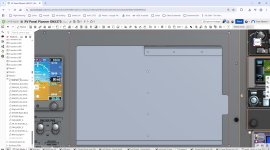
Just for interest, the red line was the cutout in my panel needed for the G3X, while the hole is for the AXIS. It's quite a bit smaller (stiffer panel perhaps).
 

Attachments

  • Screenshot (372).png
    Screenshot (372).png
    587.5 KB · Views: 110
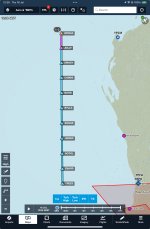
Anyone else notice this? (they certainly are!)
Hey Trent, the FAA gets cute with waypoint names, usually tailored to the local area. That's the approach into Portland (KPDX), where the local basketball team is the Portland trailblazers. Maybe you already know this as an Aussie but that's the reason for the waypoints.
 
Hey Trent, the FAA gets cute with waypoint names, usually tailored to the local area. That's the approach into Portland (KPDX), where the local basketball team is the Portland trailblazers. Maybe you already know this as an Aussie but that's the reason for the waypoints.

I didn’t know that one, but have seen these before. The arrival over the water into Brisbane used to be LEAKY-BOATS-SINNK

Then there’s the FIR boundary to the west of Perth over the ocean:
 

Attachments

  • Screenshot 2026-07-16 at 12.29.13.jpeg
    Screenshot 2026-07-16 at 12.29.13.jpeg
    365.6 KB · Views: 80
To clarify some of the requests regarding database levels and subscriptions with the AXIS displays:

Even though there are configuration modules for each display in an AXIS installation, the system still operates on a single system ID. Therefore, one database subscription is purchased for one system ID. This is true for past G3XT installations and current AXIS installations. For IFR equipped panels, you would typically have one system ID for the flight displays, and one system ID for the IFR navigator(s) due to these products requiring different levels of navigation databases (VFR or IFR), along with optional charting packages. In these installs you would have the choice to purchase only the required IFR navigation database subscription for the IFR navigator(s), and the charts (or not...), for the GDUs or other charting source (EFBs like Garmin Pilot/ForeFlight, or your classic paper printouts).

When there are multiple IFR navigators and PFD/MFDs in modern IFR aircraft and owners desire 'all available data on all available screens/units', the OnePak offerings are a great option to cover this need, because the a la carte priced options then become a costlier selection at that point.

Added layers of data requirements take place when we start combining IFR navigation units into PFDs along with adding expanded features like full control of flight plans from PFDs to external IFR navigators via HSDB. (Example: you can now fully control the flight plan, load and activate approaches on a GNX375 or GPS175 completely from a base experimental AXIS GDU due to this HSDB interface and one source flight plan.) This capability creates a requirement that the PFD and external IFR navigator share a consistent IFR level navigation database, so they agree on what they are actually controlling/modifying.

Now that that's out of the way, let's break down some examples. For simplicity and a much shorter post I input packages for the US.

Please visit the FlyGarmin.com aviation database pricing page and input all installed equipment to receive available packages and other a la carte pricing. That will look like the below for the provided example groups following.

View attachment 122771View attachment 122776View attachment 122777

Navigation Database = All GPS waypoint information data meeting either VFR or IFR level requirements (there are different levels for these use cases)
VFR/IFR Charts = VFR Sectionals and IFR Enroute (High/Low) Charts
FliteCharts = Garmin Terminal Procedure Charts (Arrival/Departure Procedures and Approach Plates)


Basic AXIS Display Installation (VFR) - GDU 116Bx
One system ID and subscription, no matter how many displays are installed. These include options for (free) VFR level basic Navigation Data, or options with advanced features like SafeTaxi, VFR sectionals, and Airport Facilities Directory.
View attachment 122779


IFR AXIS Installation - Federated Panel (PFD + Traditional Radio Stack) - GDU 116Bx + External Navigator

In a common base GDU (116Bx) + non-chart displaying IFR navigator install (GNX375 or GTN650Xi), there are 2 system IDs. It was previously common to update the IFR Navigation Database only on the navigator and chart packages on the PFD/MFD (previously $299 + $199), but with these systems now connected via HSDB and utilizing a one source flight plan, all units need to have an agreeing IFR level navigation database subscription (including the PFD, even if an experimental base unit). The below database package was created for this need. This provides all required IFR level navigation databases and listed information on the display and non-chart displaying navigator.
View attachment 122765

If you had a chart displaying navigator like a GTN750Xi and desired FliteCharts on that GPS/MFD unit as well, you would likely be selecting a OnePak, similar to the next IFR example below. This would give you all available services on all units, although it would still be an option to only update the basic level navigation database and not have the mapping/charting availability (uncommon on GTN750Xi installs, but more frequent on GPS (175/375) and GTN650Xi installs).


IFR AXIS Installation - Integrated Panel (PFD acting as the IFR Navigator, one system ID, all displays) - GDU116 C/NC

These are the wholly TSO certified flight displays, so the entire unit is a certificated piece of equipment but installed in an EAB aircraft (just like your previous GPS/GTN Xi unit was). You will need to input these devices in FlyGarmin as AXIS (Certified) units to receive proper database selections. Databases can still be a la carte for these displays, but when adding desired features together (like all IFR navigation databases and mapping/charting capability in one single display) the OnePaks are the best pricing option. The AXIS (Certified) display models that include the integrated IFR GPS capabilities do not accept the AXIS (Experimental) bundles. However if you had a supplemental GDU 116Bx experimental display installed, it's services would be included under this package.
View attachment 122766

We will have members of our Database Sales Team/Pilot Ops group available at OSH to talk through these many options for your aircraft to equip you with the best available option for your desired mission.


For a configuration with 2 x GDU116Bx + GTN 650xi, connected over HSDB, would the following separate database subscriptions allow for IFR flight plan syncing/editing?

For Axis:

Screenshot 2026-07-16 104138.png

For GTN:

Screenshot 2026-07-16 104025.png
 
Can you confirm ?
Looks to me like that is the bundle with AXIS VFR nav data so no ability to modify IFR flight plans on the AXIS.

'AXIS United States IFR Bundle + Flitecharts' is US$499 per year but I cannot find an 'AXIS North America IFR Bundle'.
Try changing your selection to the certified AXIS. I was just looking at it.
 
Try changing your selection to the certified AXIS. I was just looking at it.

The bundle naming and search/display on flyGarmin is not the most straight forward.
Having two different databases named 'Navigation Data' for AXIS experimental units
and which you load depends on whether you have an external IFR navigator is prone to mistakes.

It does appear that 'AXIS North America Database Bundle - AXIS (Experimental)' is the VFR nav data.


See https://www.vansairforce.net/thread...ted-flight-display.244714/page-6#post-1948197
 
Last edited:
I've been thinking the same thing. Although in your scenario the GTN is still a single point of failure but at least you don't also lose your PFD and the same time.

With only two axis screens (one NC), if you lose your PFD then you are flying without a certified navigator and using either the MFD or the G5.

With two Bx plus a GTN, if you lose your PFD then you still have the GTN screen plus the G5 and MFD. If you lose your GTN then at least you still have your PFD with GPS.

If money is no issue and you want ultimate redundancy then you can buy two NCs plus an 8" screen in the middle. Now you have redundant navigators and the pilot worst case has to fall back to the center 8" screen. But we are at almost $20k more than the dual Bx plus GTN.
If I was going to buy 2 IFR GPS/ nav/coms I’d get a second system with different software like an NC and 650 or 750 vs two NCs so a common SW bug taking the system down is more remote. I’d say impossible but don’t know I’d there are common sw modules in the two types.
 
Can you confirm ?
Looks to me like that is the bundle with AXIS VFR nav data so no ability to modify IFR flight plans on the AXIS.

'AXIS United States IFR Bundle + Flitecharts' is US$499 per year but I cannot find an 'AXIS North America IFR Bundle'.

VFR Navigation Data will be clearly marked in the 'View Coverage' drop down selection. VFR only Navigation Data is only available in the US.
1784307583010.png

You are correct that in order to modify IFR flight plans with the single source flight plans of AXIS (when connected to an HSDB enabled IFR navigator like GTN Xi or GNX 375), matching IFR-level Navigation Databases are required. In the above example, Americas - North is the proper Navigation Database and matches between the AXIS Experimental and GTN Navigation Only databases. That information would also be listed under the 'view coverages' link.

The additional example you gave narrows the selection down to US only. That covers US Navigation Data (IFR level) on all devices, with FliteCharts for the PFD (approaches/procedures). That was created to keep pricing similar to popular selections today (Data/Charts on PFD + NavData on Navigator). What you were looking for is included in the AXIS Americas IFR Databae Bundle + FliteCharts. You would need to add Canada/USA both to the region selection for that to appear.

1784307486076.png
 
Can the AXIS record flight data directly to the MicroUSB socket like the G3X did to the SDcard?
Or, do you have to perform a download command after each flight?
I like the "grab and go" aspect of the G3X.
 
Can the AXIS record flight data directly to the MicroUSB socket like the G3X did to the SDcard?
Or, do you have to perform a download command after each flight?
I like the "grab and go" aspect of the G3X.
Doesn't look like it - manual process.

The logged data is written to the logging folder once each second while the GDU™ is powered on. When the allocated space is fully utilized, the oldest data will be overwritten. This data can then be manually exported when desired to a USB storage device using the USB port on the bezel of the AXIS™ flight display or it can be uploaded to a PED using internal Wi-Fi or bluetooth. Once the data has been transferred to Garmin Pilot, the application can transfer the flight log to the pilot’s flyGarmin.com® account for archiving and analysis once the mobile device connects to the Internet.
 
VFR Navigation Data will be clearly marked in the 'View Coverage' drop down selection. VFR only Navigation Data is only available in the US.
View attachment 123541

You are correct that in order to modify IFR flight plans with the single source flight plans of AXIS (when connected to an HSDB enabled IFR navigator like GTN Xi or GNX 375), matching IFR-level Navigation Databases are required. In the above example, Americas - North is the proper Navigation Database and matches between the AXIS Experimental and GTN Navigation Only databases. That information would also be listed under the 'view coverages' link.

The additional example you gave narrows the selection down to US only. That covers US Navigation Data (IFR level) on all devices, with FliteCharts for the PFD (approaches/procedures). That was created to keep pricing similar to popular selections today (Data/Charts on PFD + NavData on Navigator). What you were looking for is included in the AXIS Americas IFR Databae Bundle + FliteCharts. You would need to add Canada/USA both to the region selection for that to appear.

View attachment 123540

Great so with Axis (experimental) North America Bundle ($275) + GTN 650xi Americas North Navigation Data ($350), we have matching IFR level navigation databases in the Bx PFD, Bx MFD and Navigator allowing for full FMS level flight plan sync/editing between the 3. This keeps the database position neutral with a similar G3X ($275 North America bundle) + GTN (Americas North Nav data $350) configuration. 👌Garmin.

It would be great if Axis experimental also had a matching Canada only bundle to the G3X bundle below:

Screenshot 2026-07-17 113541.png
 
Looking for a recommendation as how to best handle the below situation with a 'B' screen as a PFD which only has 3 HSDB inputs.
I know what the manual says, but there are a few different ways to handle this, will one work better than the other?
Assuming weather traffic are shared across displays via HSDB is the connection to the PFD using HSDB just for redundancy?
(My G3X already has the serial connection for W/T from the 45R)

1784319853457.png
 
Last edited:
G3Xpert: I currently have the smaller landscape G3X as MFD and primarily in EIS display mode. With the higher resolution, will the AXIS 8" display unit include EIS display enhancements, such as the ability to display round or linear gauges for most primary EIS functions, such as e.g. is the case for the current 7" smaller Txi units? Except for the tach and manifold pressure, EGT and CHT bar graphs, right now all the rest of my data, such as fuel flow, oil temp, fuel tanks, etc. are just a list of words and numbers on the left side of the screen. The (failing) VM1000 that my G3X EIS/MFD screen replaced was able to show all the primary functions with round gauges, with numerical inside, and graphs for EGT/CHT!

It would also be useful when configuring EIS data display to have a way to preview what you're going to get with various settings. Right now the configuration just kind of shows up on the screen and it may or may not look like what you wanted or imagined.

One more thing - will it be possible to set the display up to write flight data to the USB port (to a low profile fob, for example) either instead of or simultaneous to internal memory? As mentioned by others, the G3X capability to pull the card after a flight to look at data is very convenient and having to do a deliberate offload is not. Or a parallel USB appearance we can extend to a location for keeping a fob plugged in....
 
Last edited:
Garmin has just published the needed GTN Xi software update. It comes with a long list of new features. Very nice!

NAVIGATOR: GTN Xi, Service Bulletin 26100A, 006-B3191-17, Ver. 21.12, as of Jul 17, 2026
Download
 
Looking for a recommendation as how to best handle the below situation with a 'B' screen as a PFD which only has 3 HSDB inputs.
I know what the manual says, but there are a few different ways to handle this, will one work better than the other?
Assuming weather traffic are shared across displays via HSDB is the connection to the PFD using HSDB just for redundancy?
(My G3X already has the serial connection for W/T from the 45R)

View attachment 123567
It does seem the new AXIS screens could use 4 HSDB inputs. What happens if one has 2 GTN Xi series units in a panel and 2 B screens? Lots of examples with using 1 GTN but not 2. (Or at least I could not find)
 
We are in the process of releasing the necessary software versions from the compatibility table in the IM this week.
@g3xpert Thank you for releasing the GTN Xi upgrade. Exciting to see all the additional features.

I will be doing the G3x Touch to Axis upgrade this weekend and wonder if G5 software release will still happen this week.
Also, does the Axis display itself need an update before I configure it or is the version it shipped with ok?
 
I have been playing with the Axis simulator to evaluate upgrading to the system; beyond the checklist functions which have been listed for 2027 release, I notice a few other things missing that I've grown used to in G3X Touch. Wondering if these might be on the future roadmap?
- the "info" page where a matrix of datafields can be displayed, that can be handy to see but don't need to be visible (I keep things there like nearest wx, density altitude, CO level, sunset time, etc.)
- weight & balance features
- a databar field for "fuel remaining" from the fuel totalizer. I found "Fuel on Board" which appears to read the tank sensors, but no option to display the "gallons remaining" quantity from the flowmeter.
- the bottom of the HSI seems always obscured by the flight plan info; so it's not possible to read the tail of the needle.
- an easy toggle between radar types (regional, conus, combined) on the Weather app display; it's there, but buried multiple menus deep, rather than being accessible from the depiction map.

Is there support for the CO Guardian 455 (which was a CO & SpO2 monitor, now discontinued but still supported in G3X touch)?

Looking forward to playing with the demo units next week at OSH.
 
I will be doing the G3x Touch to Axis upgrade this weekend and wonder if G5 software release will still happen this week.
Also, does the Axis display itself need an update before I configure it or is the version it shipped with ok?
I found out that Garmin has the G5 software already embedded in the AXIS system. When I went through the configurations today, the G5 automatically updated to v8.70. Also, you will not need to update software in the AXIS. The Garmin website hasn't added a link for software updates yet.
 
I have a question on GDU 80Px, from what I gather it has the same cutout and mounting holes as the GDU470.
Is the bezel overhang from the panel cutout the same as the GDU470

Just curious as I have cut my panel for a GDU470 but will now be fitting a GDU 80Px

Rob
 
Back
Top