Van's Air Force

The definitive Van's Aircraft support community! Buying, building or flying an RV? Join our exclusive family of mentors and enthusiasts!

Avionics Panel Layout... 3 - G3X or 2 w/ a 750xi

RyanWhite

Active Member
Patron
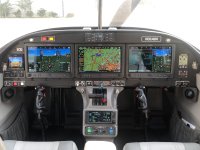
OK finished plane people - I know you're going to like what you have but anyone have input on 3 - G3X w/ a 650xi vs. 2 - G3X with a 750? I have the aerosport carbon panel and to do 3 - G3x with the 750 makes you have to remote a bunch of stuff. I have to make room for SDS controller and oxygen. I also like my current panel with the second comm on the panel - I find myself using it more than the 650xi.

Any words of wisdom from those flying????

Ryan
 
I am building a 14, so forgive my ignorance…

What does the third G3X give you?

For the record, opted for the 750 over the 650 in my -14A, that of course requires some remote boxes, but the bigger screen of the 750 was worth it to me.
 
In my flying RV-10 (I didn't build it) we have a GTN650 and three 7" non-touch displays. The left seat gets two of those (oriented vertically). I use one as my PFD and the other I use for engine instruments. But my partners in the plane use the second 7" display almost exclusively for maps. I use my iPad/ForeFlight for most of my navigation.

On the 10 that I'm building I did one 10" touch screen for each seat and I'm doing a GTN750 in the middle. I think that will be more useful than a third 10" screen for about the same price. The GTN is where I do all of my flight plan entry, approach setup, etc, so I like having a bigger screen to work with. I also believe the 750 will be able to show approach charts -- I use ForeFlight for that right now but may use the 750 if it's an option. I also expect to keep the traffic screen up on my 750 during flight.
 
The graphics and the pixel resolution seem to be so much better with the 750Xi than the G3X.
 
Last edited:
I have a flying RV 14 with 2 G3X touch screens and a GTN 650, and am building an RV 14 (currently wiring the panel) with 2 G3X touch screens and a GTN 750xi.

Here are my thoughts:
- While the 2nd G3X is an MFD , I view it as a backup and for the passenger.
- I use split screen on the PFD for other info like plates, weather, etc.
- the GTN 650 screen is useful for monitoring flight plan status - that’s about it.
- the GTN 750 xi will be able to display traffic, weather and approach plates (I have a GTX 45 to feed this data), making it an MFD as well as a navigator. Plus it has much better screen resolution than the 650.
- note that the GTN 750 will not display Sirius XM weather unless you have a GDL69 installed (I will not), though ADS-B WX will display.

As always, much of this is personal preference and YMMV.
 
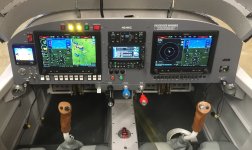
I opted for 3 screens plus 650. Two rated pilots so the right side gdu has the pfd/mfd switch and the center screen will be mfd1. Also cheaper than the alternative.
 
3 GDU + GTN 6xx
GDU screen much more useful than a GTN.
Have used it for training so right seat GDU configured as PFD2.
Typical use is:
PFD1: Screen-either full screen or split with chart or nav plate.
Data bar-8 info fields
MFD: Screen-EIS, Map, waypoint info. Data bar-2 comm, transponder, audio, 4 info fields
PFD2: Screen-split with checklist or traffic. Data bar-8 info fields
 

Attachments

  • IMG_8260.jpeg
    IMG_8260.jpeg
    2.2 MB · Views: 146
my setup is similar to Joe above. I'm using 2 10" screens (L and R) and 1 7" screen in the middle. And a 650. I too am using the aerosport cf panel.
 
3 GDU + GTN 6xx
GDU screen much more useful than a GTN.
Have used it for training so right seat GDU configured as PFD2.
Typical use is:
PFD1: Screen-either full screen or split with chart or nav plate.
Data bar-8 info fields
MFD: Screen-EIS, Map, waypoint info. Data bar-2 comm, transponder, audio, 4 info fields
PFD2: Screen-split with checklist or traffic. Data bar-8 info fields
Looks great, I'm just glad I don't have to be the one to do the condition insp! Access to that tunnel looks like fun :oops: ;)
 
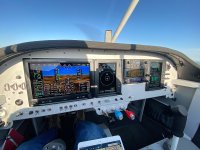
I have two G3X and 1 GTN 750 in the middle. I've just been flying with it for a couple of months but the map display on the GTN is far superior to the G3X. The resolution is higher and it also has a range ring that changes when you zoom in/out. Maybe the G3X map has range rings but I haven't found it yet. Editing an IFR flight plan will be easier on the GTN 750 vs. the 650 with the larger screen size. The only thing I'm disappointed in is the ability to display approach plates. Both will show them but they're too small to read and the G3X resolution is really grainy. So I'm trying to figure out where I'm going to put the iPad to show the plates. I also added a "Display Backup" switch to allow me to quickly change the right side G3X between a duplicate PFD and an MFD.
 
****SNIP***The only thing I'm disappointed in is the ability to display approach plates. Both will show them but they're too small to read and the G3X resolution is really grainy. So I'm trying to figure out where I'm going to put the iPad to show the plates.***SNIP***
That's why I have the 7" next to the 10.5", to display an approach plate. It fills the screen and is very readable for me.
 
Looks great, I'm just glad I don't have to be the one to do the condition insp! Access to that tunnel looks like fun :oops: ;)
Actually pretty simple with access panels on each side and only 4 screws holding the console in. Definately need to consider MX during construction.
 
I have two G3X and 1 GTN 750 in the middle. I've just been flying with it for a couple of months but the map display on the GTN is far superior to the G3X. The resolution is higher and it also has a range ring that changes when you zoom in/out. Maybe the G3X map has range rings but I haven't found it yet. Editing an IFR flight plan will be easier on the GTN 750 vs. the 650 with the larger screen size. The only thing I'm disappointed in is the ability to display approach plates. Both will show them but they're too small to read and the G3X resolution is really grainy. So I'm trying to figure out where I'm going to put the iPad to show the plates. I also added a "Display Backup" switch to allow me to quickly change the right side G3X between a duplicate PFD and an MFD.
That's one way to do it but.....a MFD can be configured to display PFD when in split screen.
 
That's why I have the 7" next to the 10.5", to display an approach plate. It fills the screen and is very readable for me.
I suppose but a full screen 10.5" shows a very LARGE approch plate. Easy zoom in and out with finger squeeze or knob.
 
I suppose but a full screen 10.5" shows a very LARGE approch plate. Easy zoom in and out with finger squeeze or knob.
Not as large as the 7” if the 10.5” is the PFD and in split screen mode (the only way to see the approach plate)
 
Not as large as the 7” if the 10.5” is the PFD and in split screen mode (the only way to see the approach plate)
MFD can show approach plates full screen. Touch the arrow icon (lower left) when you pull it up on full screen.
 
MFD can show approach plates full screen. Touch the arrow icon (lower left) when you pull it up on full screen.
Yes, of course, my point exactly. Plates display nicely on a 7” MFD when that screen is decluttered. Not so well on a split screen PFD though, hence the 7” right next to the 10.5”.
 
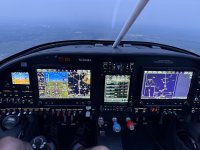
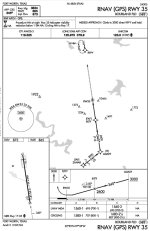
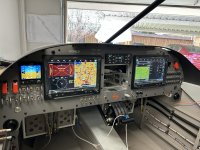
Tried this arrangement last night on a practice approach and it worked well- map on PFD, flight plan on the GTN, and the approach plate full screen on the MFD. Bonus points for those who notice I didn’t capture the glidepath for some reason.
IMG_0680.jpeg
 
We have 2 460's and a 650Xi. As far as I know, the biggest thing the 750 offers over the 650 is chart display, and that is well handled by the 460s. I don't think the 750 is worth the upgrade cost, and I really have never felt the need for a third G3X display.

Edit: additionally, having a physical audio panel and com2 have felt much more helpful to me than a 750 or third touchscreen.
 
Last edited:
Tried this arrangement last night on a practice approach and it worked well- map on PFD, flight plan on the GTN, and the approach plate full screen on the MFD. Bonus points for those who notice I didn’t capture the glidepath for some reason.
View attachment 118234
Great looking panel!

As far as no glidepath, it appears you are flying the LNAV approach indicated by the bottom left field of the 750. I can't make out the +V so it should be lateral guidance only.
 
Great looking panel!

As far as no glidepath, it appears you are flying the LNAV approach indicated by the bottom left field of the 750. I can't make out the +V so it should be lateral guidance only.
He’s flying the VNAV.
In the autopilot information line, it says: ALT GP VNAV, which indicates the autopilot is using the glide path for altitude guidance and the navigation source is VNAV.
 
Because the RNAV35 to 50F is an LNAV MDA approach and does not have vertical guidance.
Well that’s embarrassing…. I could have sworn I’ve practiced it before and I got LNAV+V. I remember commenting how close we were to the trees on the descent. That’s exactly why I’m spending some time getting familiar with the new avionics before I fly in real IMC.

To answer Carl’s question about the panel, I built the panel myself. I had the blank cut somewhere else but I designed it in Solidworks and populated/wired it.
 
Well that’s embarrassing…. I could have sworn I’ve practiced it before and I got LNAV+V. I remember commenting how close we were to the trees on the descent. That’s exactly why I’m spending some time getting familiar with the new avionics before I fly in real IMC.

To answer Carl’s question about the panel, I built the panel myself. I had the blank cut somewhere else but I designed it in Solidworks and populated/wired it.

Not to derail - but +V is a derived vertical guidance only, not an actual glide path for the approach. MDA must still be obeyed.

You did a great job building your panel! I love the backlighting.
 
Last edited:
He’s flying the VNAV.
In the autopilot information line, it says: ALT GP VNAV, which indicates the autopilot is using the glide path for altitude guidance and the navigation source is VNAV.
The autopilot is on, following the GPS for a navigation (lateral) source and holding altitude at 3000. VNAV and GP are armed but won't capture.

Again, as I said above the GPS is displaying LNAV (not LNAV + V, or any version of an approach with vertical guidance.)

Brad's note is an important one, see https://support.garmin.com/en-US/aviation/faq/02W9shbwZE6EjBT9eUHLn6
 
Built myself. Drawn in CAD and cut by sendcutsend, but all wired and installed myself. My favorite part of the build actually. Powder coated and screen printed locally for way too much money, but looks great.

Also a vote for the dual GDUs and a GTN750. Obviously the most expensive box not yet installed in that photo but you get the picture.

I have flown behind 650s and 750s and I’m spoiled - it has to be a 750 for me. Functionally the same, but on the 650 you have to scroll down to see the full page and it drives me crazy. No scrolling on the 750.
 

Attachments

  • IMG_3298.jpeg
    IMG_3298.jpeg
    2.9 MB · Views: 39
Just curious, are most building or having someone else build these high end panels?

Carl
Did layout with Aerotronics (huge fan of them, BTW), they cut a trial panel in plexi, wired it all myself (a favorite part of the build - learned ALOT), made minor layout changes, Aerotronics cut in aluminum, painted, labeled and clearcoated.

Repeating the process on the new build.
 

Attachments

  • IMG_5474.jpeg
    IMG_5474.jpeg
    1.3 MB · Views: 21
Back
Top