Van's Air Force

The definitive Van's Aircraft support community! Buying, building or flying an RV? Join our exclusive family of mentors and enthusiasts!

Panel layout

VansRV12Driver

I'm New Here
Hi,


I recently purchased a Guardian iPad Mini mount for my RV-12. We initially installed it in front of the passenger seat, which conveniently covered the opening left after removing the glove box. However, in that position it sits too far to the right for effective use from the left seat. Since I primarily use the iPad for ADS-B traffic awareness, clear and immediate visibility is important.


As a result, we are planning to redesign the panel layout.


My current approach is to keep the Dynon SkyView directly in front of the pilot, place the iPad Mini immediately to the right of the SkyView, and then position the Garmin GTR 200 radio to the right of the iPad. I’ve done a preliminary fit check, and reach to the radio appears acceptable from the left seat.


I’d appreciate your perspective on this configuration, as well as any guidance or lessons learned from similar RV-12 panel redesigns—particularly with respect to visibility, ergonomics, and overall layout efficiency.


Thank you.
 
YMMV. I have a dual Dynon HDX. I'm also am old and wear bifocals. I installed two ball type RAM mounts. One either side. I put my Stratux on the pass side. My Galaxy S6 Lite tablet on the pilot side. It's nice and close. I run AvareX. Navigation and traffic. It frees up my HDX screens to run full screen so I can see them clearly.
 
YMMV. I have a dual Dynon HDX. I'm also am old and wear bifocals. I installed two ball type RAM mounts. One either side. I put my Stratux on the pass side. My Galaxy S6 Lite tablet on the pilot side. It's nice and close. I run AvareX. Navigation and traffic. It frees up my HDX screens to run full screen so I can see them clearly.
Sounds like you need a new pair of glasses Larry!

As far as panel you did the right thing by giving it the “reach test “
 
Sounds like you need a new pair of glasses Larry!

As far as panel you did the right thing by giving it the “reach test “
I have an annual appointment with my optometrist this month!
Actually, the tablet is backup, but I really like AvareX. So much information available without changing my PFD or MFD screens.
 
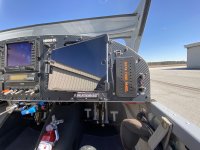
I mounted mine at map box location at an angle that makes it easy to see from the pilot seat. The left side almost touches the panel, and the right side is about 4" away with a slight up tilt. The idea was to reduce the off-axis viewing angle. Despite the reflection in the photo, glare is not really an issue in-flight. I prefer the Skyview display for ADS-B traffic SA, but the iPad is handy for a quick speed check on a target.
IMG_5448~photo.JPG
 
I mounted mine at map box location at an angle that makes it easy to see from the pilot seat. The left side almost touches the panel, and the right side is about 4" away with a slight up tilt. The idea was to reduce the off-axis viewing angle. Despite the reflection in the photo, glare is not really an issue in-flight. I prefer the Skyview display for ADS-B traffic SA, but the iPad is handy for a quick speed check on a target.
View attachment 114630
That looks like a nice setup. It doesn't swivel by chance does it?
 
YMMV. I have a dual Dynon HDX. I'm also am old and wear bifocals. I installed two ball type RAM mounts. One either side. I put my Stratux on the pass side. My Galaxy S6 Lite tablet on the pilot side. It's nice and close. I run AvareX. Navigation and traffic. It frees up my HDX screens to run full screen so I can see them clearly.
Thanks for the feedback. You've got me thinking- a dual Dynon display may be the best solution. I am going to a little homework around that.
 
Skip the iPad and use the SkyView ADS-b receiver to display traffic on the SkyView moving map. The advantage of having such integrated displays is a driver for why we have them.

For me, the iPad is a wonderful flight planning tool. In the plane the iPad says in the flight bag as the third navigational backup, and the cross country music feed to the audio panel.

Carl
 
Skip the iPad and use the SkyView ADS-b receiver to display traffic on the SkyView moving map. The advantage of having such integrated displays is a driver for why we have them.

For me, the iPad is a wonderful flight planning tool. In the plane the iPad says in the flight bag as the third navigational backup, and the cross country music feed to the audio panel.

Carl
That is a good point and one that @wirejock also made. I had a few questions and tried to call Dynon, but they are all at Sun n Fun apparently. So, come next week, I will reach out to them and likely go that way.

Appreciate the feedback.
 
That is a good point and one that @wirejock also made. I had a few questions and tried to call Dynon, but they are all at Sun n Fun apparently. So, come next week, I will reach out to them and likely go that way.

Appreciate the feedback.
You may want to play a little or sit in someone else's airplane. There is no right/wrong. No need to follow anyone's lead. That's the beauty of this stuff. You can build your panel the way you like to use it. You can even configure the Dynon with a "six pack". Make a mock up panel with pictures of every item. I printed them full size and laminated them. Even switches. Sit down and make airplane noises while you imagine how it will work for you. Move stuff around. When you're close, take a photo of it.

Just an observation..
In flight there is a lot of information for even two screens. My PFD has the usual flight info plus engine data along the bottom, terrain and traffic. MFD has the chart with traffic, trip info, full engine EMS page or full ACM page. Most often it has a full chart screen. Dynon is pretty intutive as far as making changes in flight. Windows open and close with one touch. The four mini panels are nice but not all necessary. AP and Button panel are optional. Functions are available on either screen. I use all four panels often.

The backup tablet allows me to have an independent navigation chart with traffic. I can zoom it in or out to see anything I need without effecting the information on the two displays. It's independent of anything on the panel.

Then there's the two sticks. What do you want to control? I use the Control Wheel Steering (CWS) button often. It turns the AP on/off or allows temporary control. With Dynon there's at least two ways to do everything.

What about flaps? Starter? Flip/Flop? Panel or stick?

It's your airplane. Build it exactly how you want it.
 
Appreciate the comments and the suggestion of a mock up. I took you up on your advice . That was a good idea.

Maybe what wasn't such a good idea was the part about making airplane noises. You could have left that out as my wife now believes I have gone crazy. She definitely thinks I have taken this "aviation thing" too far! :)

In all sincerity and jokes aside, I appreciate your thoughts and comments.
 
Back
Top