I raise gear, load bags and get ice part time in a couple King Airs and Phenoms to help with bills. Checklists vary by aircraft. I take pics of the checklists (each one different) and import them into ForeFlight Documents. A tap of the finger on each line tells me the item has been done. But I’ve also created my own lists when their’s is dog**it (a couple of the plane’s lists are tattered and/or go missing).
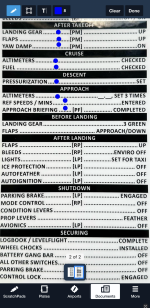
Picture of one of the lists being ‘tapped’ - one page one finger:
So how do you create those dots going across the page if you need to create your own list (nothing to take a picture of)?
Leader Lines.
I use Mac stuff these days, and this is all available on Windows too (I used it in WordPerfect 4.2 in DOS to be honest).
Leader Lines on Mac - you’ll figure it out:
Quick How To:
1. Use Pages (comes with/Mac) to create a 2-3-column, landscape mode kick ass checklist for your particular plane. Make ‘um all fit on one page - you can zoom into the PDF later if needed. Save in iCloud so you can edit it on all your Mac devices.
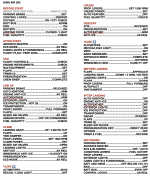
Example of part of one I created - love me some leader lines:
2. Export as PDF and import into ForeFlight Documents. Create a folder for each N-number.
3. In ForeFlight, tap each line as you complete a task. Clear annotations after flight.
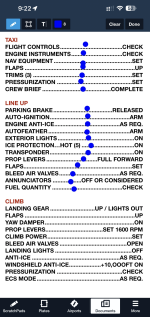
ForeFlight’s dedicated checklist https://www.foreflight.com/products/checklist/ and Garmin Pilot’s Checklist Editor https://support.garmin.com/en-US/?faq=3P2QnpxP7NAMDUk6Ig6kpA are both amazingly detailed and customizable. Too much data on one screen in the bumps makes me prefer one page one finger. I think creating my own in Pages is less work and it’s easier to check off items during a busy flight. One man’s opinion…..
Added Bonus:
If ground or tower has some instructions for you during this, you’re already in ‘write on the screen’ mode and can just scribble it down there on the list with your finger. “Exit runway right M3, right on M, right on M5 hold short 13L”
One page. One finger.
<internet search will find story about giving hard project to laziest person on team, as they will find out the way to do it with the least number of steps - I like that idea>
v/r,dr
Picture of one of the lists being ‘tapped’ - one page one finger:
So how do you create those dots going across the page if you need to create your own list (nothing to take a picture of)?
Leader Lines.
I use Mac stuff these days, and this is all available on Windows too (I used it in WordPerfect 4.2 in DOS to be honest).
Leader Lines on Mac - you’ll figure it out:
Quick How To:
1. Use Pages (comes with/Mac) to create a 2-3-column, landscape mode kick ass checklist for your particular plane. Make ‘um all fit on one page - you can zoom into the PDF later if needed. Save in iCloud so you can edit it on all your Mac devices.
Example of part of one I created - love me some leader lines:
2. Export as PDF and import into ForeFlight Documents. Create a folder for each N-number.
3. In ForeFlight, tap each line as you complete a task. Clear annotations after flight.
ForeFlight’s dedicated checklist https://www.foreflight.com/products/checklist/ and Garmin Pilot’s Checklist Editor https://support.garmin.com/en-US/?faq=3P2QnpxP7NAMDUk6Ig6kpA are both amazingly detailed and customizable. Too much data on one screen in the bumps makes me prefer one page one finger. I think creating my own in Pages is less work and it’s easier to check off items during a busy flight. One man’s opinion…..
Added Bonus:
If ground or tower has some instructions for you during this, you’re already in ‘write on the screen’ mode and can just scribble it down there on the list with your finger. “Exit runway right M3, right on M, right on M5 hold short 13L”
One page. One finger.
<internet search will find story about giving hard project to laziest person on team, as they will find out the way to do it with the least number of steps - I like that idea>
v/r,dr
Last edited: